Roku Component Libraries
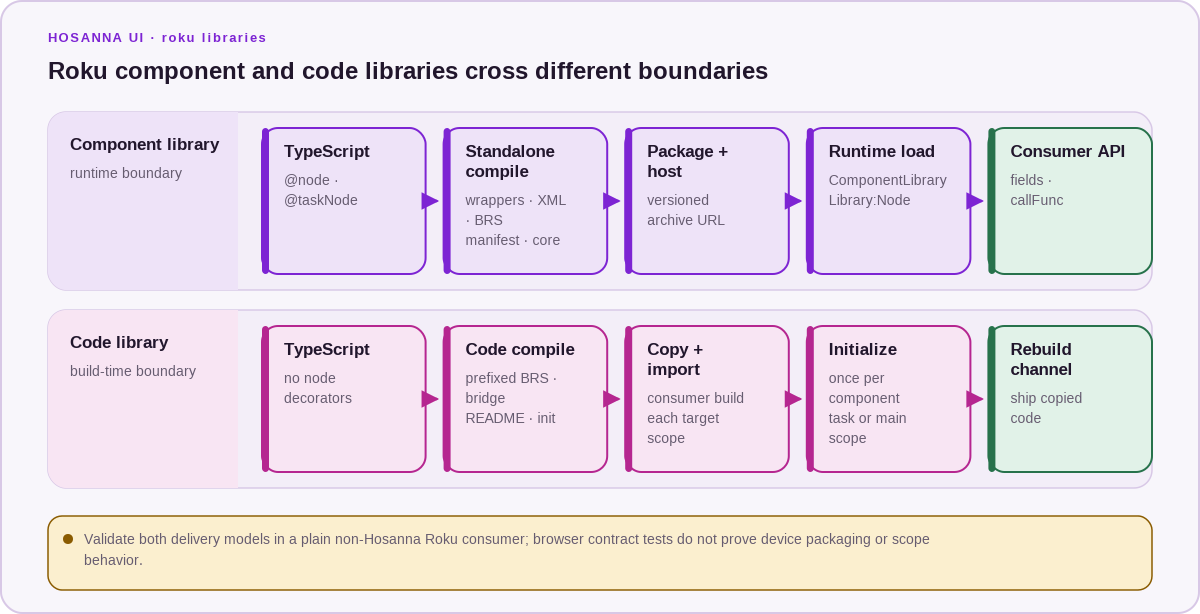
Hosanna can compile selected TypeScript classes into a self-contained Roku SceneGraph component library. A consuming channel loads the hosted package with a ComponentLibrary node and instantiates the exported nodes through the library namespace; the consumer itself does not need to be a Hosanna app.
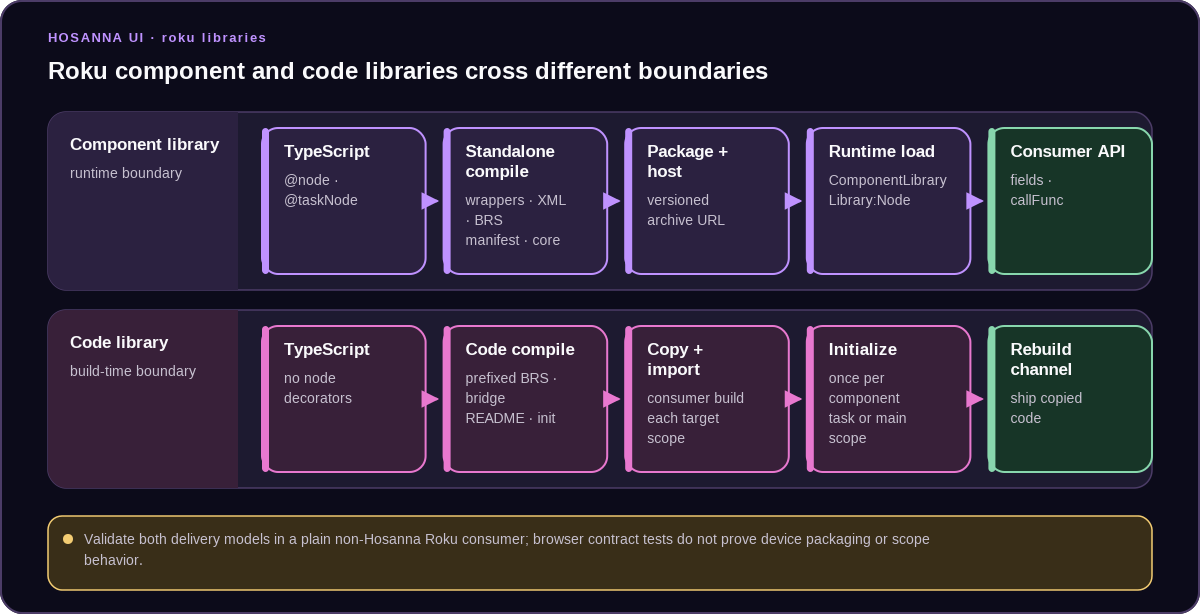
Use this delivery model for SDK surfaces that naturally cross a SceneGraph boundary: analytics, authentication, entitlement, diagnostics, overlays, ad helpers, and task-backed work. For BrightScript modules copied into a consumer at build time, use Roku Code Libraries.
Create a component library
npx --yes --package @tantawowa/hosanna-tools@5.1.1 hst template:create my-components --template component-library
cd my-components
code app.code-workspace
npm test
The starter includes a StarterCounter node, generated browser contract tests, a standalone compiler project, and a plain Roku consumer. Creation installs dependencies and runs npm run setup. Restore an existing checkout with npm ci and npm run setup.
StarterCounter exposes value, increment() and reset(). Its browser tests check field observation, callFunc and independent instances without invoking the compiler. The minimal node uses the emitted BrightScript bridge runtime and does not enable the full includeHosannaCore profile. If you add runtime classes such as HsDate or HsPromise, include their required sources and validate the resulting library on Roku.
Authoring Contract
The public API is interface-driven. A regular node extends HsSGNode<TTop> and uses @node; a task extends HsSGTask<TTop> and uses @taskNode.
- Properties on
TTopbecome public SceneGraph fields. - Methods on
TTopbecome public SceneGraph functions and must have matching public instance methods. - Read and write public state through
this.top. - Keep other class members private implementation details.
- Treat
callFuncarguments as read-only. Roku copies values across some boundaries while Web can pass references.
import { node } from '@hs-src/hosanna-bridge-lib/decorators';
import { HsSGNode } from '@hs-src/hosanna-bridge-lib/node-library';
import { ISGNNode } from
  '@hs-src/hosanna-bridge-targets/common/sg-api';

export interface IVendorAnalytics extends ISGNNode {
  writeKey: string;
  lastEvent: Record<string, unknown>;
  track(
    name: string,
    properties?: Record<string, unknown>,
  ): void;
}

@node('VendorAnalytics', 'Group')
export class VendorAnalytics
  extends HsSGNode<IVendorAnalytics> {
  start(): void {
    // Called after the generated wrapper assigns this.top.
  }

  track(
    name: string,
    properties: Record<string, unknown> = {},
  ): void {
    this.top.lastEvent = {
      name,
      properties,
      writeKey: this.top.writeKey,
    };
  }
}
Regular nodes currently use Node or Group bases. Visual nodes compose raw SceneGraph primitives; Hosanna’s declarative application views are not the generated library model.
Task Nodes
Use @taskNode for work that should not run on the render thread. Implement a public run() that returns a value or HsPromise.
@taskNode('VendorAnalyticsTask')
export class VendorAnalyticsTask
  extends HsSGTask<IVendorAnalyticsTask> {
  run(): HsPromise<Record<string, unknown>> {
    return sendAnalytics(this.top.args);
  }
}
When run() settles, the wrapper writes the result to top.output when that field is declared, then moves the task to done. Consumers set args, observe output or state, and set control = "RUN". STOP is cooperative; it cannot interrupt busy synchronous work.
Generate and Test in the Browser
Generate the browser mocks before testing:
npm run generate
npm test
The generated registry lives at src-generated/node-library/register-node-library-mocks.ts.
import {
  registerNodeLibraryMocks,
} from '../src-generated/node-library/register-node-library-mocks';
import {
  mountLibraryNode,
  runLibraryTask,
} from '@hs-src/hosanna-bridge-targets/web/sg/node-library-harness';

registerNodeLibraryMocks();

const analytics = mountLibraryNode<IVendorAnalytics>(
  'VendorAnalytics',
  { writeKey: 'dev' },
);
analytics.track('screen_view', { screen: 'home' });

const output = await runLibraryTask(
  'VendorAnalyticsTask',
  { payload: { event: 'launch' } },
);
The browser harness is for fast contract testing. The packaged library must still be tested from a plain channel on a Roku device.
Build and Package
Create a dedicated compiler project:
{
  "libraryMode": "standalone",
  "libraryName": "VendorLib",
  "libraryVersion": "1.0.0",
  "includeHosannaCore": false,
  "files": ["src/my-library/**/*.ts"],
  "outDir": "./platforms/roku-complib/pkg/components"
}
The component-library starter supplies these commands. npm ci installs the project-selected compiler. Verify it before packaging; see compiler setup for migration:
npx hsc --version
npm run package:roku
npm run serve
package:roku compiles the standalone project and writes dist/starter-components.zip.
The underlying package and server commands are:
npx hst complib:package \
  --src platforms/roku-complib/pkg \
  --out dist/starter-components.zip

npx hst complib:serve \
  --dir dist
The built root must contain the generated manifest and components/. Keep the emitted runtime and its pkg:/ paths inside that library root.
Consumer Integration
A plain Roku channel loads the hosted archive:
<ComponentLibrary id="VendorLib" />
m.lib = m.top.findNode("VendorLib")
m.lib.observeField("loadStatus", "onLibStatus")
m.lib.uri = "https://vendor.example.com/vendor-lib.zip"

' After loadStatus = "ready":
analytics = CreateObject(
  "roSGNode",
  "VendorLib:VendorAnalytics",
)
analytics.writeKey = "prod"
analytics.callFunc(
  "track",
  "screen_view",
  { screen: "home" },
)
The starter's consumer/ directory contains a plain Roku channel that checks the packaged StarterCounter. Keep npm run serve running and generate its ZIP with your computer's LAN IP:
npm run package:consumer -- http://192.168.1.100:8061/starter-components.zip
Sideload dist/consumer.zip through the Roku Development Application Installer. The screen and debug console report PASS or FAIL after loading the hosted archive and exercising its public API. This replaces the currently sideloaded development channel. See device setup for developer mode and credentials. Reserve shared lab hardware through your team's Device Deck workflow before use.
Release and Compatibility Rules
- Treat every public field, function, node name, and library name as a versioned API.
- Prefix keys written to
m.global; that namespace is shared with the host. - Do not rely on browser object identity or mutation across
callFunc. - Test task lifecycle, timers, message ports, and URL transfers on Roku.
- Cache-bust the development URL after a failed library fetch; Roku can retain a failure for the same URL.
- Sign and host the production artifact according to the current Roku component-library rules.
- Test multiple libraries together and with a Hosanna host to catch naming and scope collisions.
Reference Implementation
- Authoring examples:
src/hosanna-ui-examples/node-library/inhosanna-samples - Browser harness:
src/hosanna-bridge-targets/web/sg/node-library-harness.tsinhosanna-ui - Detailed design:
docs/roku-component-library.mdinhosanna-ui - Packaging and device consumer:
platforms/roku-complib/andsamples/roku-complib-consumer/inhosanna-samples