Hosanna Compiler
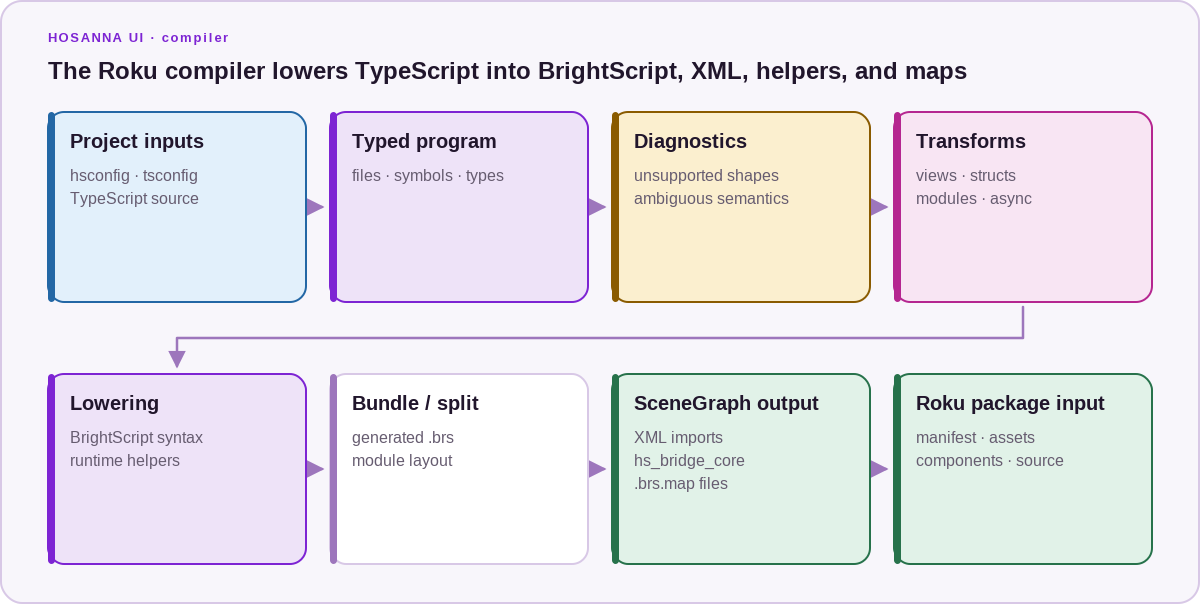
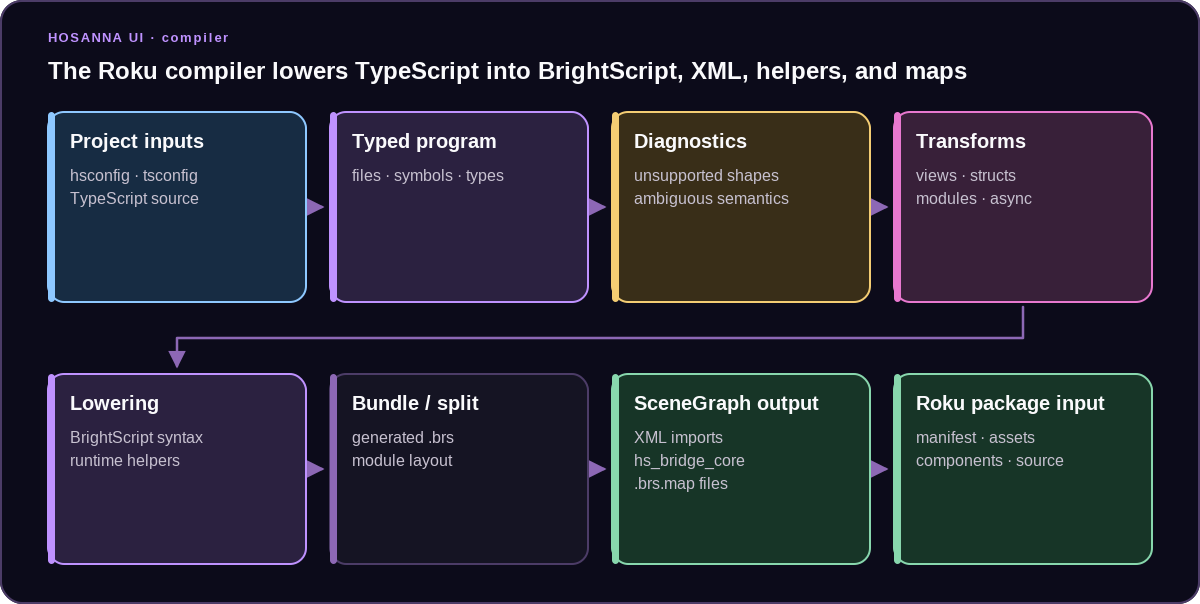
The Hosanna Compiler (hsc) converts TypeScript to BrightScript. Applications declare @tantawowa/hsc in package.json; npm installs the launcher and matching native compiler. Run it through npx hsc, an npm script, or an HST Roku build. See Compiler setup.
Role
hsc reads an hsconfig.json project file, resolves the TypeScript program, applies Hosanna build flags and transpile options, emits BrightScript/SceneGraph output, and reports Hosanna diagnostics. For Roku builds, it is the step that turns shared TypeScript into packaged BrightScript-compatible source.
Default usage:
npx hsc --project platforms/hsconfig-roku.json
npx hsc --project hsconfig.json
If --project is omitted, hsc uses hsconfig.json in the current working directory.
Current CLI Options
Use npx hsc --version to inspect the installed build selected by your application. Compiler 1.54.1 is available from public npm without a license key. npx hsc --help exposes these options:
| Option | Purpose |
|---|---|
--project | Path to the hsconfig.json project file. |
--update | Print instructions for updating the compiler through npm or HST. |
--diagnosticLevel | Minimum diagnostic type to print: error, warn, hint, info, or transpileError. Defaults to warn. |
--logLevel | Console output level: off, log, error, warn, info, debug, or trace. |
--clearCache | Clear the build cache for the project output directory, then build. |
--ignoreVersionMismatch | Ignore a mismatch with a legacy hosanna.json compiler pin. New npm applications do not need this file. |
--forceRebuild | Rebuild even when the build cache reports no changes. |
--buildFlags | Override hsconfig build flags, for example PERF_A:true,PERF_B:false. |
--transpileOptions | Override hsconfig transpile options, for example logLevel:off,emitLogTimings:false. |
Config Notes
Important hsconfig fields include:
files: source files included in the compile.outDir: generated output directory.tsConfig: TypeScript config used for the program.buildFlags: compile-time flags.transpileOptions: compiler behavior such as logging output.diagnosticExcludePathsanddiagnosticFilters: display filtering for known diagnostics.libraryMode: Roku library output mode, eitherstandaloneorcodewhen building libraries.
For Roku component libraries, libraryMode: "standalone" emits generated SceneGraph wrappers and a library manifest. For code libraries, libraryMode: "code" emits plain BrightScript modules plus a generated CODE_LIBRARY_README.md; @node and @taskNode entrypoints belong in standalone component libraries, not code libraries.
transpileOptions.enableAsyncAwait is an experimental, default-off Roku option. It enables only the documented scheduled async/await subset, not general JavaScript async compatibility. See Experimental Async/Await on Roku before enabling it; that guide includes the exact grammar limits, scheduler behavior, ESLint setup, device evidence, and rollback steps.
Persistent Diagnostic Config
The compiler supports persistent diagnostic configuration for users and projects. These files are diagnostic-only, so they can change diagnostic levels, severity overrides, filters, and excluded diagnostic paths without changing source files, output directories, build flags, or other compile behavior.
hsc loads diagnostic config in this order:
- Built-in defaults.
- Global
.hscconfig. - Project-local
.hscconfig. - Project
hsconfig. - CLI flags and programmatic options.
Later entries win. diagnosticSeverityOverrides are merged by diagnostic code, so a project can override one global diagnostic without dropping the rest. Arrays such as diagnosticFilters and diagnosticExcludePaths are replaced as whole arrays by the later config.
Global config is optional at:
~/.hsc/config.json
You can point hsc at a different global file with an absolute path:
HSC_CONFIG=/absolute/path/to/config.json npx hsc --project platforms/hsconfig-roku.json
Project-local config is optional at:
.hsc/config.json
The local config is resolved from the effective project cwd, which comes from the hsconfig location and its cwd field when present.
Supported persistent diagnostic keys:
{
  "diagnosticLevel": "warn",
  "diagnosticSeverityOverrides": {
    "HS-1138": "hint"
  },
  "diagnosticFilters": [
    { "codes": ["HS-1138"], "src": "src/hosanna-ui/lib/debug-overlay/**" }
  ],
  "diagnosticExcludePaths": []
}
Use diagnosticSeverityOverrides to demote noisy but still-correct diagnostics. For example, this demotes HS-1138 to a hint:
{
  "diagnosticSeverityOverrides": {
    "HS-1138": "hint"
  }
}
At the default diagnosticLevel of warn, that keeps HS-1138 out of normal build output. Run with --diagnosticLevel hint when you want to see hint-level diagnostics again.
Severity overrides accept error, warn, info, and hint. diagnosticLevel accepts the compiler's existing levels: error, warn, info, hint, and transpileError. Diagnostic codes can be written as HS-1138, hs-1138, "1138", or 1138; the compiler normalizes them to HS-1138. Invalid JSON, invalid values, invalid code formats, invalid field types, relative HSC_CONFIG paths, and missing explicit HSC_CONFIG files fail with an error that includes the config file path.
Diagnostics
Compiler diagnostics use HS-xxxx codes. They are printed with source locations, grouped when repeated, and filtered through diagnosticExcludePaths / diagnosticFilters.
Use hs:disable comments sparingly when a diagnostic has been reviewed and the runtime behavior is intentional. Some ESLint rules map to the same HS codes, so one suppression can intentionally quiet both lint and compiler output.
See Linter and Diagnostics for suppression shape and mapped rule examples.
Local Compiler Linking
The compiler source is proprietary and its repository is private. Contributors with an authorized compiler checkout can build a reviewed revision and link it into a consumer application:
cd ../hosanna-transpiler
npm run build
npm run install-local-hsc -- ../my-app
cd ../my-app
node node_modules/hosanna-transpiler/dist/cli.js --project platforms/hsconfig-roku.json
The helper links hosanna-transpiler without changing the app manifest or
creating a bin/hsc wrapper. Invoke its built CLI directly with the app's actual
compiler project after preparing generated source and build configuration.
Rebuild after compiler source changes. This link does not change the compiler
selected by HST, which still resolves the declared @tantawowa/hsc package.
Existing explicitly marked developer wrappers remain a compatibility path.
Normal applications use the compiler installed by npm ci and invoke it with
npx hsc.