Framework installation with npm
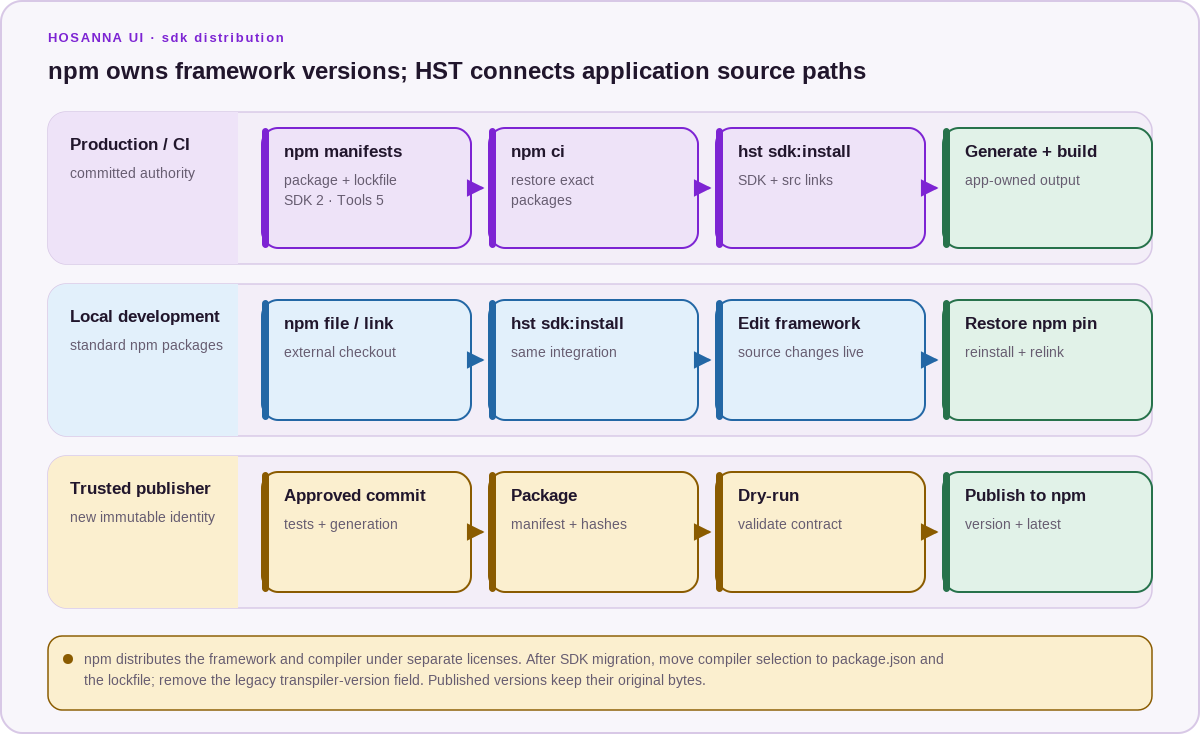
Hosanna UI 2 is published as @tantawowa/hosanna-ui under Apache-2.0. Hosanna Tools 5 uses the framework dependency declared in your app's package.json. The lockfile records the resolved version.
For a new application, game or reusable library, choose an npm starter in Getting started. This page covers SDK integration, migration and upgrades inside an existing app.
npm installs the framework source. hst sdk:install creates the app's hosanna-ui/ compatibility link and repairs the registered src/hosanna-* links. Your application imports stay the same. It does not download a framework release or select a separate source mode.
The compiler is separately distributed through public npm as @tantawowa/hsc, without license keys. The compiler is proprietary and closed source; the published 1.54.1 executable uses its bundled binary license. See Compiler and tool setup for Roku compilation.
Install in an application
For an application already migrated to npm:
npm ci
npx hst sdk:install
npm ls @tantawowa/hosanna-ui @tantawowa/hosanna-tools @tantawowa/hsc
Run these commands from the application root. The framework must be declared and installed in that application. To add the npm packages to an app without an existing SDK installation:
npm install --save-dev --save-exact @tantawowa/hosanna-ui@2.0.3 @tantawowa/hosanna-tools@5.1.1 @tantawowa/hosanna-eslint-plugin@2 @tantawowa/hsc@1.54.1
npx hst sdk:install
Apps using Vitest need a Tools 5 compatible version, >=3.2.0 <5. Upgrade an older Vitest dependency before installing Tools 5.
HST also reconciles the SDK's required consumer dependencies and can update the app manifest and lockfile. Review and commit those changes during setup or an upgrade before relying on npm ci in CI.
Commit package.json and package-lock.json. Keep node_modules/, hosanna-ui/, and generated source links out of version control. Put hst sdk:install in the application's setup script so local installs and CI use the same integration step.
Migrate an existing application
Start from a clean application checkout and save any local framework changes. Review application-specific scripts and any file: dependencies pointing into an old sibling checkout; those dependencies must resolve for the prerequisite npm install to succeed. Install the new packages without running old lifecycle scripts, then migrate:
npm install --ignore-scripts --save-dev --save-exact @tantawowa/hosanna-ui@2.0.3 @tantawowa/hosanna-tools@5.1.1 @tantawowa/hosanna-eslint-plugin@2 @tantawowa/hsc@1.54.1
npx hst sdk:migrate --replace-existing
Migration removes the old framework settings from hosanna.json and the private source override. It updates recognized install, update and generation scripts, then repairs the framework links. Legacy compiler settings, including transpiler-version, are preserved by SDK migration. The npm compiler dependency added above selects the compiler; remove the legacy transpiler-version field after moving the pin to npm, because compiler 1.54.1 still checks that field when present. Update scripts that call bin/hsc to use hsc inside npm scripts or npx hsc from a terminal. Remove old compiler activation steps and compiler-key secrets.
If the old hosanna-ui/ entry is a real directory, migration preserves it as hosanna-ui.before-npm, including its Git history. An existing backup must be moved before another directory can be replaced. An external checkout behind an old symlink is left in place.
Migration refuses dirty Git checkouts, worktree or submodule directories, and custom scripts that still use removed source commands or generate inside the SDK. Preserve those changes and use the appropriate Git commands to move worktrees or submodules first. Update any reported custom scripts before retrying. Integration failures restore the old configuration and links.
Package version selection does not require hosanna.json. After migration, remove a version-only legacy file once its compiler pin has moved to npm; retain any overrides still used by the application. AppConfig, build-config and HST/compiler project files remain separate.
Review the changed manifests, lockfile, any remaining legacy configuration, .gitignore, and scripts. Run your app's setup and generation scripts, lint, tests, browser build, and Roku build before committing the migration.
Tools 5 removes framework Git and Keygen downloads, fork synchronization, and the shared, embedded and local source modes. It also removes framework:update and framework source fields such as git-url, sdk-version, branch, distribution, flavour, and platforms. Do not copy those settings into a migrated application.
Upgrade the framework
Install the approved version with npm, then repair the links. For example, to select the first npm SDK release:
npm install --save-dev --save-exact @tantawowa/hosanna-ui@2.0.0
npx hst sdk:install
Select the version you intend to adopt. Review and commit both dependency files, then run the app checks. Updating the framework does not change the compiler dependency. See Upgrading versions.
Develop against a local checkout
Use a normal npm local dependency when you have access to a framework checkout:
npm install --save-dev /absolute/path/to/hosanna-ui
npx hst sdk:install
If an old SDK directory or link remains, use sdk:migrate --replace-existing once instead of sdk:install. npm resolves the local dependency; HST uses that installed package to maintain the same app links. There is no private source-mode override.
To check the distributable, run npm run package:source in the framework checkout and install its dist/source/*.tgz archive in the app. Restore an exact registry version before committing an application release.
CI
Install the locked npm dependencies and integrate them in the application checkout:
- name: Install application dependencies
  run: npm ci
- name: Integrate the framework
  run: npx hst sdk:install
A separate framework checkout and download credentials are unnecessary. npm ci also installs the declared platform compiler without license-key credentials. See CI integration.
Troubleshooting
| Problem | Action |
|---|---|
| Framework package missing | Declare @tantawowa/hosanna-ui in the app and install its dependencies before running HST. |
| Legacy settings or scripts detected | Follow the migration steps above and update custom scripts reported by the command. |
| Existing SDK directory | Save its changes and use sdk:migrate --replace-existing; do not delete it to bypass the migration checks. |
| Dirty checkout, worktree or submodule | Preserve changes and move the checkout with the appropriate Git commands before migrating. |
| Broken framework source link | Run npm ci followed by npx hst sdk:install. |
| Unexpected framework version | Run npm ls @tantawowa/hosanna-ui @tantawowa/hosanna-tools @tantawowa/hsc and inspect the app lockfile. |