HST Command Reference
Run HST through the application lockfile:
npx hst version
npx hst --help
npx hst <command> --help
Global Options
| Option | Purpose |
|---|---|
--help | Print command-specific help |
--version | Print version information |
--verbose | Enable verbose HST logging |
Environment and Project Configuration
| Command | Purpose |
|---|---|
version | Print the HST version |
doctor [--fix] | Check the project and toolchain; optionally repair supported installation problems |
env check | Compatibility alias for environment checks |
env fix | Apply supported environment repairs |
env prepare-gitignore | Add supported generated/secret paths to .gitignore |
config show | Show the npm compiler declaration and resolved version, or legacy configuration when no npm compiler is declared |
config set | Update legacy configuration; npm compiler versions use compiler:install <version> or npm |
config wizard | Configure a legacy compiler installation interactively |
secrets:init | Create .secrets from .secrets.example when absent |
secrets:list | List secret keys without values |
secrets:check | Compare .secrets with its template |
secrets:exec | Run a command with .secrets loaded into its environment |
Examples:
npx hst doctor
npx hst config show
npx hst secrets:check
npx hst secrets:exec -- npm run build
Target Discovery
| Command | Purpose |
|---|---|
target:list [platform] | Discover Roku devices and simulator presets |
device:list [--type <type>] [--json] | Combine Roku discovery with .hosanna-tools/devices.json preferences |
npx hst target:list
npx hst device:list
Run
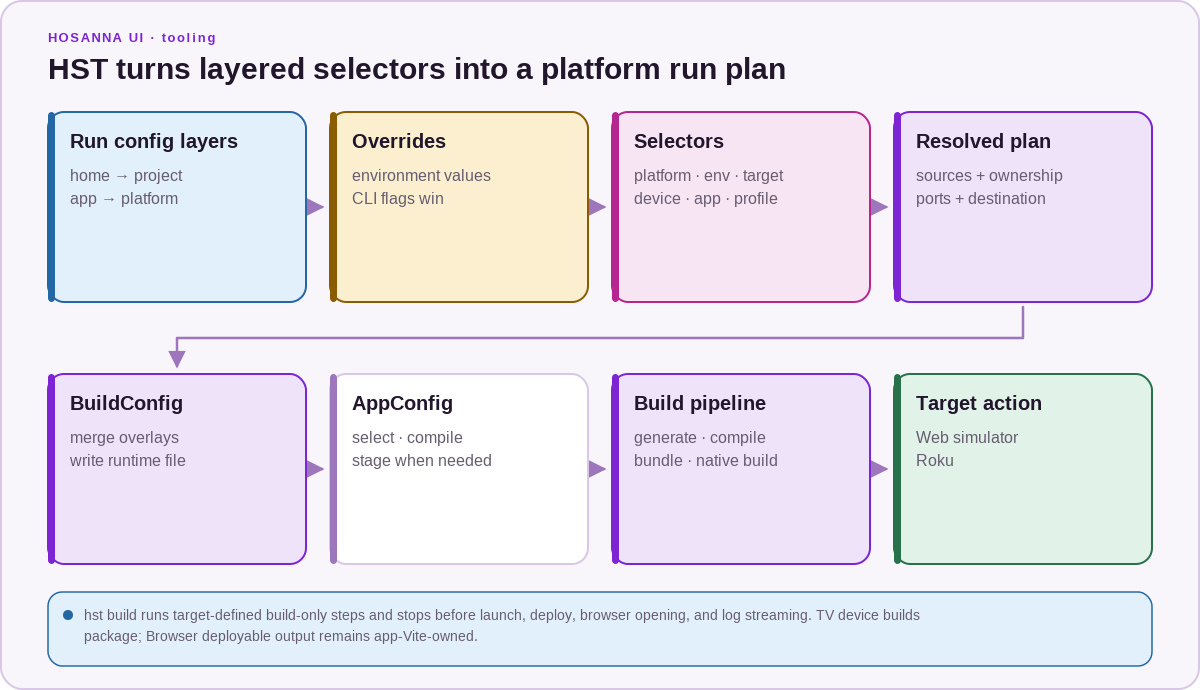
hst run [platform] [env] [target] [deviceSelector]
Important options:
| Option | Purpose |
|---|---|
--device <selector> | Select a Roku IP, saved device name, or simulator preset |
--app <key> | Select an app/flavour from run configuration |
--profile <name> | Add a build-config developer profile |
--app-config <selector> | Select runtime AppConfig |
--reuse | Reuse a matching HST session |
--replace | Replace a conflicting session or occupied device resource |
--last | Reuse the last interactive destination |
--no-open | Do not open the browser |
--no-build | Skip the platform build for device runs |
--no-logs | Do not stream device logs |
--dry-run | Print the resolved run plan without executing it |
--explain | Include configuration-source details in text plan output |
--format text|json | Select plan/result format |
--non-interactive | Fail instead of prompting |
--hsconfig <path> | Select an explicit Roku hsconfig |
--hsc-project <path> | Select an explicit Roku compiler project |
--build-cmd <command> | Override the package-bundle or emulator dev command; HST parses executable and arguments once and does not invoke a shell |
Port overrides are --vitePort, --managementPort, --webAppPort, --deviceAppPort, and --extensionPort.
Without an override, desktop preview resolves the host application's own Vite
executable and passes the selected --config plus --port as structured
arguments. An emulator --build-cmd override owns those config and port
arguments itself; HST executes the parsed vector exactly and never interpolates
it through a shell.
Examples:
npx hst run browser dev emulator
npx hst run roku dev device --device "living room"
npx hst run roku prod device --app client4 --dry-run --explain
Build
hst build [platform] [env] [target] [deviceSelector]
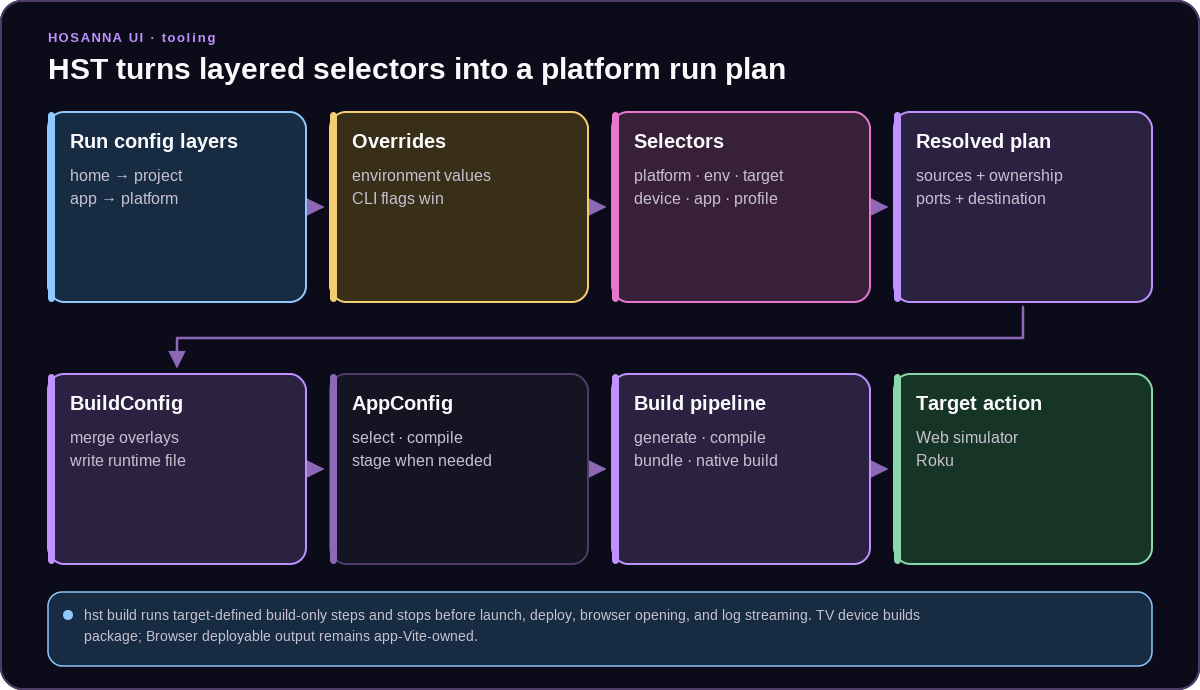
build shares platform, environment, target, device, app, profile, AppConfig,
config-selection, dry-run, and output-format options with run.
It does not launch, deploy, open a browser, or stream logs. The Browser
emulator build-only plan resolves build inputs; use the host application's
Vite build script to emit a simulator preview.
npm run build:browser
npx hst build roku prod device --hsc-project platforms/hsconfig-roku.prod.json
Use the application debugger and Roku logs for device validation. Capture hardware footage through a configured capture card or display source.
Build Config
| Command | Purpose |
|---|---|
build-config:resolve | Resolve tracked, secret, platform, environment, and profile overlays |
build-config:restore-secrets | Restore ignored overlays from BUILD_CONFIG_SECRETS_*_BASE64 variables |
build-config:resolve options:
| Option | Purpose |
|---|---|
--env <name> | Environment; falls back to HS_ENV or HOSANNA_BUILD_ENV |
--platform <name> | Platform; falls back to HS_PLATFORM or HOSANNA_BUILD_PLATFORM |
--profile <name> | Optional developer profile; falls back to HS_BUILD_PROFILE |
--allow-profile-in-prod | Explicitly permit a developer profile in production |
--out <path> | Write resolved JSON |
--manifest-out <path> | Write a sanitized source manifest |
--format json | Print JSON to stdout |
--explain | Print sources without secret values |
AppConfig
| Command | Purpose |
|---|---|
app-config:resolve | Resolve an AppConfig file and root-level $extendFile inheritance |
Options are --input, --cwd, --expression, --platform, and --out.
npx hst app-config:resolve --expression tv --platform roku
npx hst app-config:resolve --input app.config.roku.json --out /tmp/app-config.json
Code and Asset Generation
| Command | Purpose |
|---|---|
generate:all | Generate structs and command-handler maps |
generate:structs [files...] | Generate structs for selected files or the project |
generate:clean | Remove generated output managed by HST |
generate:9patch | Generate 9-patch assets |
game:prep-level <input> | Normalize Tiled JSON to the canonical Hs2d runtime subset |
Compiler, SDK, and Framework
| Command | Purpose |
|---|---|
compiler:install [version] | With a version, save the npm compiler dependency and lockfile; without one, repair the project-selected compiler |
compiler:status [--format text|json] | Report selected and installed compiler state and the resolved executable |
compiler:list [--format text|json] | List public npm versions, the project dependency, installed versions and legacy pins/cache |
sdk:install | Integrate the declared npm framework package and repair its source links |
sdk:migrate --replace-existing | Migrate old framework settings, scripts and SDK directories to the installed npm package |
template:create [directory] --template <kind> | Create app, app-mvvm, game, library or component-library, install dependencies and run the template's setup script. The default kind is app. |
The original four bundled starters were introduced in Tools 5.1.0. Tools 5.2.0 expands the default app starter with navigation, content rails, details and local demo playback, and adds the equivalent app-mvvm starter. These starters use SDK 2.0.4 and declare the compiler as an npm dependency. Pin the creator version when starting a project so an older installed command cannot select the retired Git template flow. The examples below require Tools 5.2.0 and SDK 2.0.4 to be published on npm; use reviewed local builds of both packages until then.
Create a new app without installing a global HST:
npx --yes --package @tantawowa/hosanna-tools@5.2.0 hst template:create my-app --template app
For the same app with observable view models bound to its views:
npx --yes --package @tantawowa/hosanna-tools@5.2.0 hst template:create my-mvvm-app --template app-mvvm
All five starters are included in the npm package. Choose a new destination; the
command does not overwrite an existing application. Pass --no-install to
write the starter without installing dependencies or running its setup script. Pass --no-git to skip Git initialization. The app, game and component-library starters install the platform compiler with their dependencies; browser development does not execute it. The source-library starter accepts a compiler path for its optional Roku check. No compiler license key is required.
After --no-install, finish setup inside the new app:
npm install
npm run setup
The app and app-mvvm starters include the same local catalogue, artwork and one credited Sintel demo trailer shared by all catalogue entries. They have identical screens, controls, setup and development commands. In app-mvvm, HsViewModel classes own screen state and commands, and views bind to them through the public framework API. Each README covers its architecture, replacing the demo content and running the same optional test:ui browser journey. Browser testing requires a separately installed Chromium binary; it does not require the Hosanna compiler.
See Getting started for the complete browser, IDE and Roku workflow.
Tools 5 removes framework source-mode selection, Git and Keygen framework installers, fork synchronization, and framework:update. Use npm to change framework versions, then run sdk:install. See Framework installation with npm.
Legacy licensing
| Command | Purpose |
|---|---|
license:activate <key> | Validate and store a compiler license key |
license:status | Validate the stored key and print entitlements |
These commands remain for older Keygen installations. Public npm compiler releases do not require a license key, machine activation or either command. Follow Compiler and tool setup to migrate.
Roku
| Command | Purpose |
|---|---|
roku:run | Deploy an app zip or folder |
roku:command <command> | Send an app command through ECP |
roku:package | Package and sign a channel with roku-deploy |
roku:map-stack | Map BrightScript stack/compile locations through .brs.map files |
ci:extract-pkg-key <pkg> | Extract a Roku signing key as base64 for CI storage |
complib:package | Package built standalone component-library output |
complib:serve | Serve component-library archives for an on-device development loop |
Use hst run roku ... for normal development. Use the lower-level commands for explicit pipeline steps.
Debugger and MCP
| Command | Purpose |
|---|---|
debugger:start | Start the command-debugger WebSocket proxy |
mcp:start | Start the Hosanna MCP server |
mcp:stop | Stop the server represented by the MCP lock/PID file |
dev:start | Run configured local Vite, generator-watch, and optional debugger processes |
Capture and RASP
| Command | Purpose |
|---|---|
rasp:capture <name> | Record input and export a RASP script |
rasp:export <captureId> <name> | Export a saved input capture as RASP YAML |
rasp:validate <file> | Validate RASP grammar without a device |
rasp:run <file> | Execute a RASP script against a connected app |
Hosanna UI regression tests run through application-owned Vitest scripts. There is no hst test:ui command and no generic debugger test command.