Input Adapters
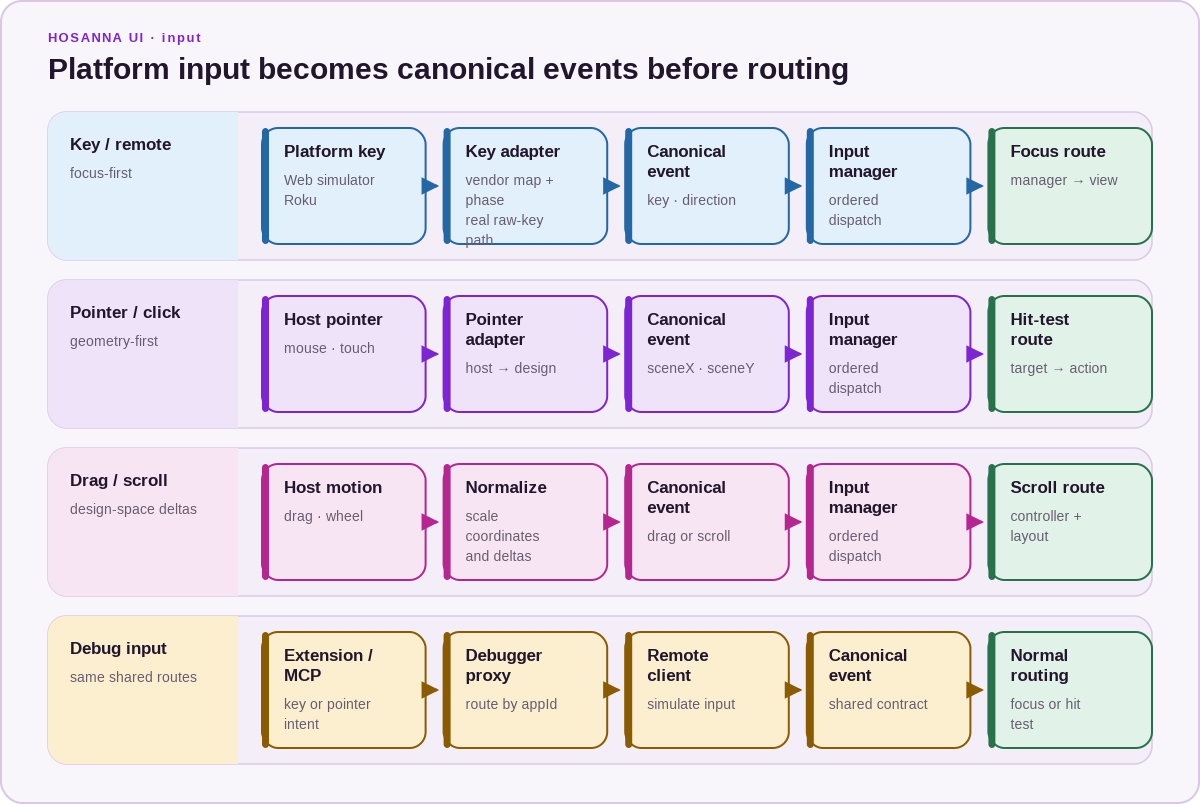
Hosanna input enters through platform adapters, then flows through InputAdapterManager before focus, pointer, click, drag, or scroll handlers see it.
Roku and Simulator Adapters
Use ?adapters= selectors in web launch URLs. Runtime logs, debug output, and sourceAdapter metadata use registered adapter names.
| Execution environment | ?adapters= selectors | Registered adapter names | Main source | Notes |
|---|---|---|---|---|
| Browser emulator | roku, keyboard, webkeyboard, debug, mouse, touch | rokuRemote, webKeyboardRoku, webKeyboard, webDebug, webMouse, webMouseTouch, touch | Browser keyboard, mouse, pointer, and touch events | Default Browser input emulates Roku remote behavior. The keyboard selector registers Roku-style browser keyboard input; webkeyboard registers browser keyboard input. touch converts browser client coordinates to Hosanna design coordinates. |
| Roku | n/a | rokuRemote | Roku remote key events | Maps Roku and simulator key names to Hosanna Key values. Long press is generated from held keys. |
Canonical Event Shape
All adapters dispatch one of the shared event types:
| Event type | Important fields |
|---|---|
key | key, rawKey, keyState, phase, direction, isKeyPress, isKeyRelease, longPress, sourceAdapter |
pointerDown / pointerUp | phase, sceneX, sceneY, pointerId, pointerType, sourceAdapter |
pointerDrag | pointer fields plus frameDeltaX, frameDeltaY, totalDeltaX, totalDeltaY, velocityX, velocityY |
scroll | deltaX, deltaY, sourceAdapter |
click | targetView, coordinates, and source adapter metadata |
Key phases are start, repeat, finish, and cancel. Key states are None, Press, Release, LongPress, LongPressUpdate, and LongPressEnd. A normal key tap often starts with KeyState.None on key down, then emits Press and Release on key up. Long press emits repeat-phase long-press events until release or cancellation.
Touch Coordinates
Touch adapters normalize host coordinates before shared app code sees them:
- A browser touch/pointer event supplies host coordinates.
- The simulator bridge converts them into Hosanna scene/design coordinates.
- The canonical
touchadapter dispatches pointer down, drag, up, cancel, and tap-as-OK events.
App code, CollectionView hit testing, and ScrollView offsets should use Hosanna design points. Do not multiply pointer positions by browser DPI, device pixel ratio, or CSS scale; adapters already account for that.
Touch phases are start, move, end, and cancel at the simulator adapter boundary. Stable pointerId values should be preserved across one pointer gesture.
Remote And Back
Remote-style adapters normalize arrows to Up, Down, Left, and Right, with matching direction values. Select/OK maps to Ok. Back maps to Back and keeps direction: None.
Develop this behavior in the web simulator and validate its native implementation on Roku.
Remote adapters cancel held-key state on blur, suspend, unmount, and source cleanup. Test Back, release, repeat, and long-press behavior with raw DOM events in previews and with the real remote on hardware.
Adapter Selection
On web, use ?adapters= selectors to limit active adapters:
http://localhost:5170/?adapters=keyboard,mouse
http://localhost:5170/?adapters=touch
http://localhost:5170/?adapters=webkeyboard
Use the selector names in URLs. Use the registered adapter names when reading runtime/debug output, including sourceAdapter fields.
Develop this behavior in the web simulator and validate its native implementation on Roku.