Observable Objects
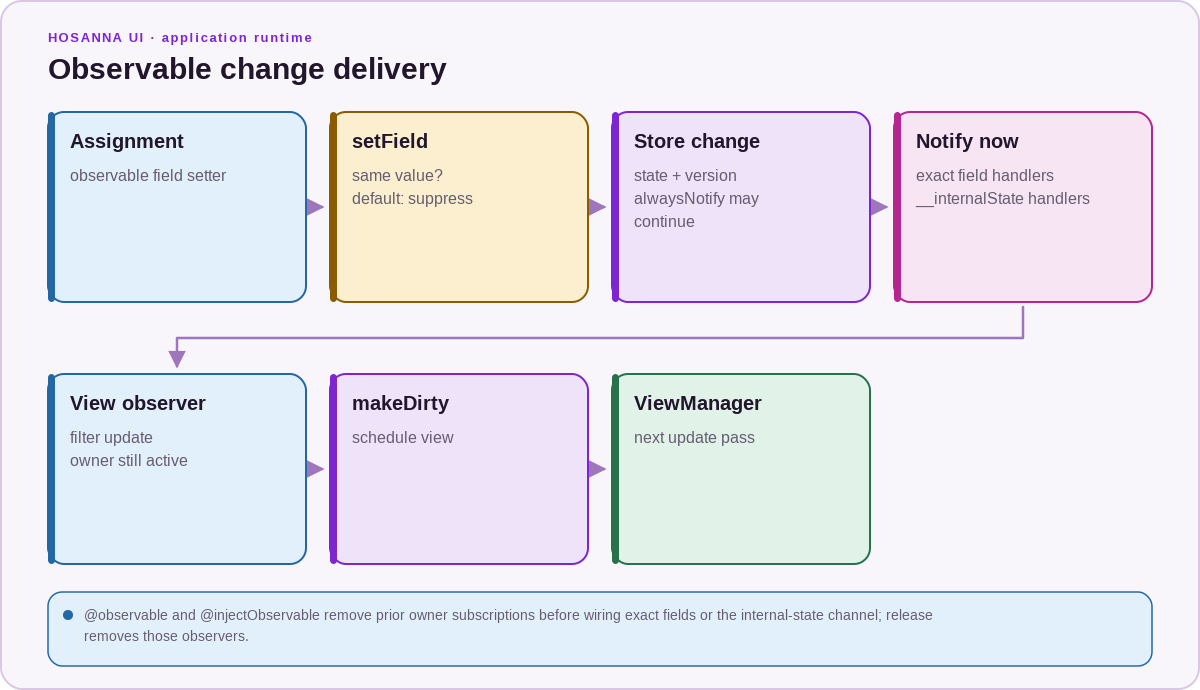
An HsObservable publishes changes to its decorated fields. A BaseView can
observe the object and rebuild when those fields change.
Define an observable
Extend HsObservable and decorate each published property:
import { HsObservable } from '@hs-src/hosanna-ui/hosanna-api';
import { observableField } from '@hs-src/hosanna-ui/lib/decorators';

export class CounterModel extends HsObservable {
  @observableField
  count = 0;

  @observableField
  name = 'John Doe';
}
Assignments notify only when the value changes. Use
@observableField(true) only when duplicate assignments must also notify.
Observe a view property
Use @observable() for an object owned by or passed into a view:
export class CounterScreenView extends BaseView<CounterScreenState> {
  @observable()
  counter = new CounterModel();

  protected override getViews() {
    return [
      Label({ text: `Count: ${this.counter.count}` }),
      Button({ text: 'Increment' })
        .onClick(() => this.counter.count++),
    ];
  }
}
Pass a field list to limit invalidation:
@observable(['count'])
counter = new CounterModel();
With no list, the decorator observes __internalState, which receives changes
from all decorated model fields.
Change observable fields from input handlers, lifecycle methods, or async
completion callbacks—not from getViews().
Inject a shared observable
Register the instance, then use the supported @injectObservable() decorator:
AppUtils.register('counter', counter);
export class SummaryScreenView extends BaseView<SummaryScreenState> {
  @injectObservable('counter', ['count'])
  counter!: CounterModel;
}
@injectObservable both resolves the IoC key and wires observation. Use
@observable() instead when the object arrives as view state or is constructed
by the view.
Filter an update in a view
A view can inspect observable notifications before Hosanna invalidates it:
protected override onObservableFieldUpdated(
  observableFieldName: string,
  field?: string,
): boolean {
  if (observableFieldName === 'counter' && field === 'name') {
    return false;
  }
  return true;
}
Return false only when that update cannot affect the rendered structure.
Observe one model from another
@observable() also works on a class that extends HsObservable. The owning
model then observes the object held in that field, and receives each change in
onObservableFieldUpdated:
export class PlayerState extends HsObservable {
  @observableField position = 0;
  @observableField title = 'Morning Sessions';
}

export class PlaybackModel extends HsObservable {
  @observable(['position', 'title'])
  player: PlayerState | undefined = new PlayerState();

  @observableField
  nowPlaying = '';

  protected override onObservableFieldUpdated(observableFieldName: string, field: string): void {
    const player = this.player;
    this.nowPlaying = player ? `${player.title} @ ${player.position}` : '';
  }
}
Assigning the field stops observing the previous object, observes the new one,
and notifies the owning model's own observers. Assigning undefined clears it.
Because nowPlaying is itself an @observableField, another model or a view
can observe PlaybackModel in turn. A change to player.position then reaches
every level of the chain in order.
Call dispose() when a model is finished; it stops observing every object held
in an @observable field. resumeObserving() observes them again.
Field lists belong to the class that declares them. A subclass observes its parent's fields plus its own, and sibling classes never share a list.
Keep screen behaviour in a view model
Extend HsViewModel for behaviour that should live outside the view. State is
@observableFields; the view reads them and sends actions back:
export class SearchViewModel extends HsViewModel {
  @observableField query = '';
  @observableField results: SearchResult[] = [];

  changeQuery(query: string): void {
    this.query = query;
  }
}

@view('SearchScreen')
export class SearchScreenView extends BaseView<ViewState> {
  override viewModel = this.createViewModel();

  protected override createViewModel(): SearchViewModel {
    return new SearchViewModel();
  }

  protected override getViews() {
    const vm = this.viewModel;
    return [Label({ text: `Query: ${vm.query}` })];
  }
}
Declaring viewModel with createViewModel() gives it the model's own type, so the
view reads this.viewModel.query without a cast.
The view observes its model and rebuilds when any decorated field changes. It
also sends the model its lifecycle: start on first appear, suspend and
resume as the screen hides and returns, and dispose when the view is
unmounted. A parent can pass a model in as viewModel instead; the view then uses
that one and does not dispose it.
A view model imports no view code, so a test can construct it and drive it directly.
Handle keys in the model
Override onKey to handle a key without a handler in the view:
export class PlayerViewModel extends HsViewModel {
  override onKey(key: string, isPress: boolean): boolean {
    if (key === 'play' && isPress) {
      this.togglePlayback();
      return true;
    }
    return false;
  }
}
A focused control sees the key first. If it bubbles up to the view that holds
the model, the model is offered it next; returning true stops it there.
Otherwise the view's own onInputEvent handler runs. Presses and releases are
both offered.
A view that overrides onInputEvent must call super.onInputEvent(event), or
its model never sees keys.
Move and follow focus
Focus uses two separate channels.
To move focus, set focus to the id of the view that should receive it:
this.focus = 'searchField';
This is a request. It is applied every time, including when the same id is
requested twice. focus holds the last id the model asked for; it does not
change when the user moves focus.
To follow focus, override focused:
override focused(target: string): void {
  this.lastFocusedId = target;
}
The view calls it when focus moves for any reason other than a request from this model, such as the user pressing a direction key. A move the model asked for is not reported back.
A model never holds a reference to its view. Use view ids, not nodes or coordinates.
A focus request for a view that does not exist yet is lost. Request focus once the target is on screen, for example after the data that creates it has loaded.
Manual observation
Prefer the decorators for normal view rendering. Lower-level integrations can
call addObserver() and removeObserver() directly—for example, when an
adapter updates a native renderer without rebuilding the view. Always remove a
manual observer when its owner stops listening.