Roku Video and Captions
Build your player in the web simulator, then validate playback and captions on Roku hardware.
Player contract
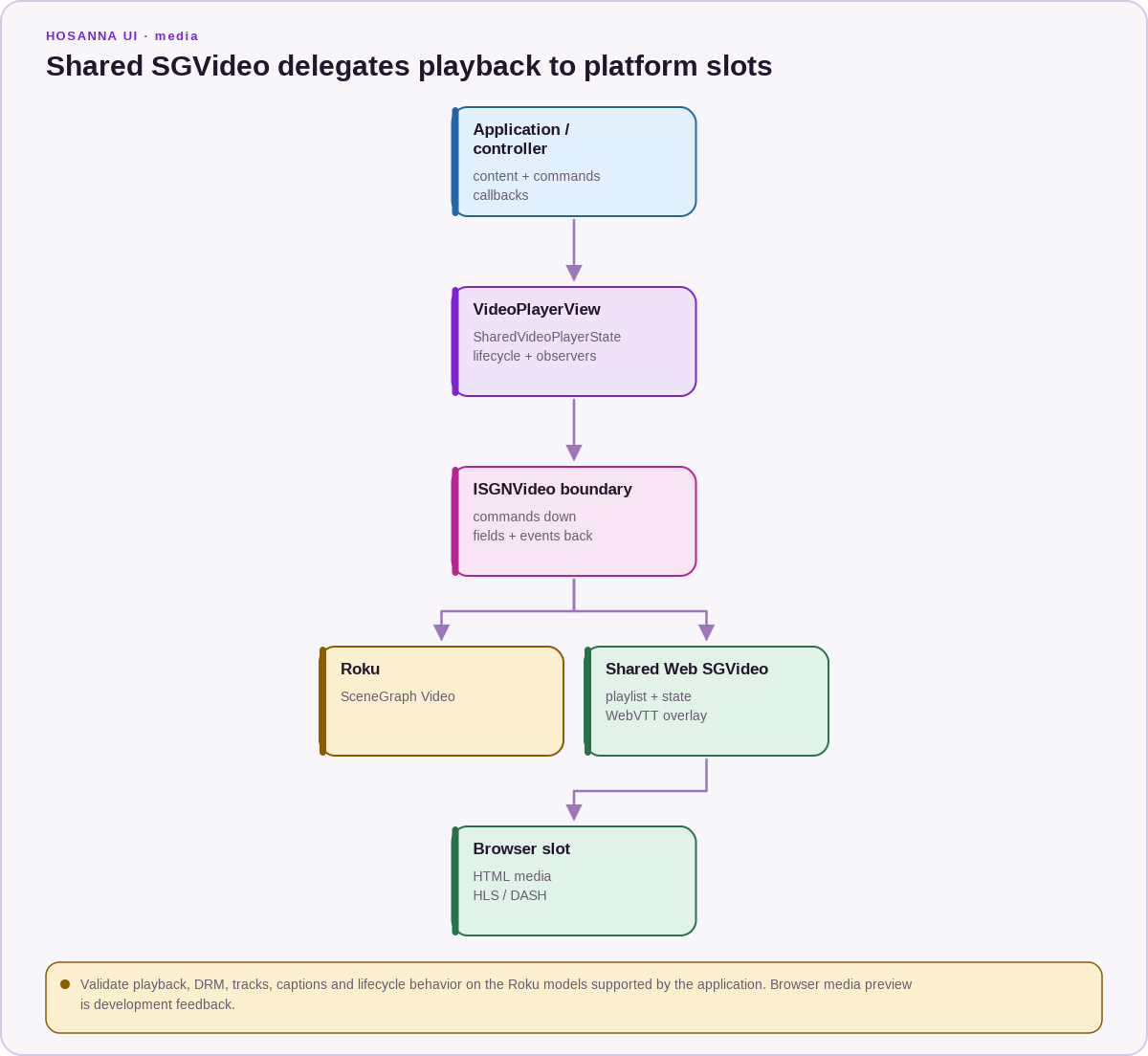
Use VideoPlayer and the SceneGraph video fields for content, playback control, seeking, state, and subtitle selection. The simulator previews these interactions with browser playback. The deployed application uses Roku's native video implementation.
Browser playback is useful for developing screens and testing player state. Stream support, DRM, decoder behavior, and caption presentation must also be checked on the Roku models you support.
Sidecar captions
Declare subtitle tracks in the content metadata. TrackName identifies the caption resource; Language and Description identify the track in the UI.
video.content = {
  url: 'https://media.example.com/program.m3u8',
  subtitleTracks: [{
    TrackName: 'https://media.example.com/program.en.vtt',
    Language: 'en',
    Description: 'English',
  }],
};
Use subtitleTrack, suppressCaptions, and the available track list to implement selection. Check cue timing after seeking, switching content, and resuming playback.
Roku verification
Test the application's actual media and license flow on hardware. Include startup, seeking, live streams, track selection, windowed and fullscreen playback, caption preferences, repeated playback, and recovery from network or license errors.
Keep media credentials and license secrets in local configuration or protected CI settings.