Getting Started
This guide uses hosanna-ui-samples as the reference application. If you are
working in a client app, use the versions and scripts checked into that repo.
Prerequisites
Ensure you have the following installed:
- Node.js: Use the repository
.nvmrcandpackage.jsonengine. The current sample app requires 24.17.0. - npm: Use the committed
package-lock.json; do not substitute another package manager. - Python: Required for certain tools.
- Operating System: A *nix-based OS (BSD, macOS, Unix, WSL).
- Editor: Any TypeScript/LSP-capable editor.
- Hosanna license: Entitled access to the SDK and compiler versions in
hosanna.json.
Windows is not directly supported. WSL can run the Browser/Roku-oriented development toolchain, but Apple native builds require macOS/Xcode and Android native builds require the Android SDK.
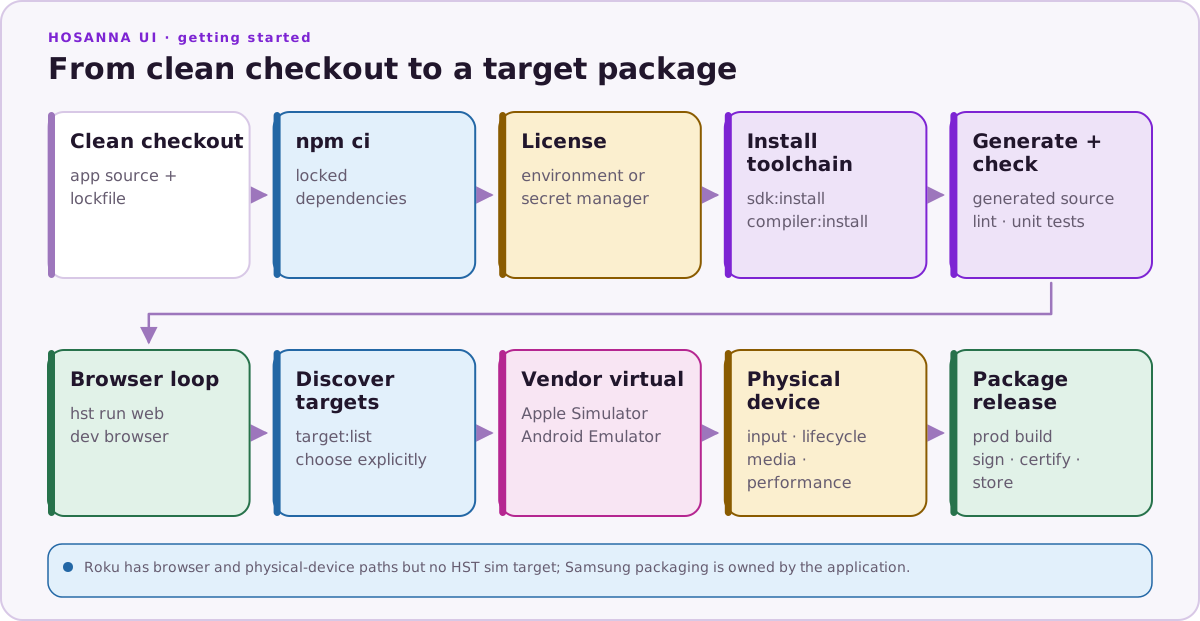
1. Install Locked Dependencies
From the application root:
npm ci
Hosanna Tools is a project dependency. Run it as npx hst; do not install or
select a separate global version.
2. Supply the License Without Printing It
read -rsp 'Hosanna license: ' HSC_LICENSE_KEY
echo
export HSC_LICENSE_KEY
Do not put the key in a committed file, shell command argument, build log, or artifact.
3. Restore the Declared Toolchain
npx hst sdk:install
npx hst compiler:install
npx hst license:status
npx hst compiler:status
npx hst env check
sdk:install restores the framework distribution selected by hosanna.json
into the app-local hosanna-ui/ directory. compiler:install installs the
declared compiler as bin/hsc.
The installer protects an existing modified SDK tree. Do not force or replace it until you have identified and preserved those changes.
4. Launch the Browser App
npx hst run browser dev emulator
In hosanna-ui-samples, .hosanna-tools/run.json selects port 5170 and HST
starts or reuses generation, Vite, and debugger services. Use arrow keys for
directional focus, Enter for Select/OK, and Backspace for Back. Click the dark
page background first if a native HTML input currently owns keyboard focus.
5. Make and Validate a Change
Regular UI examples live under
src/hosanna-ui-examples/ in hosanna-ui-samples. Generated factories and
state contracts live below src-generated/ and should not be edited.
Run the repository checks:
npm run lint
npm run build
npm test
For a one-off generation pass, run npm run generate. Continue with
Hosanna Fundamentals
before creating a new view.
Next Target
List the destinations HST can currently see:
npx hst target:list --json
Use a browser preview for shared behavior, sim for an Apple Simulator or
Android Emulator, and device for physical hardware. See
Running On Device.