Setup
Installation
Install Dependencies
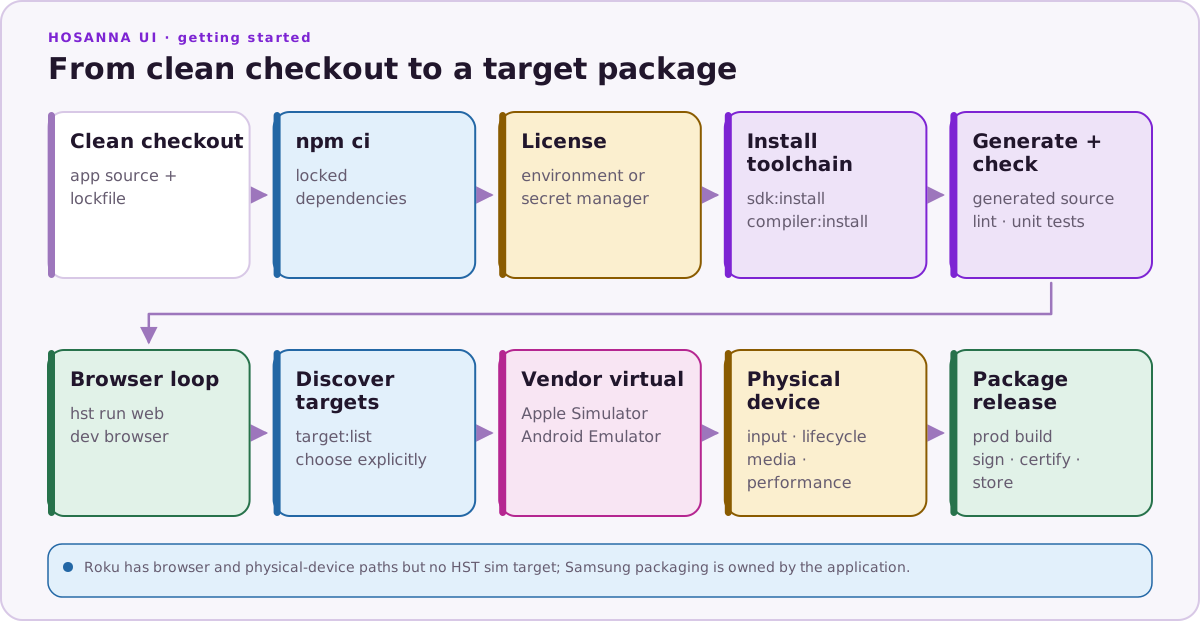
Install the exact dependency graph from the app lockfile:
npm ci
Use Hosanna Tools From The Project
Hosanna Tools is normally installed as a project dependency and run through npx hst. Do not rely on a machine-wide hst for app builds, because the repo lockfile is the source of truth for the tool version.
npx hst --help
npx hst env check
The reference sample locks its HST and Node versions in the repository. Another
app may select different compatible versions; npx hst version, its lockfile,
.nvmrc, package.json, and hosanna.json are authoritative.
Install Hosanna Compiler (HSC)
Restore the configured SDK and compiler through Hosanna Tools:
npx hst sdk:install
npx hst compiler:install
npx hst compiler:status
These commands require the active Hosanna license. The compiler is installed
as ./bin/hsc; the framework source is installed into the app-local
hosanna-ui/ root.
Development Workflow
Editing Code
Use any TypeScript-capable editor. The Hosanna UI and BrightScript editor extensions can help with navigation and optional breakpoint sessions, but the primary app workflow is terminal-first through npx hst.
Developer Process
Before committing changes, follow these steps:
-
Run the linter:
npm run lint -
Run tests:
npm test -
Commit changes: Use meaningful commit messages.
Browser Development
Browser Runtime
Use the Browser target for faster debugging across shared UI, focus, input, AppConfig, and fragment behavior:
npx hst run browser dev emulator
This resolves Web runtime build config, starts or reuses Vite and Hosanna
Tools services, and opens the browser. For a platform-shaped browser preview,
use another platform with the browser target, such as
npx hst run roku dev emulator or
npx hst run ios dev emulator --device iphone-15.
Platform Targets
Use hst run and hst build when validating a release:
- Roku:
npx hst build roku dev deviceandnpx hst run roku dev device --device "<roku name or ip>". - Apple TV and iOS:
npx hst run apple-tv dev simandnpx hst run ios dev sim; usedevicefor hardware. - Android TV and Android:
npx hst run android-tv dev simandnpx hst run android dev sim; usedevicefor hardware. - Samsung TV: preview
device:setup tizenwith--dry-run, use the Tizenemulatortarget, package thedevicetarget with an external signing profile, and run the application release checklist on an authorized TV. - LG TV: preview
device:setup weboswith--dry-run, use the webOSemulatortarget, package thedevicetarget, and run the application release checklist through a pairedaresTV. - Browser:
npx hst run browser dev emulatorand the app's Browser/PWA build.
Run npx hst target:list --form-factor tv --json or
npx hst target:list --platform ios --target sim --json when you need to
choose a target explicitly.
Documentation
Explore the docs folder for detailed information:
- Platforms: release-target setup and validation notes.
- UI and Interaction: views, focus, input, styles, fragments, and controls.
- Tools: Hosanna Tools, compiler, DevTools, MCP debugger, and diagnostics.
- Deployment: packaging, versioning, and CI.