Hosanna Compiler
The Hosanna Compiler (hsc) is the TypeScript-to-BrightScript compiler owned by ../hosanna-transpiler. App repos usually run it through bin/hsc, after hst compiler:install has installed the configured compiler version.
Role
hsc reads an hsconfig.json project file, resolves the TypeScript program, applies Hosanna build flags and transpile options, emits BrightScript/SceneGraph output, and reports Hosanna diagnostics. For Roku builds, it is the step that turns shared TypeScript into packaged BrightScript-compatible source.
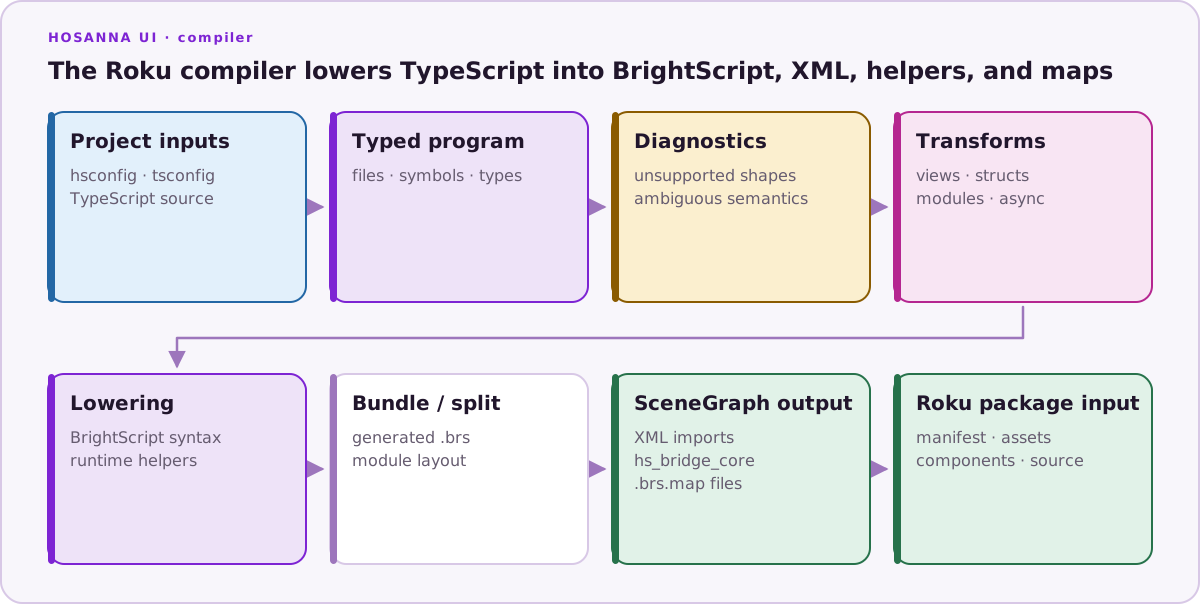
Default usage:
bin/hsc --project platforms/hsconfig-roku.json
hsc --project hsconfig.json
If --project is omitted, hsc uses hsconfig.json in the current working directory.
Current CLI Options
The compiler configured by the current samples is 1.43.2; prerelease framework workspaces may report 1.43.2-next. Always use bin/hsc --version for the installed build. hsc --help exposes these options:
| Option | Purpose |
|---|---|
--project | Path to the hsconfig.json project file. |
--fingerprint | Print this machine's fingerprint for license activation. |
--licenseHelp | Print license activation instructions. |
--update | Check for updates and install the latest compiler version when available. |
--diagnosticLevel | Minimum diagnostic type to print: error, warn, hint, info, or transpileError. Defaults to warn. |
--logLevel | Console output level: off, log, error, warn, info, debug, or trace. |
--clearCache | Clear the build cache for the project output directory, then build. |
--ignoreVersionMismatch | Ignore a mismatch between hosanna.json and the running compiler. |
--forceRebuild | Rebuild even when the build cache reports no changes. |
--buildFlags | Override hsconfig build flags, for example PERF_A:true,PERF_B:false. |
--transpileOptions | Override hsconfig transpile options, for example logLevel:off,emitLogTimings:false. |
Config Notes
Important hsconfig fields include:
files: source files included in the compile.outDir: generated output directory.tsConfig: TypeScript config used for the program.buildFlags: compile-time flags.transpileOptions: compiler behavior such as logging output.diagnosticExcludePathsanddiagnosticFilters: display filtering for known diagnostics.libraryMode: Roku library output mode, eitherstandaloneorcodewhen building libraries.
For Roku component libraries, libraryMode: "standalone" emits generated SceneGraph wrappers and a library manifest. For code libraries, libraryMode: "code" emits plain BrightScript modules plus a generated CODE_LIBRARY_README.md; @node and @taskNode entrypoints belong in standalone component libraries, not code libraries.
transpileOptions.enableAsyncAwait is an experimental, default-off Roku option. It enables only the documented scheduled async/await subset, not general JavaScript async compatibility. See Experimental Async/Await on Roku before enabling it; that guide includes the exact grammar limits, scheduler behavior, ESLint setup, device evidence, and rollback steps.
Persistent Diagnostic Config
The compiler supports persistent diagnostic configuration for users and projects. These files are diagnostic-only, so they can change diagnostic levels, severity overrides, filters, and excluded diagnostic paths without changing source files, output directories, build flags, or other compile behavior.
hsc loads diagnostic config in this order:
- Built-in defaults.
- Global
.hscconfig. - Project-local
.hscconfig. - Project
hsconfig. - CLI flags and programmatic options.
Later entries win. diagnosticSeverityOverrides are merged by diagnostic code, so a project can override one global diagnostic without dropping the rest. Arrays such as diagnosticFilters and diagnosticExcludePaths are replaced as whole arrays by the later config.
Global config is optional at:
~/.hsc/config.json
You can point hsc at a different global file with an absolute path:
HSC_CONFIG=/absolute/path/to/config.json bin/hsc --project platforms/hsconfig-roku.json
Project-local config is optional at:
.hsc/config.json
The local config is resolved from the effective project cwd, which comes from the hsconfig location and its cwd field when present.
Supported persistent diagnostic keys:
{
  "diagnosticLevel": "warn",
  "diagnosticSeverityOverrides": {
    "HS-1138": "hint"
  },
  "diagnosticFilters": [
    { "codes": ["HS-1138"], "src": "src/hosanna-ui/lib/debug-overlay/**" }
  ],
  "diagnosticExcludePaths": []
}
Use diagnosticSeverityOverrides to demote noisy but still-correct diagnostics. For example, this demotes HS-1138 to a hint:
{
  "diagnosticSeverityOverrides": {
    "HS-1138": "hint"
  }
}
At the default diagnosticLevel of warn, that keeps HS-1138 out of normal build output. Run with --diagnosticLevel hint when you want to see hint-level diagnostics again.
Severity overrides accept error, warn, info, and hint. diagnosticLevel accepts the compiler's existing levels: error, warn, info, hint, and transpileError. Diagnostic codes can be written as HS-1138, hs-1138, "1138", or 1138; the compiler normalizes them to HS-1138. Invalid JSON, invalid values, invalid code formats, invalid field types, relative HSC_CONFIG paths, and missing explicit HSC_CONFIG files fail with an error that includes the config file path.
Diagnostics
Compiler diagnostics use HS-xxxx codes. They are printed with source locations, grouped when repeated, and filtered through diagnosticExcludePaths / diagnosticFilters.
Use hs:disable comments sparingly when a diagnostic has been reviewed and the runtime behavior is intentional. Some ESLint rules map to the same HS codes, so one suppression can intentionally quiet both lint and compiler output.
See Linter and Diagnostics for suppression shape and mapped rule examples.
Local Compiler Linking
When testing compiler changes against ../hosanna-ui, use the transpiler repo's local install workflow:
cd ../hosanna-transpiler
npm run build
npm run install-local-hsc -- ../hosanna-ui
That replaces the target repo's bin/hsc wrapper with one that runs the local transpiler build. For normal app projects, use npx hst compiler:install so the project gets the configured compiler version.