Roku Code Libraries
A Roku code library is a build-time distribution: the compiler emits ordinary .brs modules that a consumer copies into its channel and imports into each component scope that uses them. Use it for shared internal logic, node orchestrators, or SDK code that does not require a runtime ComponentLibrary node.
This is different from a Roku Component Library, which is a separately hosted package with SceneGraph nodes as its public API.
Compiler Project
Configure a dedicated compiler project with libraryMode: "code":
{
  "libraryMode": "code",
  "libraryName": "VendorCodeLib",
  "libraryVersion": "1.0.0",
  "includeHosannaCore": true,
  "files": ["src/my-code-library/**/*.ts"],
  "outDir": "./platforms/roku-codelib/out"
}
The libraryName is part of the collision-avoidance contract. Generated module names are prefixed, and the build emits a library-specific initialization function.
The executable sample builds with:
npm run roku:codelib:build
See platforms/hsconfig-roku-codelib.json and src/hosanna-ui-examples/code-library/ in hosanna-ui-samples-public.
Consumer Contract
The generated output includes a consumer-facing CODE_LIBRARY_README.md. Follow that file for the exact artifact version. In general, the consumer must:
- Copy the emitted
.brsmodules into the channel. - Import them into every SceneGraph component scope that uses the library, or into
source/for main-thread code. - Include
hs_bridge_core.brsonce per scope unless the host already supplies the compatible bridge. - Call the generated
<LibraryName>_hs_lib_init()once in each component scope and once on each Roku task thread before using library classes.
Do not add @node or @taskNode entry points to a code-mode project. Those exports belong in a standalone component library.
Compatibility Rules
- Treat the emitted BrightScript API and initializer name as versioned consumer contracts.
- Validate the library in a plain non-Hosanna consumer as well as a Hosanna app.
- Test main-thread and task-thread initialization independently; each has its own scope.
- Do not assume runtime singletons cross component or task scopes.
- Keep a compatibility matrix for consumer bridge/runtime versions if the library embeds or depends on Hosanna core.
- Publish checksums and release notes with the copied-source artifact so consumers can identify exactly what they integrated.
Choose the Delivery Model
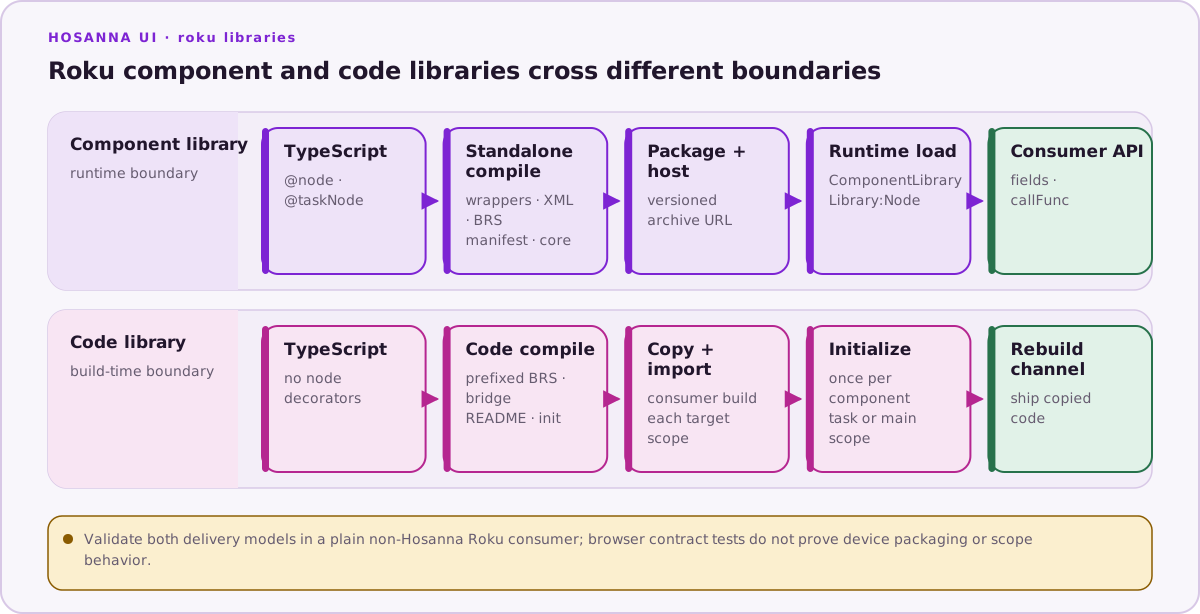
| Requirement | Component library | Code library |
|---|---|---|
| Integration time | Runtime load from a hosted package | Build-time file copy and imports |
| Public boundary | SceneGraph nodes, fields, functions, task output | BrightScript functions and classes |
| Consumer coupling | Loads a versioned external archive | Owns copied files and initialization |
| Update path | Change the hosted URI/version | Update files and rebuild the channel |
| Best fit | Vendor SDK node surfaces and overlays | Shared modules and internal orchestration |