Platform Support
Hosanna has first-class compile and HST targets for Browser, Samsung Tizen, LG webOS, Roku, iOS, Apple TV, Android, Android TV, CarPlay, Android Auto, Apple Watch, and Wear OS. Browser, Tizen, and webOS share the Web DOM renderer; their compile targets select different host initializers and adapters. The framework keeps product code focused on state, behavior, data, views, or semantic system surfaces while each platform boundary handles rendering, packaging, and device integration.
The first coordinated Browser, Tizen, and webOS framework release is Hosanna
UI 1.39.0; the matching build, setup, and device workflows ship in Hosanna
Tools 3.18.0. The legacy web CLI spelling remains a Browser compatibility
alias.
Browser, Tizen, and webOS are production-ready, first-class deployment targets. For Tizen and webOS, the supported workflow includes compile composition, desktop preview, package build, discovery, install, launch, inspection, and termination. Their target initializers own vendor media, input, accessibility, and lifecycle integration, while storage uses the shared Web implementation. As with any television release, verify the application’s content, DRM configuration, captions, accessibility experience, persistence, and lifecycle behavior on the model families it ships to.
Supported Targets
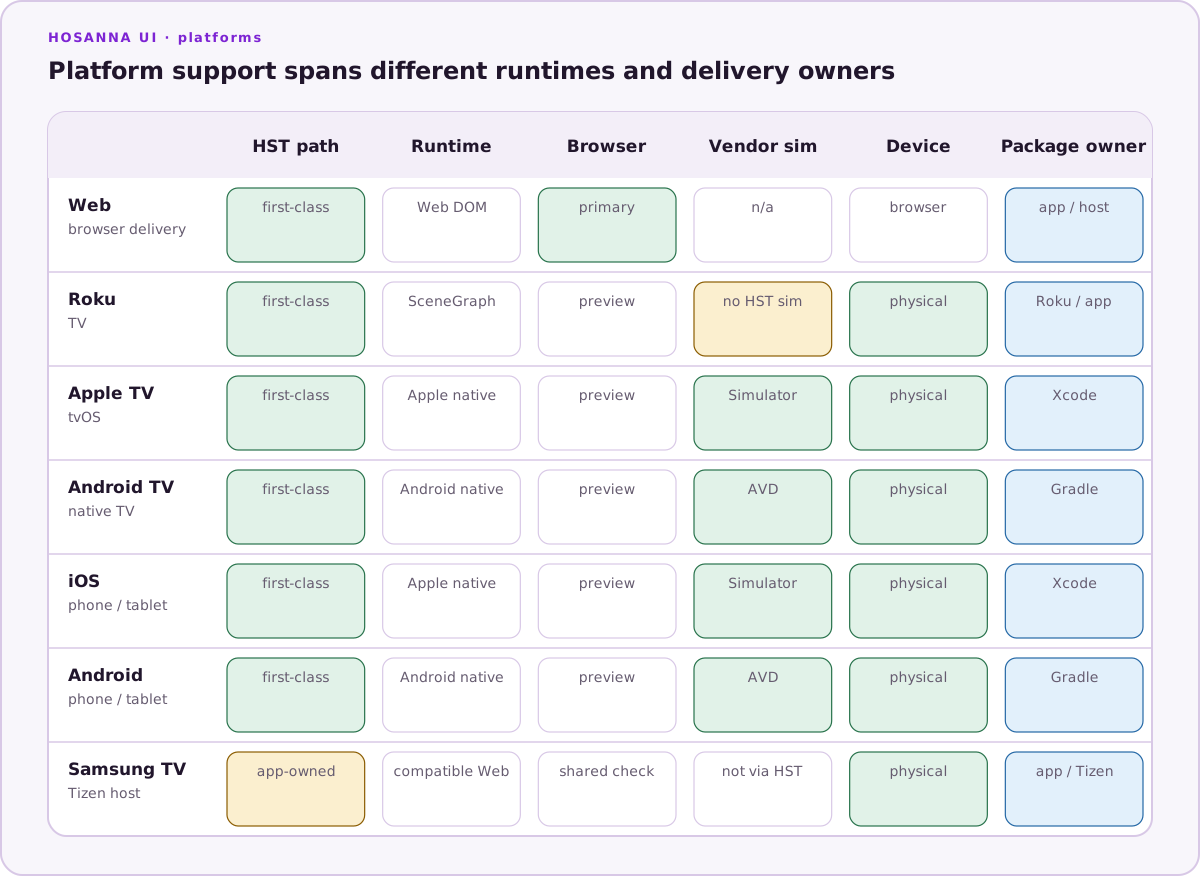
| Platform | Primary runtime | Main validation path |
|---|---|---|
| Browser | Web DOM, optionally installed as a PWA | hst run browser dev emulator, Vite, DevTools, MCP debugger, install/offline checks |
| Samsung TV | Web DOM plus Tizen initializer and AVPlay implementation | hst run tizen dev emulator/device, signed .wgt, and Samsung model release checks |
| LG TV | Web DOM plus webOS initializer and native media implementation | hst run webos dev emulator/device, .ipk, and LG model release checks |
| Roku | BrightScript and SceneGraph | hst run roku dev device, Roku sideload, device logs, MCP debugger |
| iOS | Native mobile target | hst run ios dev sim/device, touch validation, Xcode for signing/profiling |
| Apple TV | Native Apple target | hst run apple-tv dev sim/device, focus/input validation, Xcode for signing/profiling |
| Android | Native mobile target | hst run android dev sim/device, touch validation, Android Studio for signing/profiling |
| Android TV | Native Android target | hst run android-tv dev sim/device, DPAD validation, Android Studio for signing/profiling |
| CarPlay | iPhone JavaScriptCore plus native CarPlay templates | hst run carplay dev sim, CarPlay external display, physical vehicle/head unit |
| Android Auto | Hermes car service plus Android for Cars templates | hst run android-auto dev sim, Desktop Head Unit, connected phone/head unit server |
| Apple Watch | iPhone JavaScriptCore companion plus SwiftUI/watchOS | hst run apple-watch dev sim, paired Watch/iPhone simulators, physical pair through Xcode |
| Wear OS | On-watch Hermes plus Compose for Wear OS | hst run wear-os dev sim, Wear AVD, physical watch |
Shared App Model
Most product code should stay platform-neutral:
- Define screens with Hosanna views and view state.
- Use
AppConfigfor styles, fragments, callbacks, and shared app metadata. - Route remote, keyboard, pointer, and touch input through
onInputEventand the focus system. - Use the active
expression(tv,web,phone,tablet, orwatch) for presentation intent, and use platform capabilities for feature availability. Car targets retain the phone expression and advertise the active semantic car surface throughcarUIcapabilities. - Read design size, DPI, safe areas, and host viewport values from the device facade instead of direct browser or native checks.
- Keep platform-specific code behind
hst run/hst buildtarget selection, compile-time aliases, adapters, and packaging seams.device=tizenanddevice=webosconfigure a selected target for preview; they do not change which initializer was compiled. - Validate common behavior in Browser first, then finish each release on the target devices.
For the shared runtime vocabulary, config variant selection, device metrics, orientation callbacks, and capability groups, see Cross-Platform Runtime Model.
For installable browser delivery, see Browser Progressive Web Apps (PWA). PWA output belongs to Browser only; packaged Tizen and webOS builds do not include a service worker.
Platform-Specific Work
Each platform page documents the parts that differ: setup, packaging, store requirements, native services, input behavior, media playback, and debugging. Car and watch targets use small semantic system-surface APIs instead of trying to project arbitrary phone or TV view trees. Keep shared UX behavior in the core docs and use platform pages for target-specific decisions.
Start with Platform-Specific Code, Running On Device, and the page for your release target.