Licensed SDK Source Distribution
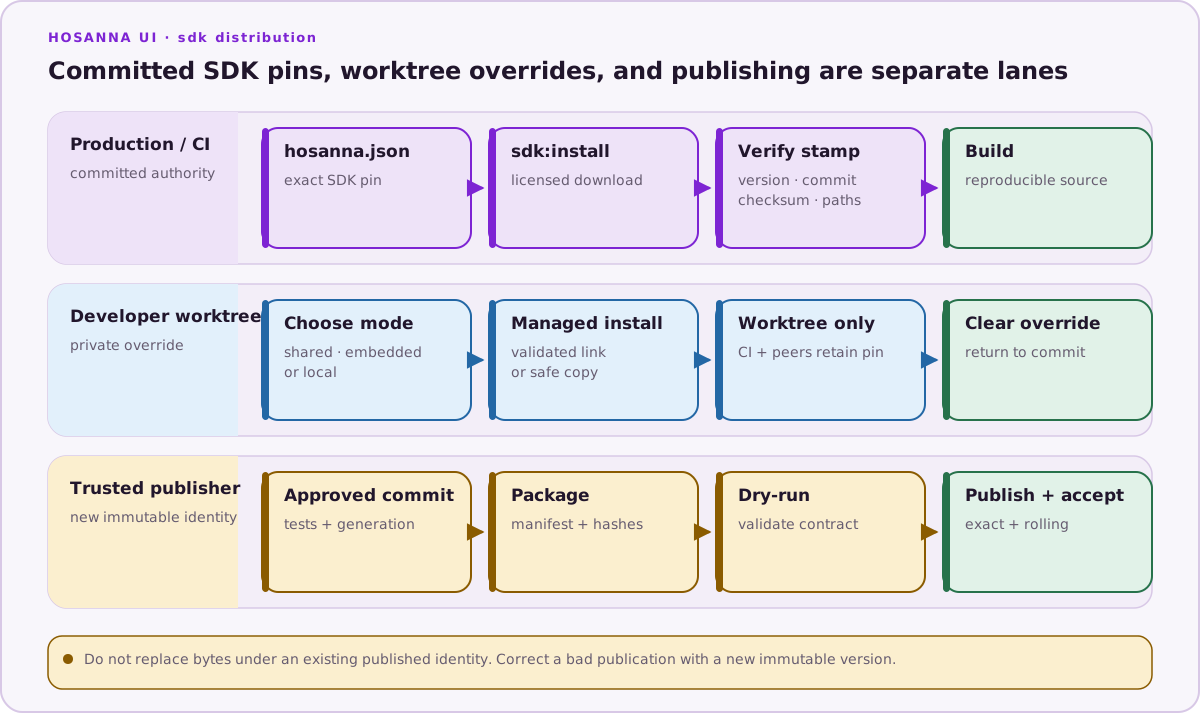
Hosanna applications can consume framework source from a private Keygen publication, a Git checkout, an embedded local copy, or a shared local checkout. Every mode integrates the same project-level source paths, so generation, tests, and builds continue to use the repository's normal commands.
Only the fullSource Keygen flavour is implemented. Do not set platforms;
split flavours and per-platform source packages are reserved and fail with:
NOT SUPPORTED YET — use flavour "fullSource"
Prerequisites
Use a project-local Hosanna Tools release:
npm install --save-dev --save-exact @tantawowa/hosanna-tools@3.15.6
npx hst --version
The full-source entitlement uses the same licence as the Hosanna Compiler. Load
HSC_LICENSE_KEY from a shell or secret manager, then verify it without putting
the key in arguments:
npx hst license:status
Never store the licence in hosanna.json, source control, logs, caches, or
build artifacts.
Commit an exact production source
Production applications should commit an approved, immutable version:
{
  "distribution": "keygen",
  "flavour": "fullSource",
  "sdk-version": "vX.Y.Z"
}
transpiler-version is an independent hosanna.json field; pin the compiler
version approved for the application rather than inferring it from the SDK
version.
Configure, install, and inspect the source:
npx hst config source keygen \
  --sdk-version vX.Y.Z \
  --install \
  --replace-existing
npx hst config source
npx hst env check
--replace-existing is needed only when a recognized SDK root already exists
and the command must switch modes. The operation snapshots the current
integration and restores it if configuration, download, validation, extraction,
or link creation fails.
The installer:
- validates the compiler licence and
SRC_FULL_SOURCEentitlement; - accepts exactly one uploaded
hosanna-full-source-vX.Y.Z.tar.gz; - requires a 64-character SHA-256 from Keygen;
- rejects unsafe archive members, symlinks, undeclared files, and invalid embedded checksums;
- stages the complete source in the project filesystem before swapping it; and
- records the resolved version, channel, source commit, release ID, artifact ID,
checksum, and installed paths in
hosanna-ui/.hosanna-dist.json.
If that stamp and all required files still match, npx hst sdk:install is
idempotent. Pass --force to sdk:install only when an intentional reinstall of
the same requested version is required.
Choose a channel
Keygen accepts three rolling selectors:
| Selector | Resolution |
|---|---|
@latest | Newest complete publication on the stable channel. |
@nightly | Newest complete publication on the development channel. |
latest | Newest valid publication across stable, nightly, manual, and tag lanes, ordered by server publication/creation time. |
For qualification:
npx hst config source keygen \
  --sdk-version latest \
  --install \
  --replace-existing
npx hst config source
The resolver ignores incomplete groups, failed uploads, invalid checksums,
unexpected products or packages, ambiguous artifacts, and inconsistent source
commits. Version text does not determine the winner for bare latest.
Use rolling selectors for deliberate qualification jobs. After qualification,
copy the reported resolved version into hosanna.json before producing a
release build.
Local development modes
Local modes write a private override instead of changing committed
hosanna.json. In a Git project it lives in worktree-specific Git metadata; in
a non-Git directory it falls back to .hosanna-tools/source.local.json.
npx hst config source shows both the active override and the committed source
mode.
This means a developer can use local source while CI and other worktrees retain the committed Keygen or Git configuration.
Shared checkout
Use shared for ordinary framework development. It creates a relative
hosanna-ui symlink to an external checkout:
npx hst config source shared \
  --source-path ../hosanna-ui \
  --install \
  --replace-existing
npx hst config source
Before linking, hst requires:
- a package manifest with a non-empty version;
distribution/manifest.json;src/hosanna-ui; andsrc/hosanna-bridge-core.
The application never owns or deletes the external checkout. A broken link or invalid target fails validation.
Embedded copy
Use embedded when the application needs a self-contained copy:
npx hst config source embedded \
  --source-path ../hosanna-ui \
  --install \
  --replace-existing
npx hst config source
The copy excludes repository metadata, dependencies, generated/build output,
secrets, local Keygen config, and symbolic links. It records every copied file
and checksum in hosanna-ui/.hosanna-local.json.
hst refuses to replace an embedded SDK after files have been added, removed,
or changed. Move intentional edits back into the source checkout, then recreate
the embedded copy. --force does not bypass this protection.
Existing local root
local tells hst to integrate a caller-provided hosanna-ui directory that
already exists at the application root:
npx hst config source local --install
It does not copy or link a checkout. Prefer shared when the framework lives
elsewhere because the relationship is explicit and can be validated.
Git distribution
Legacy or fork-based projects can configure a Git source:
npx hst config source git \
  --git-url git@github.com:YOUR-ORG/hosanna-ui.git \
  --branch main \
  --install \
  --replace-existing
A non-empty branch takes precedence over sdk-version. Clear the branch when
the project should resolve a tag such as @latest.
Return to committed source
Running a non-local source command clears the private override. If
hosanna.json already contains the desired Keygen pin:
npx hst config source keygen --install --replace-existing
npx hst config source
Supplying --sdk-version also updates the committed pin:
npx hst config source keygen \
  --sdk-version vX.Y.Z \
  --install \
  --replace-existing
Review git diff -- hosanna.json whenever you intentionally change a committed
source. The installed hosanna-ui/, its stamps, and generated project links are
managed/ignored integration state and must not be committed.
CI
CI has no developer worktree override, so sdk:install uses committed
hosanna.json:
- name: Install dependencies
  run: npm ci --no-audit --no-fund

- name: Install licensed Hosanna SDK
  env:
    HSC_LICENSE_KEY: ${{ secrets.HSC_LICENSE_KEY }}
    HSC_CACHE_DIR: ${{ runner.temp }}/hsc-cache
  run: |
    npx hst sdk:install
    npx hst config source
    npx hst env check
Do not echo the licence or enable shell tracing around this step. Production CI should use an exact committed version and fail if it cannot be installed; it must not fall back to a local path or rolling channel.
Troubleshooting
| Failure | Resolution |
|---|---|
| Licence missing or invalid | Confirm HSC_LICENSE_KEY is present in the process and npx hst license:status succeeds. |
Missing SRC_FULL_SOURCE | The compiler licence is valid but does not include source distribution. Ask the licence administrator to add the entitlement; do not create a second ad hoc key. |
| Version unavailable | Check the exact logical version and its lane. Use latest only for qualification, then inspect the resolved identity. |
| Checksum, manifest, or archive rejection | Treat the publication as unusable. Keep the previous SDK and ask an operator to publish a new version. |
| Existing SDK root | Re-run the mode switch with --install --replace-existing after confirming the root is managed or safely replaceable. |
| Dirty Git SDK root | Preserve or commit its edits first. --force is accepted only for an intentional dirty-Git replacement. |
| Modified embedded SDK | Move changes to the real checkout and recreate the embedded copy; the integrity guard cannot be forced. |
| Broken shared link | Re-run shared with a valid source checkout. Do not replace it with an ad hoc absolute symlink. |
| Environment check reports the wrong source | Run npx hst config source to distinguish the private override, committed mode, and installed root. |