White-Label Apps
White-label Hosanna repos often ship several branded app flavors from the same source tree. Those apps can share runtime code, tooling, and native projects while using different names, AppConfig selectors, build-config profiles, Roku build inputs, or device defaults.
Use .hosanna-tools/run.json app profiles for this. Select a profile with --app <key> or HOSANNA_RUN_APP=<key>.
Three Separate Selectors
Keep these selectors separate:
| Selector | Example | Purpose |
|---|---|---|
| App profile | --app regular | Selects a named entry from .hosanna-tools/run.json and changes launch/build defaults. |
| Build-config profile | --profile regular-dev | Adds an explicit build-config/profiles/<profile>.json overlay. |
| Runtime AppConfig selector | --app-config regular.tv | Chooses the app/theme/layout config loaded by the runtime. |
An app profile can set profile and appConfig defaults, but those values still mean different things.
Example Run Config
{
  "schemaVersion": 1,
  "defaults": {
    "appName": "hosanna-client",
    "vitePort": 5175,
    "platforms": {
      "browser": { "target": "emulator", "device": "rokufhd" },
      "ios": { "target": "sim", "device": "iPhone 17 Pro" },
      "android": { "target": "sim", "device": "Pixel_8" },
      "roku": { "target": "device", "sourceRoot": "platforms/roku/src" }
    }
  },
  "apps": {
    "regular": {
      "appName": "hosanna-regular",
      "profile": "regular-dev",
      "appConfig": "regular.tv",
      "platforms": {
        "roku": {
          "hscProject": "platforms/hsconfig-roku.json",
          "sourceRoot": "platforms/roku/src"
        },
        "ios": {
          "appConfig": "regular.phone",
          "passthroughArgs": ["--app", "regular"]
        }
      }
    },
    "brand-b": {
      "appName": "hosanna-brand-b",
      "profile": "brand-b-dev",
      "appConfig": "brand-b.tv",
      "platforms": {
        "web": {
          "target": "browser",
          "device": "rokufhd"
        },
        "roku": {
          "hscProject": "platforms/hsconfig-roku-brand-b.json",
          "sourceRoot": "out/roku-brand-b/pkg"
        },
        "ios": {
          "appConfig": "brand-b.phone",
          "passthroughArgs": ["--app", "brand-b"]
        }
      }
    }
  }
}
Supported app/profile keys include appName, env, vitePort, profile, appConfig, passthroughArgs, and per-platform target, device, model, sourceRoot, appPackage, hscProject, and files.
Running App Profiles
npx hst run browser dev emulator --app regular
npx hst run browser dev emulator --app brand-b
npx hst run roku dev device --app regular --device "Living Room Roku"
npx hst run roku dev device --app brand-b --device "Living Room Roku" --no-build
npx hst run ios dev sim --app regular --device "iPhone 17 Pro"
npx hst run ios dev sim --app brand-b --device "iPhone 17 Pro"
Use --dry-run --explain before committing a profile so you can see every resolved source:
npx hst run roku dev device --app brand-b --dry-run --explain
Layering Rules
Run config is resolved from home defaults, project defaults, the selected apps.<key> profile, platform-specific blocks, environment variables, and CLI flags. CLI flags win.
Build config is resolved separately:
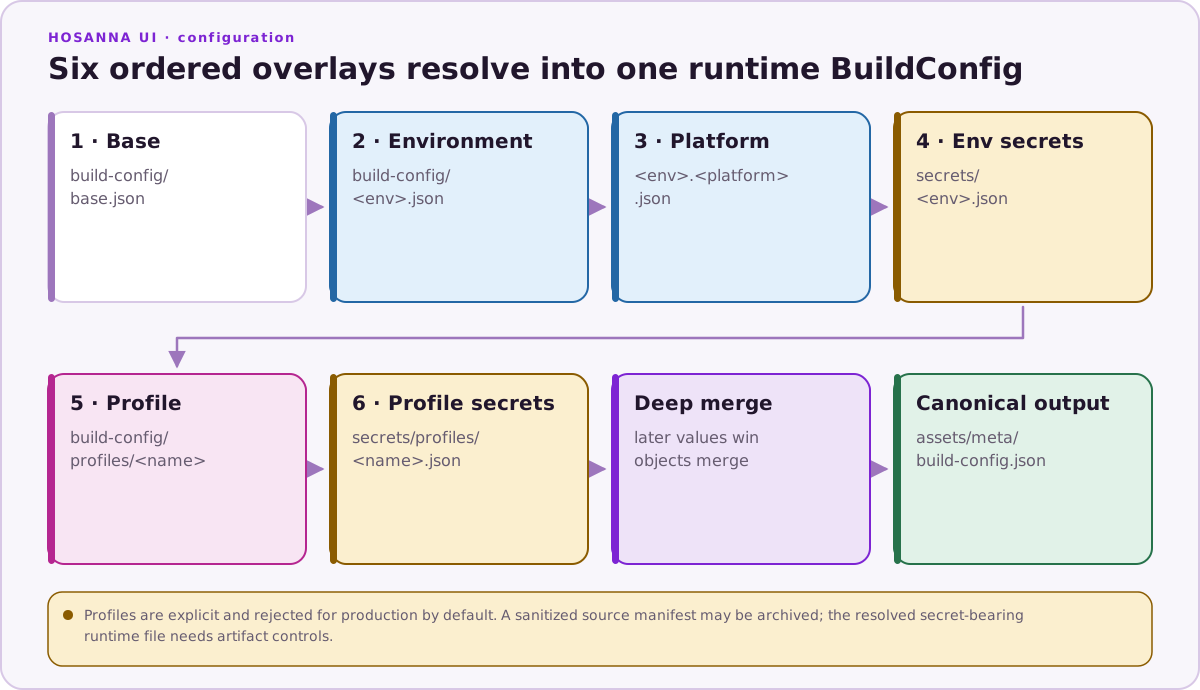
Use tracked build-config overlays for normal app behavior, endpoints, mocks, device overrides, and remote-debug defaults. Use ignored secrets/ overlays only for vendor keys, credentials, signing material, real user credentials, and other confidential values.
Repository Boundary
hosanna-ui-samples is the reference for UI rigs and application samples. Game examples live in the separate hosanna-ui-game-samples-public repository. An app profile may select any source tree that your project owns, but do not infer profile names or build paths from screenshots in another sample repository.
Rules Of Thumb
- Put repeatable app/flavor choices in
.hosanna-tools/run.json. - Put local-only developer overrides in ignored build-config profiles.
- Put confidential values in ignored
secrets/overlays or CI base64 variables. - Use
--app-configfor runtime theme/layout selection, not for secrets or device selection. - Use
target:listbefore hard-coding simulator or physical-device names.