MCP Agent Workflows
Use compact state tools first, drive short input bursts, and verify each meaningful change. Full trees and raw debugger commands are fallbacks, not the default.
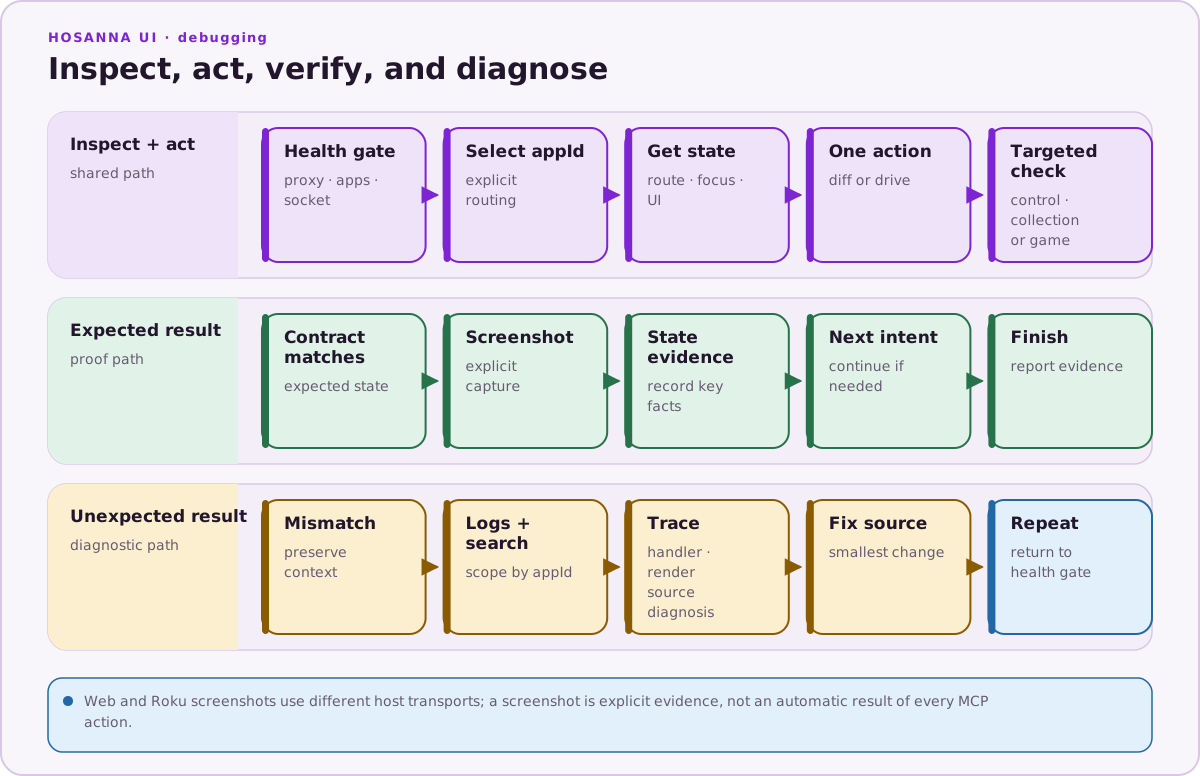
Default Loop
1. health()
2. get_state()
3. drive() or diff_state()
4. check()
5. logs() or diagnose() when the result is wrong
If several apps are connected, select an appId at the beginning and use it consistently.
Navigation
Use diff_state when the question is “what changed after this input?”:
diff_state({ keys: ["Down"] })
For a short journey:
diff_state({
  keys: ["Down", "Down", "Select"],
  timeline: true,
  format: "table"
})
Useful narrowing options include watch_hids, properties, watch_cells, and animation_frames. Use go_to only when its target is unambiguous; otherwise drive explicit keys and verify focus after each branch.
Views and Focus
Start with:
get_state()
find_views({ query: "Settings" })
get_view_details({ _hid: "<hid>" })
get_focus_graph()
Use get_view_hierarchy or get_sg_hierarchy only when targeted lookup cannot find the relevant node. Hosanna view state and SceneGraph node state are related but not interchangeable.
For a transient visual investigation, highlight_view or the start/stop highlighter tools can identify the selected view. Treat property setters as temporary debugging operations; reproduce a real fix in source afterward.
Handler and Render Problems
When focus moves unexpectedly or one key causes repeated rendering:
trace_handlers({ keys: ["Down"], watch_hids: ["506"] })
trace_render({ keys: ["Down"], watch_hids: ["506"] })
inspect_lifecycle({ _hid: "506" })
render_frequency()
Use get_perf_report, get_scroll_jank_telemetry, and reset_perf_data for
timing and scroll investigations. Measure repeated production scenarios on each
release target when setting application performance budgets.
CollectionView
For CollectionView-specific diagnosis:
get_state()
get_collection_view()
get_collection_view_slice()
diff_state({ keys: ["Down"], watch_cells: true })
trace_cv_rows()
diagnose({ scope: "collection_view" })
Listener and recording tools (start_cv_listener, pull_cv_batch, get_cv_recording, and related analysis tools) work with CollectionView diagnostic batches. They are not a general UI-test recorder.
Logs
Use agent-accessible logs before asking a developer to copy terminal output:
logs()
search_app_logs({ query: "error" })
For Roku:
configure_roku_device({ deviceIp: "192.168.1.10", devPassword: "..." })
connect_roku_logs()
get_roku_errors()
search_roku_logs({ query: "BrightScript" })
Keep the password out of prompts, committed files, and serialized reports where possible.
Screenshots
For web:
take_web_screenshot()
The tool can attach to a live Chromium CDP endpoint or load a supplied URL. It is web-only.
For Roku:
configure_roku_device({ deviceIp: "192.168.1.10", devPassword: "..." })
take_screenshot()
The Roku screenshot path uses the developer application installer and requires its password.
Hs2d Games
Use the game-specific tools when the connected runtime exposes the Hs2d debug protocol:
game_state()
game_drive({ keys: ["Left", "Select"] })
game_diff_state({ keys: ["Right"] })
game_diagnose()
game_screenshot()
These tools return game scene/runtime information rather than trying to infer it from the ordinary view hierarchy.
Repeatable Verification
MCP is for interactive inspection and diagnosis. It does not provide the removed test, start_test_recording, record_step, or replay-recording tools.
For repeatable application regression tests, use the repository's Vitest/Hosanna test scripts:
npm run test:ui:web
npm run test:ui:ios:sim
npm run test:ui:roku
For Roku certification automation, use the RASP CLI flow:
npx hst rasp:capture smoke
npx hst rasp:validate rasp-scripts/smoke.rasp
npx hst rasp:run rasp-scripts/smoke.rasp
export_rasp_capture and validate_rasp_script expose parts of that workflow to MCP when an agent already has the required capture or script.
Avoid
- Driving long key sequences without intermediate state checks.
- Assuming focus after
Back, relaunch, or a dialog dismissal. - Dumping a full hierarchy before trying
get_state,find_views, or a targeted slice. - Mixing web and device screenshot tools.
- Changing runtime fields through MCP and treating the temporary state as a source fix.
- Describing CollectionView diagnostic recording as general UI-test recording.