Sprites And Sprite Pools
Hs2dSprite is the game-facing handle for one compositor sprite. It knows its pool id, frame catalog, current frame, world position, visibility state, optional anchor, optional animation, and optional collision registration. Hs2dSpritePool allocates a fixed number of those sprites up front on a layer compositor and then reuses them for actors, projectiles, pickups, labels, and map-bound entities.
Gameplay should use Hs2d sprite layers, sprite groups, sprite pools, text pools, particle pools, tile layers, and cached surfaces. Do not build new gameplay features by drawing raw sprite loops directly to GameScreen each frame.
When To Use
Use sprite pools when the object count is bounded or can be capped:
| Use case | Recommended shape |
|---|---|
| Player, boss, or single persistent actor | A capacity-1 Hs2dSpritePool. |
| Projectiles, pickups, temporary hazards | A fixed Hs2dSpritePool plus a logical entity pool. |
| Tiled object entities | Hs2dWorldBuilder entity bindings, which create Hs2dSpriteGroup entries on an Hs2dSpriteLayer. |
| Many logical enemies with a smaller visible budget | Hs2dSpriteGroup with camera culling and a fixed physical pool. |
| Floating score or damage labels | Hs2dTextSpritePool or Hs2dFloatingTextSystem, not image sprites unless the text is bitmap art. |
Do not create compositor sprites as gameplay events happen. Allocate the budget during loading or world build, then set frame, position, visibility, collision data, and animation state at runtime.
Logical And Render Pool Lifecycle
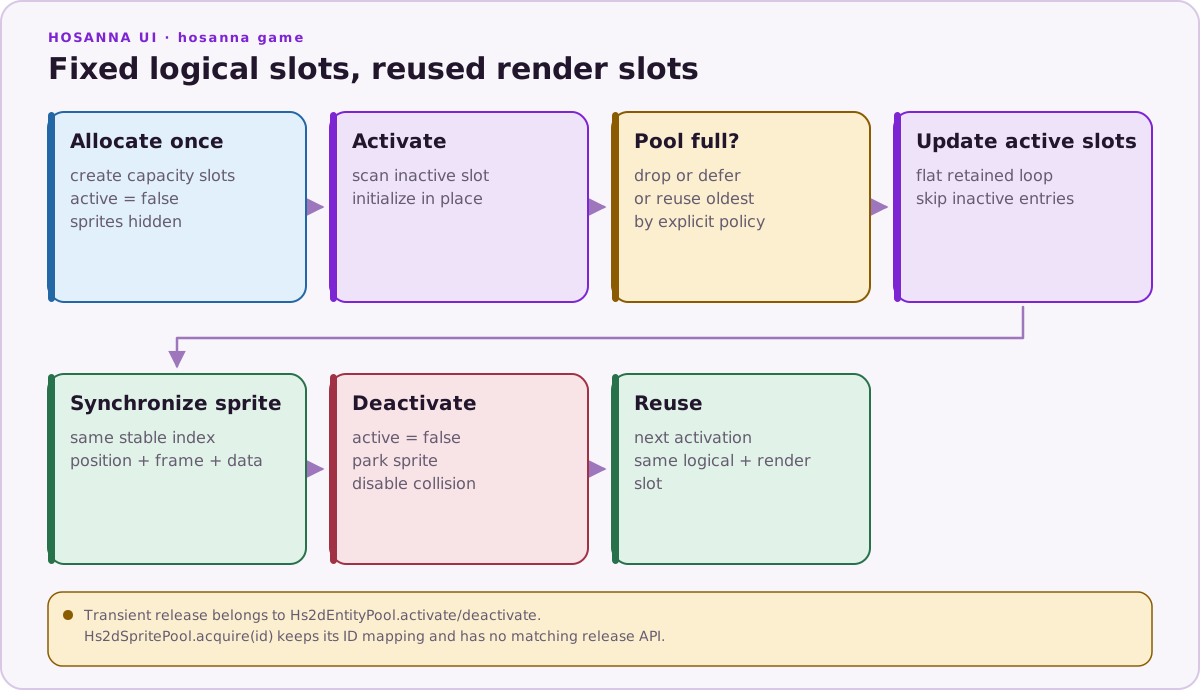
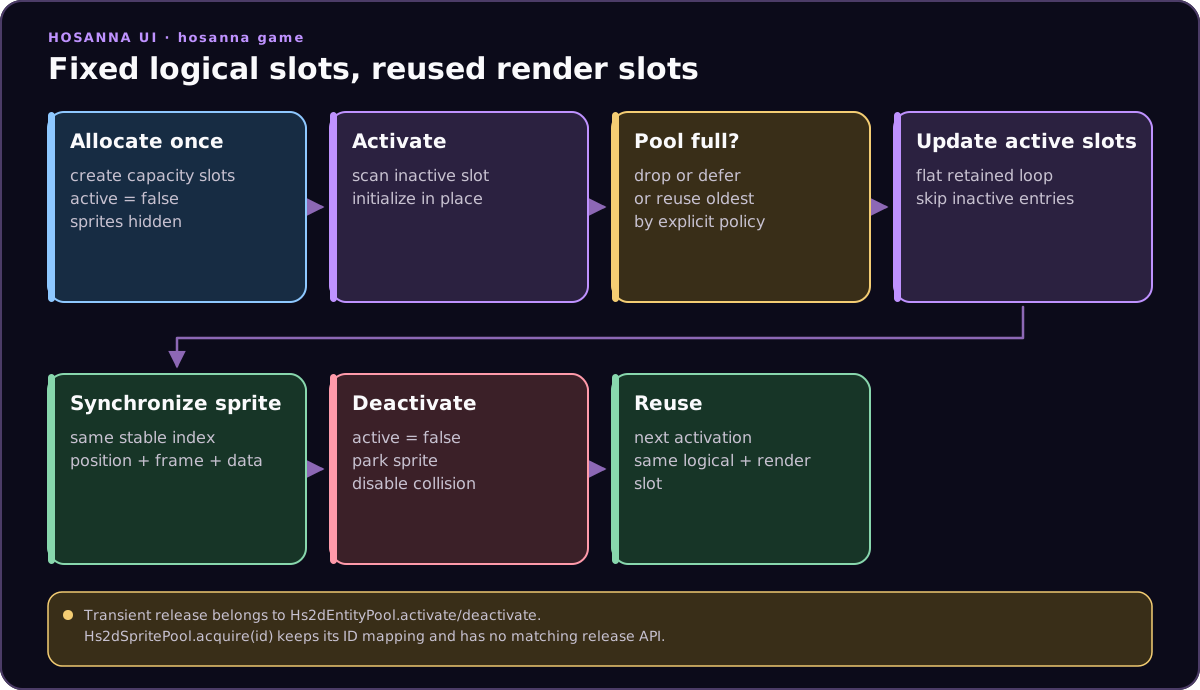
Use Hs2dEntityPool.activate() and deactivate() for transient logical
lifetime, then synchronize its stable indices into an Hs2dSpritePool.
Hs2dSpritePool.acquire(id) is an ID-stable lookup and has no matching release
API, so it is not the transient lifecycle shown above.
Construction Pattern
The usual construction path is:
- Create or obtain a foreground
Hs2dSpriteLayer. - Add a sprite pool or sprite group to that layer.
- Define frames from an atlas with
Hs2dSpriteDefinition, or pass prebuilt regions for simple manual pools. - Keep logical state in scene-owned arrays or entity pools.
- Sync logical state into sprite objects from
updateSceneSprites.
Hs2dWorldBuilder.fromLevel follows the same pattern for Tiled entity object groups. The entities option maps object types to sprite definitions and capacities, and the optional spawn callback copies map data into scene-owned state once at build time.
Update, Render, And Compose Behavior
Hs2dSprite methods mutate existing sprite handles:
| Method | Runtime effect |
|---|---|
setWorldPosition(x, y) | Stores world coordinates for later camera projection. |
setFrame(frameId) | Switches the existing sprite region to a named atlas frame. |
setVisible(true) | Marks the sprite as logically visible to its layer. |
hide(offscreenX, offscreenY) | Clears drawable and collision state and parks the handle. |
setCollision(...) | Defines collision registration for an existing physical sprite. |
setCollisionData(...) | Updates the data returned by collision checks. |
play(...) and tickAnimation(...) | Advance through named frame animations without reallocating regions. |
Hs2dSpriteLayer.update(camera) projects visible world sprites into screen positions, applies culling, hides offscreen sprites, and updates active counts. The inherited SpriteLayer render step redraws the compositor surface only because the layer is marked dirty. Composition then blits that layer surface to the screen in layer order.
Performance Notes
- Keep pool sizes explicit and measured.
- Prefer
setWorldPosition,setVisible, andsetFrameover replacing sprites. - Use anchors so game code works in entity-center or foot-position coordinates.
- Use offscreen parking for inactive sprites.
- Use
updateHs2dSpriteRenderVisibilityForCameraor the Y-sorted variant when many logical sprites exist and only a window can render. - Collision bridges should be attached once; update collision data as entity ownership changes.
- Do not scan Tiled object lists in the frame loop. Convert objects into arrays, sprite groups, or pools during world build.
Code Sample
const foreground = world.addHs2dSpriteLayer({
  id: 'foreground',
  width: screenWidth,
  height: screenHeight,
  cullPadding: 128,
  offscreenX: -1000,
  offscreenY: -1000,
});

const enemyPool = foreground.addSpritePool({
  id: 'enemy-pool',
  capacity: 24,
  definition: {
    source: enemyAtlas,
    frames: [
      { id: 'idle', x: 0, y: 0, width: 96, height: 96 },
      { id: 'hit', x: 96, y: 0, width: 96, height: 96 },
    ],
  },
  initialFrameId: 'idle',
  anchor: { x: 48, y: 48 },
  zIndex: 90,
  offscreenX: -1000,
  offscreenY: -1000,
  collisionBridge: this.collisionBridge,
});

protected override updateSceneSprites(): void {
  for (let i = 0; i < enemies.length; i++) {
    const enemy = enemies[i];
    const sprite = enemyPool.getSprite(i);
    sprite.setWorldPosition(enemy.x, enemy.y);
    sprite.setFrame(enemy.wasHit ? 'hit' : 'idle');
    sprite.setVisible(!enemy.isDestroyed);
    sprite.setCollisionData({ kind: 'enemy', entityId: enemy.id, enemyIndex: i });
  }
}
Source References
| Source | Why it matters |
|---|---|
../games/hosanna-ui/src/hosanna-game/hosanna2d/Hs2dSprite.ts | Game-facing sprite state, frame switching, animation, culling, anchors, and collision data. |
../games/hosanna-ui/src/hosanna-game/core/Hs2dEntityPool.ts | Fixed-capacity logical slots, activation, deactivation, and optional oldest-slot reuse. |
../games/hosanna-ui/src/hosanna-game/hosanna2d/Hs2dSpritePool.ts | Fixed-capacity pool allocation, manual and definition-based pools, batch updates, acquire helpers, and stats. |
../games/hosanna-ui/src/hosanna-game/hosanna2d/Hs2dSpriteLayer.ts | Layer-level projection, culling, sprite groups, visible sprite rebuilds, and active sprite counts. |
../games/hosanna-ui/src/hosanna-game/hosanna2d/Hs2dWorldBuilder.ts | Tiled entity object bindings and build-time spawn callbacks. |
../hosanna-ui-game-samples-public/src/hosanna-game-examples/native-shoot-em-up/VerticalShooterLevelScene.ts | Practical projectile, ship, enemy, collision, and pooled sprite sync patterns. |