Example Walkthrough: Vertical Shooter
The vertical shooter is the broadest Hs2d reference game. It demonstrates a complete scene stack, bundle readiness, Hs2dLevelScene, a prepared Tiled world, retained simulation state, pooled sprites, collision integration, particles, floating text, audio, persistent upgrades, run power-ups, a minimap, and debug snapshots.
Copy its boundaries and lifecycle. Do not inherit all of its feature flags or shooter-specific tuning.
Source Files
| File | What it owns |
|---|---|
../hosanna-ui-game-samples-public/src/hosanna-game-examples/native-shoot-em-up/VerticalShooterGame.ts | Minimal game boot into the title menu. |
../hosanna-ui-game-samples-public/src/hosanna-game-examples/native-shoot-em-up/VerticalShooterMenuScene.ts | Paged title menu, store, pairing, player selection, settings, and game start. |
../hosanna-ui-game-samples-public/src/hosanna-game-examples/native-shoot-em-up/VerticalShooterLevelScene.ts | Loading, world build, camera, input, render pools, collisions, effects, HUD, minimap, audio, and debug telemetry. |
../hosanna-ui-game-samples-public/src/hosanna-game-examples/native-shoot-em-up/VerticalShooterPauseScene.ts | Pausing overlay, audio backgrounding, restart, quit, pairing, and controller state. |
../hosanna-ui-game-samples-public/src/hosanna-game-examples/native-shoot-em-up/VerticalShooterGameLogic.ts | Renderer-independent weapons, enemies, collectibles, damage, score, and retained snapshot. |
../hosanna-ui-game-samples-public/src/hosanna-game-examples/native-shoot-em-up/VerticalShooterWaveDirector.ts | Fixed-capacity wave slots, triggering, spawning, movement, and completion. |
../hosanna-ui-game-samples-public/src/hosanna-game-examples/native-shoot-em-up/VerticalShooterWaveDefs.ts | Data-driven wave formations and level schedule. |
../hosanna-ui-game-samples-public/src/hosanna-game-examples/native-shoot-em-up/VerticalShooterEconomy.ts | Persistent progress-store construction and ship loadout resolution. |
../hosanna-ui-game-samples-public/src/hosanna-game-examples/native-shoot-em-up/VerticalShooterUpgradeDefs.ts | Upgrade tracks, run power-up tables, coin drops, and weighted pickup definitions. |
../hosanna-ui-game-samples-public/asset-bundles/native-shoot-em-up/asset-bundle.json | Level, image, audio, and font bundle entries. |
../hosanna-ui-game-samples-public/asset-bundles/native-shoot-em-up/levels/level-1.json | Prepared canyon map, entities, image layers, and render properties. |
For a compact file-reading checklist, see Vertical Shooter Reference.
Scene Flow
VerticalShooterGame only installs the title menu:
export class VerticalShooterGame extends Hs2dGame {
  constructor(context: GameExampleContext) {
    super()
    this.replaceScene(new VerticalShooterMenuScene(context))
  }
}
The current flow is:
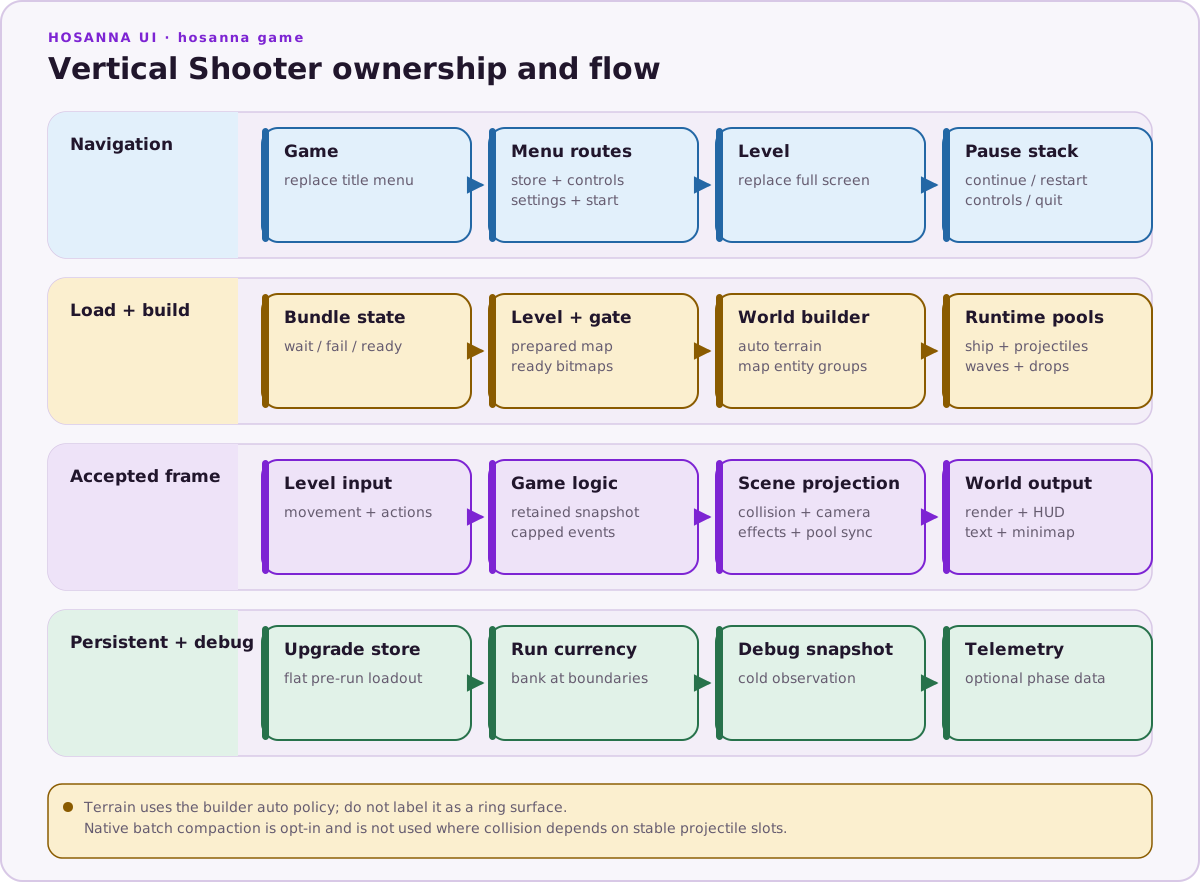
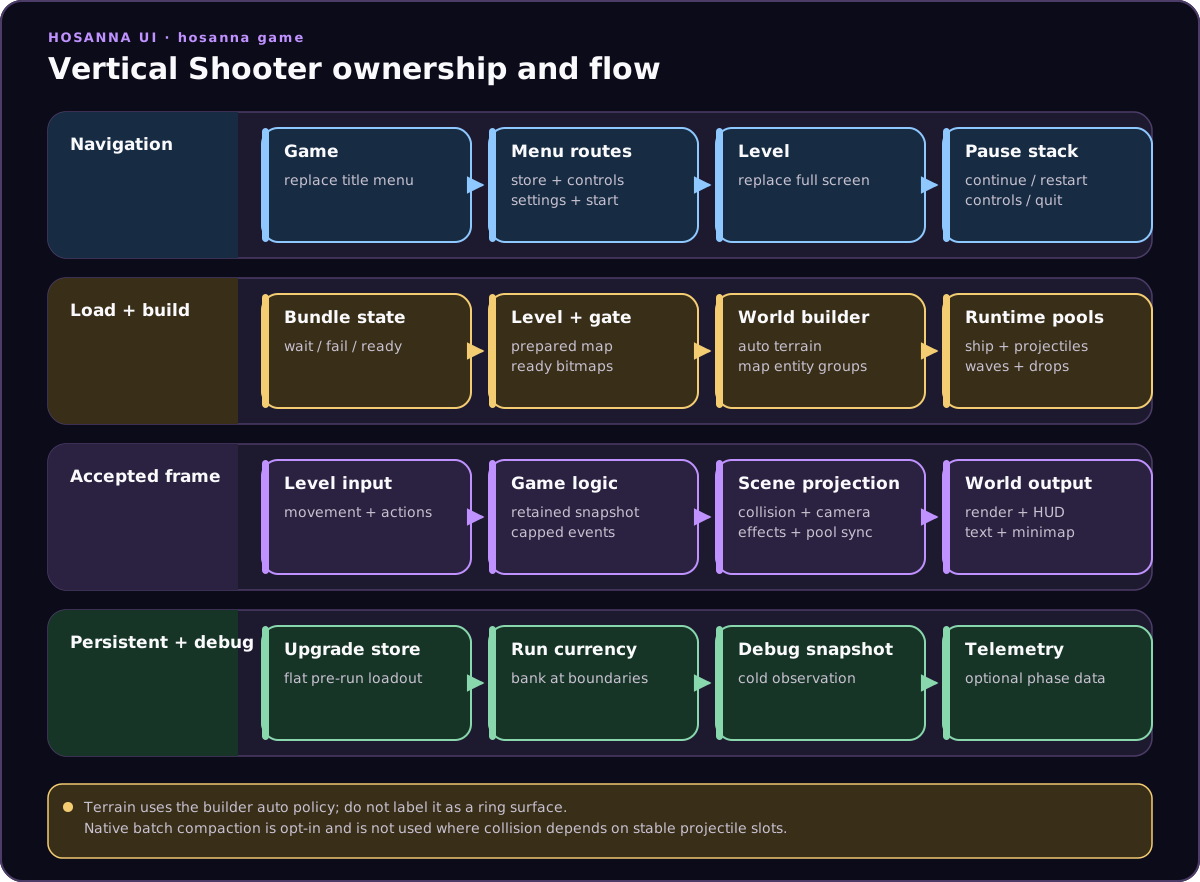
The title is a paged menu because it contains Start Game, Ship Store, pairing, player selection, settings, and quit. The pause scene extends Hs2dOverlayScene with pauseBelow: true, so the frozen level remains visible.
Pause entry backgrounds the audio manager; exit restores it. Restart pops the overlay before calling the level's restart callback.
Engine-owned controller overlays use object options:
new Hs2dControlPairingScene({ controlManager })

new Hs2dControlInputManagerScene({
  controlManager,
  screenWidth,
  screenHeight,
})
The engine source and tests define this ABI. Some sample call sites still use legacy positional arguments; do not copy those calls into new code.
Bundle Readiness
The level scene passes the bundle ID and URI resolver into Hs2dLevelScene, registers level 1 with Hs2dLevelManager, and attempts bundle-dependent initialization from both construction and the loading loop.
Initialization is deliberately staged:
- find the bundle state;
- report
not-loaded,loading, or a terminal failure through loading status; - load the prepared level only when the bundle is
ready; - create the bootstrap camera, follow controller, minimap, and resolved asset URIs;
- register every required bitmap with
Hs2dAssetGate; - wait for
assetGate.poll()before building the world.
Pressing Start before the bundle finishes therefore shows a loading screen instead of reading empty fallback paths or building a partial world.
Tiled World Build
The prepared map is a tall 23×507 grid with 128-pixel tiles. It describes:
- a sky layer;
- far and near parallax star layers;
- terrain;
- decorative map objects;
- placed enemies and other entity data.
Hs2dWorldBuilder.fromLevel(...) constructs the ordered world. The scene supplies:
- viewport and camera state;
- the permitted zoom envelope;
- parallax origin;
- decor frame mappings;
- an entity binding for map-authored enemies;
- a foreground sprite-layer ID;
- the scene itself as the HUD renderer.
Terrain remains map-driven and uses the builder's auto policy. With the current zoom envelope, the dynamic pool estimate stays bounded; if a future minimum scale makes that estimate excessive, auto can select cached chunks. Do not hard-code a renderer claim without checking terrainLayer.getStats().
Model And Scene Boundary
VerticalShooterGameLogic contains no drawing. It owns:
- ship weapon and health state;
- fixed-capacity projectile, missile, coin, pickup, and wave-enemy storage;
- map-authored enemy state;
- deterministic drop rolls;
- collectible magnet behavior;
- wave scheduling and movement;
- score, run currency, and a capped event buffer.
tick(...) patches and returns one retained VerticalShooterSnapshot. The scene provides current ship position, firing state, camera position, and collectible cull band. It then translates the returned events into audio, particles, camera shake, floating text, and HUD changes.
Collision ownership is split deliberately:
- the model handles wave-enemy collisions and weapon rules;
- the scene's collision bridge can handle sprite-backed projectile/enemy checks;
- terrain probes remain scene-side because they query the loaded level and projected ship state;
- damage application returns to the model.
This keeps the renderer and collision handles out of the gameplay core.
Runtime Pools And Native Batch Updates
Map-authored enemies are builder-created entity sprites. Fully runtime objects are separate retained pools:
- player ship;
- projectiles;
- scheduled wave enemies;
- coins;
- run power-up pickups;
- homing missiles;
- particles;
- floating score labels.
The pool capacities are constants shared with the logic where appropriate. Inactive slots are hidden and reused.
Coins, pickups, missiles, and wave enemies opt into the sprite pool's native batch update. Each system fills retained region/X/Y scratch arrays and calls flushNativeBatch(...). Projectiles do not use that compaction because collision handles depend on stable per-slot indices.
That distinction is important: native batching is an opt-in synchronization optimization, not a replacement for the sprite layer, and it is unsuitable when external systems depend on slot identity.
Camera, Scroll, Warp, And Minimap
Hs2dAutoScrollCamera owns base scroll, boost, brake, cooldown, and mega-boost state. A follow controller combines automatic velocity with the ship target, then the scene clamps both camera and ship.
Holding Up at the top of the control area charges warp. Active warp pins mega-boost, suppresses firing, changes zoom, plays looped SFX, and draws screen-space streaks. Release enters a timed deceleration state before weapons return.
The minimap is a deliberately distorted vertical radar strip: the full tall world is mapped into a readable right-side band. Terrain is baked once and the ship marker updates live. This is a design-specific use of Hs2dMiniMap, not a requirement to preserve world aspect ratio.
Economy And Run Progression
The title's Ship Store and the level scene construct stores over the same persistence key. Six persistent tracks resolve into a flat ship loadout:
- hull strength;
- engine speed;
- cannons;
- missiles;
- lasers;
- coin magnet.
The loadout is applied before a run starts. Coins collected during a run are banked transactionally at death, restart, quit, or disposal, so repeated boundary calls do not double-count them.
Run power-ups are separate from persistent upgrades. Weighted drops grant rapid fire, speed, triple shot, rockets, or laser improvements. Their level curves are numeric tables, and the collectible field pulls nearby drops toward the ship.
See Economy, Progression, Drops, And Modifiers for the reusable engine APIs.
Input And Pause
The level accepts only the single-player input route. During loading, Back is the only meaningful action. Once ready:
- arrows or the left stick steer;
- Play pushes pause;
- Back returns to the examples menu;
- OK restarts the level;
- Options toggles music;
- Fast Forward activates the banked laser;
- Replay toggles the collision manager's debug state. The runtime overlay is visible only in
__DEV__builds.
Movement state is retained across press/release events and ramps toward full strength. A directional press also nudges the ship, keeping taps responsive.
Effects, Text, Audio, And Telemetry
The scene prewarms fixed floating-score strings, updates HUD text only when values change, reuses particle emitter state, and processes only the counted prefix of logic events.
getHs2dDebugSnapshot() exposes logical state, camera state, world layers, tile layers, sprite pools, particles, and pairing state. Use that cold path for tools rather than adding allocations to the update loop.
The base Hs2dLevelScene invokes stats-window work only in __TELEMETRY__ builds. Keep required gameplay work outside onStatsWindow(), and guard optional phase timing consistently when adapting the sample.
What To Copy
- Small game object, explicit menu scene, gameplay scene, and pausing overlay.
- Bundle-state handling before level or bitmap reads.
- One-time Tiled world construction and retained entity bindings.
- Renderer-independent gameplay state with a retained snapshot and capped events.
- Fixed-capacity runtime pools and scratch arrays.
- Explicit slot-identity rules before enabling native batch compaction.
- Transactional run-currency banking at every lifecycle boundary.
- Debug snapshots and telemetry that never own gameplay correctness.
What Not To Copy
- Shooter-specific controls, speeds, zoom, warp, or weapon balance.
- Feature-flag combinations without deciding which collision owner is active.
- Pool capacities without measuring the new game.
- Legacy positional controller-scene constructors in current sample call sites.
- Per-frame strings, arrays, or closures added to the hot path.