Assets And Asset Bundles
Game art, audio, fonts, and levels belong in asset bundles. This page covers bundle layout, manifests, key naming, and URI resolution. Bitmap readiness lives in Asset Gates And Bitmap Cache. Audio registration and playback lives in Audio Manager.
Source References
| Source | What to read there |
|---|---|
../games/hosanna-ui/src/hosanna-game/assets/GameAssetBundleManager.ts | Runtime bundle descriptor loading, descriptor caching, URL normalization, and ready/failed states. |
../games/hosanna-ui/src/hosanna-game/assets/GameAssetBundleTypes.ts | Public GameAssetBundleState shape passed into game contexts. |
../hosanna-ui-game-samples-public/src/hosanna-game-examples/assetBundles.ts | Sample-side key and fallback URI resolution helpers. |
../hosanna-ui-game-samples-public/src/hosanna-game-examples/native-shoot-em-up/NativeShootEmUpAssets.ts | Reference constants for bundle IDs, manifest keys, and pkg:/asset-bundles/... fallbacks. |
../hosanna-ui-game-samples-public/asset-bundles/native-shoot-em-up/asset-bundle.json | Concrete descriptor with image, audio, font, and level entries. |
../hosanna-ui-game-samples-public/src/hosanna-game-examples/ExampleGamesController.ts | Load game bootstrap, register bundle audio, and pass ready bundle states into game contexts. |
Bundle Layout
Use one directory per game or shared art package:
asset-bundles/my-game/
  asset-bundle.json
  app.config.json
  images/
  audio/
  fonts/
  levels/
The vertical shooter reference bundle follows the same pattern:
asset-bundles/native-shoot-em-up/
  asset-bundle.json
  app.config.json
  images/
  audio/
  fonts/
  levels/
asset-bundle.json is the runtime descriptor. app.config.json is loaded separately by the examples shell when a game definition points at it.
Manifest Shape
Descriptors use a stable bundle ID and an assets array:
{
  "bundleId": "native-shoot-em-up",
  "appConfig": "/asset-bundles/native-shoot-em-up/app.config.json",
  "assets": [
    {
      "key": "native-shoot-em-up.images.ship",
      "url": "/asset-bundles/native-shoot-em-up/images/ship.png",
      "fileName": "images/ship.png",
      "required": false
    },
    {
      "key": "native-shoot-em-up.audio.music",
      "url": "/asset-bundles/native-shoot-em-up/audio/music.mp3",
      "fileName": "audio/music.mp3",
      "required": false
    }
  ]
}
| Field | Purpose |
|---|---|
bundleId | Logical bundle name. It must match the game definition and the load request. |
assets[].key | Code-facing stable key. Scenes should use constants for these. |
assets[].url | Descriptor URL. Leading slash URLs are resolved against the bundle manager baseUrl. |
assets[].fileName | Bundle-local path used by packaged fallback logic and resolved manifests. |
assets[].required | Passed through to the bridge asset bundle task manager. |
assets[].headers | Optional request headers, also passed through when present. |
Do not replace missing art with generated rectangles or text in shared game code. Add the asset to the bundle and let the normal bundle, gate, and cache pipeline expose the failure.
Key Idioms
Use namespaced keys that start with the bundle ID:
my-game.images.player
my-game.images.tile-atlas
my-game.audio.music
my-game.audio.hit
my-game.fonts.hud
my-game.levels.level-1
This convention keeps keys unique when multiple bundles are loaded into the same game context. It also lines up with default music lookup: the examples controller first tries <bundleId>.music, then <bundleId>.audio.music.
Keep code-side constants beside the game-specific asset roots:
const ASSET_ROOT = 'pkg:/asset-bundles/my-game/';
const IMAGE_ROOT = `${ASSET_ROOT}images/`;
const AUDIO_ROOT = `${ASSET_ROOT}audio/`;

export const MY_GAME_ASSETS = {
  bundleId: 'my-game',
  player: `${IMAGE_ROOT}player.png`,
  playerBundleKey: 'my-game.images.player',
  music: `${AUDIO_ROOT}music.mp3`,
  musicSoundKey: 'my-game.audio.music',
} as const;
The key and fallback URI should travel together. That makes the code robust across packaged runs, local web runs, and downloaded/ensured bundle paths.
Loading States
GameAssetBundleManager.loadBundleState(bundleId, version?) builds this descriptor URL:
<baseUrl>/asset-bundles/<bundleId>/asset-bundle.json
It returns a state object:
| State | Meaning |
|---|---|
loading | The descriptor or asset ensure work is active. |
ready | The manifest is ready and can resolve assets. |
failed | Descriptor fetch or asset ensure failed. Inspect error and bundle logs. |
The manager first tries a cached descriptor stored under the bundle cache directory as _bundle.json. If the cached descriptor has the wrong bundleId or requested version, it is ignored or treated as stale. Stale descriptors force a new descriptor fetch before asset ensure.
When the descriptor is fetched, leading slash asset URLs are normalized against the manager baseUrl, then passed to AssetBundleTaskManager.ensureBundle with maxConcurrent: 2. Ready manifests log ready and failed key counts; failed keys log the per-asset error when available.
Fallback URI Pattern
Every scene should resolve by manifest key and keep a package URI fallback:
const playerUri = resolveGameAssetBundleUri(
  context,
  MY_GAME_ASSETS.bundleId,
  MY_GAME_ASSETS.playerBundleKey,
  MY_GAME_ASSETS.player,
);
resolveGameAssetBundleUri checks context.assetBundles for a matching ready bundle. It supports both descriptor-style asset arrays and ready manifest records:
- Legacy descriptor arrays return
asset.urlfor a matchingasset.key. - Ready manifest records return
asset.pathwhen the record isstate: 'ready'. - If no ready asset is found, the fallback is returned.
Use resolveGameAssetUri when the caller already has a pkg:/asset-bundles/<bundleId>/<relativePath> URI:
const courseUri = resolveGameAssetUri(
  context,
  'pkg:/asset-bundles/mini-golf/levels/course-1.json',
);
That helper parses the bundle ID and relative path, then matches manifest entries by url or fileName. It returns the prepared asset path when a ready manifest has one; otherwise it returns the original URI.
Runtime Flow
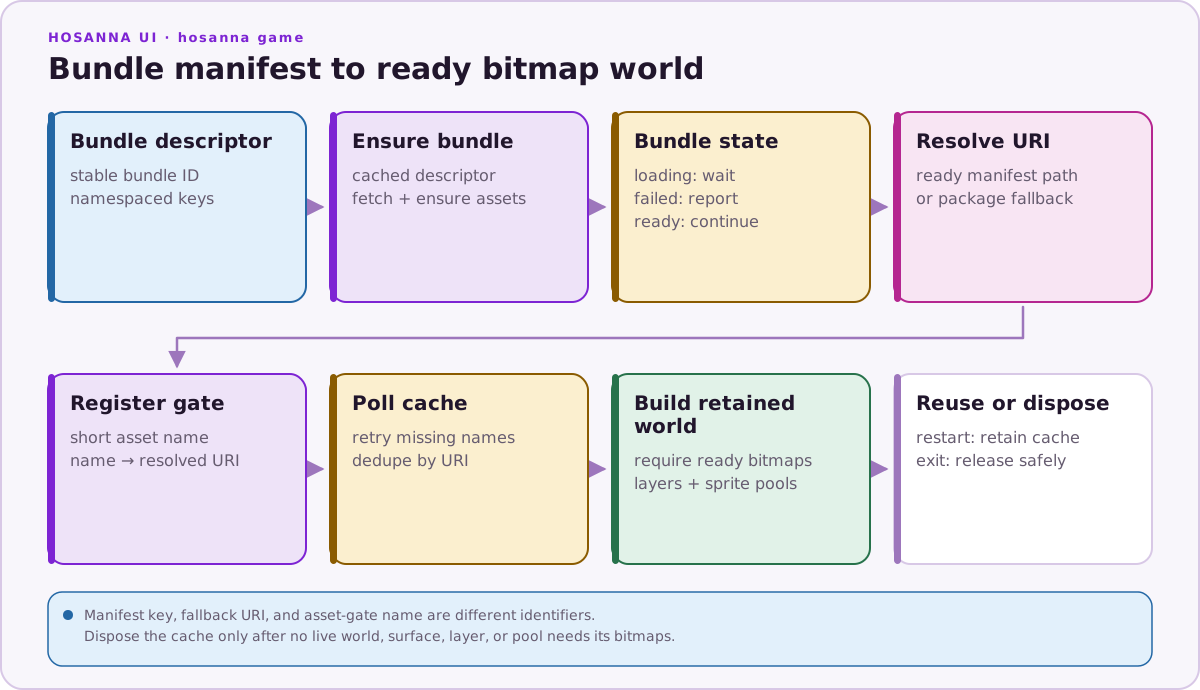
Scene code should still handle not-loaded, loading, and failed bundle states. The vertical shooter defers level, camera, and gate initialization until the native-shoot-em-up bundle reports ready; if the bundle fails, it shows a terminal loading status instead of trying to read empty fallbacks.
Do And Don't
| Do | Don't |
|---|---|
Use namespaced keys such as native-shoot-em-up.images.ship. | Use bare keys like ship in shared or multi-bundle contexts. |
Keep manifest keys and pkg:/asset-bundles/... fallbacks in constants. | Scatter string literals through scenes. |
Resolve through resolveGameAssetBundleUri or resolveGameAssetUri. | Assume asset.url is the final runtime path after bundle ensure. |
| Wait for the relevant bundle state before loading levels or registering bitmap gates. | Build an Hs2d world while bundle state is still loading. |
| Let the manifest expose missing files and failed keys. | Generate placeholder art in runtime code to hide missing bundle entries. |
| Register audio after bundle states are available. | Create audio resources directly in gameplay loops. |