Runtime Frame Loop
GameRuntime is the host-owned frame loop for Hosanna games. It is intentionally small: it ticks engine services, drains input, gives one controller a chance to update, asks that controller to render, draws optional debug overlays, and presents the screen.
Game authors normally do not subclass or replace GameRuntime. Put game flow in an Hs2dGame, put screens in scenes, and put gameplay in Hs2dLevelScene. The runtime is the boundary between the platform host and the game controller.
Frame Order
Every accepted frame runs in this order:
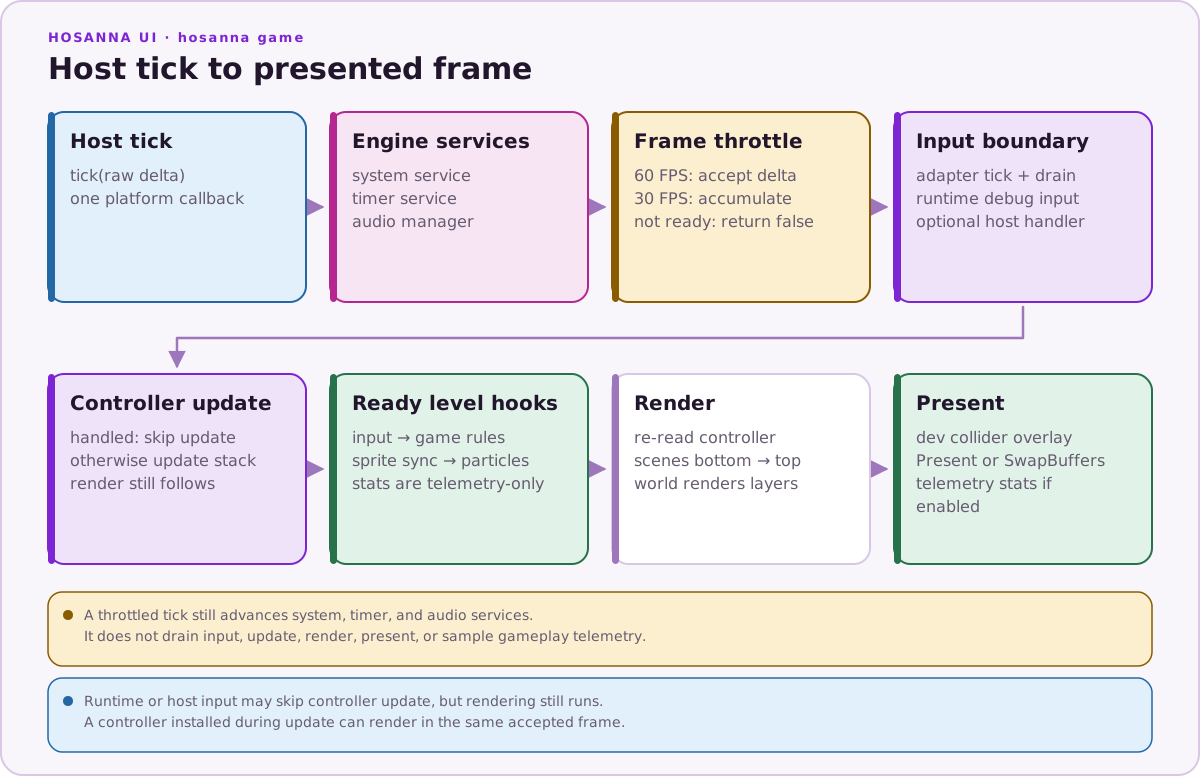
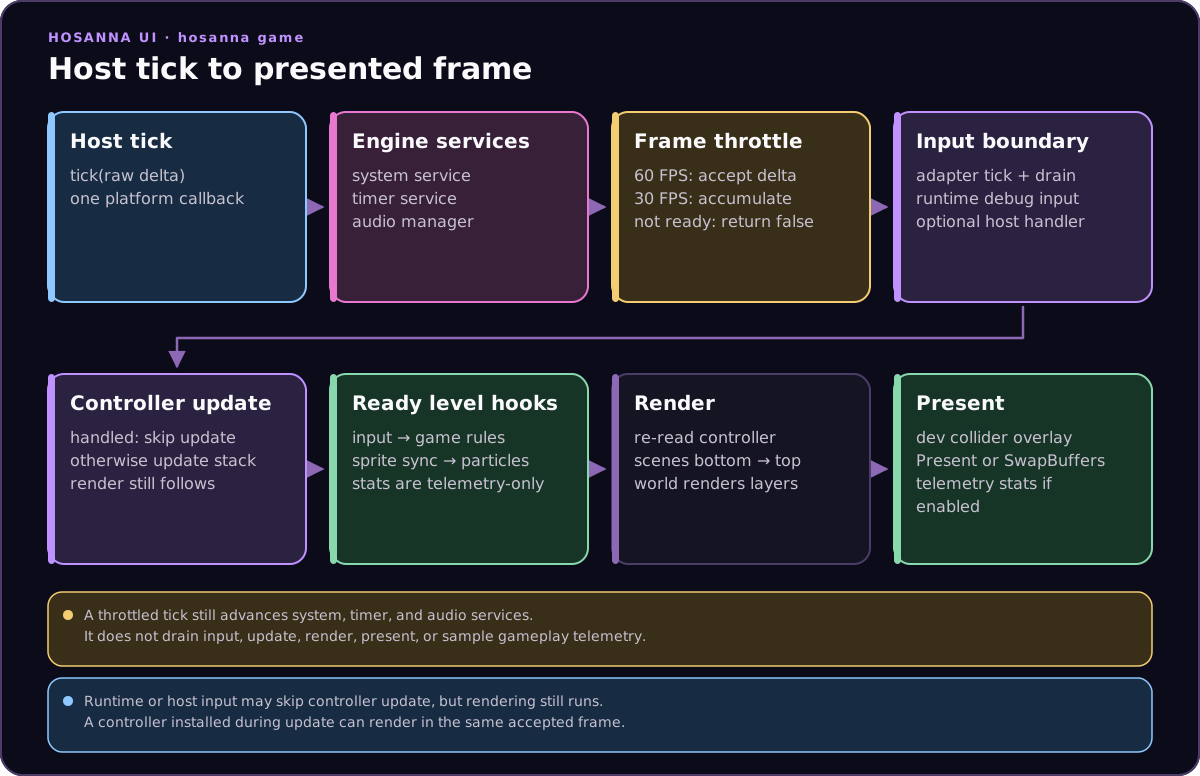
Services use every host delta, including a tick skipped by the 30 FPS gameplay throttle. Input, controller update, render, presentation, and runtime performance sampling use only the accepted frameDeltaMs.
The update phase always happens before render. Game logic should mutate state during update, then render should compose the state that already exists.
Runtime Responsibilities
GameRuntime owns these concerns:
| Concern | Runtime behavior |
|---|---|
| Frame acceptance | Runs every 60 FPS tick by default, or accumulates deltas when setTargetFps(30) is active. |
| Services | Ticks system, timer, and audio services before gameplay input/update. |
| Input | Ticks the input manager, drains normalized GameInput objects, and handles runtime debug shortcuts first. |
| Controller dispatch | Calls controller.update(deltaMs, inputs) and then controller.render(screen). |
| Presentation | Calls screen.Present() when available, otherwise SwapBuffers(). |
| Debug overlay | In a __DEV__ build, renders collision debug colliders after the controller unless the current controller handles debug rendering itself. |
| Stats | In a __TELEMETRY__ build, tracks frame distribution and update, render, and present timings. |
| Controller lifetime | Disposes the previous controller when setController() installs a replacement controller. |
Game code owns scene selection, world state, entity logic, and drawing policy. The runtime only coordinates the frame.
Controller Wiring
The host creates the runtime once, then installs a game controller. The controller is usually an Hs2dGame subclass.
export class MyGameHost {
  private readonly runtime: GameRuntime;

  constructor(screen: GameScreen, inputManager: GameInputAdapterManager, context: MyGameContext) {
    this.runtime = new GameRuntime({
      screen,
      inputManager,
      timerService: context.timerService,
      audioManager: context.audioManager,
    });
    this.runtime.setController(new MyGame(context));
  }

  tick(deltaMs: number): void {
    this.runtime.tick(deltaMs);
  }
}
Keep this host layer thin. If a menu opens a level, use Hs2dGame.replaceScene(). If a pause panel opens, use Hs2dGame.pushScene(). Do not swap the runtime controller for ordinary game screens.
Target FPS
The runtime defaults to 60 FPS. Calling setTargetFps(30) makes the runtime accumulate incoming deltas until the 30 FPS interval is reached. A skipped gameplay tick still advances system, timer, and audio services; it returns before input, update, render, or presentation.
class GraphicsOptionsScene extends Hs2dScene {
  constructor(private readonly runtime: GameRuntime) {
    super();
  }

  setPerformanceMode(isLowPower: boolean): void {
    if (isLowPower) {
      this.runtime.setTargetFps(30);
      return;
    }
    this.runtime.setTargetFps(60);
  }
}
Use 30 FPS as a deliberate product choice, not as a way to hide an expensive frame loop. New gameplay should still follow the performance covenant: fixed pools, cached surfaces, one camera, and no steady-state allocation.
Runtime Input Handling
In a __DEV__ build, the runtime sees input before the game controller and uses the options button to toggle collision debug rendering when the input is neither a release nor a held repeat. That shortcut is compiled out of non-development builds. If runtime or host input handles the frame, controller update is skipped for that frame.
Hosts may also install a runtime input handler:
this.runtime.setInputHandler((deltaMs, inputs) => {
  void deltaMs;
  for (let i = 0; i < inputs.length; i++) {
    const input = inputs[i];
    if (input.release || input.held) continue;
    if (input.isButton('back')) {
      this.navigateToShellMenu();
      return true;
    }
  }
  return false;
});
Use this for host-level concerns that sit above the game. Use scene handleInputs() for gameplay and menu actions.
Controller Changes During A Frame
GameRuntime.tick() captures the controller before update, then reads the controller again before render. This lets an update replace the controller and have the new controller render the same frame.
That behavior is useful for host-level transitions, but normal game flow should stay inside Hs2dGame:
replaceScene(scene)for menu to level, level to game over, or back to title.pushScene(scene)for pause, controller pairing, diagnostics, or modal overlays.popScene()for returning to the scene underneath.
If a scene transition happens during Hs2dGame.update(), the scene stack rules decide what renders and what updates. See Game And Scene Stack.
Present Phase
The controller renders into the supplied GameScreen. After controller render:
- In a
__DEV__build, collision debug colliders render unless the controller reportsisCollisionDebugRenderingHandled(). Present()is called when the screen exposes it.- Otherwise,
SwapBuffers()is called. - In a
__TELEMETRY__build, runtime stats are updated with measured update, render, and present timing.
Do not call Present() or SwapBuffers() from a scene. Scenes draw; the runtime presents.
Performance Stats
getPerformanceStats() returns one retained object. Timing and distribution fields are populated only when __TELEMETRY__ is enabled.
| Field group | Meaning |
|---|---|
fps | Last completed one-second FPS window. |
frameCount | Accepted frames accumulated in the current, not-yet-published measurement window. It resets after each window. |
targetFps, targetFrameMs | Active target and its frame budget. |
windowFrameCount, windowElapsedMs | Size of the last published measurement window. |
lastFrameMs, lastUpdateMs, lastRenderMs, lastPresentMs | Most recent accepted-frame delta and measured phases. |
frameDeltaP50Ms, frameDeltaP95Ms, frameDeltaP99Ms, frameDeltaMaxMs | Frame-delta distribution for the last published window. |
overBudgetFrameCount, missedFrameBudgetCount, slowFrameCount | Budget pressure in the last window. |
consecutiveSlowFrameCount, maxConsecutiveSlowFrames | Current and maximum slow-frame streaks. |
shortFrameCount, longFrameCount, bunchedFrameCount, shortLongFrameCount | Delivery-shape diagnostics for short/long and alternating frames. |
averageUpdateMs, maxUpdateMs, averageRenderMs, maxRenderMs, averagePresentMs, maxPresentMs | Phase averages and maxima for the last published window. |
These stats describe runtime phases. Use Hs2dTelemetry inside level scenes when you need finer breakdowns such as projectile update, sprite sync, particle update, or world render.
Do And Don't
Do:
- Let
GameRuntimeown frame presentation. - Install one
Hs2dGamecontroller for normal game flow. - Keep platform services ticking before gameplay update.
- Treat
deltaMsas the single source of frame time. - Read runtime stats when diagnosing frame budget issues.
Don't:
- Call scene
update()orrender()directly from host code. - Present the screen from a scene or layer.
- Create a new runtime to open a pause menu, level, or modal.
- Put game-specific input shortcuts in the runtime unless they are truly host-level.
- Rely on 30 FPS throttling to compensate for avoidable per-frame allocation or drawing.
Source References
| Source | Runtime facts to verify |
|---|---|
../games/hosanna-ui/src/hosanna-game/runtime/GameRuntime.ts | Tick order, FPS throttling, input drain, controller dispatch, debug collision render, present/swap, performance stats, controller disposal. |
../games/hosanna-ui/src/hosanna-game/hosanna2d/game/Hs2dGame.ts | Normal controller implementation used by Hs2d games. |
../games/hosanna-ui/src/hosanna-game/hosanna2d/game/Hs2dScene.ts | Scene update/render surface consumed by Hs2dGame. |
../hosanna-ui-game-samples-public/src/hosanna-game-examples/native-shoot-em-up/VerticalShooterGame.ts | Minimal sample controller installed by a host. |