Framework Architecture
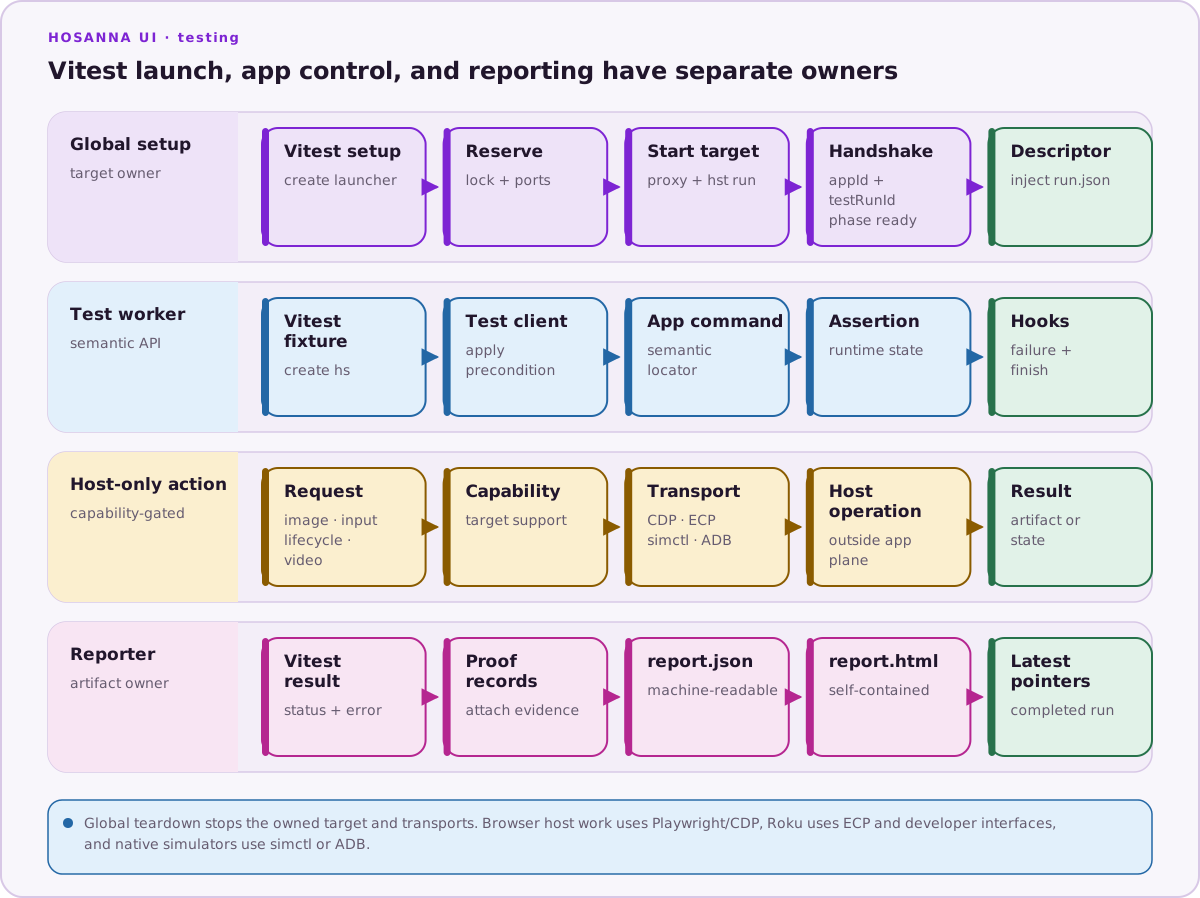
The framework separates application launch from test-worker assertions. This matters because Vitest global setup runs outside the worker that owns test and expect.
Components and responsibilities
Application runtime
The Hosanna runtime exposes test commands for status, hierarchy, focus, screens, CollectionViews, images, registry state, and logs. This is the semantic source used by hs.control, hs.image, and the other client APIs.
Shared controls should expose stable id or testId values and serializable state. Application code should not know about Vitest test files or artifact directories.
Hosanna Tools launcher
createHosannaGlobalSetup(config) starts the debugger proxy, launches the selected target through hst run, and injects test launch variables and any non-production build-config overlay. It waits for:
- the expected application ID;
- the generated test-run ID in application registration;
GetTestStatusto report the same IDs and phaseready.
For web targets it owns a persistent Chromium context and CDP endpoint. For Apple and Android native simulators it selects the native destination, arranges debugger connectivity, builds/installs through HST, and controls launch, relaunch, deep links, and screenshots through simctl or ADB. For physical Roku it deploys and relaunches the configured developer channel through ECP, advertises a reachable debugger host, and attaches Roku logs. For physical Tizen and webOS it builds and deploys through the vendor DeviceDriver, relaunches without arguments through terminate/launch, and waits for MCP reconnection. Query-bearing rig navigation uses a bounded same-file MCP reload rather than vendor launch parameters.
The launcher holds a per-management-port lock, verifies ports, and tears down the process tree, browser, debugger, log clients, and temporary profiles.
Vitest fixture
createHosannaVitest(config) extends a Vitest test with hs. Before each test it creates a HosannaTestClient, applies the configured default precondition, and registers failure/finish hooks. Failure hooks capture diagnostics even if the test assertion itself did not request artifacts.
The fixture also adds asynchronous matchers for controls, logs, images, and screenshots.
Semantic client
HosannaTestClient is the application-facing API. Most calls go through the runtime command plane. Host transports are used only where the operation truly belongs to the host:
- Playwright CDP for browser screenshots, touch, text input, and WebM;
- Roku ECP/developer interfaces for device key input, relaunch, screenshots, and logs.
simctlor ADB for native-simulator lifecycle, deep links, and screenshots.- Tizen/webOS DeviceDriver terminate/launch for no-argument physical relaunch;
query-only MCP
ReloadPagefor same-package-file rig navigation. - HST capture transports for supported native/device full-run video.
Tizen/webOS do not expose a shared screenshot or vendor-native log-stream transport. Application/MCP logs remain common, and physical video evidence uses explicitly configured external capture. Device reports and captures record the application behavior exercised on each selected TV model.
This boundary keeps a test's locators semantic and makes target capabilities explicit.
Reporter
createHosannaReporter(config) receives Vitest results, finds proof records for each test, and writes report.json and a self-contained report.html. It also publishes latest.json and a redirecting latest.html inside the artifact root.
Execution lifecycle
- Vitest calls global setup.
- The launcher selects
platformandtargetfrom config or environment. - It validates port layout and starts the target.
- The application completes the exact test-session handshake.
- The descriptor is written to
run.jsonand injected into Vitest. - Before each test, the fixture creates a client and applies the default precondition.
- The test drives and observes the app.
- A failed test triggers automatic diagnostic capture.
- Each test client closes; after the run, the reporter writes reports.
- Global teardown stops the target and finalizes any configured video capture.
Configuration and extension points
defineHosannaTestConfig supports target selection, device selector, application configuration, launch/artifact timeouts, ports, screenshots, reports, supported target video capture, secrets, services, named preconditions, Roku settings, and a non-production build-config overlay.
Extend an application suite with:
- named preconditions for deterministic user or registry state;
- typed
servicesfor host-side setup clients; - semantic support helpers for repeated navigation or domain data;
createHosannaTestTargetplustest.runIf(...)for target-specific cases;- explicit
hs.proof.capture(...)calls for report evidence.
The sample suite's integration/support/browser.ts is an example of a deliberately browser-only extension: it connects to the owned CDP endpoint and clicks the center of semantic Hosanna control bounds to verify pointer input. The shared client does not currently expose a pointer API, so this helper stays in application test code and is selected only for the desktop Browser target.
Do not put application screen IDs, credentials, service schemas, or editorial assumptions in the shared framework.
Application-specific extensions
Applications can add helpers that locate rows by semantic metadata, wait for
remote images to report successful loading and positive decoded dimensions,
navigate domain screens, and seed application-specific registry state. Secret
values should be resolved with envSecret only when needed so they remain
redacted from diagnostics.
Application suites can also wrap proof capture to retain structural evidence while enabling pixel comparison through an application-owned switch. Such a switch is an application convention, not a built-in environment variable interpreted by the shared package.
Underlying runner boundary
Vitest controls discovery, filtering, hooks, retries, timeouts, and result status. Hosanna Tools controls target lifecycle and application diagnostics. Playwright is an implementation detail of browser transport; do not use page.locator(...) as an alternative application selector in tests.
The current package script npm run test:ui invokes Vitest with vitest.integration.config.ts. It is not the obsolete hst test:ui JSON recorder/replay command, and application suites should not recreate that older recording format.