Regression Testing Overview
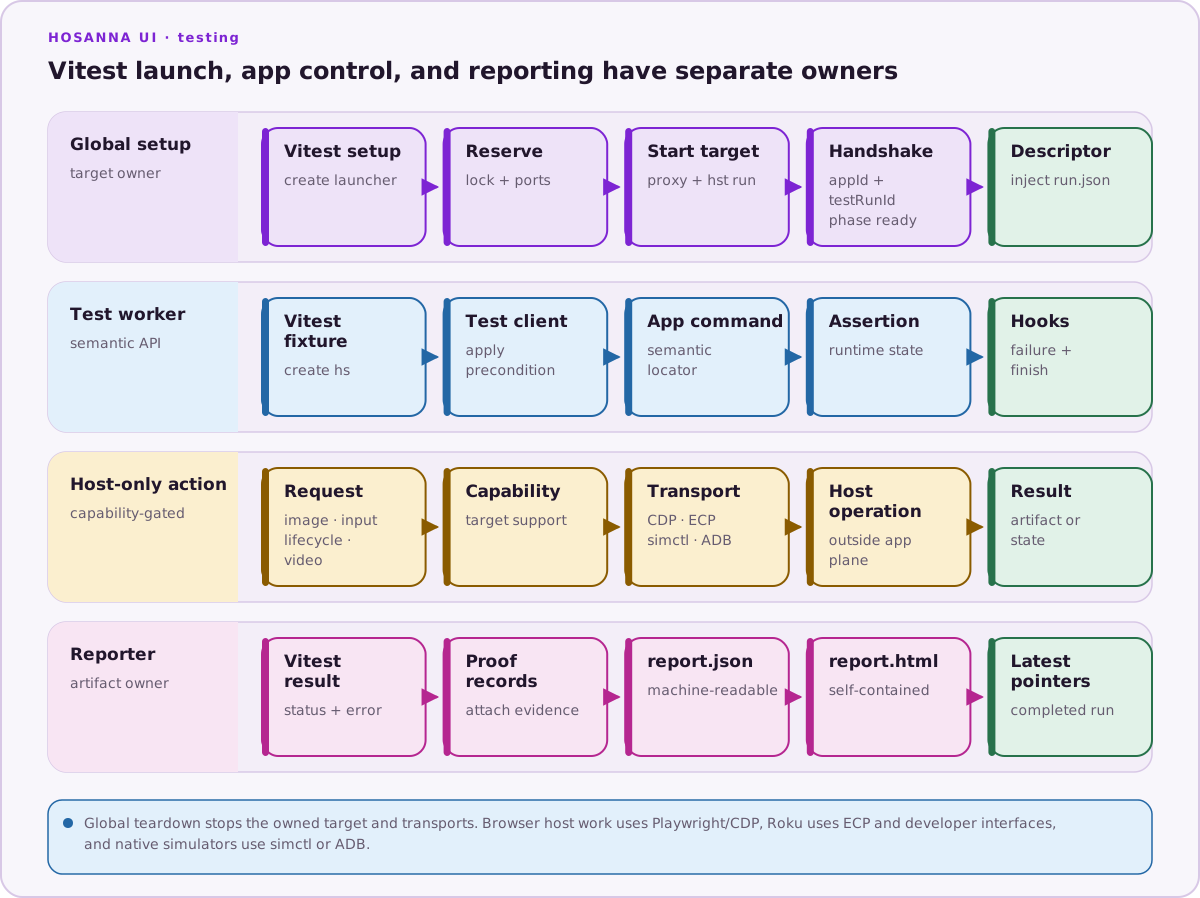
Hosanna regression tests launch an application, wait for an exact test-session handshake, drive it through public test APIs, and assert state reported by the running runtime. They are useful for journeys where rendering, focus, input routing, persistence, or a platform transport is part of the behavior.
Choose the right test level
| Test level | Best for | Typical boundary |
|---|---|---|
| Unit | One class, function, or small state machine | Runs in Vitest without an application |
| In-process integration | Several TypeScript modules working together | Still runs without a launched target |
| Application regression | User journeys and runtime/platform integration | Launches through hst run and uses the Hosanna command plane |
| Visual regression | Intentional rendered appearance | Compares a target-specific PNG baseline |
Application regression tests are not a replacement for unit tests. Keep most data and error permutations below the UI, then protect a smaller set of high-value user journeys in the launched suite.
The three reference projects
- The Hosanna UI runtime supplies the test commands that expose application status, hierarchy, focus, collections, images, registry state, and logs.
@tantawowa/hosanna-toolssupplies the public testing package, target launcher, Vitest fixture, semantic client, artifact capture, and reporter.hosanna-ui-samples-publicdemonstrates a small, deterministic suite against sample rigs.
See the sample suite's integration/README.md for its concise repository-local runbook.
What the framework provides
The shared package currently provides:
- one owned application runtime per Vitest run;
- a unique test-run ID and readiness handshake;
hs.control,hs.image,hs.collection,hs.screen, andhs.focusstate APIs;- remote-style key input on every supported target;
- touch and text input on capable browser targets;
- registry-based named preconditions and app reload/relaunch;
- stable-state waits instead of fixed timing delays;
- screenshots on browser, Apple/Android native simulator, and physical Roku targets;
- target-specific PNG comparison with optional masks;
- proof records, automatic failure diagnostics, JSON/HTML reports, and optional full-run video on supported transports;
- environment-backed secrets that are redacted from commands, logs, and serialized artifacts.
Vitest remains the test runner. Playwright owns the Chromium browser, touch/text transport, screenshot capture, and WebM recording; Playwright locators are not the public Hosanna application locator API.
What it does not guarantee
The framework does not make an unstable application state deterministic. Tests still need stable IDs or test IDs, explicit preconditions, and meaningful readiness conditions.
The Browser target exercises application behavior in a Chromium viewport with platform routing flags. Use the corresponding device target for the television GPU, firmware, native input stack, decoder, accessibility services, and physical display.
Video is evidence, not an assertion. A passing video does not replace semantic state assertions. Likewise, a screenshot baseline proves only the captured target, dimensions, fonts, assets, and rendering environment.
Continue
- Complete Installation and Setup.
- Learn the fixture in Writing and Running Tests.
- Use Images and Visual Regression only after the structural test is stable.
- Add the suite to automation with Running in CI.
For API ownership and lifecycle details, see Framework Architecture.