Android Auto
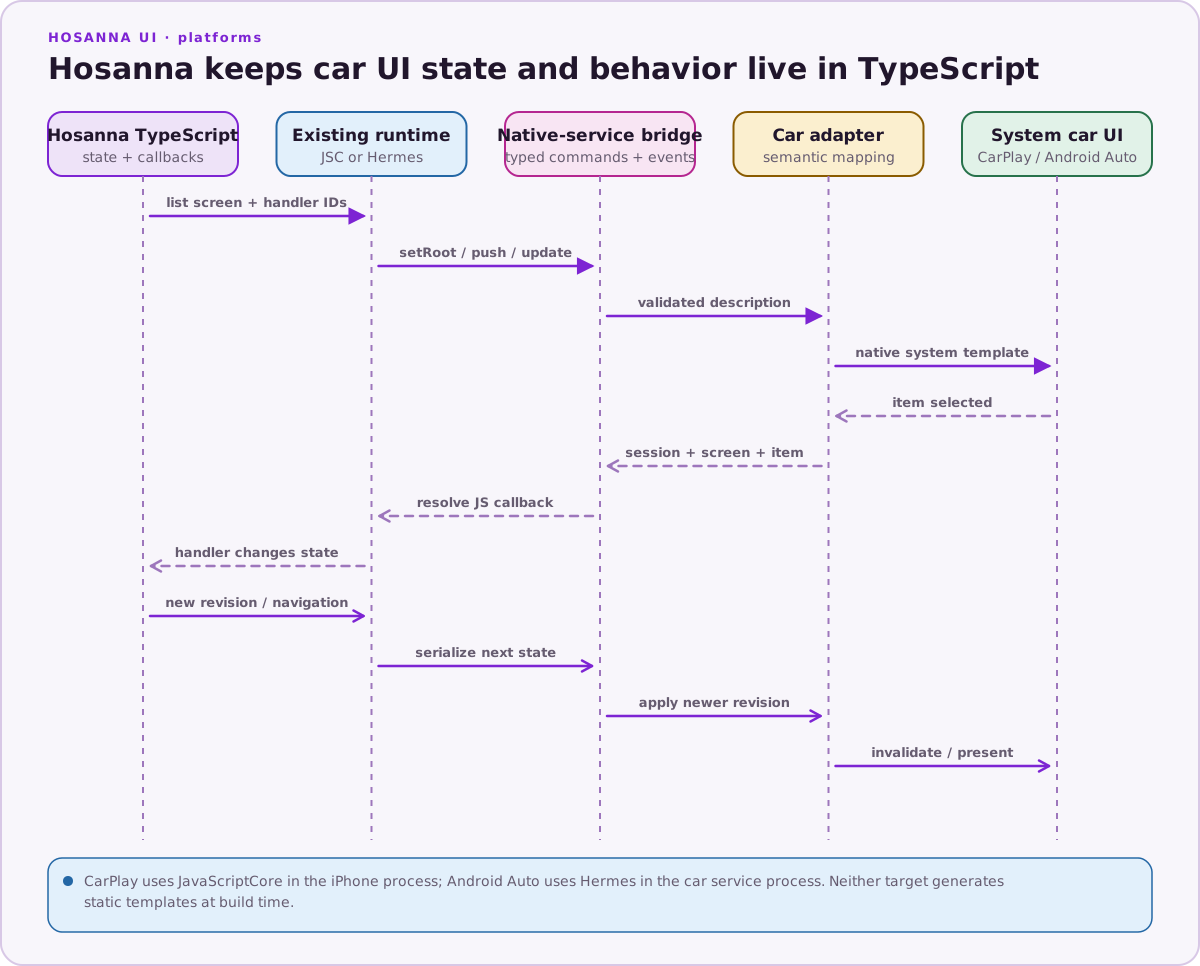
Android Auto is a first-class Hosanna target built on the Android for Cars App Library. Hosanna TypeScript stays live in Hermes, describes a semantic car UI, and receives native selection and lifecycle events through the existing bridge. Kotlin maps the description to Google-supported templates; it does not contain a second copy of the product logic.
Runtime Model
Android Auto can start a CarAppService without opening the phone activity.
Hosanna therefore hosts Hermes in a process/session coordinator rather than
making its lifetime depend on MainActivity:
- the Android Auto service creates a car
SessionandScreen; - the coordinator starts or reuses Hermes and the existing native services;
- TypeScript sends a validated list description through
ICarUIManager; - Kotlin maps it to
ListTemplate,ItemList, andRow; Screen.invalidate()asks the host to read the new revision;- row selection returns to the registered TypeScript callback;
- JavaScript updates state or changes the native screen stack.
The dedicated car-service process and frame pump drive onTick and keep
JS-owned state and callbacks alive when no phone activity is visible. The
headless host does not install the normal UI runtime's timer services; advance
app-owned scheduled work from onTick.
Supported Car UI
The common API covers:
- session lifecycle and navigation snapshots;
- list screens, sections, items, text, and enabled/browsable state;
- root, push, update, pop, and pop-to-root operations;
- stable callback IDs and TypeScript selection handlers;
- monotonically increasing screen revisions for dynamic data.
Android preserves sections only when there is more than one and every section
has a title; otherwise it flattens their rows into a single ItemList. A screen
model's type and title are immutable for a given screen ID, so use a new ID to
change either one.
The host controls how many items it can display. For each list-template render,
the adapter queries ConstraintManager.CONTENT_LIMIT_TYPE_LIST and includes
rows in source order only up to that runtime limit. Do not assume that two
vehicles expose the same capacity.
The adapter deliberately uses the Car App Library template model. Arbitrary Android views, phone layouts, and unrestricted custom interactions are outside the Android Auto target.
Application Entry
Provide @hs-platform/AndroidAutoAppEntry. The Android Auto bundle uses its own
entry while importing shared application/domain modules normally. The entry
returns a runtime object with required onTick and dispose methods.
export function createAndroidAutoApp({carUI, launchArgs}) {
  const app = new MyCarApplication(carUI, launchArgs);
  app.start();
  return app;
}
The same semantic app class can be used by CarPlay when the product behavior is truly common. Put Google-only capabilities behind a platform extension instead of weakening the shared contract.
Create and Configure
Hosanna Tools generates the car source set/flavor, manifest service and category metadata, Car App Library dependency, Hermes bundle wiring, and app package configuration.
Run native:init once when adding the target. Subsequent native:prepare
calls validate the app-owned project without recreating it.
npx hst native:init android-auto
npx hst native:prepare android-auto --non-interactive --format json
npx hst native:doctor android-auto
npx hst target:list --platform android-auto --target sim --json
The default car package is derived from the phone package and can be overridden
in platforms/native/android/app.properties. Declare the real supported car
app category; template availability and Play eligibility depend on it.
To opt a media application into the framework token bridge, identify its app-owned service when initializing or updating the target:
npx hst native:init android-auto \
  --android-auto-media-browser-service .media.PlaybackService
HST stores the value as android.auto.mediaBrowserService in
platforms/native/android/app.properties. It accepts a relative class, a
fully qualified class, or Android's flattened package/class form. Generated
manifest entries normalize a flattened component to its local service class
rather than writing flattened component syntax into android:name or
metadata.
When media support is added to an existing HST-managed project, HST migrates the media-service configuration, manifest, discovery descriptor, and Gradle dependency only when each file still matches its recorded managed template. It preserves app-edited files and prints a specific warning for every media permission, service, descriptor entry, or dependency that must be merged manually.
The framework service accepts every host only in debug builds. Its release
validator is intentionally empty: a production app must subclass
HosannaCarAppService, return an explicit Google/OEM host allowlist from
createHostValidator, and point the manifest at that application-owned
service class.
Media Applications
Do not declare a media product as POI to make a template appear during
development. A templated audio app must use
androidx.car.app.category.MEDIA, declare the
androidx.car.app.MEDIA_TEMPLATES permission, advertise both media and
template in automotive_app_desc.xml, set car API level 8 or later, and
provide the required media-app attribution icon.
The discovery descriptor must include media; template alone does not make
the app discoverable as an Android Auto media application:
<automotiveApp>
    <uses name="media" />
    <uses name="template" />
</automotiveApp>
Templates do not replace Android's media architecture. The app still needs a
MediaSession and a MediaBrowserService or MediaLibraryService for
playback, recommendations, voice, and other host integrations. It must expose
a path to MediaPlaybackTemplate from every browsing screen and satisfy the
current media quality requirements.
Hosanna exposes the platform extension through the public Hosanna API; the
carUI value in AndroidAutoAppContext already has this type:
import type {
  AndroidAutoMediaPlaybackScreen,
  IAndroidAutoCarUIManager,
} from '@hs-src/hosanna-ui/hosanna-api';
IAndroidAutoCarUIManager provides:
getMediaPlaybackStatusand a status listener forunconfigured,disconnected,connecting,ready, andfailedphases;setRootMediaPlaybackScreen,pushMediaPlaybackScreen, andupdateMediaPlaybackScreenfor atype: 'media-playback'screen;- at most two optional, JS-owned header actions; and
addMediaPlaybackRequestListener, which receives a systemSHOW_MEDIA_PLAYBACKrequest so TypeScript can navigate to playback.
For example, TypeScript can make playback the root when the system requests it. An application with an existing browsing stack can push the same screen instead:
const mediaSubscriptions: Array<() => void> = [];

const playbackRequests = carUI.addMediaPlaybackRequestListener(({sessionId}) => {
  carUI.setRootMediaPlaybackScreen(sessionId, {
    type: 'media-playback',
    id: 'now-playing',
    revision: nextPlaybackRevision(),
    title: 'Now Playing',
    actions: [{
      id: 'queue',
      title: 'Queue',
      onSelect: () => showQueueInTypeScript(sessionId),
    }],
  });
});

if (playbackRequests.ok && playbackRequests.value) {
  mediaSubscriptions.push(playbackRequests.value);
} else if (!playbackRequests.ok) {
  console.warn(
    `Unable to observe media playback requests: ${playbackRequests.message ?? playbackRequests.reason}`,
  );
}

function disposeMediaSubscriptions(): void {
  for (const unsubscribe of mediaSubscriptions.splice(0)) {
    unsubscribe();
  }
}
Call disposeMediaSubscriptions from the Android Auto application's dispose
method. Screen revisions must increase; the model type and title remain
immutable for a given screen ID.
The native adapter reads the media service component from metadata on
HosannaCarAppService, connects to that consumer-owned service with
MediaBrowserCompat, and registers its compatible session token with
MediaPlaybackManager:
<application>
    <meta-data
        android:name="androidx.car.app.minCarApiLevel"
        android:value="8" />
    <meta-data
        android:name="androidx.car.app.TintableAttributionIcon"
        android:resource="@drawable/hosanna_car_attribution_icon" />

    <service
        android:name="com.tantawowa.hosanna.car.HosannaCarAppService"
        android:exported="true"
        android:process=":hosanna_car">
        <intent-filter>
            <action android:name="androidx.car.app.CarAppService" />
            <category android:name="androidx.car.app.category.MEDIA" />
        </intent-filter>
        <meta-data
            android:name="com.tantawowa.hosanna.car.MEDIA_BROWSER_SERVICE"
            android:value=".media.PlaybackService" />
    </service>

    <service
        android:name=".media.PlaybackService"
        android:exported="true"
        android:foregroundServiceType="mediaPlayback"
        android:process=":hosanna_car">
        <intent-filter>
            <action android:name="androidx.media3.session.MediaLibraryService" />
            <action android:name="android.media.browse.MediaBrowserService" />
        </intent-filter>
    </service>
</application>
androidx.car.app.minCarApiLevel is application metadata. Nesting it inside
either service does not configure the host's minimum Car App API level. Replace
the generated attribution placeholder with the product's monochrome icon
before release.
For a foreground media service, include the permissions required by the app's target SDK, including the Android 14 media-playback permission when applicable:
<uses-permission android:name="android.permission.FOREGROUND_SERVICE" />
<uses-permission
    android:name="android.permission.FOREGROUND_SERVICE_MEDIA_PLAYBACK" />
The current adapter contract is validated with Car App Library 1.7.0 and an
explicit androidx.media:media:1.8.0 dependency. A Media3 consumer must also
pin a compatible media3-session version and declare the foreground-service
permissions required by its target SDK. It must provide a real
MediaLibrarySession, player, catalog, playback state, and foreground-service
lifecycle. Hosanna supplies the template, token registration, and live JS
events; it does not create a second Hermes runtime or own the product's player
and media business logic.
The adapter does not render MediaPlaybackTemplate until token registration is
ready. The host then obtains metadata and transport controls from the consumer
MediaSession; the optional Hosanna actions remain live TypeScript callbacks.
If media-service connection or token registration fails, the session reports
failed, releases that connection, and retries when the car session resumes or
when the system sends another playback request.
For the platform state documented with Hosanna UI 1.33.3, templated media apps on Android Auto remain part of Google's Early Access Program and can be published only to Internal Testing and Closed Testing tracks. Car App Library 1.7 being stable does not remove that distribution restriction. Confirm the current status in Google's Android for Cars overview before planning a public Play release.
Separately, Car App Library 1.9's additional media components are alpha and require the corresponding beta-program access and host feature flag. They are not part of this 1.7.0 contract; do not make a release target depend on them without the corresponding Google access and test plan.
Desktop Head Unit Setup
The Desktop Head Unit (DHU) is a projection host, not a replacement for the phone-side Android Auto application. Before running:
- install the DHU package with
sdkmanager "extras;google;auto"; - install the current Android Auto app on a connected phone or compatible Google Play emulator;
- enable Android Auto developer mode;
- select Start head unit server;
- keep
adbconnected and allow the launcher to forward TCP port 5277; - run the Hosanna Android Auto target.
HST finds the standard SDK install at
extras/google/auto/desktop-head-unit. Set HS_ANDROID_AUTO_DHU to the
executable when the SDK uses a non-standard location.
An AVD containing only AndroidAutoStubPrebuilt does not expose the head-unit
server and cannot establish a real DHU session.
Build and Run
npx hst build android-auto dev sim --device Hosanna_Phone_API_35
npx hst run android-auto dev sim --device Hosanna_Phone_API_35
For a connected phone, change sim to device and use its adb serial.
The run flow builds the Android Auto Hermes bundle, compiles bytecode, installs
the app, forwards the DHU connection, and starts the host. Starting the DHU is
not proof that the Android Auto session connected; confirm the Hosanna session
lifecycle in device logs and the rendered template in the DHU. HST reports
surfaceSession.state: "host-started" with verified: false; treat that as an
unverified or blocked live-host result, not a passed interaction test.
Android Auto uses the bundled headless Hermes path in this iteration. HST
rejects --hot-reload for this target instead of starting a development server
that the car-service runtime cannot consume.
An Android Automotive OS emulator is useful supplemental Car App Library validation, but it is not proof that Android Auto projection through the DHU works.
Lifecycle and Updates
Treat each Android Auto Session as independent from phone activity lifecycle.
Install a root for its stable Hosanna session ID, invalidate only for a newer
screen revision, and release the callback registry when the session is
destroyed. Activity-only services must report unavailable rather than retaining
a dead activity reference.
Validation Checklist
- Build and install the car flavor through Hosanna Tools.
- Establish an actual DHU session with the phone-side head-unit server.
- Verify initial list rendering and template constraints.
- Select a row and observe the TypeScript handler.
- Verify JS-driven invalidate/update and push/pop navigation.
- Exercise session stop/reconnect and a data response arriving after teardown.
- For media apps, verify token status reaches
ready, playback metadata and transport controls come from the real media session, and a system playback request reaches the TypeScript listener and navigates to playback. - Run shared Android, phone, and Android TV regression suites.
- Confirm category, distraction rules, permissions, signing, quality guidance, and Play review requirements before release.
See Google's current DHU setup, templated app guidance, and car app quality guidelines. For runtime limits and audio products, also follow the Constraints API, media app architecture, and templated media app requirements.