Wear OS
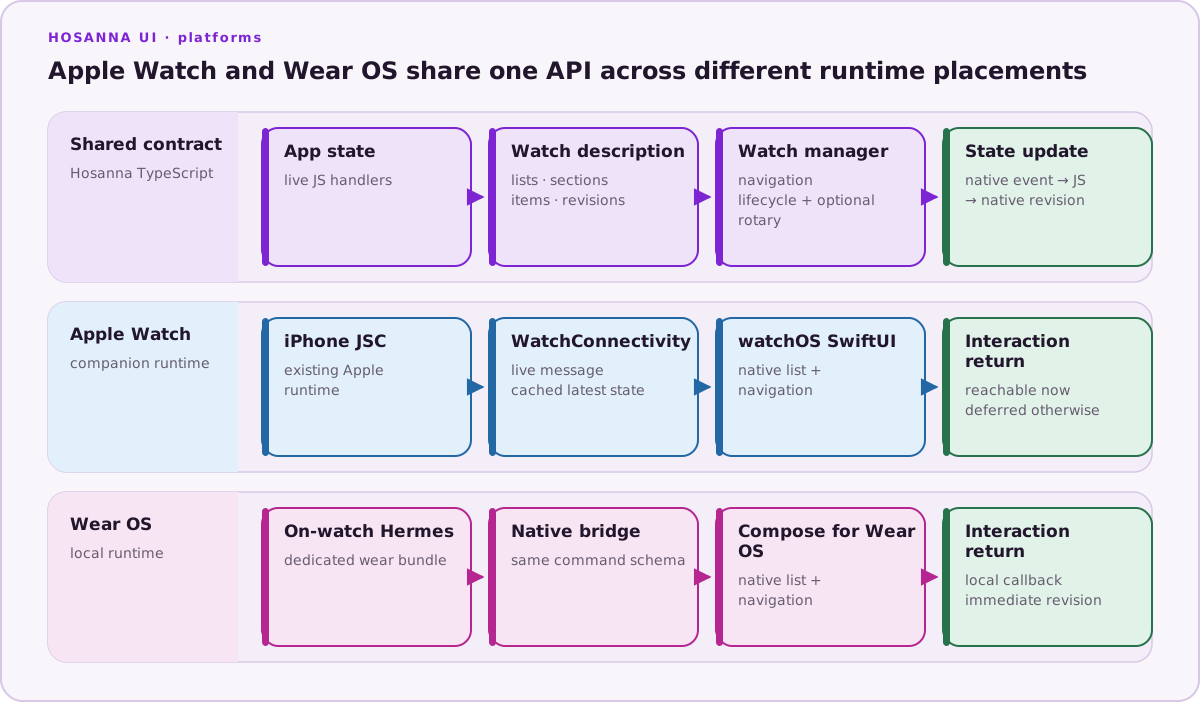
Wear OS is a first-class Hosanna target. It runs the existing Android Hermes runtime locally on the watch and translates the shared semantic watch model to Compose for Wear OS. The watch is therefore a real live Hosanna runtime, not a static native copy of the phone application.
Runtime Model
The target uses:
Hosanna TypeScript
→ on-watch Hermes runtime
→ existing typed native-service bridge
→ Wear OS semantic adapter
→ Compose for Wear OS
Compose sends selection, navigation, lifecycle, ambient, and rotary events back through the bridge. The registered TypeScript handler changes state and emits a new screen revision. Kotlin owns runtime hosting and native rendering; application business rules remain in TypeScript.
Shared Watch API
Wear OS implements the same IWatchUIManager contract as Apple Watch:
- list screens, sections, text/action items, and stable IDs;
- root, push, update, pop, and pop-to-root operations;
- item-selection and navigation callbacks;
- created through destroyed lifecycle phases;
- visible, interactive, reachable, and ambient flags;
- optional rotary events;
- revision ordering for asynchronous updates.
Keep the shared surface small and native. Do not render an arbitrary phone SceneGraph tree at watch scale. Add a Wear-only extension when a capability is genuinely platform-specific.
Application Entry
Provide @hs-platform/WearOsAppEntry. The Wear bundle has its own entry but can
import the same domain/data modules as other targets.
export function createWearOSApp({watchUI, launchArgs}) {
  const app = new MyWatchApplication(watchUI, launchArgs);
  app.start();
  return app;
}
The entry returns a runtime object with a required dispose method and an
optional onTick hook. The existing Hermes frame pump drives onTick; do not
add a second JavaScript engine or unrelated native timer architecture.
Create and Configure
Hosanna Tools generates app-owned configuration and wires framework-owned runtime sources:
- the
wearGradle flavor/source set; - a watch manifest with
android.hardware.type.watch; - framework-owned
HosannaWatchActivityand reusable Compose renderer sources; - framework-owned Hermes/JNI/native-service bridge sources;
- the
hosanna-wear-os.jsdebug bundle and release.hbcbytecode path; - the watch application ID, defaulting to
<android phone id>.wear.
Run native:init once when adding the target. Subsequent native:prepare
calls validate the app-owned project without recreating it.
npx hst native:init wear-os
npx hst native:prepare wear-os --non-interactive --format json
npx hst native:doctor wear-os
npx hst target:list --platform wear-os --target sim --json
Hosanna accepts wearos and android-watch as input aliases, but emits and
documents the canonical wear-os target.
Emulator Setup
Install a current Wear OS system image and create an AVD with a watch hardware
profile. The target inventory verifies android.hardware.type.watch, excludes
watch AVDs from phone/TV/Auto lists, and reports the exact device identifier.
sdkmanager "system-images;android-36.1;android-wear-signed;arm64-v8a"
avdmanager create avd \
  --name Hosanna_Wear_OS_API_36 \
  --package "system-images;android-36.1;android-wear-signed;arm64-v8a" \
  --device wearos_large_round
Use an image/ABI appropriate for the development machine and current Android SDK rather than copying the example blindly.
Build and Run
npx hst build wear-os dev sim --device Hosanna_Wear_OS_API_36
npx hst run wear-os dev sim --device Hosanna_Wear_OS_API_36
The run flow builds the dedicated Wear bundle, compiles Hermes bytecode when
enabled, assembles the wear APK, installs the exact watch package, launches
HosannaWatchActivity, and attaches logs. Use device plus an adb serial for
physical hardware.
Debug builds can load the generated JavaScript bundle. Non-debug builds require
the compiled .hbc bundle rather than treating bytecode as optional.
Wear OS uses the bundled headless Hermes path in this iteration. HST rejects
--hot-reload for Wear OS until the headless runtime has a complete reload,
dispose, and state-reinstallation controller.
Lifecycle, Ambient, and Data
- Stop presentation-only work while ambient or invisible.
- Keep state changes revisioned and reject stale asynchronous completions.
- Use rotary callbacks for navigation intent; do not assume every device has a rotating crown or bezel.
- Keep lists short and glanceable, with touch targets and typography suitable for round and small screens.
- Declare standalone capability truthfully. A local Hermes runtime does not by itself guarantee that authentication, networking, media, or account flows work without the phone.
Validation Checklist
- Launch on a Wear OS AVD through
hst run, not only a JVM/unit test. - Verify initial Compose content originates from TypeScript.
- Select an item and verify the Hermes callback.
- Verify a JS state update changes Compose and push/pop navigation.
- Exercise ambient, inactive/resumed, process recreation, and asynchronous results after teardown.
- Test round and square layouts plus rotary/no-rotary devices where supported.
- Validate on physical hardware before production.
- Confirm package/signing/versioning, watch feature metadata, standalone flag, permissions, battery/network behavior, accessibility, and Play quality.
For current platform requirements, see Google's Compose for Wear OS setup, packaging guidance, standalone and hybrid guidance, and Wear OS quality guidelines.