Apple Watch
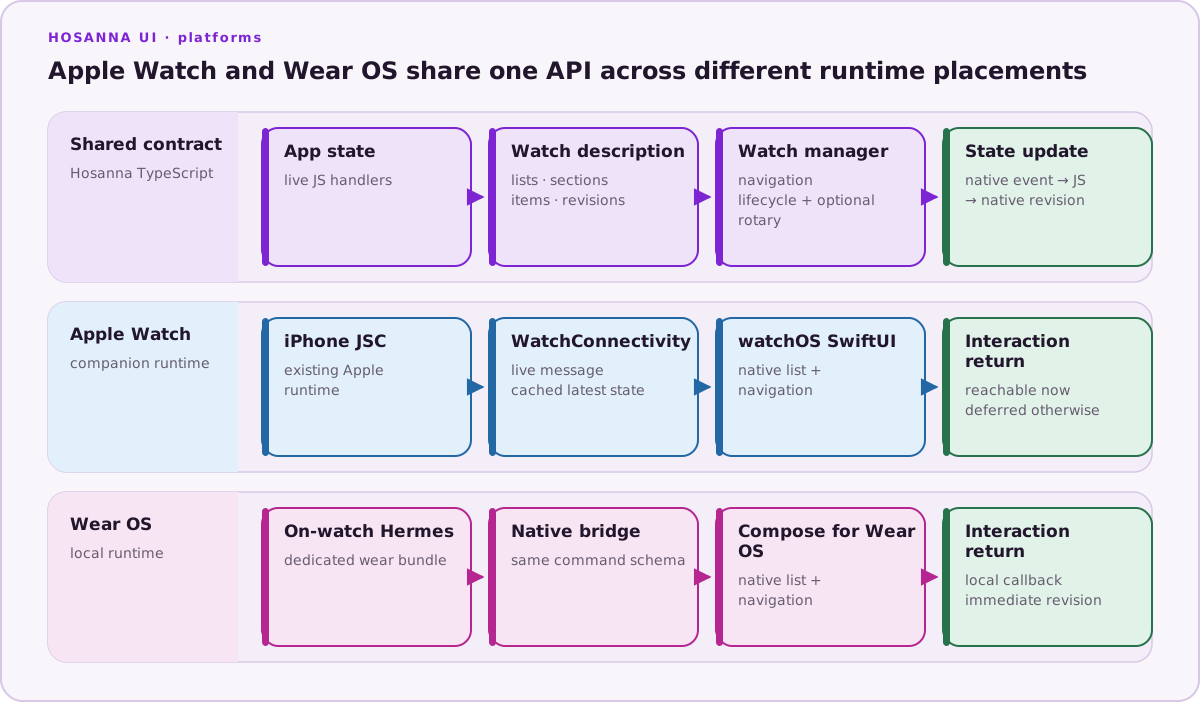
Apple Watch is a first-class Hosanna target with a companion runtime architecture. watchOS does not provide the JavaScriptCore framework used by Hosanna's Apple runtime, so the paired iPhone keeps the live TypeScript application while a native SwiftUI watch app renders the semantic watch model.
Runtime Model
The supported path is:
Hosanna TypeScript on paired iPhone
→ existing JavaScriptCore runtime and native-service bridge
→ WatchConnectivity adapter
→ native SwiftUI watch surface
Interactions travel back through the same layers. While both apps are
reachable, WCSession messages deliver selections and current state directly.
The native watch app also caches the latest accepted revision so it can render
useful state during a temporary disconnect; queued/deferred interactions are
reconciled when communication resumes.
Application state, callback ownership, navigation intent, and asynchronous data remain in TypeScript. Swift owns only watchOS lifecycle, connectivity, and the supported native presentation.
Shared Watch API
IWatchUIManager exposes a deliberately small, watch-shaped contract:
- root list screen and per-session lifecycle;
- sections, text items, action items, title/detail text, and enabled state;
- root, push, update, pop, and pop-to-root navigation;
- selection and navigation callbacks;
- visible, interactive, reachable, and ambient state;
- optional rotary input events;
- stable screen IDs and increasing revisions.
This API is shared with Wear OS. Apple-specific behavior should stay behind an
extension when it cannot be expressed honestly in the common contract.
SwiftUI List owns Digital Crown scrolling on Apple Watch, so
the watchUI capability's rotaryInput flag is false and raw crown deltas are
not sent to TypeScript.
Application Entry
Provide @hs-platform/AppleWatchAppEntry. It is evaluated inside the paired
iPhone's existing JSContext and receives an Apple Watch-scoped launch identity:
export function createAppleWatchApp({watchUI, launchArgs}) {
  const app = new MyWatchApplication(watchUI, launchArgs);
  app.start();
  return app;
}
The entry can return a disposer function or a runtime object with optional
onTick and required dispose methods.
A typical application subscribes to lifecycle before reading existing
sessions, installs a root for every session, increments a screen revision for
updates, and releases both listeners and callback registrations from dispose.
Create and Configure
Hosanna Tools generates and maintains:
- the
hosanna-watchwatchOS application target and scheme; - an app-owned
@mainSwiftUI entry that hostsHosannaWatchRootView; - the reusable framework source from
HosannaAppleWatch; - embedding/dependency from
hosanna-ios; watchos.xcconfig, companion identifier, bundle ID, and signing settings.
By default the watch bundle identifier is <ios bundle id>.watch.
Run native:init once when adding the target. Subsequent native:prepare
calls validate the app-owned project without recreating it.
npx hst native:init apple-watch
npx hst native:prepare apple-watch --non-interactive --format json
npx hst native:doctor apple-watch
npx hst target:list --platform apple-watch --target sim --json
watchos is accepted as an input alias; commands and generated configuration
use the canonical apple-watch name.
Build and Run
Select the watch simulator. Hosanna Tools resolves its paired iPhone, boots both devices, builds the embedded companion application, installs/launches the iPhone JavaScriptCore host, and then launches the watch application.
npx hst build apple-watch dev sim \
  --device "Apple Watch Series 11 (46mm)"
npx hst run apple-watch dev sim \
  --device "Apple Watch Series 11 (46mm)"
Current CoreDevice inventory exposes the paired iPhone but does not provide a
reliable standalone Watch install/launch destination to HST. For hardware,
open the generated project in Xcode, select the paired Watch destination, and
run the hosanna-watch/companion scheme. Launch/deploy the paired iPhone
companion and its JavaScriptCore runtime as well; launching only the watch can
leave it asking the user to open the iPhone app. hst target:list apple-watch --target device reports this limitation explicitly instead of pretending a
simulator or iPhone is the watch. Signing must cover both bundle identifiers
and the companion relationship.
Reachability and Lifecycle
WCSession.isReachable is transient. Do not treat it as durable storage or a
guarantee that the iPhone process is running. The adapter distinguishes:
- immediate messaging when the counterpart is reachable;
- latest-state caching for watch presentation;
- background/context transfer, whose delivery is opportunistic;
- lifecycle and reachability changes surfaced to TypeScript;
- stale revisions, which native code rejects rather than rendering backward.
Pause presentation-only work in ambient mode and disable actions while the surface is not interactive. Guard asynchronous completions by request and session identity.
Validation Checklist
- Launch the real paired iPhone + Watch simulator pair through
hst run. - Verify initial cached/loading state and live JS-driven list content.
- Select an item and verify the callback reaches JavaScriptCore.
- Verify a TypeScript state change updates SwiftUI and navigation.
- Toggle reachability and confirm cached/deferred behavior.
- Exercise inactive/active, background, ambient, disconnect, reconnect, and session teardown.
- Repeat on a physical paired iPhone and Apple Watch before production.
- Confirm signing, privacy usage, notifications/background modes if used, App Store metadata, and accessibility.
The first target does not include complications, widgets, notifications, or standalone on-watch JavaScript. Those are separate capabilities. See Apple's watchOS app guidance, WatchConnectivity session reference, and background execution guidance.