Example Walkthrough: Diagnostics And Pairing
The diagnostic entries are focused verification rigs, not game templates. Use them to reproduce a subsystem problem with little unrelated work, compare renderer strategies on the same workload, or inspect a cold debug snapshot.
Registered Diagnostic Entries
The current registry exposes:
| Id | Purpose |
|---|---|
controller-rig | Route local P1 fallback and paired P1–P4 inputs to four independent squares. |
h2d-tilemap-static | Exercise a 3840×2160 immutable map through bounded cached chunks. |
h2d-tilemap-dynamic | Exercise the same map through a toroidal ring surface. |
diagnostic-colliders | Check collision shapes, centered sprites, movement, and camera zoom. |
diagnostic-particles | Stress pooled compositor particles and emitter behavior. |
diagnostic-text | Compare direct HUD text, cached bitmap text, animated text sprites, and renderer stats. |
sound-rig | Exercise music, SFX, backgrounding, rate changes, and audio stress under visual load. |
SpriteLabController and ParticleLabController also exist in the diagnostics source directory, but they are not registered launchable examples. Do not promise them in user-facing run instructions.
Source Files
| File | What to read |
|---|---|
../hosanna-ui-game-samples-public/src/hosanna-game-examples/registry.ts | Authoritative launchable IDs and labels. |
../hosanna-ui-game-samples-public/src/game.ts | Web input adapters, popup control server, pairing manager, and paired-input adapter. |
../hosanna-ui-game-samples-public/src/sample-platform/roku-game/hs-game-main.ts | Roku-hosted control server and the same pairing/input architecture. |
../hosanna-ui-game-samples-public/src/hosanna-game-examples/GameShell.ts | Shared pairing, player-selection, and controller-state menu entry points. |
../hosanna-ui-game-samples-public/src/hosanna-game-examples/diagnostics/ControllerRigController.ts | Player-index routing diagnostic. |
../hosanna-ui-game-samples-public/src/hosanna-game-examples/diagnostics/H2dTilemapModeDemoController.ts | Static cached-chunk and dynamic ring-surface comparison. |
../hosanna-ui-game-samples-public/src/hosanna-game-examples/diagnostics/ColliderRigController.ts | Collider and zoom diagnostic. |
../hosanna-ui-game-samples-public/src/hosanna-game-examples/diagnostics/ParticleRigController.ts | Registered particle diagnostic. |
../hosanna-ui-game-samples-public/src/hosanna-game-examples/diagnostics/TextRigController.ts | Registered text diagnostic. |
../hosanna-ui-game-samples-public/src/hosanna-game-examples/diagnostics/SoundRigController.ts | Registered audio diagnostic. |
../games/hosanna-ui/src/hosanna-game/control/Hs2dControlInputManager.ts | Pairing state, assignments, messages, and queued gameplay input. |
../games/hosanna-ui/src/hosanna-game/control/PairedControlsInputAdapter.ts | Bridge from paired control events into the runtime input manager. |
Pairing Architecture
Both hosts construct one Hs2dControlInputManager, then register one PairedControlsInputAdapter with the runtime input adapter manager.
const controlManager = new Hs2dControlInputManager({
  server,
  host,
  port,
  now,
})

inputManager.registerAdapter(
  new PairedControlsInputAdapter(controlManager)
)
The server implementation differs by platform:
- web uses
BrowserPopupControlServer; - Roku uses
RokuHostedControlServer.
The manager is then passed through the example context, so menus, scenes, gameplay controllers, presentation bindings, and debug tooling all observe the same pairing state.
The public controller-scene ABI is object-based:
new Hs2dControlPairingScene({ controlManager })

new Hs2dControlInputManagerScene({
  controlManager,
  screenWidth,
  screenHeight,
})

new Hs2dControlPlayerPickerScene({
  controlManager,
  characters,
  onDone,
})
The engine source and tests are authoritative for these constructors. Some sample call sites still use the older positional form and should be migrated in a source follow-up; do not copy that form into new code.
Controller Rig
ControllerRigController keeps four square states. It routes each GameInput with isHs2dGameplayInputForPlayer(...):
- P1 allows the local keyboard/remote fallback;
- paired P1–P4 affect the square matching
playerIndex; - both directional buttons and
leftStickaxes are normalized; - release events return the relevant axis to zero.
The HUD reads controlManager.getPlayers() only to show current slot labels. Its debug snapshot publishes the four square positions and the pairing state.
Use this rig to verify input ownership before debugging a multiplayer game. If the correct square moves here, routing into the game is the next boundary to inspect.
Tilemap Comparison
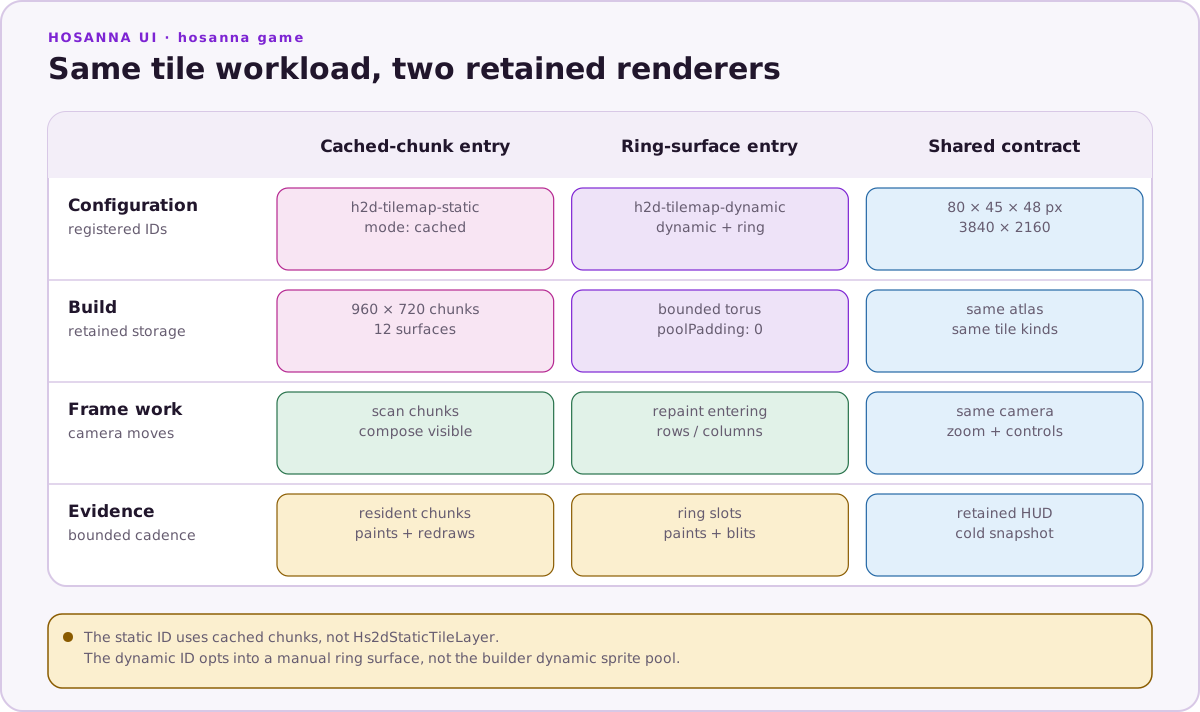
The tilemap diagnostic deliberately uses an 80×45 map of 48-pixel tiles:
80 × 45 tiles = 3,600 tiles
3,840 × 2,160 world pixels
The former 32×18 map matched a single 1080p viewport and did not exercise tile recycling. Any document or diagram that still shows 32×18 is obsolete.
Both modes use the same generated tile kinds, tile assets, camera path, zoom range, and controls. That makes their counters comparable.
Static mode
Static mode requests mode: 'cached' with 960×720 chunks. The 3840×2160 world becomes 12 bounded chunk surfaces. Immutable tiles paint when chunks are built; each frame composes only visible chunks.
Watch:
- visible and resident tiles;
- resident and composed chunks;
- initial tile paints;
- surface redraws.
Steady-state tile paints and redraws should remain zero after the immutable chunks are ready.
Dynamic mode
Dynamic mode requests:
{
  mode: 'dynamic',
  renderMode: 'ring-surface',
  poolPadding: 0,
}
The toroidal surface retains the viewport-sized tile ring and repaints only rows or columns entering the camera. Padding is zero because extra horizontal slots can push a 1080p surface beyond Roku's 2048-pixel bitmap guard.
Watch:
- visible and resident ring slots;
- atlas paints, crop/blit work, and slot changes;
- prepared tiles and clear operations;
- prepared-strip blits versus direct fallback strips;
- deadline preparation work.
Do not describe this diagnostic as the ordinary dynamic sprite-pool implementation. It explicitly opts into ring-surface.
Frame-Pacing Telemetry
The tilemap rig measures more than FPS. Its one-second window includes:
- last, average, minimum, and maximum frame time;
- frame-time jitter;
- late and bunched frames;
- duplicate camera frames;
- catch-up camera frames;
- per-frame camera movement in screen pixels;
- renderer-specific paint, prepare, compose, and residency counters.
Auto-scroll speeds are calibrated to produce integral screen-pixel steps at 60 Hz. This makes a repeated frame followed by a double step visible instead of blending into an uneven authored cadence.
The retained HUD surface redraws at a bounded cadence, not every frame. A cold getDiagnosticSnapshot() or getHs2dDebugSnapshot() exposes the same state to tooling.
Other Rigs
Use each rig for its narrow boundary:
- Collider Rig: verify projected shapes and hit behavior across movement and zoom before changing gameplay collisions.
- Particle Rig: inspect pool capacity, active particles, emitter movement, and burst stress without a full game.
- Text Rig: verify cache behavior and text-sprite animation; do not infer general frame rate from an intentionally stressed text case.
- Audio Rig: test background music, SFX overlap, rate controls, backgrounding, and the audio manager while a visual workload is active.
Running And Checking
From hosanna-ui-game-samples-public:
npm install
npx hst sdk:install
npx hst run browser dev emulator
The project checks are:
npm run lint
npm run build
npm test
npm run roku:game:build
Run the relevant registered ID from the examples menu, then compare its HUD with its debug snapshot before moving the problem into a larger game.
What To Copy
- One rig per subsystem or renderer comparison.
- Identical workloads when comparing two implementations.
- Retained telemetry data and bounded HUD refresh.
- Debug snapshots that expose the same counters shown on screen.
- Centralized pairing ownership and player-index routing.
What Not To Copy
- Diagnostic stress settings as production defaults.
- Immediate diagnostic drawing as a production renderer.
- Unregistered internal controllers in launch instructions.
- The retired 32×18 tilemap dimensions.
- Positional controller-scene constructors.