Example Walkthrough: Hosanario
Hosanario is the platformer reference: prepared Tiled levels define the world, a headless HosanarioGame owns gameplay rules, and HosanarioLevelScene connects the simulation to Hs2d rendering and runtime services.
Copy the ownership boundaries. Treat jump tuning, level layouts, enemy behavior, and art as sample-specific.
Source Files
| File | What it owns |
|---|---|
../hosanna-ui-game-samples-public/src/hosanna-game-examples/hosanario/HosanarioBrosGame.ts | Minimal game boot into the title scene. |
../hosanna-ui-game-samples-public/src/hosanna-game-examples/hosanario/HosanarioScenes.ts | Paged title/level chooser and the pausing overlay. |
../hosanna-ui-game-samples-public/src/hosanna-game-examples/hosanario/HosanarioLevelScene.ts | Bundle gate, level load, world build, camera, sprite synchronization, effects, audio, HUD, and debug snapshot. |
../hosanna-ui-game-samples-public/src/hosanna-game-examples/hosanario/HosanarioLevel.ts | Conversion from Hs2dLevel objects and zones into simulation data. |
../hosanna-ui-game-samples-public/src/hosanna-game-examples/hosanario/HosanarioGame.ts | Renderer-independent platformer rules and the retained snapshot. |
../hosanna-ui-game-samples-public/src/hosanna-game-examples/hosanario/HosanarioCameraTarget.ts | Camera target smoothing and snap behavior. |
../hosanna-ui-game-samples-public/src/hosanna-game-examples/hosanario/HosanarioDust.ts | Additional dust particle behavior. |
../hosanna-ui-game-samples-public/src/hosanna-game-examples/hosanario/HosanarioAssets.ts | Three-level catalog and bundle keys. |
../hosanna-ui-game-samples-public/asset-bundles/hosanario/asset-bundle.json | Image, audio, font, and level bundle entries. |
../hosanna-ui-game-samples-public/asset-bundles/hosanario/levels/level-1.json | First prepared Tiled level; levels 2 and 3 follow the same contract. |
Actual Scene Flow
The game does not boot directly into gameplay. It installs HosanarioTitleScene:
export class HosanarioBrosGame extends Hs2dGame {
  constructor(context: GameExampleContext) {
    super();
    this.replaceScene(new HosanarioTitleScene(context));
  }
}
The complete flow is:
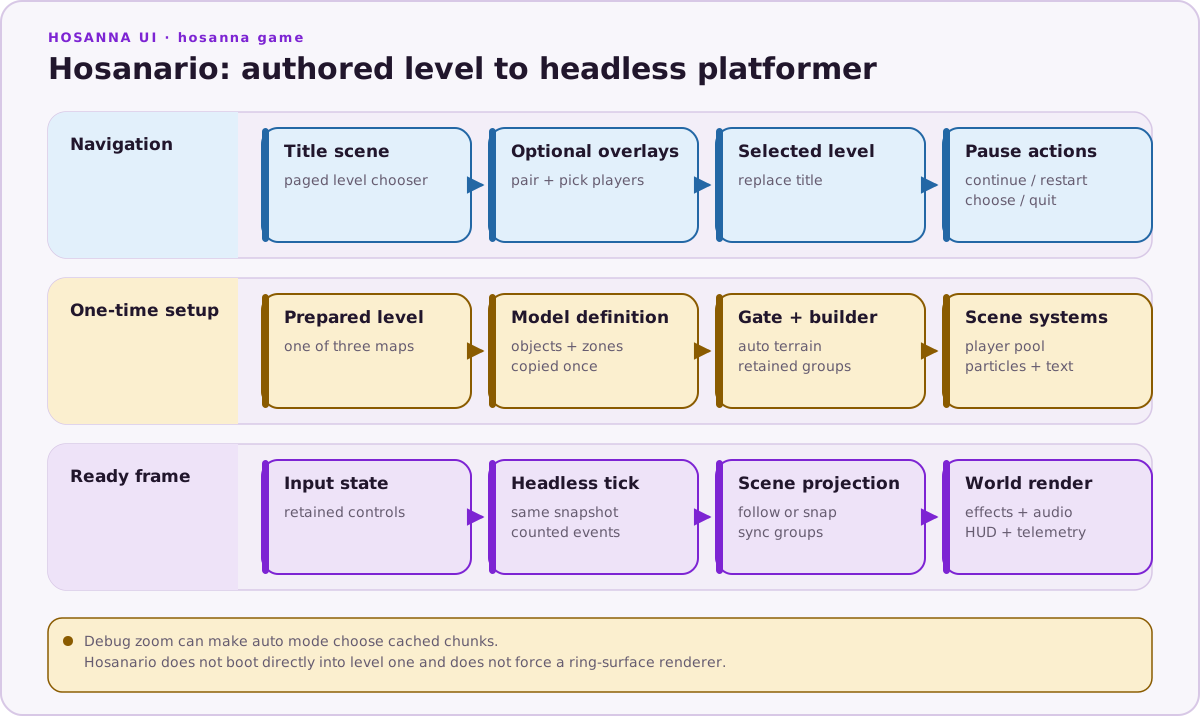
The title menu contains one choice for each of the three levels, followed by controller pairing, player selection, settings, and quit. buildPagedMenu keeps that list usable when it exceeds the page size.
Engine-owned controller overlays use object options:
new Hs2dControlPairingScene({ controlManager })
new Hs2dControlPlayerPickerScene({ controlManager, characters })
HosanarioPauseScene uses pauseBelow: true. The level stays visible beneath the overlay but does not update. Restart, choose-level, and quit actions go through a small HosanarioPauseHost interface instead of closures stored throughout the scene.
Loading And World Construction
HosanarioLevelScene extends Hs2dLevelScene. It clamps the selected level index, registers all three prepared levels with Hs2dLevelManager, and defers bundle-dependent work until the Hosanario bundle is ready.
After readiness:
- load the selected
Hs2dLevel; - convert its objects and zones into a
HosanarioLevelDefinition; - construct
HosanarioGame; - create the bootstrap camera and follow controller;
- gate every bitmap used by the world;
- call
Hs2dWorldBuilder.fromLevel(...); - retain the returned tile layers, sprite groups, and world;
- add the player pool, particle layers, floating text, and life icon;
- align all sprite groups to the simulation snapshot.
buildWorld() returns undefined while either the bundle or bitmaps are not ready, letting the base level scene keep rendering its loading state.
Tiled Responsibilities
The prepared maps carry two kinds of data:
- render structure: sky, parallax image layers, terrain, z order, and asset keys;
- gameplay structure: coins, enemies, moving platforms, checkpoints, a goal, player spawn, and hazard zones.
HosanarioLevel.ts is the explicit boundary between authoring data and simulation data. The model does not query the Tiled document during its frame loop.
The three current levels are:
asset-bundles/hosanario/levels/level-1.jsonasset-bundles/hosanario/levels/level-2.jsonasset-bundles/hosanario/levels/level-3.json
Do not hard-code the first level as though it were the entire sample.
Terrain Renderer Choice
The scene supplies a very low minimum render scale because debug zoom-out can expose a large portion of the level. Hs2dWorldBuilder therefore allows auto mode to select cached chunks when a dynamic tile pool would be excessive.
This is an important distinction:
- the map asks for an automatic tile mode;
- the builder estimates the worst visible pool at the configured minimum scale;
- the builder may choose cached chunks;
- the game does not manually force a ring-surface renderer.
Use Tile Layer Modes for renderer selection rules.
Headless Simulation
HosanarioGame owns:
- horizontal movement and collision;
- buffered jumps and coyote time;
- jump-hold gravity and an apex double jump;
- enemies and stomps;
- moving platforms;
- coins and score;
- checkpoints, hazards, lives, respawn, win, and game-over state.
It mutates one snapshot object for the lifetime of the model. Entity arrays are retained. Sound and effect arrays are fixed-capacity; the scene reads only soundEventCount and effectEventCount.
The scene translates input into a small retained HosanarioInputState, ticks the model, reads the same snapshot, and then:
- plays bounded sound events;
- emits particles and floating score text;
- follows or snaps the camera target;
- synchronizes entity and player sprites;
- refreshes render visibility only when camera movement or scale warrants it;
- draws HUD and status overlays.
That model/scene split is the central pattern to copy.
Camera And Zoom
The follow camera targets the player's center and clamps to the level bounds. The scene uses two update behaviors:
followTo(...)during ordinary play;snapTo(...)after a respawn or restart, when smoothing from the old position would show empty space.
It also applies a start/respawn zoom punch that settles toward the normal rendering scale. Because culling depends on scale as well as camera position, the scene includes scale in its visibility-refresh decision.
Sprites, Effects, And HUD
Tiled object types bind to retained sprite groups for coins, enemies, platforms, checkpoints, and the goal. The player uses its own one-slot pool. Per-frame synchronization changes position, frame, and visibility; it does not recreate sprites.
Two bounded particle paths are used: the main Hs2d particle layer and a separate dust layer. A world-space floating-text system displays score feedback. HUD strings are rebuilt only when their underlying values change, and fixed text can be prewarmed.
Telemetry accumulation and the stats-window performance text are guarded by __TELEMETRY__. Gameplay correctness must not depend on onStatsWindow().
What To Copy
- Boot through an explicit title scene and keep level selection out of the game constructor.
- Gate the bundle and decoded bitmaps before building the world.
- Convert authored map data into a renderer-independent model once.
- Retain one snapshot and bounded event buffers.
- Keep camera, audio, particles, HUD, and sprite synchronization in the scene.
- Let
autoterrain mode choose cached chunks when worst-case zoom makes a dynamic pool too large. - Snap the camera at discontinuities and smooth it during normal movement.
What Not To Copy
- Platformer-specific jump constants and collision rules.
- Exact entity capacities without recounting the new map.
- Debug zoom as a player-facing camera design.
- Unconditional telemetry work in production builds.
- A direct level boot or a one-level description; neither matches the current sample.