Tiled Levels And World Builder
Tiled maps are the preferred source for map-driven Hs2d worlds. A prepared map defines the world size, layer order, image layers, tile layers, decor, entity placements, and data-only zones. Runtime code binds those objects to fixed-capacity systems and then keeps gameplay state in scene-owned structures.
Use this page as the entry point. The detailed contracts live in the focused pages below.
Workflow
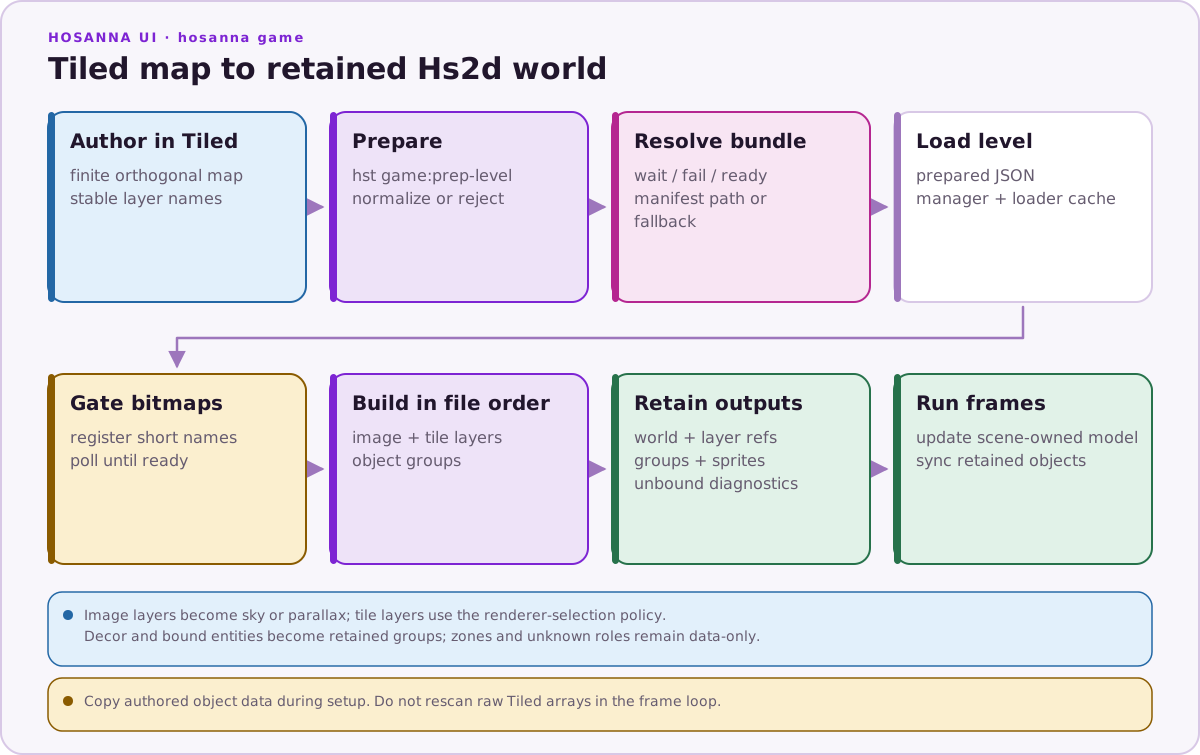
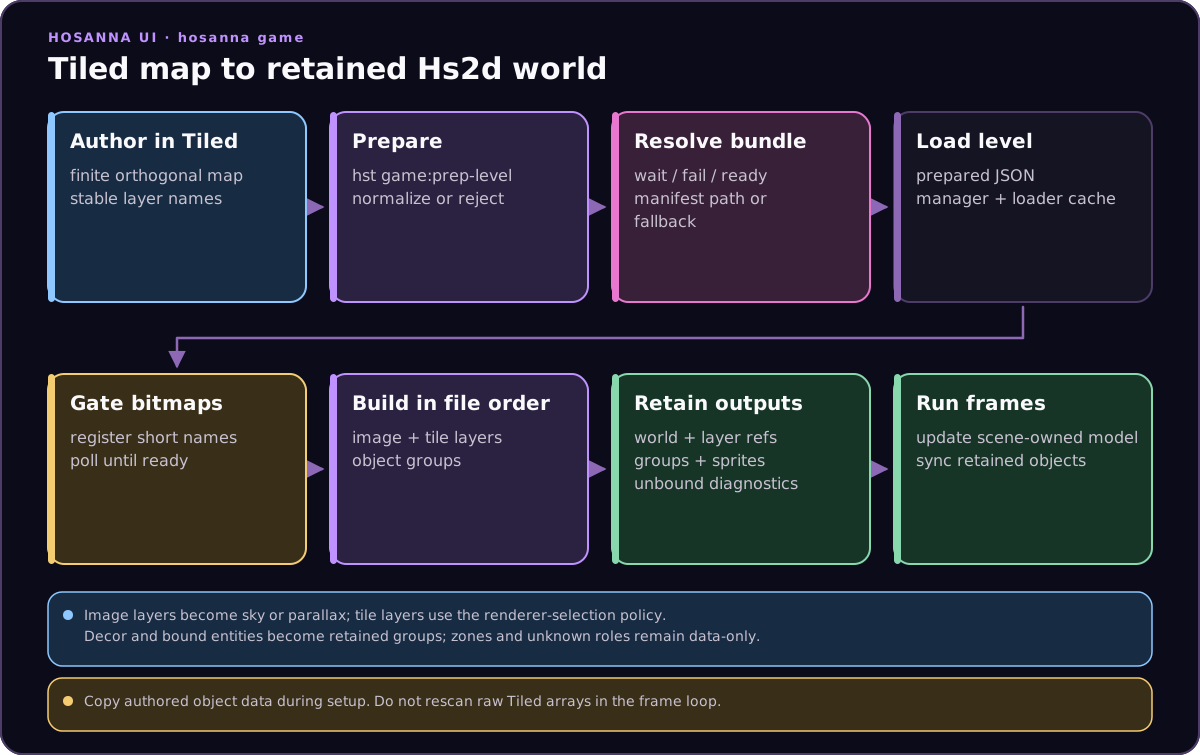
During gameplay, update scene-owned state and synchronize retained sprites. Do not scan raw map data in the frame loop.
Tiny End-To-End Example
Keep the same names across the bundle, asset gate, Tiled properties, and world builder.
asset-bundle.json exposes namespaced manifest keys:
{
  "bundleId": "my-game",
  "assets": [
    { "key": "my-game.levels.level-1", "url": "/asset-bundles/my-game/levels/level-1.json", "fileName": "levels/level-1.json" },
    { "key": "my-game.images.tile-atlas", "url": "/asset-bundles/my-game/images/tile-atlas.png", "fileName": "images/tile-atlas.png" },
    { "key": "my-game.images.sky", "url": "/asset-bundles/my-game/images/sky.png", "fileName": "images/sky.png" },
    { "key": "my-game.images.enemy-atlas", "url": "/asset-bundles/my-game/images/enemy-atlas.png", "fileName": "images/enemy-atlas.png" }
  ]
}
Code resolves those manifest keys to URIs, then registers short asset-gate names:
const gate = new Hs2dAssetGate({ bitmapCache: this.bitmapCache })
  .add('tile-atlas', this.resolveBundleUri(
    'my-game.images.tile-atlas',
    'pkg:/asset-bundles/my-game/images/tile-atlas.png',
  ))
  .add('sky', this.resolveBundleUri(
    'my-game.images.sky',
    'pkg:/asset-bundles/my-game/images/sky.png',
  ))
  .add('enemy-atlas', this.resolveBundleUri(
    'my-game.images.enemy-atlas',
    'pkg:/asset-bundles/my-game/images/enemy-atlas.png',
  ));
Tiled uses the gate names, not the namespaced manifest keys:
Image layer: sky
  hs2d:role = sky
  hs2d:asset = sky

Tile layer: terrain
  hs2d:mode = auto
  hs2d:z = 40

Object group: entities
  hs2d:role = entities
  object type = enemy
The builder uses the same gate names:
const built = Hs2dWorldBuilder.fromLevel({
  level: this.loadedLevel as Hs2dLevel,
  assets: gate,
  viewportWidth: this.screenWidth,
  viewportHeight: this.screenHeight,
  tilesetAsset: 'tile-atlas',
  entities: {
    enemy: {
      capacity: 16,
      asset: 'enemy-atlas',
      frames: [{ id: 'enemy', x: 0, y: 0, width: 64, height: 64 }],
      initialFrameId: 'enemy',
      spawn: (object, sprite) => {
        sprite.setWorldPosition(object.x, object.y);
      },
    },
  },
  hud: this,
});
| Concept | Name in this example |
|---|---|
| Manifest key | my-game.images.enemy-atlas |
| Fallback URI | pkg:/asset-bundles/my-game/images/enemy-atlas.png |
| Asset-gate name | enemy-atlas |
| Entity binding asset | asset: 'enemy-atlas' |
| Tiled entity type | enemy |
Do And Don't
| Do | Don't |
|---|---|
| Prepare raw Tiled JSON before runtime use. | Ship raw compressed/chunked/infinite Tiled exports to the runtime. |
| Register every bitmap referenced by Tiled image layers, tilesets, decor, and entity bindings. | Build the world before the asset gate reports ready. |
| Use short gate names consistently in Tiled and builder options. | Put a namespaced manifest key in Tiled unless the gate uses that exact same string. |
| Copy object data into scene-owned arrays or pools during build/setup. | Re-scan Tiled object arrays every frame. |
Use hs2d:mode and builder overrides to choose tile renderers. | Implement custom per-frame tile draw loops for ordinary maps. |
Detailed Pages
| Page | Use it for |
|---|---|
| Tiled Map Requirements | Raw Tiled export versus prepared runtime JSON, supported map subset, prep behavior, runtime rejection cases, tilesets, tile ids, objects, and solidity. |
| Tiled Layer Properties | Verified hs2d:* properties, native Tiled parallax/offset fields, image layer options, tile layer modes, object group roles, decor object properties, clear colors, and defaults. |
| World Builder And Level Loading | Hs2dLevelManager, Hs2dLevelLoader, Hs2dAssetGate, Hs2dWorldBuilder.fromLevel, tile mode overrides, built world references, and sample build flow. |
| Entity Bindings Decor And Zones | Binding Tiled object types to sprite groups, spawn callbacks, capacity sizing, decor frame mapping, named sprite layers, zones, and game-owned object properties. |
Source Anchors
The core implementation lives in:
../games/hosanna-ui/src/hosanna-game/hosanna2d/level/Hs2dTiledLevel.ts../games/hosanna-ui/src/hosanna-game/hosanna2d/level/Hs2dLevel.ts../games/hosanna-ui/src/hosanna-game/hosanna2d/level/Hs2dLevelLoader.ts../games/hosanna-ui/src/hosanna-game/hosanna2d/level/Hs2dLevelManager.ts../games/hosanna-ui/src/hosanna-game/hosanna2d/Hs2dWorldBuilder.ts../hosanna-tools/src/support-tools/tiled-prep.ts
The most useful sample scenes are:
../hosanna-ui-game-samples-public/src/hosanna-game-examples/native-shoot-em-up/VerticalShooterLevelScene.ts../hosanna-ui-game-samples-public/src/hosanna-game-examples/hosanario/HosanarioLevelScene.ts../hosanna-ui-game-samples-public/asset-bundles/hosanario/levels/build_levels.py