World Builder And Level Loading
Hs2dWorldBuilder.fromLevel is the preferred entry point for map-driven games. It reads a prepared Tiled level once, allocates layers and sprite groups, returns references to the built systems, and then the frame loop works from scene-owned state.
Do not scan Tiled objects or raw JSON during gameplay frames.
Runtime Flow
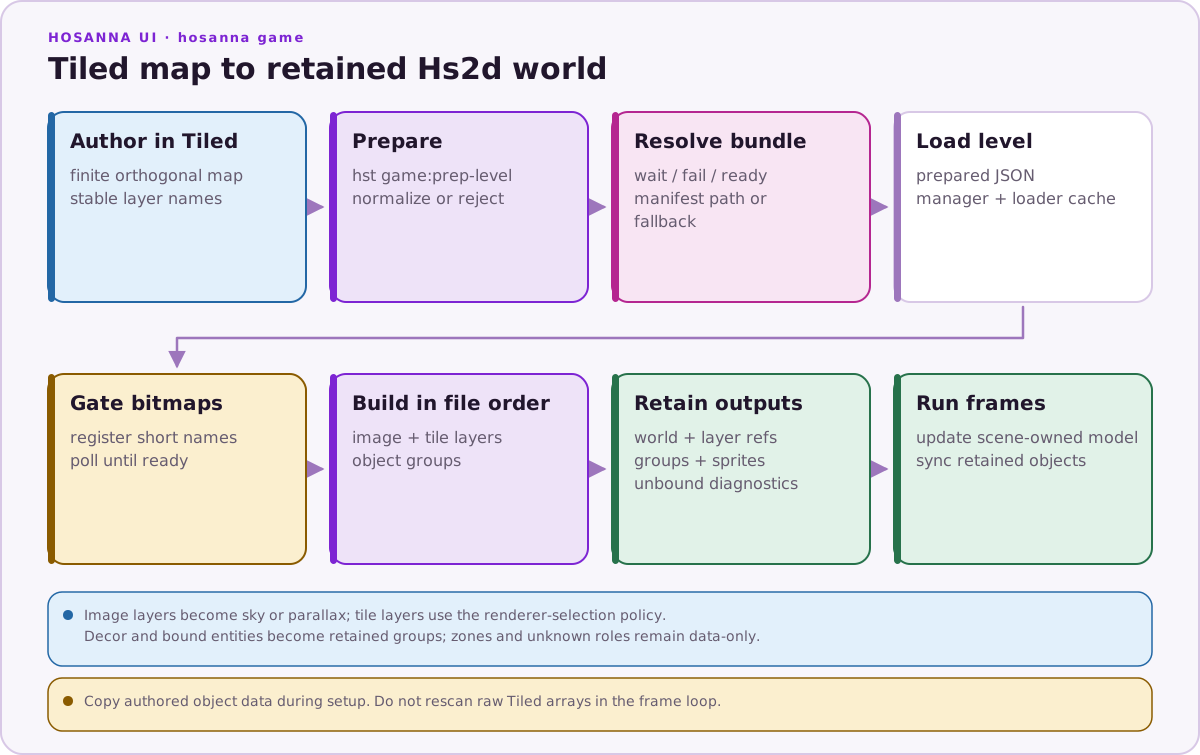
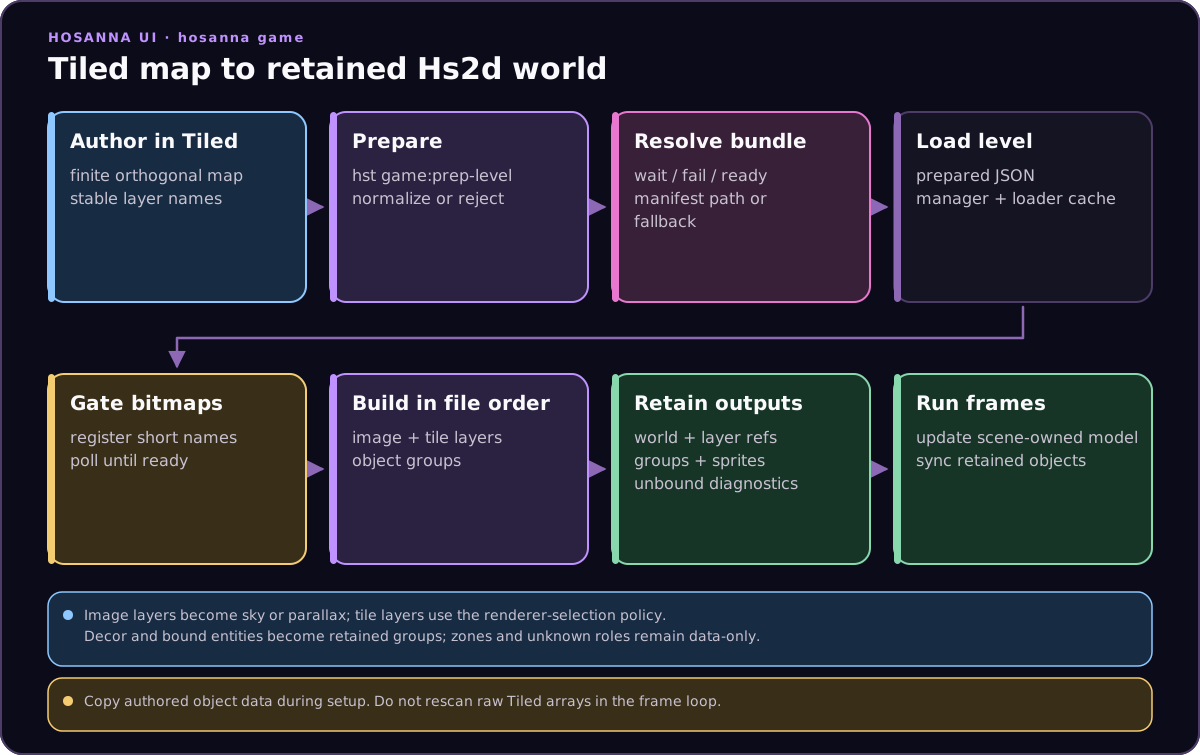
Hs2dLevelLoader uses ReadAsciiFile(uri) and parseTiledJsonLevel. It throws if the file is missing or empty. Hs2dLevelManager adds level definitions, asset-key resolution, and caching.
Level Manager
Use Hs2dLevelManager when levels live in asset bundles:
this.levelManager = new Hs2dLevelManager({
  bundleId: MY_GAME_ASSETS.bundleId,
  levels: {
    1: {
      assetKey: MY_GAME_ASSETS.level1BundleKey,
      fallbackUri: MY_GAME_ASSETS.level1,
    },
  },
  resolveAssetUri: (_bundleId, assetKey, fallbackUri) => this.resolveBundleUri(assetKey, fallbackUri),
});
For fixed local paths or tests, use uri directly:
const levelManager = new Hs2dLevelManager({
  bundleId: 'my-game',
  levels: {
    1: { uri: 'pkg:/asset-bundles/my-game/levels/level-1.json' },
  },
});
loadLevel(1) returns a cached Hs2dLevel after the first load.
Asset Gate
The builder requires a ready Hs2dAssetGate:
const assetGate = new Hs2dAssetGate({ bitmapCache: this.bitmapCache });
assetGate.add('tile-atlas', this.resolveBundleUri(MY_ASSETS.tileAtlasKey, MY_ASSETS.tileAtlas));
assetGate.add('sky', this.resolveBundleUri(MY_ASSETS.skyKey, MY_ASSETS.sky));
assetGate.add('enemy-atlas', this.resolveBundleUri(MY_ASSETS.enemyAtlasKey, MY_ASSETS.enemyAtlas));
Before building:
if (!assetGate.poll()) {
  this.setLoadingStatus(assetGate.getStatusText());
  return undefined;
}
If fromLevel is called while assets are missing, it throws with the missing asset names.
Build A World
Minimal shape:
const built = Hs2dWorldBuilder.fromLevel({
  level,
  assets: assetGate,
  viewportWidth: this.screenWidth,
  viewportHeight: this.screenHeight,
  cameraX: this.bootstrapCamera.x,
  cameraY: this.bootstrapCamera.y,
  scale: this.bootstrapCamera.scale,
  clearColor: 0x000000ff,
  spriteLayerId: 'my-game-foreground',
  entities: {
    enemy: {
      capacity: 24,
      asset: 'enemy-atlas',
      frames: [
        { id: 'idle', x: 0, y: 0, width: 64, height: 64 },
        { id: 'hit', x: 64, y: 0, width: 64, height: 64 },
      ],
      initialFrameId: 'idle',
      zIndex: 90,
      spawn: (object, sprite, index, level) => {
        sprite.setFrame(level.getStringProperty(object, 'variant', 'idle'));
        this.bindEnemy(index, object, sprite);
      },
    },
  },
  hud: this,
});

const world = built.world;
world.setCameraController(this.cameraController);
this.terrainLayer = built.tileLayers['terrain'];
this.enemyGroup = built.entityGroups['enemy'];
this.world = world;
The builder processes level.layerOrder in file order. A layer may supply explicit z values, but file order is still the construction order.
Builder Options
Common Hs2dWorldFromLevelOptions:
| Option | Default | Purpose |
|---|---|---|
level | required | Parsed Hs2dLevel. |
assets | required | Ready Hs2dAssetGate. |
viewportWidth, viewportHeight | required | Screen-space viewport dimensions. |
cameraX, cameraY | 0 | Initial world camera position. |
parallaxOriginX, parallaxOriginY | camera position | Origin for parallax strip math. |
scale | 1 | Initial world camera scale. |
clearColor | 0x000000ff unless map property exists | World clear color fallback. |
spriteLayerId | hs2d-foreground | Default foreground sprite layer id. |
cullPadding | 128 | Default foreground sprite-layer culling padding. |
zoomScaleRatio | 1 | Default foreground sprite-layer zoom behavior. |
projectionScaleRatio | engine layer default | Projection scaling behavior for dynamic tiles/sprites. |
minScale, maxScale | layer defaults | Zoom envelope. minScale also affects auto tile mode selection. |
isScaleFromTopLeft | layer default | Scale projection origin behavior. |
tileLayerModes | map properties | Code-side tile mode override by layer id. |
tileLayerChunkSizes | map properties/default 512 | Code-side cached chunk size override by layer id. |
offscreenX, offscreenY | -1000 | Parking position for hidden sprites. |
tilesetAsset | tileset name | Asset-gate name for the tileset bitmap. |
worldArtScale | 1 | One-time build scale for tile/entity art. |
decorFrames | frame name maps to same asset name | Decor frame-to-asset map. |
entities | {} | Object type to entity binding map. |
hud | none | Object with drawHud(screen). |
Built World Result
Hs2dBuiltWorld returns:
| Field | Use |
|---|---|
world | The Hs2dWorld to update/render. |
level | The same Hs2dLevel, returned for convenience. |
spriteLayer | The builder-created default foreground sprite layer, if one was needed. |
tileLayers | Tile layer id to the builder's sprite-pool dynamic, static, or cached-chunk layer instance. The builder does not create ring-surface layers. |
tileRegions | Regions sliced from the tileset. |
decorGroups | Decor object group id to parallax sprite group. |
entityGroups | Entity type to sprite group. |
entitySprites | Entity type to created layer sprites. |
unboundEntityTypes | Object types placed in the map without code bindings. Diagnostics only. |
Unbound entity types do not fail the build. They are useful during development to catch missing bindings.
Tile Layer Selection
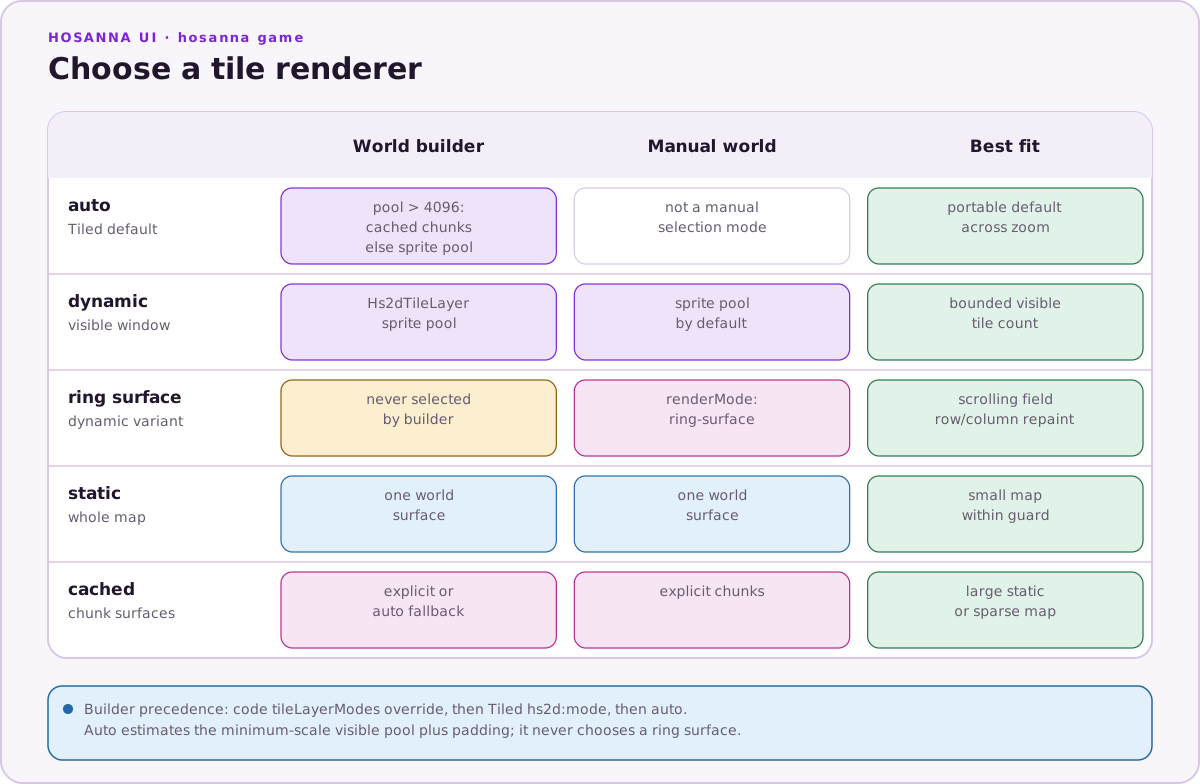
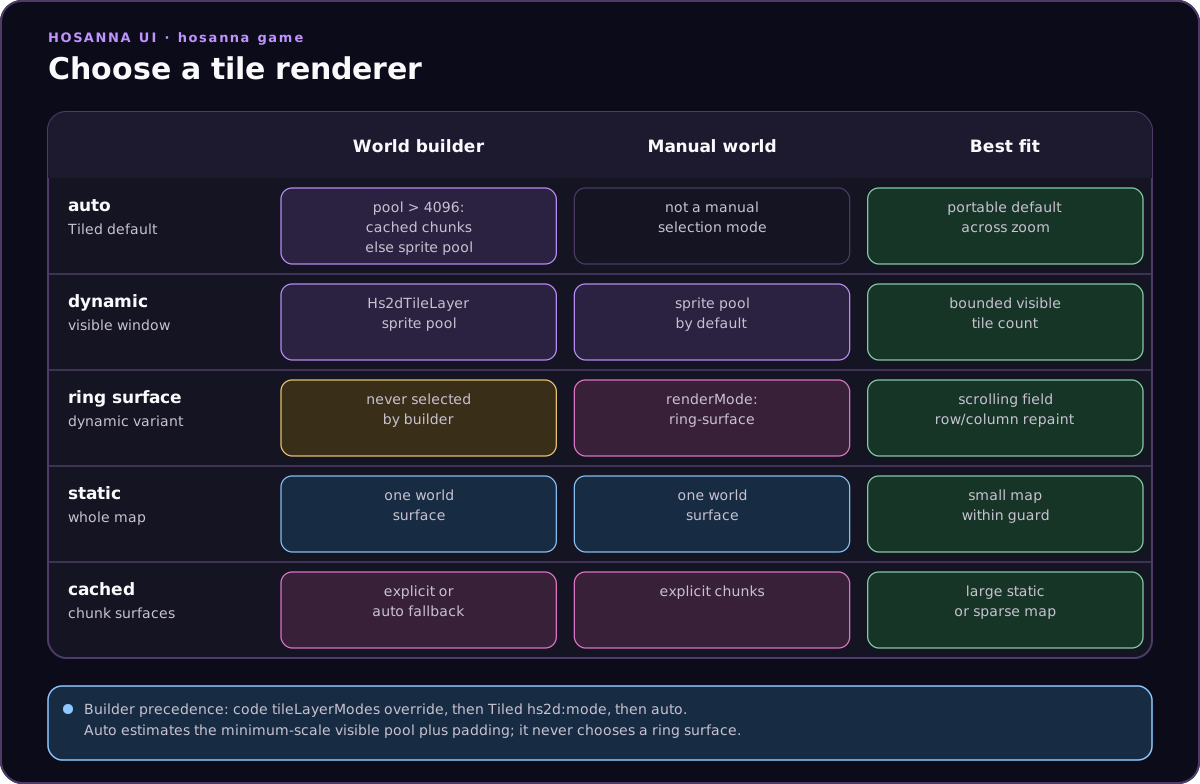
Prefer hs2d:mode in Tiled when the map owns the rendering choice:
{ "name": "hs2d:mode", "type": "string", "value": "auto" }
Use code-side overrides when the same prepared map needs different behavior by platform or debug mode:
const built = Hs2dWorldBuilder.fromLevel({
  level,
  assets: assetGate,
  viewportWidth: this.screenWidth,
  viewportHeight: this.screenHeight,
  tileLayerModes: { terrain: 'cached' },
  tileLayerChunkSizes: { terrain: { width: 256, height: 256 } },
});
auto estimates the worst-case dynamic pool:
columns = floor(viewportWidth / max(minScale, 0.1) / tileWidth) + poolPadding * 2
rows    = floor(viewportHeight / max(minScale, 0.1) / tileHeight) + poolPadding * 2
If columns * rows is greater than 4096, the builder uses cached chunks. Otherwise it uses the dynamic pooled tile layer.
Hs2dWorldBuilder never selects Hs2dRingTileLayer; that is a manual world.addTileLayer({ mode: 'dynamic', renderMode: 'ring-surface', ... }) path.
The builder also owns a private world and can lazily create only its configured spriteLayerId. Map hs2d:spriteLayer properties and entity binding layer overrides should be omitted or match that id. Use imperative world construction when several separately configured sprite layers are required.
Collision And Tile Queries
Use Hs2dLevel helpers from simulation/collision code:
const tileX = GameMath.floorToInt(projectile.x / level.tileWidth);
const tileY = GameMath.floorToInt(projectile.y / level.tileHeight);

if (level.isSolidTile(tileX, tileY, 'terrain')) {
  this.deactivateProjectile(projectile);
}
For tile-specific logic:
const tileKind = level.getTileKinds('terrain')[tileY * level.width + tileX];
const tileProps = level.getTileProperties(tileKind);
const damage = level.getNumberProperty({ properties: tileProps }, 'damage', 0);
Keep this kind of query in bounded simulation work. Do not traverse full tile arrays every frame unless the array is small and the work is intentionally amortized.
Sample Pattern
The vertical shooter and Hosanario follow the same build contract:
- Wait for the asset bundle to be ready.
- Load the prepared level through
Hs2dLevelManager. - Register every bitmap needed by image layers, tile layers, decor, and entities on
Hs2dAssetGate. - Wait for
assetGate.poll(). - Call
Hs2dWorldBuilder.fromLevel. - Store
built.tileLayers['terrain'],built.entityGroups[...], and any sprite arrays needed by the simulation. - Add camera controller, particles, extra sprite pools, and HUD.
- In the frame loop, update simulation state and synchronize scene-owned arrays into sprites.
Hosanario also sizes entity capacity from placed objects so debug zoom-out can show the whole level without visible entity capping:
private getEntityCapacity(objectType: string, minimum: number): number {
  const level = this.loadedLevel;
  if (!level) return minimum;
  let count = 0;
  for (const ref of level.layerOrder) {
    if (ref.kind === 'object') {
      count += level.getObjectsByType(ref.id, objectType).length;
    }
  }
  return Math.max(minimum, count);
}
Do And Don't
Do:
- build the world only after the level and asset gate are ready
- keep map layer names stable and use them as code ids
- store returned layer/group references after build
- bind placed objects to scene-owned simulation arrays in
spawn - use code-side
tileLayerModesonly for runtime/platform overrides - dispose worlds/bitmap caches when a scene owns large cached surfaces
Don't:
- call
fromLevelbeforeassetGate.poll()returns true - create sprites or regions inside the frame loop
- scan all Tiled object groups every frame
- mutate prepared map JSON to tune per-platform renderer choices
- ignore
unboundEntityTypesduring development
Source Reference
| Source | Confirms |
|---|---|
../games/hosanna-ui/src/hosanna-game/hosanna2d/level/Hs2dLevelLoader.ts | File loading behavior and empty-file error. |
../games/hosanna-ui/src/hosanna-game/hosanna2d/level/Hs2dLevelManager.ts | Level definitions, asset-key/fallback resolution, and cache behavior. |
../games/hosanna-ui/src/hosanna-game/hosanna2d/Hs2dWorldBuilder.ts | Builder options, build order, asset readiness, layer construction, tile mode selection, result shape, and defaults. |
../games/hosanna-ui/src/hosanna-game/hosanna2d/Hs2dWorldBuilder.test.ts | Tested build behavior for layers, entity binding, tile modes, auto cached fallback, chunk overrides, invisible layers, and missing assets. |
../hosanna-ui-game-samples-public/src/hosanna-game-examples/native-shoot-em-up/VerticalShooterLevelScene.ts | Complete vertical shooter loading and builder pattern. |
../hosanna-ui-game-samples-public/src/hosanna-game-examples/hosanario/HosanarioLevelScene.ts | Complete platformer loading, entity capacity sizing, builder, and runtime sprite sync pattern. |