Building for Samsung TV
Hosanna Tools automates Tizen bundling, packaging, install, launch, inspection, and termination. Its guided setup command covers credential-safe Samsung CLI checks, while Developer Mode, on-TV permission, certificate/DUID creation, and installation authorization remain interactive vendor steps.
Prerequisites
- Node and project dependencies installed from the lockfile.
- A Hosanna SDK installation owned by
hosanna.jsonandnpx hst sdk:install. - Samsung TV SDK command-line tools, including
tizenandsdb. - A Samsung certificate profile managed outside the repository for
.wgtpackaging. Package-only builds do not require a connected TV. - For device runs, a Tizen 5.5-or-newer Samsung TV on a network reachable from the development machine. Tizen 5.5 is the supported implementation floor.
Follow Samsung's current command-line setup and TV application configuration.
Establish device trust
- Enable Developer Mode in the TV Apps screen.
- Configure the development machine address and restart the TV.
- Preview HST's safe setup commands, then connect and accept the TV trust prompt.
- Create/select a Samsung TV certificate profile and back it up securely.
- Confirm the device is online before invoking HST.
npx hst device:setup tizen --host 192.168.1.20 \
  --signing-profile samsung-tv-dev --dry-run
npx hst device:setup tizen --host 192.168.1.20 \
  --signing-profile samsung-tv-dev
sdb devices
npx hst device:list --type tizen --json
HST never stores certificate keys or TV passwords in source. A friendly device
alias or serial may live in project/user .hosanna-tools/devices.json. If the
Samsung CLI is missing, that configured entry can appear offline; only an
online sdb devices result proves discovery.
device:setup tizen runs sdb connect, confirms the host is authorized in
sdb devices, and can verify an existing exact signing-profile name. It does
not accept the TV prompt, create or read certificates, register the TV DUID, or
grant permission to install applications.
Preview on desktop
npx hst run tizen dev emulator
This compiles the Tizen initializer and semantic input/video classes while using keyboard emulation. Use it for shared application behavior, then use a device run for the television decoder, hardware plane, Voice Guide, storage persistence, and lifecycle.
Build and package
npx hst build tizen dev device --signing-profile samsung-tv-dev
npx hst build tizen prod device --non-interactive \
  --signing-profile samsung-tv-prod
The plan generates AppConfig and BuildConfig, bundles with vite.tizen.config.ts, stages a relative-path Chrome 68-compatible package, invokes Samsung build/package tools, and returns the .wgt path. It does not discover, install to, or launch a TV.
Development staging uses the app's development manifest and replaces its
tokens with one exact LAN debugger WebSocket plus exact configured service
origins. Production staging starts with package-local config.xml, substitutes
only exact configured service origins, and contains no debugger origin,
wildcard network scheme, or unsafe-eval. The Web DOM renderer writes inline
element styles, so style-src 'unsafe-inline' remains intentional.
Pass reviewed origins with repeated --connect-origin arguments, the platform
connectOrigins run-config field, or HS_TV_CONNECT_ORIGINS. A physical
contract test can add its clear fixture root with HS_TEST_MODE=true and
HS_TEST_STREAM_BASE_URL=http://<development-machine>:5180. HST
derives the exact origin for CSP and Tizen WARP, carries the base URL into the
test launch, and rejects credentials, wildcards, mismatched explicit origins,
or unresolved tokens.
Install, launch, and inspect
npx hst run tizen dev device --device 192.168.1.20 \
  --signing-profile samsung-tv-dev
npx hst device:inspect tizen --device 192.168.1.20
npx hst device:terminate tizen --device 192.168.1.20
Use --dry-run --explain to inspect resolved config, manifest, signing profile, package path, and device selection without side effects.
The run command installs and launches; inspection and termination happen only
when their explicit commands are invoked. Inspection sends the manifest's full
<tizen:application id> to Samsung—not the 10-character package prefix—parses
the returned debug port, creates an SDB forward to loopback, prints the local
inspector URL, and opens it in the default browser. If Samsung does not return a
valid port, HST fails with guidance instead of claiming an inspector session.
Debug-mode availability depends on Developer Mode and the selected TV model.
The TV driver does not promise a vendor-native log stream, so use
application/MCP logs as the common path.
The debugger host in a device build must be the development machine's reachable LAN address, not localhost. Permit that endpoint only in development CSP/config.
In the physical test harness, no-argument hs.app.relaunch() terminates and
launches the package through the Tizen driver, then waits for MCP reconnection.
Changing test rigs uses MCP ReloadPage with a query-only URL that is
bounded to the current packaged file. This is test navigation, not a Samsung
launch-CLI deep-link claim.
Package ownership
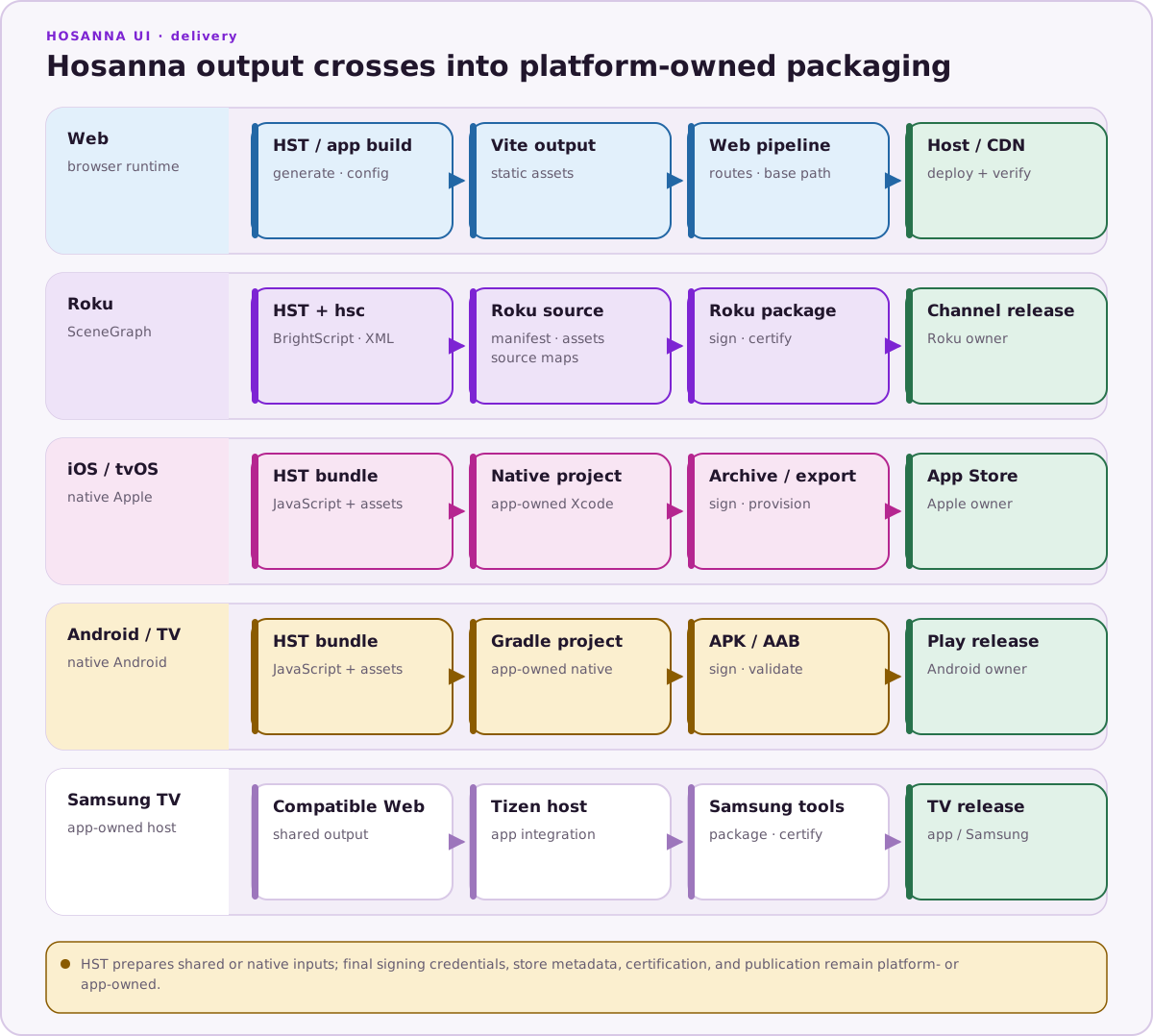
The application owns platforms/tizen/config.xml, identity, icons, access origins, privileges, and CSP. HST owns reproducible staging and vendor command orchestration. Samsung owns certificates, installation trust, and store submission.
Typical privileges are internet, tv.inputdevice, and Samsung tvinfo. Add DRM privilege only for a build that actually uses the corresponding encrypted playback path.
Device release checklist
Run the sample Web TV Platform Contract rig with a LAN-reachable
testStreamBaseUrl, then verify the application's input, storage, media,
captions, accessibility, lifecycle, MCP connectivity, and performance on its
target models. Complete Samsung's current store checklist before submission;
see Samsung TV (Tizen).