Base App and Launching
BaseApp owns framework bootstrap, shared services, scene-level views, the main
loop, and post-launch runtime services. Its constructor calls begin()
immediately; subclasses should use lifecycle hooks instead of trying to perform
work after super(...) but before launch starts.
Synchronous Bootstrap
begin() performs this setup before the asynchronous launch sequence:
- Prepare and observe the scene.
- Create and configure the IoC container.
- Assign platform/base services, then run
beforeLaunch(). - Resolve injected app dependencies.
- Add scene-level views, begin app launch, and start the main loop.
Views such as DialogManagerView are created only after IoC dependencies are
resolved because their decorators may resolve services during construction.
Asynchronous Launch Sequence
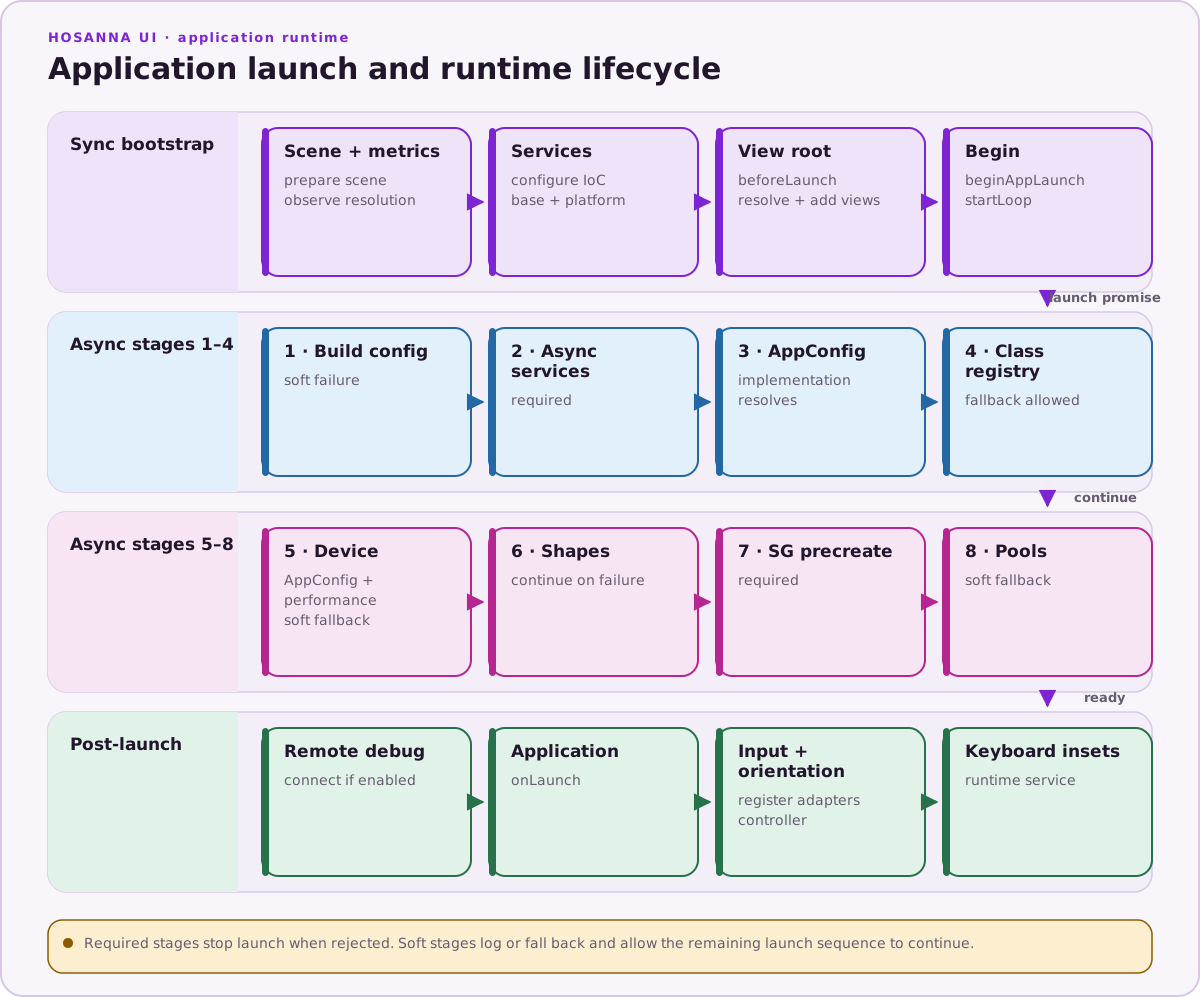
runAppLaunchSequence() currently runs eight stages in order:
- Load build config. Failure is logged and launch continues.
- Initialize async services.
- Load AppConfig.
- Initialize the non-Roku class registry; failure falls back to defaults.
- Configure the device, AppConfig, and performance manager.
- Load theme shapes.
- Pre-create configured SceneGraph views.
- Preload instance pools; failure falls back to on-demand allocation.
After the promise resolves, BaseApp connects remote debugging, calls
onLaunch(), registers input adapters, and starts orientation and keyboard
inset services. A rejected required stage is logged and prevents those
post-launch steps.
Order matters. IoC must exist before any views relying on injected services are instantiated.
IoC Access
- Use
@inject()without args to resolve by property name, or@inject('key')to resolve by explicit key. - Use
AppUtils.resolve<T>(key, required?)andAppUtils.register(key, value)outside initializer code. There is no public staticIoCContainer.resolve()shortcut.
PlatformAppInitializer provides platform overrides (e.g., hosannaDevice), while apps add custom services via getCustomIOCServices().