Layout With Groups
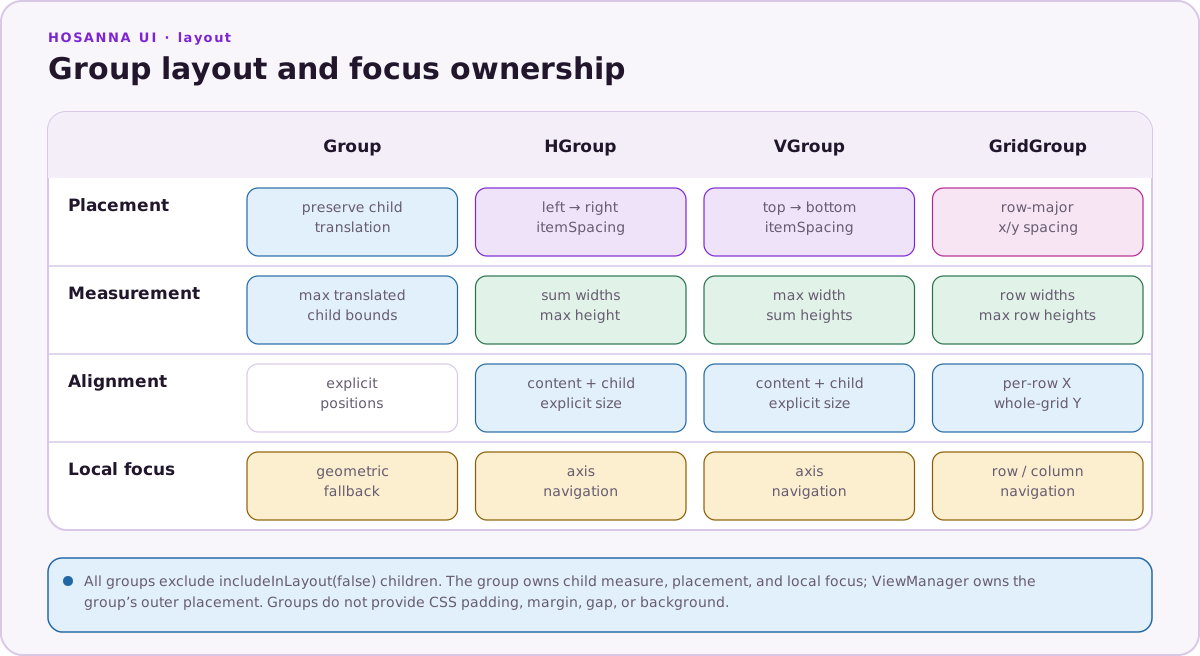
Groups are aggregate views: they own child views, measure them, place them, and participate in focus navigation. Choose the group by the layout you need.
Group: explicit positions
Group keeps each child's translation. If the group has no explicit width or
height, it measures to the furthest translated child:
Group([
  Image({
    imageUri: 'pkg:/assets/background.png',
    width: 640,
    height: 360,
  }),
  Label({
    text: 'Featured',
    width: 300,
    height: 48,
  }).translation([24, 24]),
])
Use Group for overlays and custom positioning. It also has geometric focus
fallback: if ordinary focus resolution finds no target, it searches focusable
children in the requested direction.
HGroup and VGroup: one-dimensional stacks
HGroup lays children left to right; VGroup lays them top to bottom:
VGroup([
  Label({ text: 'Choose a profile' }),
  HGroup([
    Button({ text: 'Ada' }),
    Button({ text: 'Grace' }),
  ]).itemSpacing(16),
])
  .itemSpacing(24)
  .horizAlignment(SGHorizontalAlignment.Center)
Their layout fields are:
| Field | Meaning |
|---|---|
itemSpacing | Space inserted between layout children. |
horizAlignment | Left, center, or right alignment within an explicit width. |
vertAlignment | Top, center, or bottom alignment within an explicit height. |
focusEntryStrategy | How the group selects a child when focus enters it. |
Alignment only has visible space to work with when the group has an explicit size larger than its measured content.
GridGroup: rows and columns
GridGroup lays children row by row. A number gives every row the same column
count; an array can vary it per row:
GridGroup(cards)
  .columns(4)
  .itemSpacing([24, 32])
GridGroup(menuItems)
  .columns([1, 3, 3])
  .itemSpacing(18)
itemSpacing(18) applies the same spacing in both axes.
itemSpacing([24, 32]) sets horizontal and vertical spacing separately.
GridGroup also supports the alignment and focus-entry fields listed above.
Spacing and surfaces
Groups do not implement CSS-style padding, margin, gap,
backgroundColor, alignItems, or justifyContent. Use:
itemSpacingfor space between stacked or grid children;Spacer({ width, height })for deliberate empty space;- a translated nested
Groupfor inset content; and - a
Rectangle,Shape, orImagesibling behind the content for a visual surface.
Group([
  Shape({
    width: 420,
    height: 180,
    shapeStyleKey: 'card',
  }),
  VGroup([
    Label({ text: 'Title' }),
    Label({ text: 'Description' }),
  ])
    .translation([24, 20])
    .itemSpacing(12),
])
Children with includeInLayout(false) are excluded from group measurement and
stacking.
Focus guidance
Focusable children normally determine the navigation path; a group does not
need canReceiveFocus(true) just to contain them. Use
focusEntryStrategy(GroupFocusEntryStrategy.Nearest) when focus entering from
outside should prefer the geometrically nearest eligible child. Test each
direction on remote-driven targets, especially when nesting groups with
different axes.