Handling Remote Control
Hosanna normalizes platform input before it reaches a focused view:
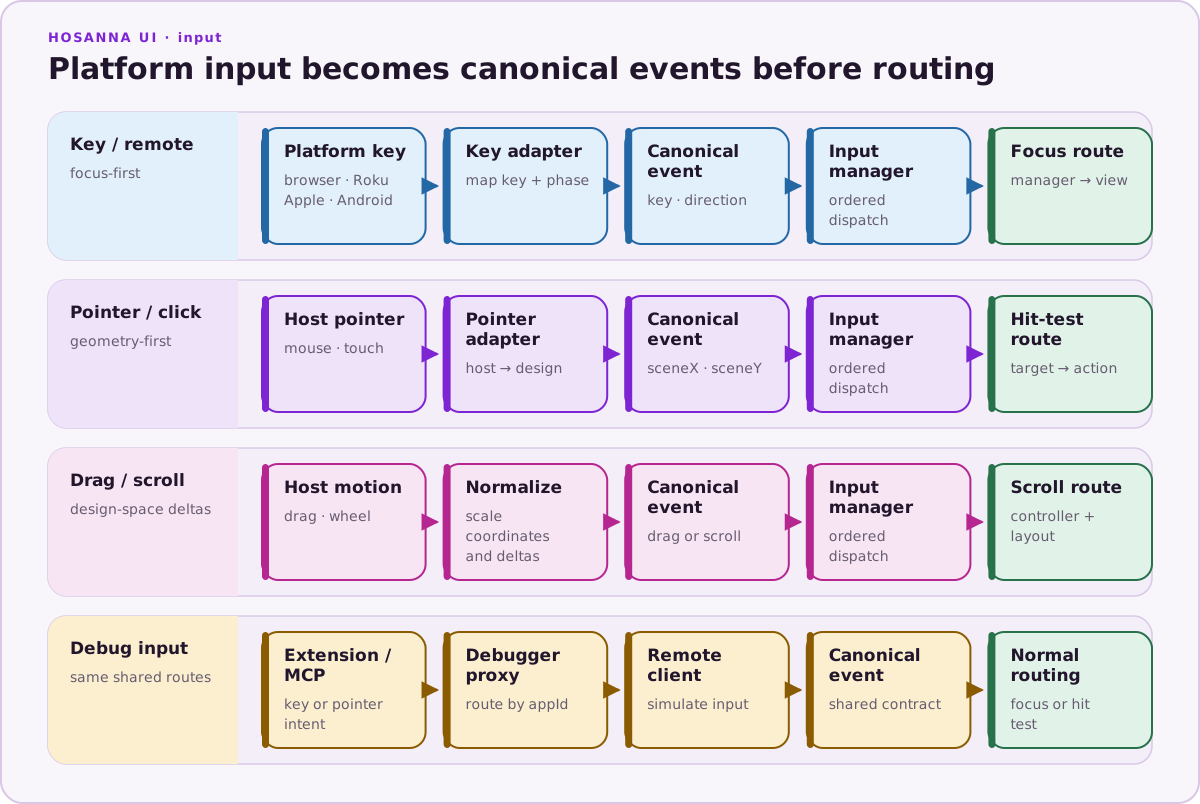
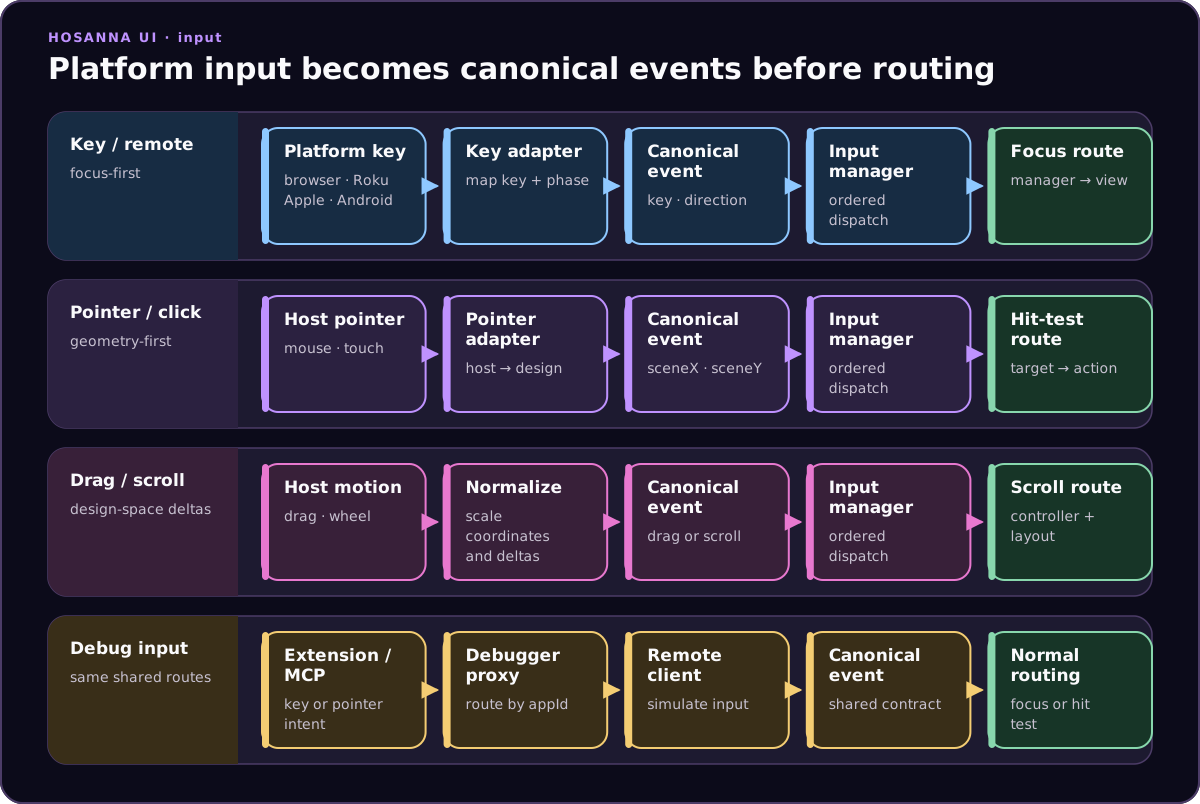
TV remotes, browser keyboard input, pointer clicks, touch gestures, and debug input can therefore share the same focus and action paths.
Key input
Common keys are represented by Key, including Up, Down, Left, Right,
Ok, Back, Options, Play, FastForward, Rewind, and Replay.
Override or attach onInputEvent when a view needs behavior beyond its
control's defaults:
import { Key } from '@hs-src/hosanna-bridge-core/api';
import {
  HsInputEvent,
  KeyState,
} from '@hs-src/hosanna-ui/lib/input/input-api';

Button({ text: 'Close' })
  .onInputEvent((event: HsInputEvent) => {
    if (event.key === Key.Back && event.keyState === KeyState.Press) {
      this.closePanel();
      event.preventDefault = true;
      event.consumed = true;
    }
  });
Set preventDefault when the normal control/focus handling should stop, and
consumed when parent handlers should treat the event as handled.
Directional events can invoke findNextFocusable() and explicit
nextFocusMap rules. Keep ordinary OK and directional behavior in built-in
controls whenever possible so pointer and remote activation remain aligned.
Web adapter profiles
Use ?adapters= to restrict which web adapters are registered:
?adapters=keyboard,mouse,touch
?adapters=roku,touch
?adapters=webkeyboard
Supported names are:
keyboard: browser keys mapped to Roku-style remote input;webkeyboard: browser keyboard events for text-input paths;debug: debugger hover/highlight input;mouse: pointer hover, click, and wheel input;touch: touch pointer input; androku: the web Roku-emulation profile.
Tizen and webOS compile targets register vendor-specific profiles instead of
the Browser default. Their desktop previews add webKeyboardTizen or
webKeyboardWebOs, which translates DOM key events into the same raw-key entry
point as tizenRemote or webOsRemote. This makes preview tests exercise the
same press, release, repeat, long-press, Back, media, and color-key semantics as
hardware.
Samsung Back is native code 10009; LG Back is 461. The webOS host must set
disableBackHistoryAPI: true so browser history does not consume it. Do not
add synthetic Roku events or delayed Back-release workarounds to product code.
With no explicit adapters filter, Roku emulation and its keyboard mapping are
enabled by default. When touch is selected without mouse, touch handling
also accepts mouse pointer events for local testing.
Web remote overlay
The optional on-screen remote uses a separate launch flag:
?showRemoteOverlay=true
?showRemoteOverlay=1
?showRemoteOverlay=mini
?showRemoteOverlay=tiny
The removed ?touch=true alias does not enable the overlay. Select the touch
input adapter separately when the application canvas should accept touch:
?expression=phone&adapters=touch,keyboard&showRemoteOverlay=mini
The overlay sends normalized d-pad, OK, and Back events. Its directional buttons also support held-key input.
Use an overlay or desktop keyboard for rapid interaction work. For each TV app release, verify repeat rate, long press, key-up delivery, Home/Exit policy, blur and suspend cleanup, and the enabled media/color keys on representative models.
Pointer coordinates
Web mouse and touch adapters translate browser coordinates and wheel deltas
into Hosanna design coordinates before hit testing. Do not apply browser DPI or
CSS scale to sceneX, sceneY, or scroll deltas again.