Background Commands
Hosanna's async command system moves work behind a string command such as
Http.Get or CatalogueCommands.LoadHome. A view dispatches the command, an
AbstractAsyncHandler handles it, and the handler completes it with an
IAsyncEvent.
Use this system for work that belongs in a worker task or needs the same command contract on every target. Ordinary synchronous view logic does not need a background command.
Dispatch a command
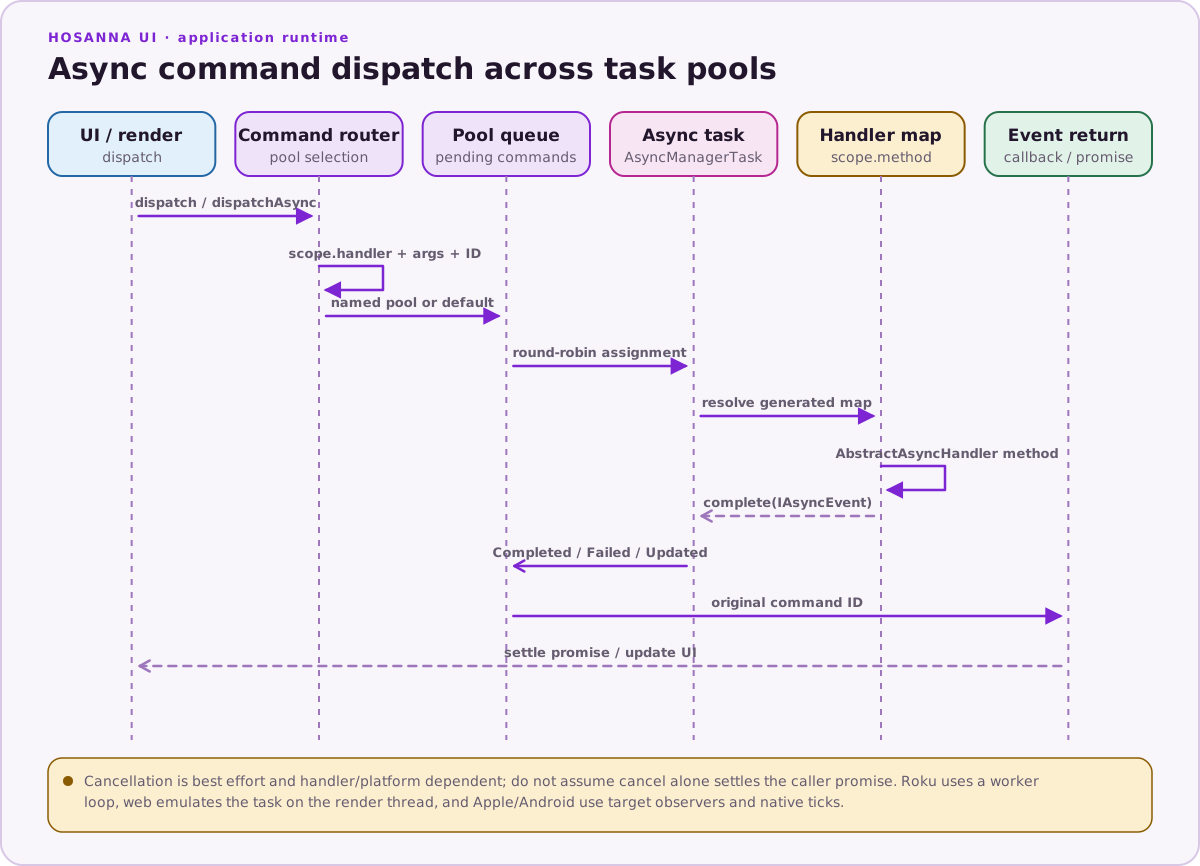
The build generates command enums from decorated handlers. Prefer the generated enum to a hand-written command string:
import { TaskIdRigCommands } from '@src-generated/async/AsyncManagerCommands';

this.dispatch<{ taskId: string; message: string }>(
  TaskIdRigCommands.Wait5Seconds,
  { message: 'Finished loading' },
)
  .then((result) => {
    this.statusText = `${result.message} on ${result.taskId}`;
  })
  .catch((reason) => {
    console.error('Command failed', reason);
  });
dispatch<T>() returns an HsPromise<T>. Its arguments are:
dispatch<T>(
  command: string,
  args?: Record<string, unknown>,
  cancellationToken?: HsCancellationToken,
  taskId?: string,
): HsPromise<T>
The optional taskId selects a pool declared in build config. If it is omitted,
the command uses the default pool:
{
  "tasks": {
    "default": 1,
    "analytics": 2
  }
}
Use dispatchAsync() when you need the command object itself:
const command = this.dispatchAsync(
  TaskIdRigCommands.Wait5Seconds,
  { message: 'Finished loading' },
  (event) => {
    console.info('Command event', event);
  },
  'analytics',
);

command.cancel();
Its return value is an AsyncCommand, not a promise. The promise is exposed as
command.promise; pause(), resume(), and cancel() are also available.
Whether a running operation can pause or cancel cleanly depends on its handler.
Write a handler
A command handler receives the whole IAsyncCommand, including its generated
ID and typed args. It must report completion through this.complete():
import {
  AbstractAsyncHandler,
  command,
  commandCategory,
} from '@hs-src/hosanna-ui/async/AbstractAsyncHandler';
import {
  AsyncCommandState,
  IAsyncCommand,
} from '@hs-src/hosanna-ui/async/AsyncApi';

interface LoadGreetingArgs {
  name: string;
}

@commandCategory('Greeting')
export class GreetingCommands extends AbstractAsyncHandler {
  @command('Load')
  load(command: IAsyncCommand<LoadGreetingArgs>) {
    const name = command.args?.name ?? 'friend';

    this.complete({
      id: command.id,
      state: AsyncCommandState.Completed,
      data: { message: `Hello, ${name}` },
    });
  }
}
Complete failures with AsyncCommandState.Failed and put the useful failure
value in data. Do not return a native Promise and assume its resolution will
complete the command—the manager observes the event passed to complete().
After adding or renaming a decorated handler, regenerate the project output so
the command appears in src-generated/async/AsyncManagerCommands.ts.
Function pointers in task arguments
Some command options, including HTTP postProcessFunction, accept an
AsyncFunctionPointer. The referenced function must be exported at module
scope:
// response-handlers.ts
export function normalizeResponse(response: IHsFetchResponse) {
  response.contextData = response.contextData ?? {};
}

// In the dispatcher
this.dispatch<IHsFetchResponse>(Http.Get, {
  url: 'https://api.example.com/items',
  postProcessFunction: normalizeResponse,
});
Do not pass an inline callback, a closure, or .bind(this). Task boundaries do
not preserve captured variables or a view instance. Treat the function as
worker-side processing; update view state in the returned promise or command
callback.
Practical rules
- Keep command arguments and results serializable across task boundaries.
- Use one generated command value (
Category.Handler), not separate category and handler arguments. - Complete every handler path with the original
command.id. - Put UI changes in the dispatching view's completion path.
- Pass a cancellation token to
dispatch()when the underlying operation supports cancellation.