Primitives Overview
Primitives are the lowest-level Hosanna views. They map closely to renderer
nodes and usually expose visual or platform behavior without adding application
policy. Controls such as Button, TextInput, and ComboBox compose primitives
and add interaction, styling, and events.
Core Visual Primitives
ImageRig
Source: hosanna-ui-samples-public/src/hosanna-ui-examples/rigs/views/ImageRig.ts@view('ImageRig')
export class ImageRigView extends BaseExampleScreenView<ImageRigLocalState> {
@state localSuccessStatus: string = 'Loading';
@state remoteSuccessStatus: string = 'Loading';
@state localFailStatus: string = 'Loading';
@state remoteFailStatus: string = 'Loading';
protected override getViews(): ViewStruct<ViewState>[] {
const isMobile = this.isMobileRigLayout();
const labelWidth = isMobile ? this.getRigContentWidth() : 360;
const imageSize = isMobile ? Math.min(180, labelWidth) : 300;
return [
GridGroup([
// Local success
VGroup([
Label({
text: 'Local image (success)',
color: '#ffffff',
width: labelWidth,
height: 40
}),
Image({
id: 'localSuccess',
imageUri: 'pkg:/assets/images/icons/eye@res.png',
loadingBitmapUri: 'pkg:/assets/images/icons/information-solid@res.png',
failedBitmapUri: 'pkg:/assets/images/icons/close@res.png',
loadingBitmapOpacity: 1,
failedBitmapOpacity: 1,
width: imageSize,
height: imageSize,
onLoadStatusChange: (e) => this.setState({ localSuccessStatus: this.statusTextFor(e.status) })
}),
Label({
text: this.localSuccessStatus,
color: '#ffffff',
width: labelWidth,
height: 40
})
]).itemSpacing(12),
// Remote success
VGroup([
Label({
text: 'Remote image (success)',
color: '#ffffff',
width: labelWidth,
height: 40
}),
Image({
id: 'remoteSuccess',
imageUri: 'http://192.0.2.30:5173/assets/images/icons/eye@res.png',
loadingBitmapUri: 'pkg:/assets/images/icons/information-solid@res.png',
failedBitmapUri: 'pkg:/assets/images/icons/close@res.png',
loadingBitmapOpacity: 1,
failedBitmapOpacity: 1,
width: imageSize,
height: imageSize,
onLoadStatusChange: (e) => this.setState({ remoteSuccessStatus: this.statusTextFor(e.status) })
}),
Label({
text: this.remoteSuccessStatus,
color: '#ffffff',
width: labelWidth,
height: 40
})
]).itemSpacing(12),
// Local failure
VGroup([
Label({
text: 'Local image (failure)',
color: '#ffffff',
width: labelWidth,
height: 40
}),
Image({
id: 'localFail',
imageUri: 'pkg:/assets/images/icons/does-not-exist@res.png',
loadingBitmapUri: 'pkg:/assets/images/icons/information-solid@res.png',
failedBitmapUri: 'pkg:/assets/images/icons/close@res.png',
loadingBitmapOpacity: 1,
failedBitmapOpacity: 1,
width: imageSize,
height: imageSize,
onLoadStatusChange: (e) => this.setState({ localFailStatus: this.statusTextFor(e.status) })
}),
Label({
text: this.localFailStatus,
color: '#ffffff',
width: labelWidth,
height: 40
})
]).itemSpacing(12),
// Remote failure
VGroup([
Label({
text: 'Remote image (failure)',
color: '#ffffff',
width: labelWidth,
height: 40
}),
Image({
id: 'remoteFail',
imageUri: 'http://192.0.2.130:5173/assets/images/icons/NOT_THERE@res.png',
loadingBitmapUri: 'pkg:/assets/images/icons/information-solid@res.png',
failedBitmapUri: 'pkg:/assets/images/icons/close@res.png',
loadingBitmapOpacity: 1,
failedBitmapOpacity: 1,
width: imageSize,
height: imageSize,
onLoadStatusChange: (e) => this.setState({ remoteFailStatus: this.statusTextFor(e.status) })
}),
Label({
text: this.remoteFailStatus,
color: '#ffffff',
width: labelWidth,
height: 40
})
]).itemSpacing(12)
])
.columns(isMobile ? 1 : 2)
.itemSpacing(isMobile ? [24, 32] : [80, 80])
.translation([this.getRigLeftOffset(240), this.getRigTopOffset(180)])
];
}
private statusTextFor(status: SGImageLoadStatus): string {
switch (status) {
case SGImageLoadStatus.None: return 'None';
case SGImageLoadStatus.Loading: return 'Loading';
case SGImageLoadStatus.Ready: return 'Ready';
case SGImageLoadStatus.Failed: return 'Failed';
default: return `${status}`;
}
}
}| Primitive | Use it for |
|---|---|
Image | Local or remote bitmap content, tinting, scaling, and load status. See Image. |
Label | Standard single- or multi-line text. |
SimpleLabel | Lower-level text rendering where its smaller API is sufficient. |
MultiStyleLabel | Text composed from differently styled spans. |
RichText | Rich text content supported by the active renderer. |
VerticalText | Vertically arranged text. |
Rectangle | Solid-color rectangles and simple blocks. |
Shape | Theme-backed scalable shapes. See Shapes. |
AnimatedPoster | Frame-based poster animation. |
RiveAnimation | Rive assets on supported targets. |
Use stable IDs whenever another view, an animation, or a fragment callback must address the primitive after it mounts.
HosannaLabelsRigView
Source: hosanna-ui-samples-public/src/hosanna-ui-examples/rigs/views/HosannaLabelsRigView.ts@view('HosannaLabelsRigView')
export class HosannaLabelsRigViewView extends BaseExampleScreenView<HosannaLabelsRigViewState> {
protected override getViews(): ViewStruct<ViewState>[] {
return [
VGroup([
Label()
.id('fontLabelLarge')
.fontKey('Large, 30')
.color('#FF0000')
.text('Large valid key'),
Label()
.fontKey('LargeBold')
.color('#000000')
.text('LargeBold valid key'),
Label()
.fontKey('Large, 55')
.color('#00FF00')
.text('Large, 55: valid key'),
Label()
.fontKey('LargeBold, 24')
.color('#0000FF')
.text('LargeBold, 24: valid key'),
Label()
.id('fontLabelCustom')
.fontKey('pkg:/assets/fonts/Roboto-Medium.ttf,42')
.color('#FF00FF')
.text('pkg:/assets/fonts/Roboto-Medium.ttf,42: valid key'),
Label()
.fontKey('pkg:/assets/fonts/Roboto-Medium.ttf,18')
.color('#FFFF00')
.text('pkg:/assets/fonts/Roboto-Medium.ttf,18: valid key'),
Label()
.fontKey('pkg:/assets/fonts/Montserrat-Black.ttf,40')
.color('#00FFFF')
.text('pkg:/assets/fonts/Montserrat-Black.ttf,40: valid key'),
Label()
.fontKey('pkg:/assets/fonts/Montserrat-Light.ttf,40')
.color('#000000')
.text('pkg:/assets/fonts/Montserrat-Light.ttf,40: valid key'),
Label()
.fontKey('pkg:/assets/fonts/Roboto-Medium.ttf')
.color('#FF0000')
.text('pkg:/assets/fonts/Roboto-Medium.ttf: INVALID'),
Label()
.fontKey('')
.color('#000000')
.text('"": INVALID'),
Label()
.fontKey('pkg:/assets/fonts/Montserrat-Black.ttf')
.color('#00FF00')
.text('pkg:/assets/fonts/Montserrat-Black.ttf: INVALID'),
Label()
.fontKey('pkg:/assets/fonts/Montserrat-Light.ttf')
.color('#0000FF')
.text('pkg:/assets/fonts/Montserrat-Light.ttf: INVALID'),
])
.height(800)
.horizAlignment(SGHorizontalAlignment.Right)
.vertAlignment(SGVerticalAlignment.Center),
];
}
}MeasureRig
Source: hosanna-ui-samples-public/src/hosanna-ui-examples/rigs/views/MeasureRig.ts@view('MeasureRig')
export class MeasureRigView extends BaseExampleScreenView<MeasureRigState> {
@state activeText = 'none';
private items: IActionButtonItem[] = [
{ id: '1', text: 'play', actionType: ButtonActionType.Play },
{ id: '2', text: 'pause', actionType: ButtonActionType.Pause },
{ id: '3', text: 'stop', actionType: ButtonActionType.Stop },
];
protected override getViews(): ViewStruct<ViewState>[] {
const isMobile = this.isMobileRigLayout();
const contentWidth = isMobile ? this.getRigContentWidth() : 1000;
const buttonGroup = isMobile ? VGroup : HGroup;
return [
VGroup([
Group([
buttonGroup([
Label({
text: `The text is : ${this.activeText}`,
wrap: true,
numLines: 4,
width: isMobile ? contentWidth : 800,
}),
Button({
text: 'button 1',
styleKey: 'controls.Button.default',
})
.isInitialFocus()
.onClick(() => {
console.info('I clicked button 1');
this.activeText = 'I clicked button 1';
})
,
Button({
text: 'button 2',
styleKey: 'controls.Button.default',
})
.onClick(() => {
this.activeText = 'I clicked button 1 - really long lorem ipsum dolor sit amet, consectetur adipiscing elit. Sed do eiusmod tempor incididunt ut labore et dolore magna aliqua. Ut enim ad minim veniam, quis nostrud exercitation ullamco laboris nisi ut aliquip ex ea commodo consequat. Duis aute irure dolor in reprehenderit in voluptate velit esse cillum dolore eu fugiat nulla pariatur. Excepteur sint occaecat cupidatat non proident, sunt in culpa qui officia deserunt mollit anim id est laborum.';
}),
Rectangle({ color: '#00ff00' })
.size(100, 80)
.onResize((event: ResizeEvent) => {
console.info('>> RESIZE EVENT: Rectangle resized', event.width, event.height);
}),
Label({ text: 'some text longer' }).height(80),
Label({ text: 'some text longer longest' })
.onResize((event: ResizeEvent) => {
console.info('>> RESIZE EVENT: Label', event.width, event.height);
}),
])
.itemSpacing(isMobile ? 16 : 30)
.onResize((event: ResizeEvent) => {
console.info('>> RESIZE EVENT: button group', event.width, event.height);
}),
]),
buttonGroup([
Label({ text: 'BBB some text' }).height(80),
Rectangle({ color: '#ff0000' }).width(contentWidth).height(80),
// Label({ text: 'BBB some text longer' }),
// Label({ text: 'BBB some text longer longest' })
]).itemSpacing(isMobile ? 16 : 30)
.canReceiveFocus(false),
buttonGroup(this.items.map((item) =>
Button({
id: item.id,
text: item.text,
customData: item,
styleKey: 'controls.Button.default',
}).onClick((event: ButtonEvent) => {
console.info('I clicked button ?', event.view);
this.activeText = `I clicked button ${event.view.getCustomData<IActionButtonItem>()?.actionType}`;
this.commitAction(event.view.getCustomData<IActionButtonItem>());
})
))
])
];
}
commitAction(item: IActionButtonItem) {
const url = 'https://jsonplaceholder.typicode.com/posts?userId=1'
return this.dispatch<IHsFetchResponse>(Http.Get, {
url
})
.then<void>((response: IHsFetchResponse) => {
console.info('Response:', response);
})
// eslint-disable-next-line @typescript-eslint/no-explicit-any
.catch((reason: any): void => {
console.error('Failed to fetch data', reason);
});
}
}Native Keyboard Primitives
NativeKeyboard and NativeMiniKeyboard expose the platform
DynamicKeyboard and DynamicMiniKeyboard nodes. Both can receive native focus
and emit onTextChange from the renderer's text field. Their default sizes
are 1395 × 570 and 575 × 721, respectively.
NativeKeyboard({ id: 'full', placeholderText: 'Enter text' })
  .onTextChange(event => {
    this.query = event.text;
  });
Prefer the higher-level TextInput control for forms because it selects the
TV dialog, web input, or native mobile input according to renderMode. See
Keyboard.
Media and Host Content
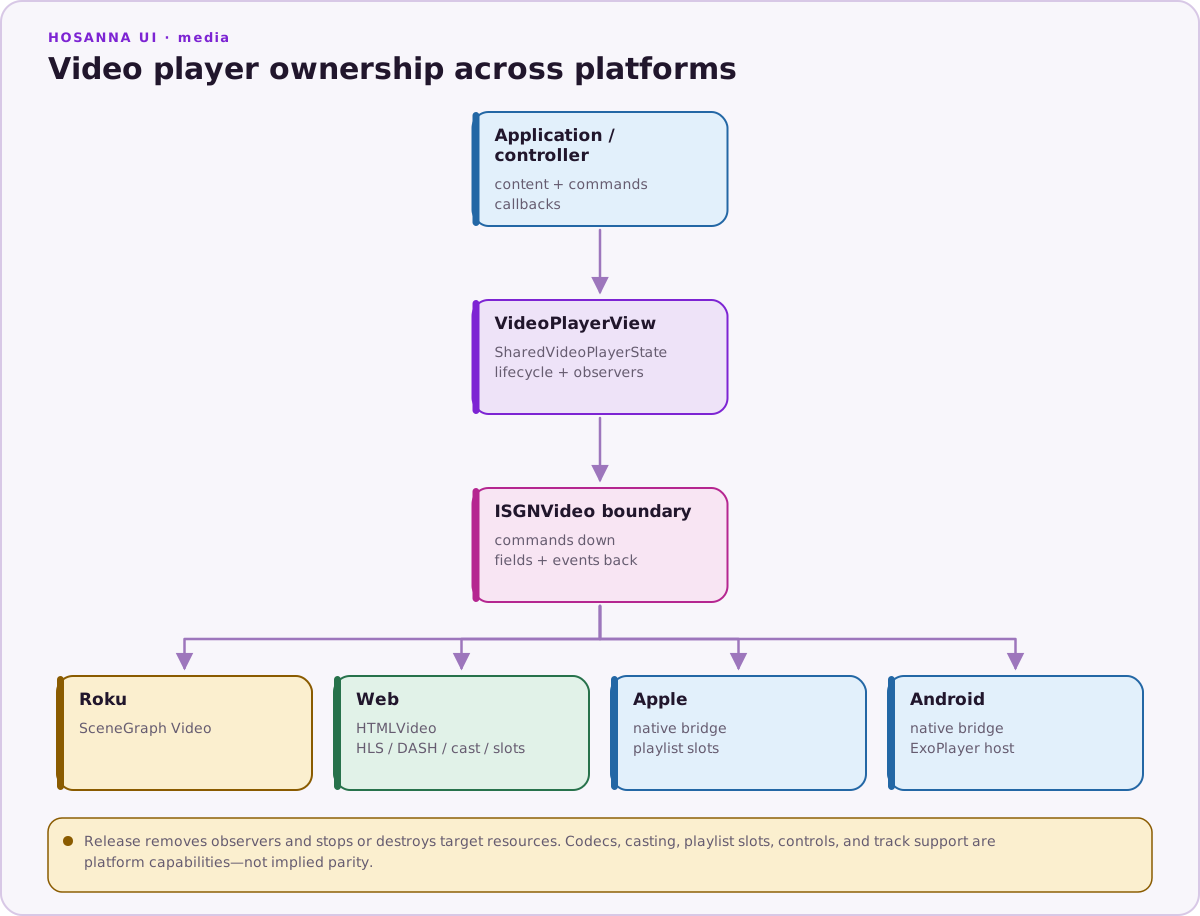
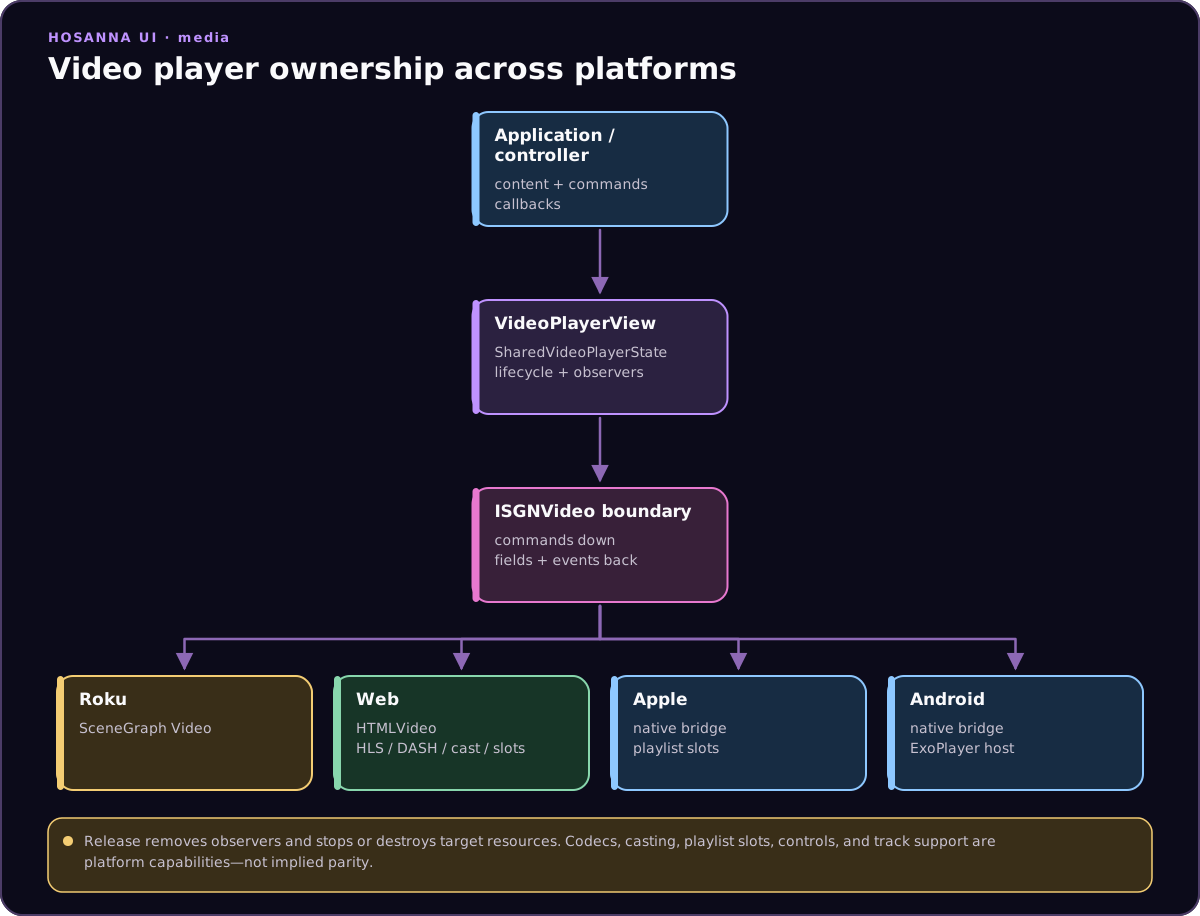
VideoPlayerwraps the active platform video renderer.WebViewhosts web content where the platform implements it.
These are lifecycle-bearing primitives, not decorative nodes. Supply the state objects and content required by their APIs, and release or replace them through the normal Hosanna view lifecycle.
Skeleton Views
Every BaseView has an isSkeleton state field. When it is true, Hosanna
builds the array returned by getSkeletonViews() instead of getViews().
SkeletonRectangle and SkeletonCircle are the supplied placeholder views.
protected override getSkeletonViews(): ViewStruct<ViewState>[] {
  return [
    SkeletonCircle({ id: 'avatar', radius: 60 }),
    SkeletonRectangle({
      id: 'title',
      translation: [140, 30],
      width: 320,
      height: 36,
    }),
  ];
}
Toggle the field around the asynchronous work that supplies the normal view:
protected loadData(): void {
  this.isSkeleton = true;
  this.contentService.getContentCategoryList()
    .then((pageData) => {
      this.pageData = pageData;
      this.isSkeleton = false;
    });
}
SkeletonRig
Source: hosanna-ui-samples-public/src/hosanna-ui-examples/rigs/views/SkeletonRig.ts@view('SkeletonRig')
export class SkeletonRigView extends BaseExampleScreenView<SkeletonRigState> {
@state isSkeleton: boolean = true;
protected override getViews(): ViewStruct<ViewState>[] {
return [
Rectangle({
width: 1920,
height: 1080,
color: '#000000',
}),
HGroup([
Label({
text: 'Skeleton Rig ',
}),
Label({
text: 'loaded',
})
])
.translation([0, 60])
.width(1920)
.horizAlignment(SGHorizontalAlignment.Center),
VGroup([
HGroup([
Mask([
Image({
imageUri: 'https://picsum.photos/500/300',
width: 120,
height: 120,
}),
])
.maskUri('pkg:/assets/images/circle_120.png')
.maskSize([120, 120]),
Spacer({ width: 20 }),
Label({
text: 'Some title',
width: 200,
height: 60,
}),
])
.vertAlignment(SGVerticalAlignment.Center)
.height(120),
Spacer({ height: 20 }),
Label({
text: `Ribeye meatloaf chislic, shoulder kielbasa cupim tongue bacon picanha bresaola andouille. T-bone turducken corned beef bacon kielbasa chuck buffalo.`,
fontKey: 'Smallest,30',
width: 500,
height: 120,
numLines: 3,
wrap: true,
color: '#ff0000',
}),
Spacer({ height: 20 }),
Rectangle({
width: 400,
height: 5,
color: '#ff0000',
}),
Spacer({ height: 20 }),
Image({
width: 500,
height: 300,
imageUri: 'https://picsum.photos/500/300',
}),
])
.id('contentContainer')
.canReceiveFocus(false)
.isSkeleton(this.isSkeleton)
.translation([300, 300]),
Button({
text: this.isSkeleton ? 'Loading...' : 'Reload data',
width: 300,
height: 60,
translation: [1200, 600],
})
.isInitialFocus()
.onClick(this.loadData.bind(this)),
];
}
protected override getSkeletonViews(): ViewStruct<ViewState>[] {
return [
//buildsketon views
SkeletonCircle({ translation: [0, 0], radius: 60 }),
SkeletonRectangle({ translation: [140, 30], width: 200, height: 60 }),
SkeletonRectangle({ translation: [0, 140], width: 500, height: 30 }), // Line 1
SkeletonRectangle({ translation: [0, 180], width: 500, height: 30 }), // Line 2
SkeletonRectangle({ translation: [0, 220], width: 400, height: 30 }), // Line 3 (shorter to simulate possible text wrapping)
SkeletonRectangle({ translation: [0, 280], width: 400, height: 5 }),
SkeletonRectangle({ translation: [0, 300], width: 500, height: 300 }),
];
}
onDidAddToAggregateView(view: IAggregateView): void {
console.info('SkeletonRigView added to aggregate view', view);
this.loadData();
}
private loadData() {
//! Simulate a data loading delay
this.isSkeleton = true;
// eslint-disable-next-line @typescript-eslint/no-explicit-any
const scope = {} as any;
scope.timerId = setTimeout(() => {
this.isSkeleton = false;
clearTimeout(scope.timerId);
}, 3000); //! change this to the desired delay
}
}