Level Scene Lifecycle
Hs2dLevelScene is the canonical base class for gameplay scenes that render an Hs2dWorld. It owns the transition from loading to a ready retained world and keeps restart behavior inside the existing allocation envelope.
Use it for new world or level games unless you are writing a small menu, diagnostics surface, or custom engine test.
For the per-frame input, simulation, camera, sprite, particle, telemetry, HUD, and render hooks, see Level Scene Frame Hooks.
What The Base Class Owns
Hs2dLevelScene owns shared gameplay plumbing:
| Concern | Base class behavior |
|---|---|
| Loading state | Runs loading input and optional asset polling until a world exists. |
| World reference | Stores the active Hs2dWorld and exposes isReady plus getWorld(). |
| Camera access | Exposes activeCamera, cameraX, cameraY, screen-to-world helpers, and tickSceneCamera(). |
| HUD | Owns an Hs2dHud and connects it to the world's text renderer when ready. |
| Assets | Accepts an Hs2dAssetGate, bundle id, and bundle URI resolver. |
| Audio | Carries an optional audio manager for level music and SFX. |
| Telemetry | Provides phase timer helpers and once-per-window stats hooks. |
| Particles | Updates a particle layer with registered native emitters. |
| Render template | Separates update hooks from world.render(screen). |
Game authors fill in the hooks. The base class decides when the hooks run.
Loading Phase
While this.world is undefined, update() runs this template:
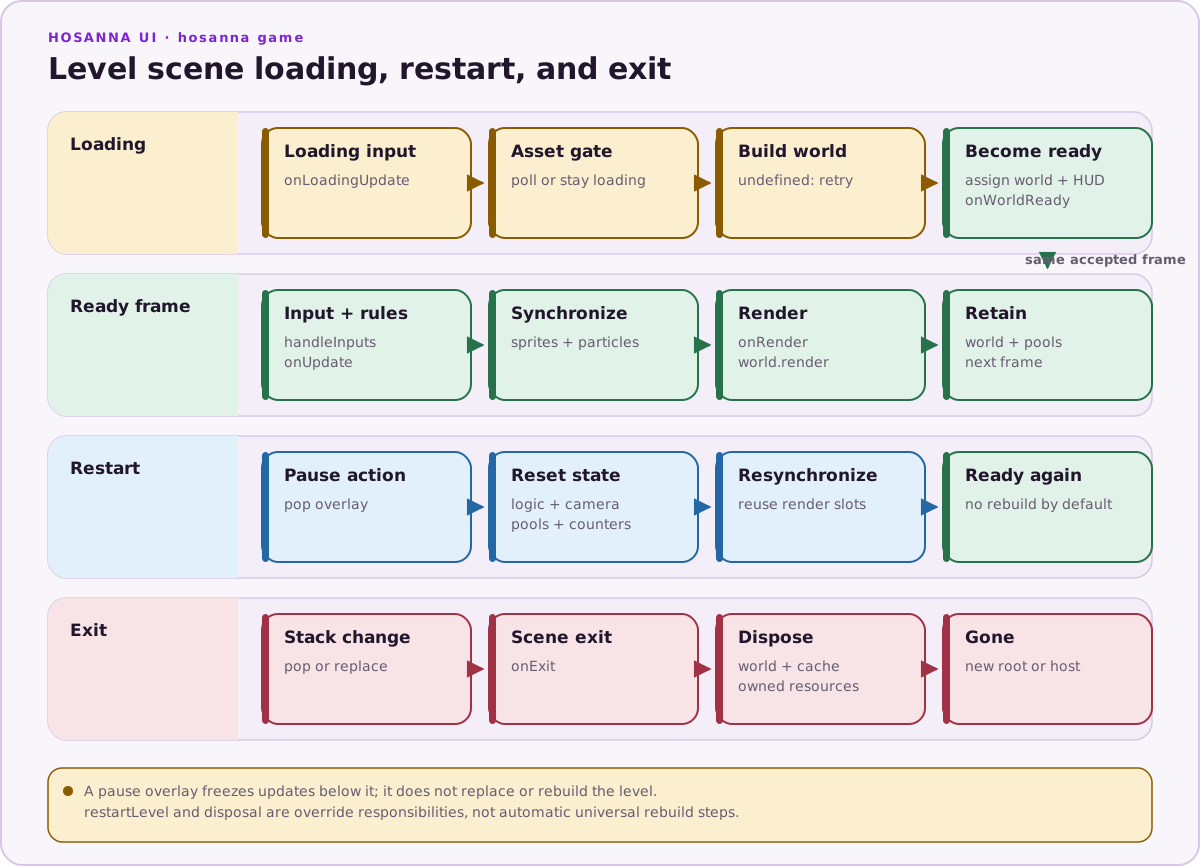
The important detail is that loading and world build are still part of update, not render. Render only draws the loading screen while the world is missing.
protected override onLoadingUpdate(deltaMs: number, inputs: GameInput[]): void {
  void deltaMs;
  for (let i = 0; i < inputs.length; i++) {
    const input = inputs[i];
    if (input.release) continue;
    if (input.isButton('back')) {
      this.context.navigateToMenu();
      return;
    }
  }
}

protected override drawLoadingStatus(screen: GameScreen): void {
  screen.Clear(0x101a33ff);
  this.hud.drawTextCentered(
    screen,
    this.statusText || 'Loading...',
    Math.floor(this.screenWidth / 2),
    Math.floor(this.screenHeight / 2),
    0xffffffff,
    this.hudFont
  );
}
Loading input should be conservative. Do not run gameplay actions before the world, sprite pools, and camera exist.
Build The World Once
buildWorld() should create the world and return it only after all required assets are ready. Prefer Hs2dWorldBuilder.fromLevel() for Tiled maps.
protected override buildWorld(): Hs2dWorld | undefined {
  if (!this.tryInitializeAssets()) {
    return undefined;
  }

  const assets = this.assetGate;
  if (!assets || !assets.poll()) {
    if (assets) {
      this.setLoadingStatus(assets.getStatusText());
    }
    return undefined;
  }

  const built = Hs2dWorldBuilder.fromLevel({
    level: this.loadedLevel as Hs2dLevel,
    assets,
    viewportWidth: this.screenWidth,
    viewportHeight: this.screenHeight,
    cameraX: this.cameraX,
    cameraY: this.cameraY,
    clearColor: 0x101a33ff,
    spriteLayerId: 'my-game-foreground',
    hud: this,
  });

  const world = built.world;
  world.setCameraController(this.cameraController);
  this.foregroundLayer = built.spriteLayer;
  this.playerSpritePool = this.createPlayerPool(this.foregroundLayer);
  return world;
}
Do asset resolution, Tiled reads, pool creation, layer lookup, and text prewarm setup here or in helpers called by this method. Do not perform that work every frame.
World Ready Hook
Use onWorldReady(world) when setup needs the base class to assign this.world and connect the HUD text renderer first.
protected override onWorldReady(world: Hs2dWorld): void {
  this.createFloatingScoreText(world.textRenderer);
  this.tickSceneCamera(0);
  this.updateSceneSprites();
  this.statusText = 'ready';
}
The base class assigns this.world and connects the HUD renderer before calling this hook. Keep world-dependent camera ticks and initial synchronization here unless buildWorld() deliberately assigns this.world itself.
Restart
Pause menus and debug tools call restartLevel(). Override it to reset logical state, camera state, pools, counters, and synchronized sprites.
override restartLevel(): void {
  this.playerX = this.startPlayerX;
  this.playerY = this.startPlayerY;
  this.score = 0;
  this.playerHealth = 100;
  this.projectiles.deactivateAll();
  if (this.particles) {
    this.particles.clear();
  }
  this.cameraX = this.startCameraX;
  this.cameraY = this.startCameraY;
  this.tickSceneCamera(0);
  this.updateSceneSprites();
}
Restart should not rebuild the whole world unless the level definition or assets changed. Reset state and reuse existing pools.
Do And Don't
Do:
- Extend
Hs2dLevelScenefor gameplay worlds. - Gate assets before building the world.
- Build layers, pools, and Tiled bindings once.
- Use
onWorldReady()for setup that requiresthis.world. - Reset and reuse the existing world on restart.
Don't:
- Load bitmaps, regions, levels, or manifests after entering ready gameplay.
- Tick a world-dependent camera inside
buildWorld()before the base class assignsthis.world. - Rebuild the world for a state-only restart.
- Open pause by replacing the level scene; push a pausing overlay instead.
Source References
| Source | Lifecycle facts to verify |
|---|---|
../games/hosanna-ui/src/hosanna-game/hosanna2d/game/Hs2dLevelScene.ts | Loading state, isReady, asset gate polling, world assignment, HUD hookup, world-ready hook, and restart hook. |
../games/hosanna-ui/src/hosanna-game/hosanna2d/game/Hs2dScene.ts | Base scene hooks inherited by level scenes. |
../hosanna-ui-game-samples-public/src/hosanna-game-examples/native-shoot-em-up/VerticalShooterLevelScene.ts | Complete level implementation: bundle readiness, world build, world-ready setup, restart, and disposal. |
../hosanna-ui-game-samples-public/src/hosanna-game-examples/native-shoot-em-up/VerticalShooterPauseScene.ts | How pause overlays call back into restartLevel() and leave the level scene alive underneath. |