ViewJsonAnimator
ViewJsonAnimator is a lightweight, high-performance animator that updates SceneGraph renderer fields directly from one set of values to another. It operates on a map of view IDs to renderer instances and animates field values over time. This makes it ideal for simple property animations where you know the renderer and fields to tween.
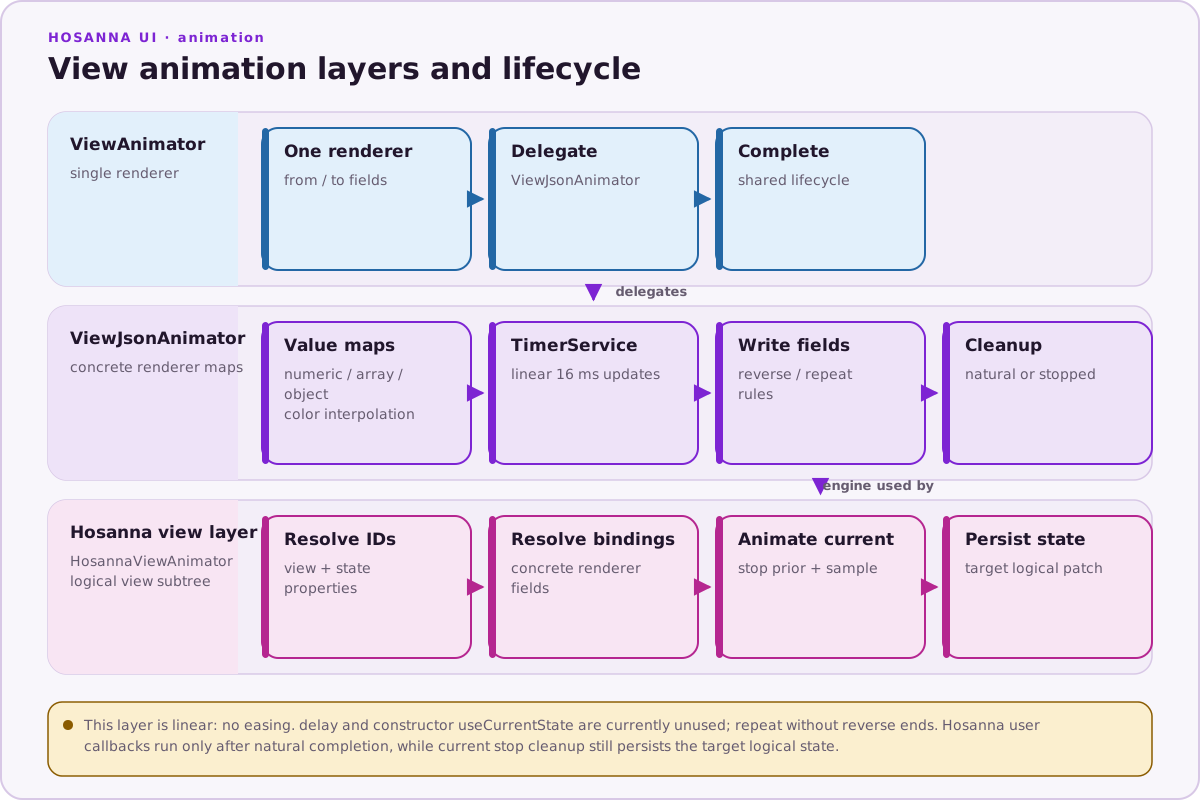
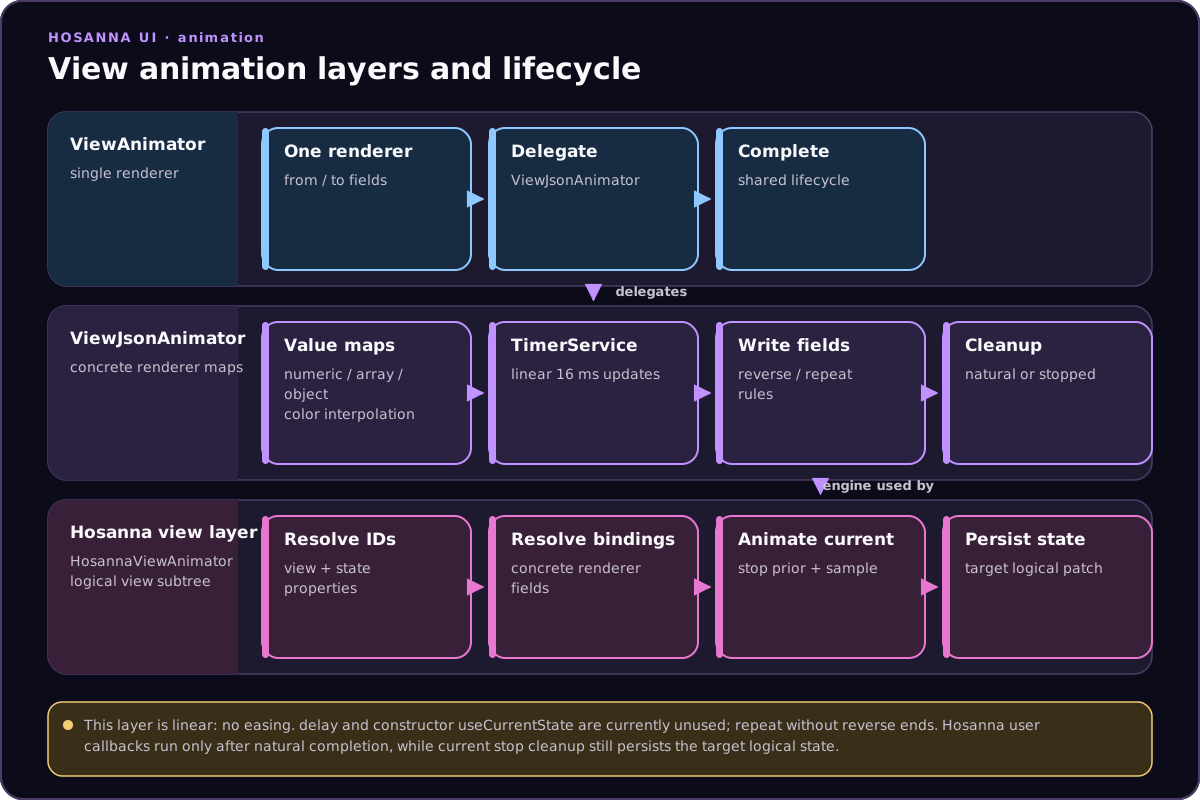
Key features:
- Animates one or many SG nodes at once using JSON maps
- Supports reversing animations and reverse-repeat loops
- Can start from current renderer values
- Advances in 16 ms steps while registered with
TimerService
Core API (summary)
animateTo(values, duration, options?): retarget from current renderer values with{ viewId: { field: value } }maps.start(resume?, useCurrentState?): Begin; optionally sample current values.stop(),pause(),resume().
Live Example
AnimatedRectangle
Source: hosanna-ui-samples-public/src/hosanna-ui-examples/rigs/animation/AnimatedRectangle.ts@view('AnimatedRectangle')
export class AnimatedRectangleView extends BaseExampleScreenView<AnimatedRectangleState> {
@state color: string = '#000000';
private animator: ViewJsonAnimator | undefined = undefined;
canReceiveFocus = false;
compositeView = false
protected override createRenderer(): ISGNRectangle {
return this.reserveRenderer('Rectangle') as ISGNRectangle;
}
override layoutAt(x: number, y: number, parentWidth: number, parentHeight: number) {
super.layoutAt(x, y, parentWidth, parentHeight);
}
startAnimation() {
if (!this.animator) {
this.initDefaultAnimator();
}
if (this.animator) {
this.animator.start();
}
}
stopAnimation() {
if (this.animator) {
this.animator.stop();
}
}
animateTo(values: JsonData, duration: number, options?: Partial<AnimationOptions>) {
if (!this.animator) {
this.initDefaultAnimator();
}
if (this.animator) {
this.animator.animateTo(values, duration, options);
}
}
private initDefaultAnimator() {
if (!this.animator && this.renderer) {
this.animator = new ViewAnimator(this.renderer, {}, {}, { duration: 1000 });
}
}
initAnimator(toValues: JsonData = {}, fromValues: JsonData = {}, options: AnimationOptions = { duration: 1000 }): void {
if (!this.animator && this.renderer) {
this.animator = new ViewAnimator(this.renderer, toValues, fromValues, options);
}
};
}Press Pulse to widen and flash the rectangle using reverse; press Blue to restore its color.
animateTo() always samples current renderer fields, so it can retarget without
jumping. When calling start() directly, pass true as its second argument to
sample current fields.
The current implementation stores delay and constructor
useCurrentState options but does not read them during ticks. A non-reversing
animation also stops at its target even when repeat is true. Use
reverse: true, repeat: true for a repeating ping-pong animation.
Single-view convenience: ViewAnimator
If you want to animate a single renderer, use ViewAnimator (a thin wrapper over ViewJsonAnimator).
Also note: BaseView.animateTo helper
For orchestrated, state-driven animations across many logical views, prefer
HosannaViewAnimator.
Stop or retarget existing animations before launching new ones on the same view to avoid tug-of-war.