Data Sources, Triggers, and Callbacks
CollectionViewDataSource is the runtime model for a CollectionView. It owns the ordered row list, row IDs, row versions, loading state, and pending change notifications. Rows define their visual settings, item data, dynamic loading behavior, trigger hooks, and lifecycle callbacks.
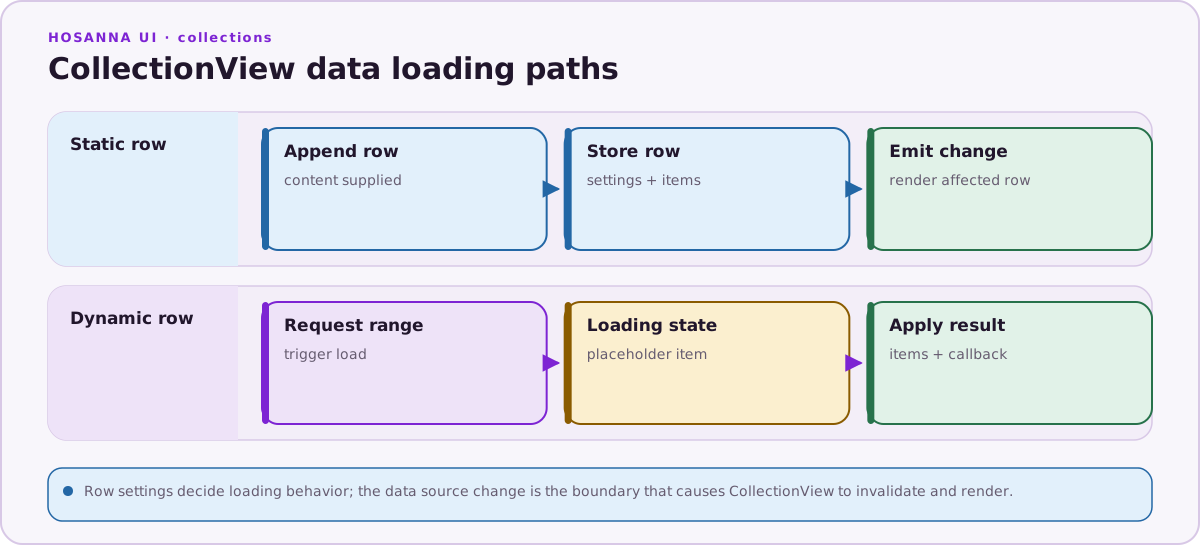
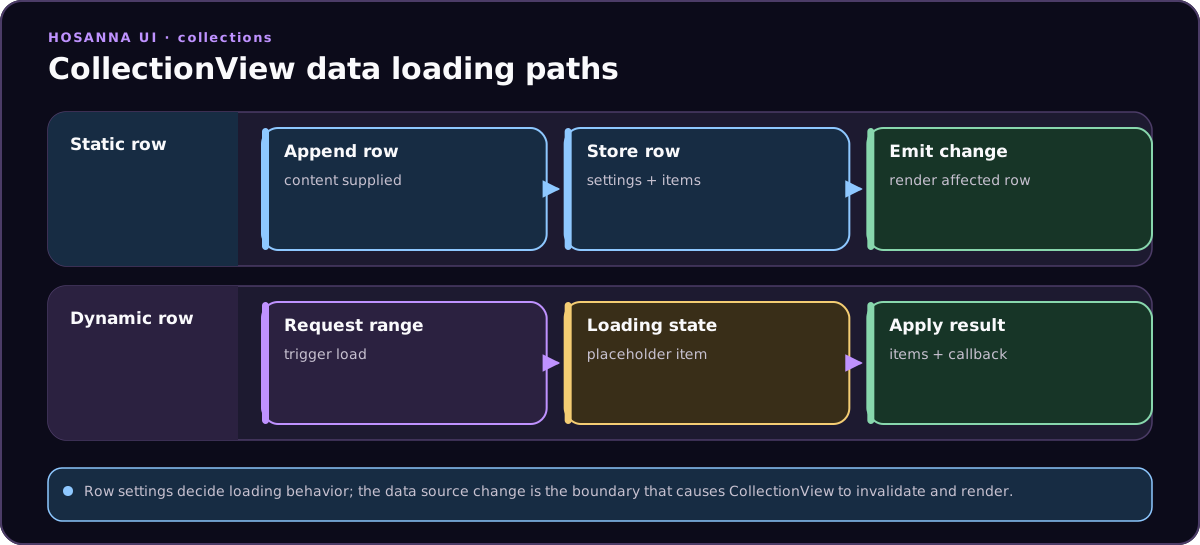
Rows enter the data source as static items or dynamic loading configs, then resolve into rendered rows, cells, callbacks, and events.
The implementation source of truth lives in hosanna-ui/src/hosanna-list. The most useful working examples are in hosanna-ui/src/hosanna-ui-examples/rigs/collection-view, especially:
DataSourceParamsRig.tsfor parameterized dynamic rows, HTTP options, eager/lazy loading, function-backed data sources, and request cancellation.VariableCellWidthRig.tsfor row callbacks, variable-width rows, and dynamic mutation controls.CollectionViewDSLTabRig.tsandSeasonListRig.tsfor row/item triggers, tab switching, nested tab groups, and directional focus triggers.CollectionViewMixedCellStyleKeysRig.tsfor rows where items choose different cell style keys.- The collection-view style inspection rig for building and inspecting row settings interactively.
Create a Data Source
Create the data source in state, pass it to CollectionView, then mutate the data source as app data arrives.
@state private dataSource = new CollectionViewDataSource([]);

protected override getViews(): ViewStruct<ViewState>[] {
  return [
    CollectionView({ id: 'homeRails' })
      .isInitialFocus()
      .dataSource(this.dataSource)
      .onItemSelected(event => {
        const item = event.view.getFocusedDataSourceItem();
        this.openDetails(item);
      }),
  ];
}
Rows can be provided in the constructor, added with appendRows, or replaced later with setInitialData or replaceAllRows.
this.dataSource.appendRows(rows, undefined, true);
Use applyNow = true when the UI should process the change immediately. Use applyNow = false when you are making several changes and want to flush one combined update with applyUpdates().
Row Shape
Every row has an id, data, items, and either a settingsKey or inline settings. The row data is for row-level metadata such as a header label. The items array is the cell data for that row.
const row: ICollectionViewDataSourceRow<
  { label: string },
  { id: string; title: string; imageUrl: string }
> = {
  id: 'continue-watching',
  settingsKey: 'rows.regular',
  data: { label: 'Continue watching' },
  items: videos,
};
Common row fields:
| Field | Purpose |
|---|---|
id | Stable row identifier used by mutations, triggers, and tab resolution. |
settingsKey | AppConfig key for row layout, cell style, focus behavior, header behavior, tab grouping, and other row settings. |
settings | Inline or resolved row settings. settingsKey plus settingsOverrides is the usual authoring path. |
settingsOverrides | Per-row overrides applied on top of the AppConfig row settings. |
data | Row-level data, usually used by headers and fragments. |
items | Cell data. Each item must have an id; dynamic rows may start with an empty array. |
isHidden | Keeps the row in the data source while hiding it from the rendered list. Tab rigs use this heavily. |
isEnabled | Enables or disables interaction for the row. |
params | Row-scoped values available to {{...}} substitution. |
dataSourceConfig | Dynamic loading configuration for HTTP or function-backed rows. |
callbacks | Row lifecycle hooks such as onMount, onContentReady, and onVariableWidthContentReady. |
selectTriggers, focusTriggers, and key triggers | Declarative trigger hooks that run when the row or item receives selection, focus, options, or directional key events. |
Row settings are documented in Rows and Settings. Data-source rows can also set tab and section metadata directly, but launch apps should prefer AppConfig row settings for shared layout concepts.
Static Rows
Static rows carry their items inline. Use them for local menus, fixed tabs, preloaded content, or rows whose data is already available.
this.dataSource.appendRows([
  {
    id: 'settings-menu',
    settingsKey: 'rows.regularText',
    data: { label: 'Settings' },
    items: [
      { id: 'profile', title: 'Profile' },
      { id: 'devices', title: 'Devices' },
      { id: 'sign-out', title: 'Sign out' },
    ],
  },
], undefined, true);
Static rows can still use triggers and callbacks. VariableCellWidthRig.ts uses static rows with onContentReady and onVariableWidthContentReady callbacks to calculate per-cell widths.
Dynamic Rows
Dynamic rows use dataSourceConfig. The row starts without real items, the data source adds loading items, and DataSourceRowLoadingManager loads content when the row is requested.
{
  id: 'latest',
  settingsKey: 'rows.regularDataSource',
  data: { label: 'Latest' },
  items: [],
  params: {
    route: {
      value: 'posts',
      type: DataSourceParamType.String,
    },
  },
  dataSourceConfig: {
    type: CollectionViewDataSourceType.Dynamic,
    url: 'https://jsonplaceholder.typicode.com/{{route}}',
    loadingStrategy: CollectionViewDataSourceLoadingStrategy.Lazy,
  },
}
IDataSourceConfig supports:
| Field | Purpose |
|---|---|
type | CollectionViewDataSourceType.Static or CollectionViewDataSourceType.Dynamic. Dynamic rows are loaded through the row loading manager. |
loadingStrategy | Eager starts loading when the row is added or mounted. Lazy loads when the row enters the viewport. Lazy is the default behavior when no strategy is set. |
url | HTTP URL or func://callbackName?... URL. {{...}} expressions are substituted before loading. |
loadMoreUrl | URL used for pagination or incremental loading flows. |
method | HTTP method. Supported commands map to GET, POST, PUT, PATCH, DELETE, and HEAD; GET is the default. |
headers | Header object. Values can use {{...}} substitution. |
body | Request body. Strings nested inside objects and arrays can use {{...}} substitution. |
postProcessFunction | Function pointer called by the HTTP command with the response. Use this to normalize or annotate the response before row items are parsed. |
contextData | Extra data passed through as response.contextData, often used to identify the row or request key. |
Dynamic row responses can be an array, { items: [...] }, or { data: [...] }. The row loading manager assigns item IDs during the pre-success callback and then calls dataSource.onContentReady(...) followed by dataSource.addLoadedItemsToRow(...).
Eager and Lazy Loading
Use eager loading for content that should already be present by the time the user reaches it. Use lazy loading for below-the-fold rails, long pages, and expensive requests.
{
  id: 'featured',
  settingsKey: 'rows.regularDataSource',
  data: { label: 'Featured' },
  items: [],
  dataSourceConfig: {
    type: CollectionViewDataSourceType.Dynamic,
    url: 'https://picsum.photos/v2/list?page=1&limit=10',
    loadingStrategy: CollectionViewDataSourceLoadingStrategy.Eager,
  },
}
{
  id: 'more-like-this',
  settingsKey: 'rows.regularDataSource',
  data: { label: 'More like this' },
  items: [],
  dataSourceConfig: {
    type: CollectionViewDataSourceType.Dynamic,
    url: 'https://picsum.photos/v2/list?page=2&limit=10',
    loadingStrategy: CollectionViewDataSourceLoadingStrategy.Lazy,
  },
}
DataSourceParamsRig.ts shows both strategies side by side. VariableCellWidthRig.ts combines eager and lazy dynamic rows with variable-width callbacks.
Parameters
Rows can define typed params. A param has a value, type, optional options, and optional metadata in data.
params: {
  pageNumber: {
    value: 2,
    type: DataSourceParamType.Number,
  },
  sortOrder: {
    value: 'newest',
    type: DataSourceParamType.Picker,
    options: ['newest', 'oldest', 'trending', 'a-z'],
    data: { icon: 'sort' },
  },
  includePremium: {
    value: true,
    type: DataSourceParamType.Boolean,
  },
}
Use {{paramName}} to substitute a row param into the URL, headers, or body.
dataSourceConfig: {
  type: CollectionViewDataSourceType.Dynamic,
  url: 'https://picsum.photos/v2/list?page={{pageNumber}}&limit=20',
  loadingStrategy: CollectionViewDataSourceLoadingStrategy.Lazy,
}
Supported param protocols:
| Expression | Source |
|---|---|
{{route}} | The current row's params.route.value. |
{{dataSource://some.path}} | A property on the CollectionViewDataSource. |
{{row://rowId.some.path}} | A property on another row in the same data source. |
{{app://some.path}} | A property on the current app instance. |
{{ioc://serviceKey.some.path}} | A property resolved from the IoC container. |
Headers and bodies are resolved recursively:
dataSourceConfig: {
  type: CollectionViewDataSourceType.Dynamic,
  url: 'https://api.example.com/search',
  method: 'POST',
  headers: {
    'Content-Type': 'application/json',
    'Authorization': 'Bearer {{ioc://authService.accessToken}}',
  },
  body: {
    category: '{{categoryId}}',
    sort: '{{sortOrder}}',
    filters: {
      premium: '{{ioc://accountService.isPremium}}',
    },
  },
}
Supported param types are String, Number, Boolean, and Picker. Picker params should provide an options array. DataSourceParamsRig.ts includes examples for string params, number params, picker params, header substitution, nested POST bodies, and deep path resolution.
Function Data Sources
Rows can load from a function instead of HTTP by using a func:// URL. The row loading manager parses the function name and query params, looks up the callback from registerCallbackFunctions(), and passes an IDataSourceContext.
{
  id: 'filtered-posts',
  settingsKey: 'rows.regularDataSource',
  data: { label: 'Posts by user' },
  items: [],
  dataSourceConfig: {
    type: CollectionViewDataSourceType.Dynamic,
    url: 'func://getSubsetItems?userId=3',
    loadingStrategy: CollectionViewDataSourceLoadingStrategy.Lazy,
  },
}
The callback receives:
interface IDataSourceContext {
  id: string;
  datasource: CollectionViewDataSource;
  row: ICollectionViewDataSourceRow;
  view: BaseView<ViewState>;
  params: JsonData;
}
Return an item array, { items: [...] }, or { data: [...] }. The manager converts the result to the same response shape as an HTTP load. Override DataSourceRowLoadingManager.registerCallbackFunctions() in app tooling or a project-specific subclass to expose your own function-backed loaders.
Post-Process Functions
Use postProcessFunction when an HTTP response needs app-specific normalization, logging, or metadata. The function receives the fetch response and can read response.contextData.
export function normalizeRailResponse(response: IHsFetchResponse) {
  const rowId = response.contextData?.rowId;
  console.info('Loaded row', rowId);
}

const row = {
  id: 'featured',
  settingsKey: 'rows.regularDataSource',
  data: { label: 'Featured' },
  items: [],
  dataSourceConfig: {
    type: CollectionViewDataSourceType.Dynamic,
    url: 'https://picsum.photos/v2/list?page=1&limit=10',
    loadingStrategy: CollectionViewDataSourceLoadingStrategy.Eager,
    postProcessFunction: normalizeRailResponse,
    contextData: { rowId: 'featured' },
  },
};
DataSourceParamsRig.ts uses samplePostProcessFunction for this shape.
Loading State and Cancellation
Dynamic rows maintain dataSourceState:
| Field | Meaning |
|---|---|
itemState | pending, loading, loaded, or failed. |
itemCount | Total item count known by the data source. |
loadedCount | Number of loaded real items. |
hasMore | Whether more items are expected. |
failCount | Number of failed load attempts. |
lastUpdateTime | Timestamp of the latest state update. |
DataSourceRowLoadingManager prevents duplicate loads for the same row and stores cancellation tokens for active requests.
@inject() dataSourceRowLoadingManager!: DataSourceRowLoadingManager;

Button({
  id: 'cancelAllRequestsButton',
  text: 'Cancel All Requests',
  onClick: () => {
    this.dataSourceRowLoadingManager.cancelAllRowLoads(this.dataSource);
  },
});
The default failure path marks the row failed and calls addLoadedItemsToRow(row.id, [], true) so loading cells are removed. Override onRequestRowLoadFailure on a project-specific loading manager when the app needs retries, custom error cells, or telemetry.
Mutations
CollectionViewDataSource exposes row and item mutations for live apps, rigs, filters, and detail-driven updates.
dataSource.appendRows(rows, index, applyNow);
dataSource.setInitialData(rows);
dataSource.replaceAllRows(rows);
dataSource.clear();

dataSource.appendItemsToRow(rowId, items, applyNow);
dataSource.addLoadedItemsToRow(rowId, items, applyNow);
dataSource.removeItemsFromRow(rowId, startIndex, endIndex, applyNow);
dataSource.updateItem(rowId, itemIndex, newItem, applyNow);

dataSource.removeRow(rowId, applyNow);
dataSource.moveRowToIndex(rowId, newIndex, applyNow);
dataSource.changeRowEnabled(rowId, isEnabled, applyNow);
dataSource.ChangeRowHidden(rowId, isHidden, applyNow);
dataSource.markRowAsInvalid(rowId, applyNow);
dataSource.UpdateRowConfiguration(row, data, applyNow);

dataSource.applyUpdates();
Update an item without changing its ID
An item's id is its logical identity. Keep it stable when presentation data
changes, including labels, progress, selection state, or cellSettingsKey, and
pass the changed item through updateItem():
const row = this.dataSource.getRows()[rowIndex];
const currentItem = row.items[itemIndex];
const updatedItem = {
  ...currentItem,
  id: currentItem.id,
  isSelected: true,
  cellSettingsKey: 'cells.filters.selected',
};

this.dataSource.updateItem(row.id, itemIndex, updatedItem, false);
this.dataSource.applyUpdates();
updateItem() advances an internal content revision and emits an item update.
If the mounted cell still has the same item ID, CollectionView compares that
revision and refreshes the cell when it changed. This preserves the normal
ID-only fast path for items that have not been updated.
Do not change the ID or set Hosanna's internal revision field to force a
refresh. Directly mutating an object in row.items also does not notify the
CollectionView. Call updateItem() after the mutation instead. The method
supports either a replacement object, as above, or the same mutated object.
Pass true as applyNow for one immediate update. For several related
changes, pass false to each call and finish with one applyUpdates(). A row
that uses per-item cellSettingsKey values must also enable
useMixedCellStyleKeys in its row settings.
VariableCellWidthRig.ts shows live mutation controls:
this.dataSource.appendItemsToRow(this.selectedRowId, [newItem], true);
this.dataSource.removeItemsFromRow(this.selectedRowId, 1, 2, true);
this.dataSource.updateItem(this.selectedRowId, 1, updatedItem, true);
replaceAllRows records the currently focused row and item before replacing data, then restores the same indices when they are still valid.
CollectionView Events
Collection events are imperative handlers on the CollectionView instance. Use them when the view class should respond directly to focus, selection, long press, options, row load, or motion progress.
CollectionView({ id: 'homeRails' })
  .dataSource(this.dataSource)
  .onRowFocus(event => console.info('row focus', event.rowIndex))
  .onItemFocus(event => console.info('item focus', event.rowIndex, event.itemIndex))
  .onItemSelected(event => this.openItem(event.view.getFocusedDataSourceItem()))
  .onItemLongPressSelected(event => this.showActions(event.view.getFocusedDataSourceItem()))
  .onOptionsKeyPressed(event => this.showOptions(event.rowIndex, event.itemIndex));
Events include type, rowIndex, optional itemIndex, optional percent, optional direction, and for row-load events the related dataSource and row.
Triggers
Triggers are declarative row or item hooks. They can be strings in the collection-view DSL or function pointers. The DSL manager checks the row first, then the focused item. Row settings can also provide triggers.
Supported trigger arrays:
| Trigger | Runs when |
|---|---|
selectTriggers | The row/item is selected. |
longPressSelectTriggers | The row/item is long pressed. |
focusTriggers | The row/item receives focus. |
optionsTriggers | The Options key is pressed. |
leftKeyTriggers | Left input is handled for the focused row/item. |
rightKeyTriggers | Right input is handled for the focused row/item. |
upKeyTriggers | Up input is handled for the focused row/item. |
downKeyTriggers | Down input is handled for the focused row/item. |
String triggers use context://verb:arg1:arg2:
{
  id: 'tabRow',
  settingsKey: 'rows.regularHeaderDSL',
  data: { label: 'Tabs' },
  items: [
    { id: 'filmsTab', title: 'Films', tabId: 'films' },
    { id: 'seasonsTab', title: 'Seasons', tabId: 'seasons' },
  ],
  focusTriggers: ['ds://selectTabItem:tabItems'],
}
Available DSL commands:
| Command | Effect |
|---|---|
app://play:mediaId | Dispatches app-level playback behavior. |
app://showScreen:ScreenClassName | Dispatches app-level screen navigation behavior. |
app://showDialog:DialogClassName | Shows a dialog from a trigger. |
app://customAction:actionName | Dispatches a named app action. |
cv://scrollToIndices:rowIndex:itemIndex | Animates the collection to a row/item. |
cv://jumpToIndices:rowIndex:itemIndex | Jumps the collection to a row/item. |
cv://setContainerClippingRect:x:y:width:height | Updates the collection container clipping rect. |
cv://focusRow:previous, cv://focusRow:next, cv://focusRow:current | Moves or consumes directional focus at the row level. |
ds://setRowHidden:true:rowId | Hides or shows a row. |
ds://setRowFocusable:rowId:true | Declares row focusability intent for custom data-source managers. |
ds://selectTabItem:tabGroupName | Shows the row matching the focused item's tabId and hides sibling rows in the tab group. |
ds://filterItems:rowId | Dispatches a filter hook for project-specific DSL managers. |
Use string triggers when content or AppConfig should drive behavior without TypeScript code at the call site. CollectionViewDSLTabRig.ts uses focusTriggers: ['ds://selectTabItem:tabItems'] for tabs. SeasonListRig.ts uses rightKeyTriggers: ['cv://focusRow:next'] and leftKeyTriggers: ['cv://focusRow:previous'] for two-column season navigation.
Use function-pointer triggers for TypeScript-owned behavior. This is the preferred shape when the callback lives in the view class and does not need to be addressable from AppConfig or JSON data.
private openFocusedItem: CollectionViewTriggerHandler = (view, row, rowIndex, itemIndex) => {
  const item = (view as ICollectionView).getDataSourceItemForIndex(rowIndex ?? 0, itemIndex ?? 0);
  this.openDetails(item);
};

private makeRail(): ICollectionViewDataSourceRow {
  return {
    id: 'featured',
    settingsKey: 'rows.regular',
    data: { label: 'Featured' },
    items: this.featuredItems,
    selectTriggers: [this.openFocusedItem],
  };
}
String and function-pointer triggers can be mixed in one array. They execute in order. If a function-pointer trigger throws, the DSL manager logs the error and continues processing the remaining triggers.
Row Callbacks
Row callbacks run during row lifecycle and layout work. They are different from triggers: callbacks are about row rendering and content readiness, while triggers are about user interaction.
Supported callbacks:
| Callback | Shape | Purpose |
|---|---|---|
onMount | RowCallbackHandler[] | Runs when the row mounts. |
onContentReady | RowCallbackHandler[] | Runs when static content is ready or dynamic content has loaded. |
onVariableWidthContentReady | VariableWidthRowCallbackHandler | Returns { widths, positions } for variable-width horizontal rows. |
Callback handler types:
type RowCallbackHandler = (
  row: IBaseCollectionViewRow,
  content: ICollectionViewDataSourceRow<any, IIdentifiable>
) => void;

type VariableWidthRowCallbackHandler = (
  row: IBaseCollectionViewRow,
  content: ICollectionViewDataSourceRow<any, IIdentifiable>
) => { widths: number[]; positions: number[] };
Registered Callbacks
Registered callbacks are named callbacks stored in IRowCallbacksProvider. This shape is useful when row data comes from JSON, AppConfig, tools, or sample content that cannot hold a TypeScript function pointer.
@inject() rowCallbacksProvider!: IRowCallbacksProvider;

private registerCallbacks(): void {
  this.rowCallbacksProvider.registerRowCallback(
    RowCallbackType.OnContentReady,
    'setupVariableCellWidths',
    (row, content) => {
      console.debug('content ready', row.id, content.items.length);
    }
  );

  this.rowCallbacksProvider.registerRowCallback(
    RowCallbackType.OnVariableWidthContentReady,
    'measureVariableWidths',
    (row, content) => {
      const widths = content.items.map(item => this.measureItem(item));
      const positions = widths.reduce<number[]>((acc, width, index) => {
        acc.push(index === 0 ? 0 : acc[index - 1] + widths[index - 1] + row.cellPadding);
        return acc;
      }, []);
      return { widths, positions };
    }
  );
}
Rows reference registered callbacks by name:
{
  id: 'variable-width-row',
  settingsKey: 'rows.textDataSourceVariableWidth',
  data: { label: 'Variable width' },
  items,
  callbacks: {
    onContentReady: ['setupVariableCellWidths'],
    onVariableWidthContentReady: 'measureVariableWidths',
  },
}
VariableCellWidthRig.ts uses this registered-callback style.
Function-Pointer Callbacks
Function-pointer callbacks keep behavior close to the view class and avoid string registration. Prefer this style for TypeScript-authored rows.
private onRailContentReady: RowCallbackHandler = (row, content) => {
  console.info('ready', row.id, content.items.length);
};

private measureVariableWidthCells: VariableWidthRowCallbackHandler = (row, content) => {
  const widths: number[] = [];
  const positions: number[] = [];
  let x = 0;

  for (const item of content.items) {
    const width = this.measureTitle(item.title) + 48;
    widths.push(width);
    positions.push(x);
    x += width + row.cellPadding;
  }

  return { widths, positions };
};

private makeVariableWidthRow(): ICollectionViewDataSourceRow {
  return {
    id: 'tags',
    settingsKey: 'rows.textDataSourceVariableWidth',
    data: { label: 'Tags' },
    items: this.tags,
    callbacks: {
      onContentReady: [this.onRailContentReady],
      onVariableWidthContentReady: this.measureVariableWidthCells,
    },
  };
}
Registered callback names and function pointers can be mixed for onMount and onContentReady arrays:
callbacks: {
  onMount: ['trackMountedRow', this.attachRuntimeMetadata],
  onContentReady: ['setupAnalytics', this.onRailContentReady],
}
onVariableWidthContentReady takes one callback entry, either a registered name or a function pointer.
Variable-Width Rows
Variable-width rows require row settings with isVariableWidth: true. The callback returns one width and one X position per item.
{
  id: 'dynamic-lazy-floating',
  settingsKey: 'rows.textDataSourceVariableWidthFloating',
  data: { label: 'Dynamic Lazy' },
  items: [],
  params: {
    route: {
      value: 'posts',
      type: DataSourceParamType.String,
    },
  },
  dataSourceConfig: {
    type: CollectionViewDataSourceType.Dynamic,
    url: 'https://jsonplaceholder.typicode.com/{{route}}',
    loadingStrategy: CollectionViewDataSourceLoadingStrategy.Lazy,
  },
  callbacks: {
    onContentReady: ['setupVariableCellWidths'],
    onVariableWidthContentReady: 'measureVariableWidths',
  },
}
In VariableCellWidthRig.ts, the variable-width callback measures each title, adds horizontal padding, and computes cumulative positions using row.cellPadding.
Tab Rows and Nested Navigation
Tab switching is data-source driven. The focused tab item needs a tabId, and content rows need matching IDs plus parent tab-group settings.
{
  id: 'tabRow',
  settingsKey: 'rows.regularHeaderDSL',
  data: { label: 'Tabs' },
  items: [
    { id: 'supplementsTab', title: 'Supplements', tabId: 'supplements' },
    { id: 'collectionsTab', title: 'Collections', tabId: 'collections' },
  ],
  focusTriggers: ['ds://selectTabItem:tabItems'],
}
When ds://selectTabItem:tabItems runs, the DSL manager reads the focused item's tabId, shows the matching content row, hides sibling rows for that tab group, and updates the selector's current tab state. Nested tabs work the same way: a selected parent row can reveal another tab selector, and that selector can reveal its own dependent content rows.
Directional key triggers can steer focus between related rows:
{
  id: 'season-tabs',
  settingsKey: 'rows.tabsHeaderSecondary',
  data: { label: 'Seasons' },
  items: seasonItems,
  rightKeyTriggers: ['cv://focusRow:next'],
  focusTriggers: ['ds://selectTabItem:tabItemsSecondary'],
}

{
  id: 'row-season-1',
  settingsKey: 'rows.tabsContentSecondary',
  data: { label: 'Season 1' },
  items: episodeItems,
  leftKeyTriggers: ['cv://focusRow:previous'],
}
SeasonListRig.ts and seasonsData.ts are the best source for this pattern.
Mixed Cell Styles
Rows can allow each item to choose its own cell style key by setting useMixedCellStyleKeys: true in row settings. Each item can then include cellSettingsKey.
{
  id: 'mixed-style-row',
  settingsKey: 'rows.mixedCellStyles',
  data: { label: 'Mixed styles' },
  items: [
    { id: 'hero', title: 'Hero', cellSettingsKey: 'cells.posterLarge' },
    { id: 'tile', title: 'Tile', cellSettingsKey: 'cells.posterSmall' },
  ],
}
Use this for editorial rows, ad insertions, featured cards, and rows where the first item is visually different from the rest. See CollectionViewMixedCellStyleKeysRig.ts.
Mixed Focus Settings
Rows can also allow each item to override focus indicator art, blend color, feedback offsets, or focused scale by setting useMixedFocusSettings: true in row settings. Each item then provides a partial focusSettings object:
{
  id: 'mixed-focus-row',
  settingsKey: 'rows.editorial',
  settingsOverrides: {
    useMixedFocusSettings: true,
  },
  data: { label: 'Mixed focus' },
  items: [
    {
      id: 'hero',
      title: 'Hero',
      focusSettings: {
        indicatorBlendColor: '#FFCC00',
        focusedScale: 1.08,
      },
    },
    { id: 'standard', title: 'Standard' },
  ],
}
Use this when one row mixes editorial cells that need different focus footprints without splitting the content into separate rows.
Programmatic Navigation
Use collection methods when the view class controls navigation directly:
jumpToRow(rowIndex, itemIndex?, force?): move immediately without animation.scrollToRow(rowIndex, itemIndex?, force?): animate toward a row and item.renderForIndices(rowIndex, itemIndex, force?): force rendering around a target index pair.
Use DSL triggers when data should control navigation:
rightKeyTriggers: ['cv://focusRow:next'];
leftKeyTriggers: ['cv://focusRow:previous'];
selectTriggers: ['cv://jumpToIndices:3:0'];
Choosing the Right Hook
| Need | Use |
|---|---|
| Open a detail screen from TypeScript | onItemSelected or a function-pointer selectTriggers callback. |
| Let JSON/AppConfig rows open screens, dialogs, or tab content | String triggers such as app://showScreen:DetailsScreen or ds://selectTabItem:tabItems. |
| Load row items from an HTTP endpoint | dataSourceConfig with an HTTP url. |
| Load row items from app code or cached data | dataSourceConfig.url = 'func://callbackName?...'. |
| Add auth headers, request bodies, or filters | params, headers, and body with {{...}} substitution. |
| Run layout work after data arrives | callbacks.onContentReady. |
| Calculate per-cell widths | callbacks.onVariableWidthContentReady plus row settings with isVariableWidth: true. |
| Hide/show rows for tabs or filters | ChangeRowHidden, ds://selectTabItem, or a project-specific DSL manager. |
| Perform several data changes at once | Mutate with applyNow = false, then call applyUpdates(). |
Launch Checklist
- Give every row and item a stable
id. - Prefer
dataSourceConfigfor dynamic rows. - Use
CollectionViewDataSourceLoadingStrategy.Eageronly for content that should load immediately. - Use
paramsand protocol substitution instead of constructing many one-off URLs. - Prefer function-pointer callbacks and triggers for TypeScript-authored rows.
- Use registered callback names when row definitions must come from AppConfig, JSON, or tooling output.
- Keep trigger strings small and declarative; put complex behavior in TypeScript.
- Test tab and directional-key triggers in the collection-view rigs before copying them into app screens.
- Keep item IDs stable when data changes, and call
updateItem()to refresh the mounted cell. - Batch related mutations with
applyNow = falseand flush once withapplyUpdates().