Rows, Settings, and Focus
Rows and Settings
A data source row points to AppConfig by settingsKey. When settingsOverrides is present, Hosanna resolves the base row style and deep-merges the row override into it before rendering.
For the AppConfig reference pages, see Rows and Cells. This page focuses on how CollectionView consumes those styles at runtime.
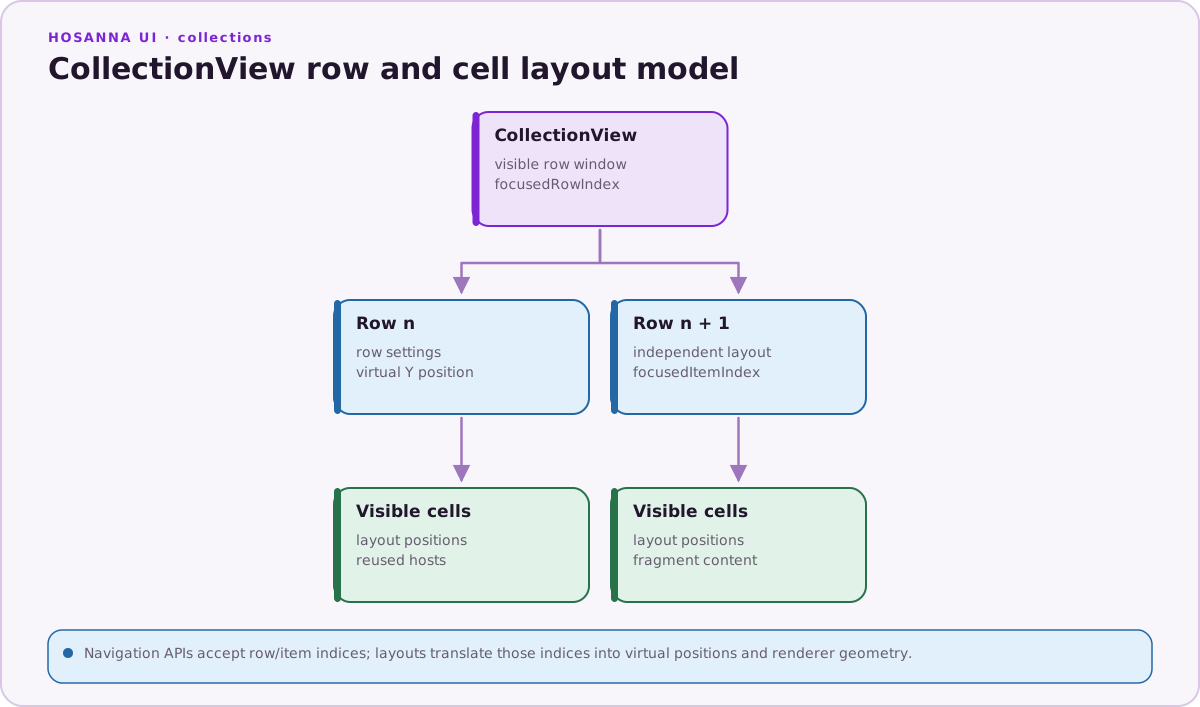
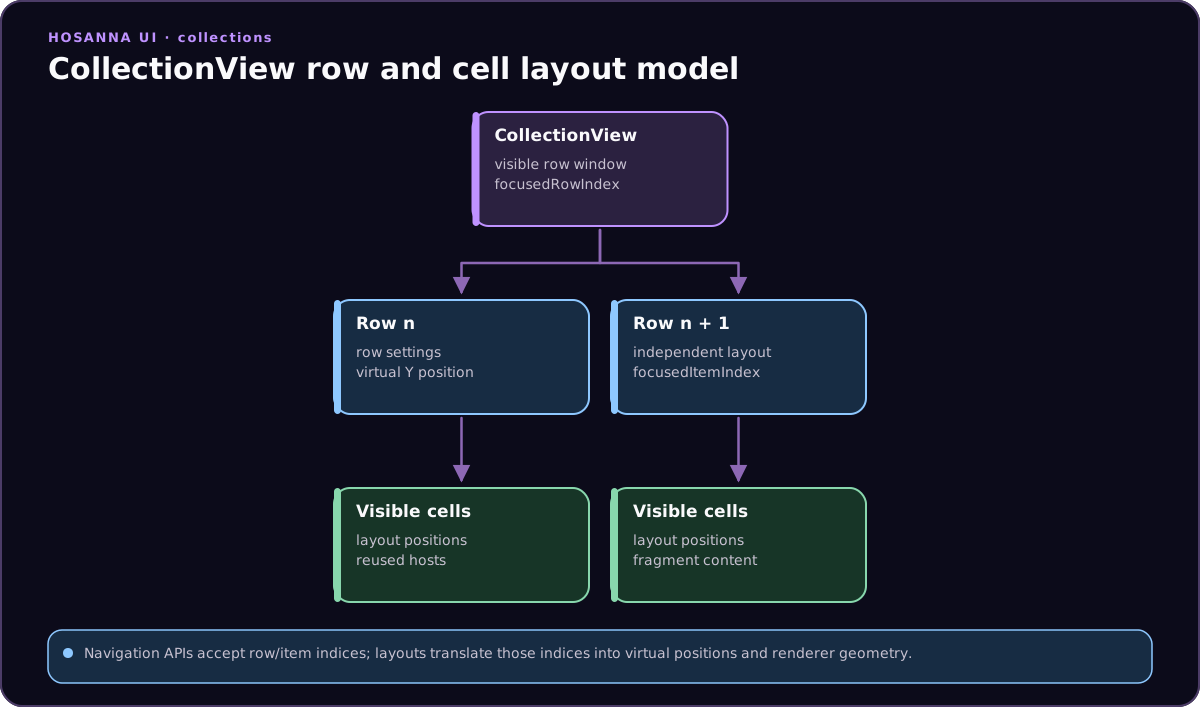
Rows choose layout, cell footprint, focus behavior, and the default cell fragment; the CollectionView keeps focus movement in row/item coordinates.
const row: ICollectionViewDataSourceRow = {
  id: 'featured',
  settingsKey: 'rows.regular',
  settingsOverrides: {
    height: 420,
    cellSize: [640, 360],
    cellSettingsKey: 'cells.featured',
  },
  data: { label: 'Featured' },
  items,
};
The most common row settings are:
rowType:HorizontalRow,ListRow,GridRow, or a custom row type.customViewType: the view class used by a custom row.height,contentOffset,screenPosition,spacing,cellSize,numCols.cellSettingsKey: default cell style for the row.headerSettings: label and placement settings for row headers.focusSettings: indicator, scale, footprint, and long-press behavior.useMixedCellStyleKeys: allow items in one row to choose their owncellSettingsKey.useMixedFocusSettings: allow individual items to override row focus settings.isFocusable: opt a row in or out of focus resolution.floatingFocusAreaWidth,canPeekInto, andpeekAheadHeight: tune floating focus and peek behavior for rows that reveal part of nearby content.
HorizontalRow is the common default. Use GridRow for multi-column rows, ListRow for vertical lists inside the collection, and custom rows when a whole row should be a real Hosanna view.
AppConfig Inheritance
Use $extends to compose row and cell styles without duplicating every field.
{
  "rows": {
    "regular": {
      "rowType": "HorizontalRow",
      "height": 317,
      "cellSettingsKey": "cells.regular",
      "focusSettings": { "indicatorAppearance": "onTop" }
    },
    "featured": {
      "$extends": "rows.regular",
      "height": 430,
      "cellSize": [640, 360],
      "cellSettingsKey": "cells.featured"
    }
  }
}
~ references resolve another AppConfig value. They are useful for shared tokens such as fonts, colors, images, and repeated style blocks.
{
  "theme": {
    "fonts": {
      "row-header": "pkg:/assets/fonts/Poppins-SemiBold.ttf, 24"
    }
  },
  "rows": {
    "regular": {
      "headerSettings": {
        "fontKey": "~theme.fonts.row-header"
      }
    }
  }
}
Focus Settings
Focus is driven by the collection view, not by individual application event handlers. Row focus settings define how the focused item appears and how row movement feels.
horizAnimSettings: choose floating or fixed horizontal focus behavior.vertAnimSettings: choose fixed vertical row movement.indicatorAppearance:none,onTop, orbehind.indicatorImageUriandindicatorBlendColor: define the focus indicator art.focusedScale: scales focused cells when the row applies focused state.canLongPress: enables long-press selection events for the row.displayMode,feedbackOffsets, and footprint settings tune visual feedback.
Rows normally apply one focusSettings object to every item. When a row enables useMixedFocusSettings, each item may provide its own partial focus settings:
const row: ICollectionViewDataSourceRow = {
  id: 'editorial',
  settingsKey: 'rows.editorial',
  settingsOverrides: {
    useMixedFocusSettings: true,
  },
  data: { label: 'Editorial' },
  items: [
    {
      id: 'hero',
      focusSettings: {
        indicatorImageUri: 'pkg:/assets/images/hero-focus.9.png',
        indicatorBlendColor: '#00AEEF',
        focusedScale: 1.08,
      },
    },
    { id: 'standard' },
  ],
};
Item-level values override only the fields they declare; the row focusSettings remains the fallback.
Use isFocusable: false on row settings when a visual row should stay in the render list but not receive focus. For custom row types, the row implementation can also expose canReceiveFocus.
floatingFocusAreaWidth controls the horizontal region used by floating focus rows. canPeekInto and peekAheadHeight allow vertical movement to reveal part of the next row before full focus moves there.
Cell Fragments
DynamicCell renders fragment config from cells.*. Fragments usually define base views plus state-specific updates.
{
  "cells": {
    "regular": {
      "$supportsDataMap": true,
      "views": {
        "base": [
          {
            "id": "poster",
            "subType": "Poster",
            "uri": "${data.posterUrl}",
            "width": 384,
            "height": 216,
            "opacity": 1,
            "scale": [1, 1]
          }
        ],
        "normal": {
          "poster": { "opacity": 1, "scale": [1, 1] }
        },
        "focused": {
          "poster": { "scale": [1.05, 1.05] }
        },
        "selected": {
          "poster": { "opacity": 0.85 }
        }
      }
    }
  }
}
When a row enables useMixedCellStyleKeys, each item can provide a cellSettingsKey. This is useful for rails that mix poster, hero, and metadata cells without creating separate rows.
Pointer Row Hooks
Custom row implementations can participate in pointer and touch behavior through optional row hooks:
getPointerItemIndex(localX, localY, rowTop): returns the item index under a pointer point in collection-local coordinates.canHandleHorizontalPointerScroll(): declares whether the row can consume horizontal wheel or trackpad scrolling.
Built-in pointer adapters use these hooks after converting host input into Hosanna design coordinates. Keep row geometry and hit testing in design points.
Fragment Data and Callbacks
Fragments support richer behavior than static JSON. With $supportsDataMap, exact whole-field ${data.*} expressions on identified views.base children are tracked in a data map and updated when row item data changes. Keep bindings out of status maps. ${fn.name(args)} bindings compute a single field through an onSpecificViewDataChange registration made before fragment creation. AppConfig also supports fragment callback groups:
onMount: run after the fragment is created.onUnmount: run before the fragment is released.onApplyViewStatus: run whennormal,focused,selected, ordisabledstate is applied.onDataChange: run after data-bound values change.onSpecificViewDataChange: compute a specific SG field from data, field name, and callback arguments when a fragment uses${fn.name(args)}.
Use direct bindings for simple text, image, scale, and opacity changes. Fragment Data Bindings documents nested paths, function bindings, registration timing, missing values, unsupported forms, and the current $extends limitation. Use fragment constraints for metadata-driven layout relationships such as pinning, filling, insetting, and aspect ratios. Use callbacks only when derived layout needs custom code, multiple child updates, or measurement side effects.
See Fragment Callbacks and Lifecycle for status, ordering, pooling, and cleanup, and View Fragments for the complete fragment guide map.