Asset Gates And Bitmap Cache
Hs2dAssetGate is the build-time readiness check for bitmap assets. GameBitmapCache is the shared bitmap loader/cache behind that gate. Use them together so scenes do not build worlds with missing art and do not reopen bitmap files from frame-time draw paths.
Source References
| Source | What to read there |
|---|---|
../games/hosanna-ui/src/hosanna-game/hosanna2d/game/Hs2dAssetGate.ts | Gate API, missing-name polling, status text, and requireBitmap. |
../games/hosanna-ui/src/hosanna-game/assets/GameBitmapCache.ts | Bitmap loader interface, Roku default loader, getOrCreate, preload, and dispose. |
../games/hosanna-ui/src/hosanna-game/hosanna2d/game/Hs2dLevelScene.ts | Loading template: poll assets, build the world, then run update/render hooks. |
../hosanna-ui-game-samples-public/src/hosanna-game-examples/native-shoot-em-up/VerticalShooterLevelScene.ts | Real usage with deferred bundle readiness, asset gate registration, loading status, world build, and sprite pools. |
../hosanna-ui-game-samples-public/src/hosanna-game-examples/hosanario/HosanarioLevelScene.ts | Platformer example that registers a larger bitmap set before Hs2dWorldBuilder.fromLevel. |
GameBitmapCache currently lives in src/hosanna-game/assets/GameBitmapCache.ts.
The Objects
| Object | Responsibility |
|---|---|
GameBitmapCache | Owns bitmap references by URI, de-duplicates preload calls, and creates bitmaps through a loader. |
GameBitmapLoader | Platform-specific loader contract with getOrCreate(uri) and preload(uri). |
RokuGameBitmapLoader | Default loader. It creates roBitmap from a URI and returns undefined on failure. |
Hs2dAssetGate | Owns named bitmap requirements for a scene build and polls the cache until every name resolves. |
The gate stores bitmaps by logical names such as ship, tile-atlas, or space-sky. The cache stores bitmaps by URI. Several gate names can point at the same URI, but most scenes should keep a one-to-one mapping for clarity.
Naming Contract
Asset docs use three different names. Keep them distinct:
| Name | Example | Where it is used |
|---|---|---|
| Manifest key | my-game.images.ship | asset-bundle.json and resolveGameAssetBundleUri. |
| Fallback URI | pkg:/asset-bundles/my-game/images/ship.png | Package/local fallback when the bundle state cannot resolve a key yet. |
| Asset-gate name | ship | Hs2dAssetGate.add(name, uri), Tiled hs2d:asset, tilesetAsset, decor frame mappings, and world-builder entity asset. |
The manifest key resolves a URI. The URI opens a bitmap. The gate name is the stable in-engine name for that bitmap.
const shipUri = this.resolveBundleUri(
  'my-game.images.ship',
  'pkg:/asset-bundles/my-game/images/ship.png',
);

assetGate.add('ship', shipUri);
If a Tiled image layer has hs2d:asset=space-sky, register assetGate.add('space-sky', spaceSkyUri). If an entity binding says asset: 'enemy-atlas', register assetGate.add('enemy-atlas', enemyAtlasUri). Do not put a namespaced manifest key in Tiled unless you also used that exact string as the gate name.
Lifecycle
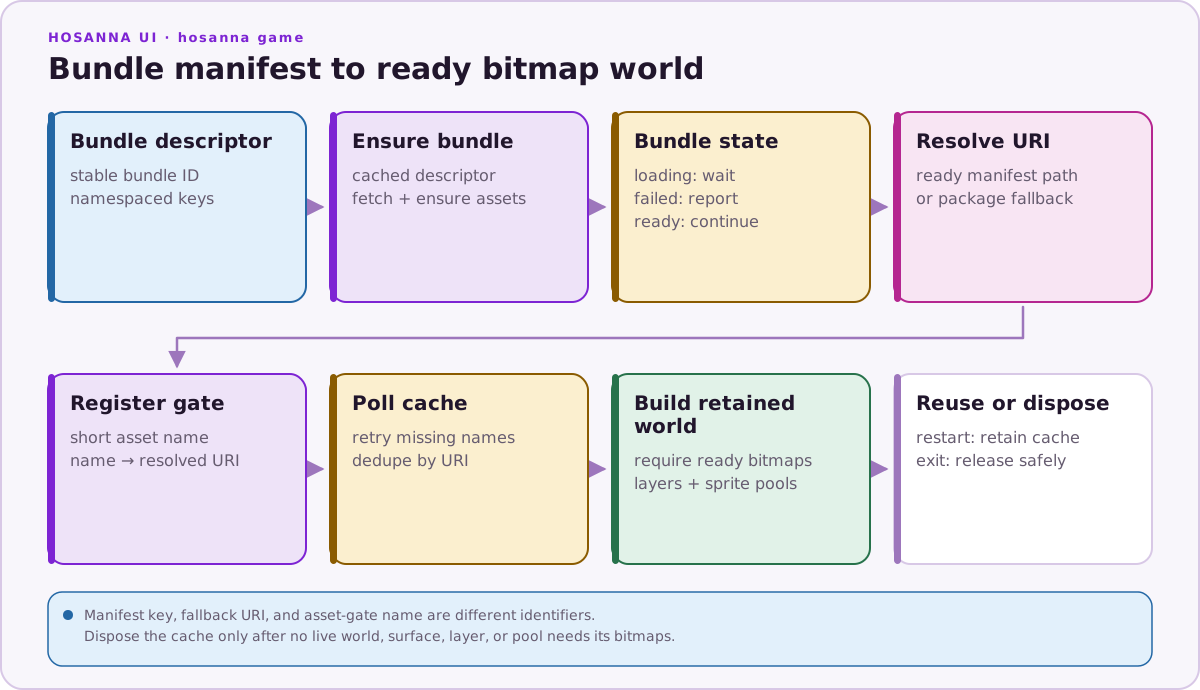
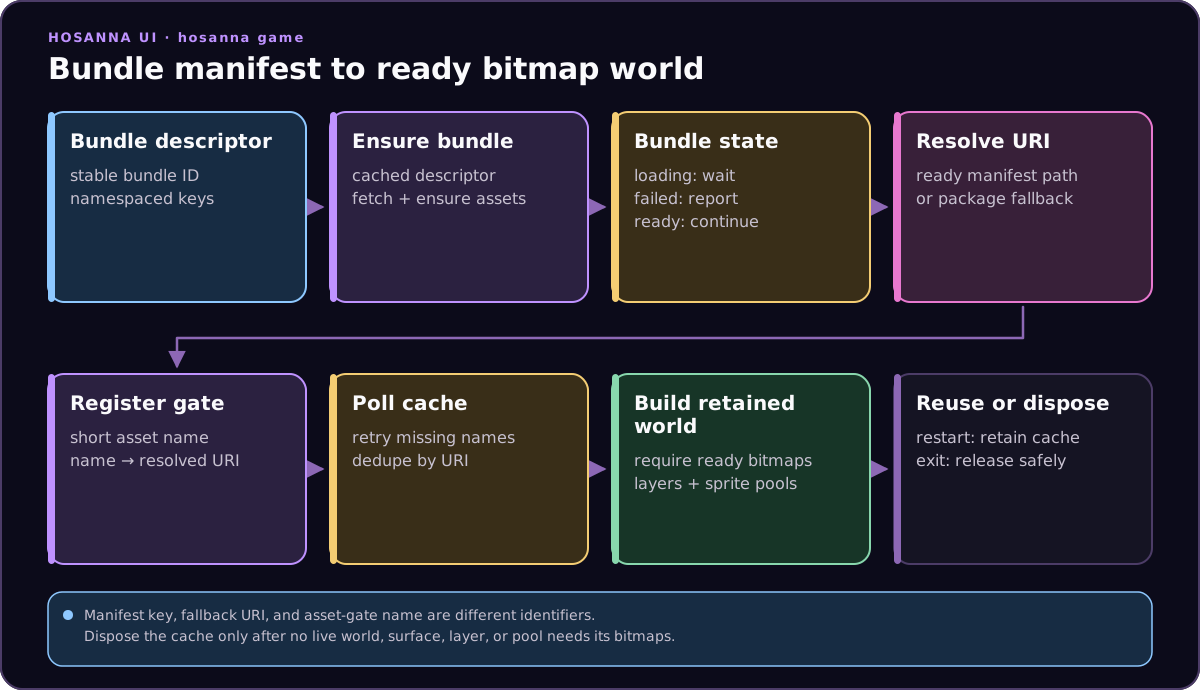
The vertical shooter deliberately defers level, camera, and gate setup until the native-shoot-em-up bundle is ready. Pressing Start early therefore shows a loading status instead of trying to read empty or stale fallback paths.
Gate API
const assetGate = new Hs2dAssetGate({ bitmapCache: this.bitmapCache });

assetGate
  .add('tile-atlas', this.tileAtlasUri)
  .add('enemy-atlas', this.enemyAtlasUri)
  .add('ship', this.shipUri)
  .add('projectile', this.projectileUri);

if (!assetGate.poll()) {
  this.setLoadingStatus(assetGate.getStatusText());
  return undefined;
}

const ship = assetGate.requireBitmap('ship');
| API | Use |
|---|---|
new Hs2dAssetGate({ bitmapCache }) | Share an existing cache; if omitted, the gate creates its own cache. |
add(name, uri) | Register one named bitmap requirement. |
addAll(urisByName) | Register a map of name to URI. |
poll() | Try to resolve missing bitmaps through the cache. Returns true once all are ready. |
isReady | Read the last readiness result. |
getBitmap(name) | Return a ready bitmap or undefined. |
requireBitmap(name) | Return a ready bitmap or throw Hs2dAssetGate asset not ready: <name>. |
getMissingNames() | Inspect the current missing-name set. |
getStatusText() | Loading text such as loading assets: ship, projectile. |
cache | Access the underlying GameBitmapCache. |
poll() only revisits names that are still missing. It updates status text only when the missing-name set changes.
Bitmap Cache API
const cache = new GameBitmapCache();

const bitmap = cache.getOrCreate(uri);
const sameBitmap = cache.get(uri);

cache.preload(uri).then((loadedBitmap) => {
  this.loadedBitmap = loadedBitmap;
});

cache.preloadAll([tileAtlasUri, shipUri, projectileUri]).then((bitmaps) => {
  this.preloadedBitmaps = bitmaps;
});

cache.dispose();
preload and preloadAll return HsPromise. Shared Roku-transpiled game code should use HsPromise chaining or the level-scene polling/gate pattern, not async/await.
| API | Use |
|---|---|
get(uri) | Return a cached bitmap without loading. |
getOrCreate(uri) | Return cached bitmap or synchronously ask the loader to create one. |
preload(uri) | Asynchronously load and cache one bitmap. Multiple calls share the same promise while loading. |
preloadAll(uris) | Load a list of URIs. |
dispose() | Replace the bitmap and loading records so held bitmap references can be released. |
GameBitmapCache.setDefaultLoader(loader) | Swap the process default loader for web/test platforms. |
Failed getOrCreate calls are retried on every call by design because gates poll until assets appear. Do not put unguarded getOrCreate calls in draw loops for possibly missing art. If a frame-time path must reference optional art, add its own backoff or gate the art first.
World Build Pattern
Use this shape for Hs2dLevelScene subclasses:
private readonly bitmapCache = new GameBitmapCache();
private assetGate?: Hs2dAssetGate;

private tryInitializeAssets(): boolean {
  if (this.assetGate) return true;
  if (this.getBundleState() !== 'ready') {
    this.setLoadingStatus('waiting for asset bundle my-game...');
    return false;
  }

  const playerUri = this.resolveBundleUri(
    MY_GAME_ASSETS.playerBundleKey,
    MY_GAME_ASSETS.player,
  );

  this.assetGate = new Hs2dAssetGate({ bitmapCache: this.bitmapCache })
    .add('player', playerUri)
    .add('tile-atlas', this.resolveBundleUri(
      MY_GAME_ASSETS.tileAtlasBundleKey,
      MY_GAME_ASSETS.tileAtlas,
    ));

  return true;
}

protected override buildWorld(): Hs2dWorld | undefined {
  if (this.world) return this.world;
  if (!this.tryInitializeAssets()) return undefined;

  const assets = this.assetGate as Hs2dAssetGate;
  if (!assets.poll()) {
    this.setLoadingStatus(assets.getStatusText());
    return undefined;
  }

  const built = Hs2dWorldBuilder.fromLevel({
    level: this.loadedLevel as Hs2dLevel,
    assets,
    viewportWidth: this.screenWidth,
    viewportHeight: this.screenHeight,
    hud: this,
  });

  this.world = built.world;
  return this.world;
}
If the scene also creates manual sprite pools, keep using the same cache after the gate is ready:
const ship = this.bitmapCache.getOrCreate(this.shipUri);
const projectile = this.bitmapCache.getOrCreate(this.projectileUri);
if (!ship || !projectile) return;

this.shipSpritePool = spriteLayer.addSpritePool({
  id: 'my-game:ship',
  capacity: 1,
  definition: {
    source: ship,
    frames: [{ id: 'ship', x: 0, y: 0, width: 96, height: 128 }],
  },
  initialFrameId: 'ship',
  anchor: { x: 48, y: 64 },
  zIndex: 120,
  offscreenX: -1000,
  offscreenY: -1000,
});
This mirrors the vertical shooter: Hs2dWorldBuilder.fromLevel receives the ready gate for level art, and later sprite-pool construction reuses GameBitmapCache for ship/projectile sources.
Loading And Failure Behavior
Use clear loading statuses:
if (bundleState !== 'ready') {
  if (bundleState.indexOf('failed') === 0) {
    this.setLoadingStatus('asset bundle my-game ' + bundleState + ' - check the asset server');
  } else {
    this.setLoadingStatus('waiting for asset bundle my-game (' + bundleState + ')...');
  }
  return false;
}
When the bundle is ready but bitmaps are not, report the gate status:
if (!assetGate.poll()) {
  this.setLoadingStatus(assetGate.getStatusText());
  return undefined;
}
This separates descriptor/ensure failures from bitmap-open failures. That distinction matters on device: a ready manifest can still point at a bitmap path that fails to open.
Dispose And Restart
Restarting a level should usually reuse the existing cache. The scene has already paid the bitmap-open cost, and the restart should reset gameplay state rather than reload art.
Use bitmapCache.dispose() when the owner is long-lived and you need to explicitly release cached bitmap references after leaving a game or clearing a large art set. dispose() replaces the internal records instead of deleting keys one by one because dynamic-key deletion has been unreliable on device.
Do not call dispose() while any live world, sprite pool, tile layer, or cached surface still uses those bitmap references.
Do And Don't
| Do | Don't |
|---|---|
Build gates after the bundle state is ready. | Register gates with empty strings or unresolved keys and hope the paths fix themselves later. |
Poll the gate from the loading/build path and return undefined until ready. | Call requireBitmap before poll() returns true. |
| Share one cache between the gate and manual sprite pools in a scene. | Create separate caches for the same art inside one world build. |
| Reuse cached bitmaps on level restart. | Reopen roBitmap sources in every frame. |
Use getStatusText() for loading UI and logs. | Show a blank screen while assets are missing. |
| Dispose only when the owner can safely release all bitmap references. | Dispose while a world that uses those bitmaps is still alive. |