Performance Covenant
Hs2d is Roku-first. New games must treat the renderer path, allocation behavior, collision model, text cache, particle pools, telemetry, and camera/layer model as part of the game contract.
Source References
| Source | Why it matters |
|---|---|
../games/hosanna-ui/src/hosanna-game/hosanna2d/game/Hs2dLevelScene.ts | Canonical frame template, scene sprite and particle telemetry, stats window, HUD cache hookup. |
../games/hosanna-ui/src/hosanna-game/hosanna2d/Hs2dWorld.ts | Hot-path world tick/render, particle layer registration, snapshots, and camera/layer update rules. |
../games/hosanna-ui/src/hosanna-game/hosanna2d/Hs2dSpritePool.ts | Fixed sprite pools, batch movement, collision enable/disable, and active sprite stats. |
../games/hosanna-ui/src/hosanna-game/hosanna2d/Hs2dParticleLayer.ts | Fixed-capacity particle layer update and counters. |
../games/hosanna-ui/src/hosanna-game/core/Hs2dTextRenderer.ts | Cached text, prewarming, text stats, text sprites, and floating text systems. |
../games/hosanna-ui/src/hosanna-game/collision/GameCollisionManager.ts | Collision registration, debug overlays, single/multiple checks, and stats. |
../hosanna-ui-game-samples-public/src/hosanna-game-examples/native-shoot-em-up/VerticalShooterLevelScene.ts | Reference game with feature flags, pooled projectiles, particles, floating text, collision counters, phase timings, and throttled HUD status. |
Hard Rules
- Use
Hs2dGame, scenes, worlds, layers, sprite pools, tile layers, cached surfaces, bitmap caches, and asset gates. - Do not create a standalone gameplay
GameControllerwith raw screen drawing. - Do not add per-frame
screen.DrawRect,DrawObject, orDrawScaledObjectloops for gameplay sprites, large tile sets, bullets, particles, or backgrounds. - Do not allocate objects, arrays, closures, bitmaps, regions, promises, or text sprites in steady-state gameplay frames.
- Do not read Tiled object lists or layer JSON during the frame loop.
- Do not configure collision regions or create collision IDs in the frame loop.
- Do not create particle sprites or text sprites in response to gameplay events.
- Do not rebuild long HUD/debug strings every frame.
- Do not use browser-only APIs in shared Roku-transpiled game code.
- If Roku drops below 55 FPS, fix the render path before adding more visuals or features.
Frame Phases
Keep update and render separate:
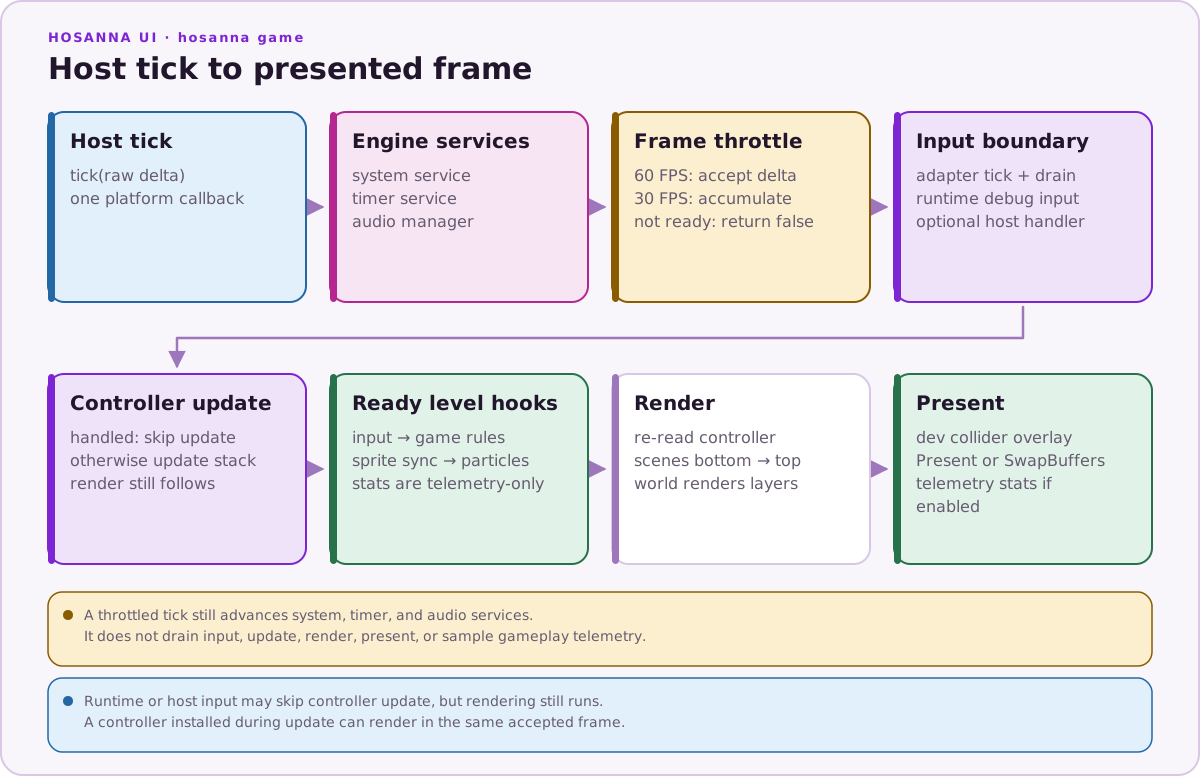
Update mutates logical state. Render composes existing layer state. If render code changes gameplay state, fix the scene. Hs2dLevelScene already gives new games the fixed hook sequence shown above.
Put gameplay decisions in onUpdate. Put pooled sprite, text, layer visibility, and collision-sprite synchronization in updateSceneSprites or a bounded sync helper called from update before collision checks. Keep onRender to world.render(screen) plus intentional render-phase telemetry.
Pools
Use fixed-capacity pools for:
- actors
- enemies
- projectiles
- pickups
- particles
- floating text
- dynamic tiles
- decor sprite groups
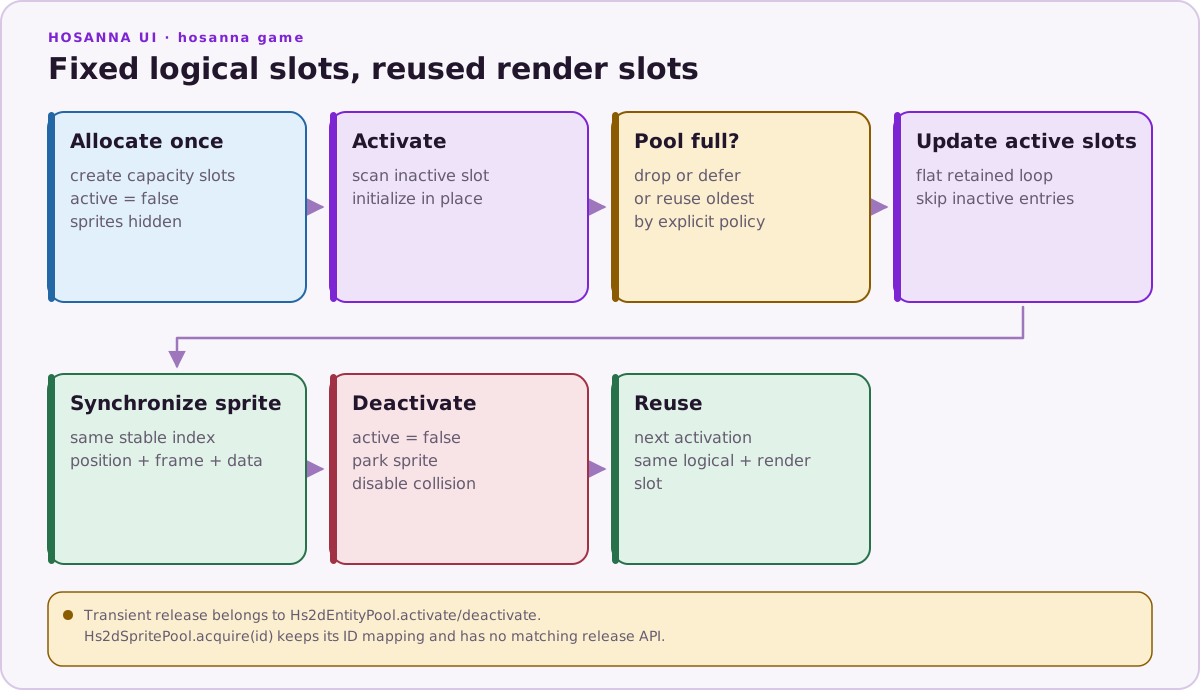
Pools should allocate during loading or world build. At runtime, mark entries active/inactive, move unused entries offscreen, and reuse existing sprite or text objects.
Pool sizes are part of the game design. Name them:
const PROJECTILE_POOL_SIZE = 12;
const ENEMY_POOL_SIZE = 24;
const PARTICLE_POOL_SIZE = 160;
const FLOATING_SCORE_TEXT_POOL_SIZE = 16;
If a pool fills, decide whether to reuse the oldest entry, drop the spawn/effect, or lower the source rate. Do not grow the pool dynamically in gameplay.
Cached Surfaces
Use cached compositor surfaces for:
- static maps
- chunked maps
- menu panels
- repeated backgrounds
- expensive custom world rendering
Dirty work should happen when content changes, not every frame. Per-frame work should usually be a viewport blit or sprite move.
Camera And Culling
Tick one camera once per frame. Layers read it. Use camera culling for sprites, decor, tile windows, and text. Amortize expensive culling or sort work when possible.
Do not let each layer create independent camera math for gameplay. Put shared projection behavior in the world, camera controller, or layer implementation.
Visibility refresh does not need to run on every pixel of camera movement. The vertical shooter refreshes enemy visibility only after enough camera movement or on forced rebuild. Use a named threshold when culling or sorting is expensive.
Text
Use cached text and text sprite pools for HUD and gameplay labels. Direct DrawText is acceptable for loading screens, diagnostics, bounded menus, and short debug overlays.
Gameplay text rules:
- prewarm common score/combo labels explicitly with
Hs2dTextRenderer.prewarmBitmapText(target, items); text-poolprewarmvalues alone do not rasterize bitmaps - keep cache keys stable
- use
Hs2dFloatingTextSystemfor damage/score popups - use cull bounds for world-space floating labels
- update long status text once per stats window
- track text renderer
cacheHits,cacheRedraws, andfallbackDrawswhen tuning
Do not use text as placeholder art for gameplay sprites. Missing sprites should be fixed in the asset bundle.
Collisions
Collision is update-phase work:
- define shapes during region/sprite setup
- use
Hs2dCollisionBridgewith Hs2d sprites and pools - use stable collision IDs
- sync native sprite positions before checks
- use
checkFirstwhen one hit resolves the interaction - keep tile/map collision as direct logical probes when that is cheaper
- use collision counters and available debug overlays to tune shapes and check volume; runtime overlay rendering is
__DEV__-only, and ordinary Hs2d sprite registrations currently omit debug geometry
Do not put collision checks in render, drawHud, layer render, layer compose, or cached-surface painting.
Particles
Particles must be fixed-capacity sprite particles:
- add particle layers during world build
- use
CompositorParticleSystemthroughHs2dParticleLayer - update emitters before
super.updateParticles(deltaMs) - keep burst sizes named and bounded
- use
activeParticles,emittedParticles, andmovedParticlescounters - clear/reset counters in a stats window
Do not use the removed ParticleEmitter draw2d path. It throws by design.
Asset Work
Do not load assets, create scaled bitmaps, create regions, or parse levels in gameplay frames. Use asset bundles, GameBitmapCache, Hs2dAssetGate, and build-time world construction.
Telemetry
Use Hs2dTelemetry and runtime stats to identify the slow phase before changing code. Track:
- scene update time
- sprite sync time
- particle update time
- world render time
- active sprite counts
- active tile counts
- active particle/text counts
- collision checks and hits
- FPS windows
Performance fixes should reduce measured work in a named phase.
Instrument the phase boundary you can change:
this.markPhaseTimer();
this.checkProjectileHits();
if (__TELEMETRY__) this.telemetry.accumulatePhase('projectileHit');
Then report it on a stats window:
this.statusText =
  `fps: ${this.fps}`
  + ` projHitMs: ${this.formatPerfMs(this.telemetry.getAccumulatedMs('projectileHit'))}`
  + ` spriteMs: ${this.formatPerfMs(this.telemetry.getAccumulatedMs('sceneSprite'))}`
  + ` particleMs: ${this.formatPerfMs(this.telemetry.getAccumulatedMs('particleUpdate'))}`
  + ` renderMs: ${this.formatPerfMs(this.telemetry.getAccumulatedMs('render'))}`;
Gate timing setup and accumulation with __TELEMETRY__. Treat zero telemetry from an unavailable timer as "not measured", not as proof of no cost, and never put required game-state work in a telemetry-only stats hook.
Do And Don't
| Do | Don't |
|---|---|
| Build worlds, regions, surfaces, pools, and particle layers during loading/build. | Create render resources during steady-state gameplay. |
| Keep update and render phases separate. | Mutate gameplay state from render or HUD draw code. |
| Use fixed-capacity pools and named budgets. | Let bullets, particles, labels, or enemies grow unbounded. |
| Use Hs2d layers and cached surfaces for repeated composition. | Add direct screen draw loops for gameplay entities. |
| Sync collision sprites before checks. | Run collisions from render or against stale native sprite positions. |
| Use cached text and stats-window HUD strings. | Re-rasterize long debug text every frame. |
| Gate expensive features while measuring. | Optimize by disabling random systems without phase evidence. |
| Pair telemetry with active counts. | Compare FPS alone and guess the cause. |
| Leave unrelated files alone during docs-only work. | Mix docs expansion with navigation or code refactors unless assigned. |