Controller Pairing
The paired-controller stack lets phone/web controllers connect to a running Hs2d game, claim a player slot, and feed normalized GameInput objects into the runtime. It is separate from the input model itself; see Game Input for normalized buttons, phases, and gameplay routing helpers.
For the pairing UI, controller-state overlay, character assignment, hosted controller presentation, motion, and custom controls, see Controller Pairing Scenes And Presentation.
Source References
| Source | What to read there |
|---|---|
../games/hosanna-ui/src/hosanna-game/control/Hs2dControlProtocol.ts | Protocol message types, player state, pairing state, max players, source adapter name, and button-code mapping. |
../games/hosanna-ui/src/hosanna-game/control/Hs2dControlInputManager.ts | Server lifecycle, session token, pairing, reconnection, input conversion, draining, and diagnostics. |
../games/hosanna-ui/src/hosanna-game/control/PairedControlsInputAdapter.ts | Adapter that starts the manager, ticks it, and dispatches drained inputs to GameInputAdapterManager. |
../hosanna-ui-game-samples-public/src/hosanna-game-examples/diagnostics/ControllerRigController.ts | Diagnostic gameplay that routes paired players to separate squares. |
Pieces
| Piece | Responsibility |
|---|---|
Hs2dControlServer | Platform server abstraction. Starts HTTP/WebSocket endpoints, drains events, sends responses, closes connections. |
Hs2dControlInputManager | Owns session token, player slots, controller state, event conversion, and queued GameInput objects. |
PairedControlsInputAdapter | Bridges the manager into the normal GameInputAdapterManager. |
Hs2dControlPairingScene | User-facing pairing screen with URL, QR-style code, and player slots. |
Hs2dControlInputManagerScene | Compact overlay showing controller slots and allowing slot removal. |
Hs2dControlPlayerPickerScene | Assigns the host remote and paired controller slots to game-defined characters. |
Hs2dControllerPresentation | Describes the controller UI and live values a game publishes to paired clients. |
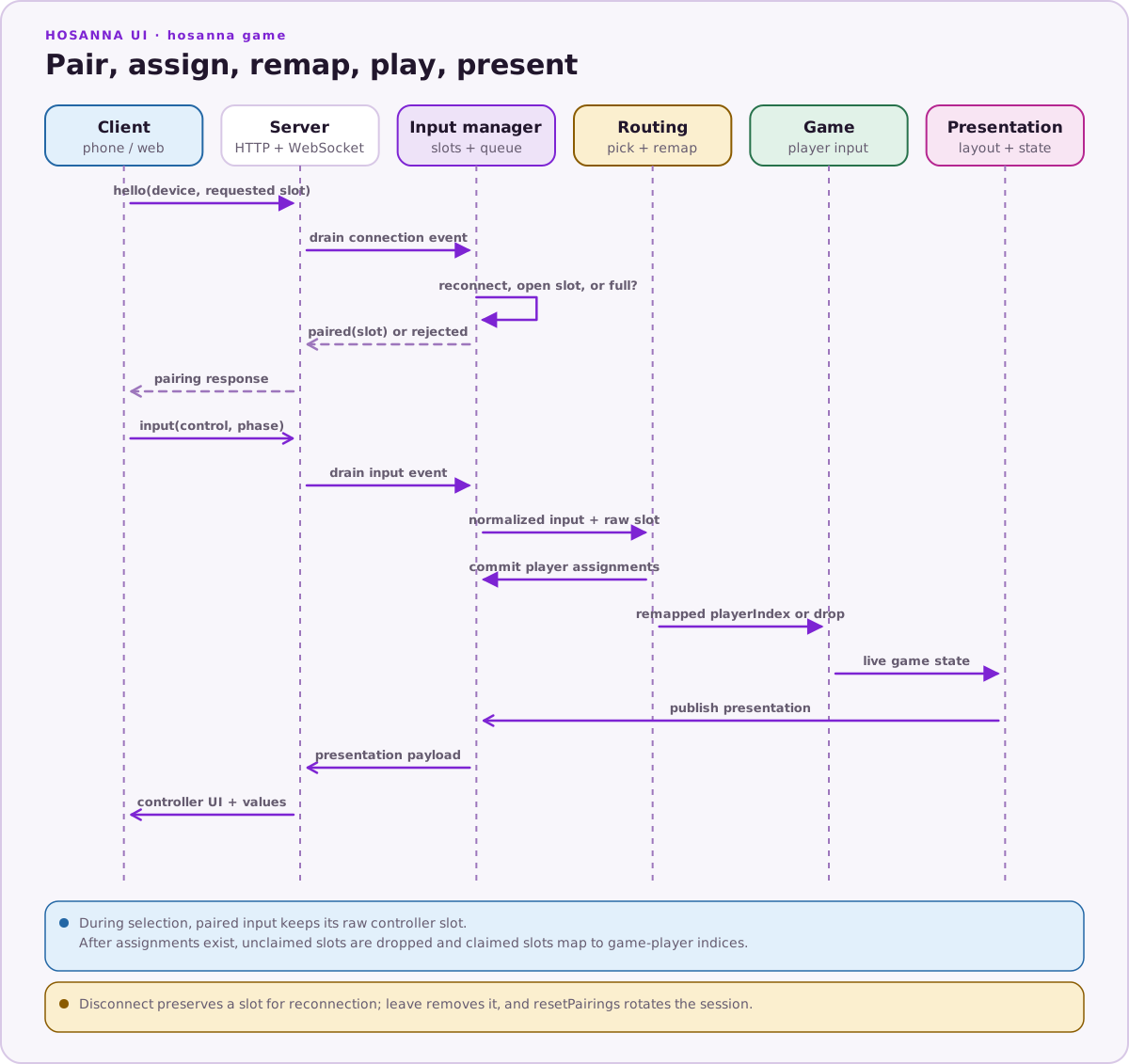
The hard player limit is H2D_CONTROL_MAX_PLAYERS = 4. Paired controller inputs use sourceAdapter: 'pairedControlsInput' and deviceType: 'touch'.
Manager Lifecycle
Create the manager with a server implementation:
const controlManager = new Hs2dControlInputManager({
  server,
  host: '0.0.0.0',
  port: 49280,
  controllerRoot: '/controller',
});
| Option | Use |
|---|---|
server | Required platform server implementation. |
host | Optional host passed to the server. |
port | Optional port. Defaults to 49280. |
sessionToken | Optional explicit token. If omitted, the manager generates hs2d-.... |
controllerRoot | Optional server-specific controller asset root. |
now | Optional clock for tests and deterministic state. Defaults to Date.now(). |
The core lifecycle methods are:
| API | Behavior |
|---|---|
start() | Starts the server once, passes host/port/session/controller root, marks enabled, and logs pairing/WebSocket URLs. |
stop() | Stops the server, clears players and queued inputs, and marks disabled. |
resetPairings() | Closes current player connections, clears slots/input, generates a new session token, and restarts if enabled. |
_tick(deltaMs) | Ticks the server when supported, drains server events, and updates manager state. |
drainInputs() | Returns and clears queued GameInput objects. |
getPairingUrl() returns:
<server-http-origin>/controller?session=<sessionToken>
getWebSocketUrl() delegates to the server with the current session token. The manager logs both URLs on start, and the pairing scene logs the controller URL periodically so it is visible in device logs.
Because the URL contains a session token, treat it as a local-session credential. Use resetPairings() when a session should no longer be joinable.
Pairing Protocol
Controller clients send one of these message types:
| Message | Meaning |
|---|---|
hello | Pair or reconnect a device. Includes deviceId, optional label, and optional requestedPlayerIndex. |
input | Send a button, stick, or axis event. |
heartbeat | Refresh last-seen time. |
leave | Remove the connection. |
On hello, the manager first checks for an existing player with the same deviceId. If found, it updates the connection ID, marks the player connected, and preserves the existing slot. Otherwise it assigns the requested slot if valid and open; if not, it assigns the first open slot. If all four slots are full, it sends a rejected response with reason full.
Disconnect events mark a player disconnected but keep the slot. A later hello from the same deviceId reconnects to the same slot. leave removes the connection entirely.
Input Conversion
Paired input messages become normal GameInput objects:
this.inputQueue.push(new GameInput({
  buttonCode,
  button: this.resolveButton(message.control, isAxis),
  press: message.phase === 'press',
  held: message.phase === 'held' || message.phase === 'axis',
  release: message.phase === 'release',
  x: message.x,
  y: message.y,
  sourceAdapter: PAIRED_CONTROLS_SOURCE_ADAPTER,
  deviceType: 'touch',
  deviceId: player.deviceId,
  playerIndex: player.playerIndex,
  timestamp: message.timestamp ?? this.now(),
  control: String(message.control),
  motion: message.motion,
  axis: isAxis ? {
    name: String(message.control),
    value: message.value ?? 0,
    x: message.x,
    y: message.y,
  } : undefined,
}));
Button aliases are applied at conversion time:
| Controller control | GameInput.button |
|---|---|
a | ok |
attack, bomb, or confirm | ok |
start | play |
leftStick | leftStick with axis |
rightStick | rightStick with axis |
| Other known button names | Same button name |
| Unknown names | unknown |
hs2dControlButtonCode maps controller names to numeric codes. It mirrors Roku remote codes for shared controls and uses synthetic values for gamepad-style controls.
Runtime Adapter
Register PairedControlsInputAdapter with the runtime input manager when paired controllers should feed gameplay:
const inputManager = new GameInputAdapterManager();

inputManager.registerAdapter(
  new PairedControlsInputAdapter(controlManager),
);
The adapter:
- Calls
controlManager.start()on attach. - Calls
controlManager._tick(deltaMs)on each enabled adapter tick. - Drains paired inputs.
- During player selection, dispatches the controller's raw slot index to the picker.
- During gameplay, remaps a claimed controller slot to its assigned game-player index.
- Drops input from an unclaimed paired controller once assignments exist.
- Dispatches accepted input to
GameInputAdapterManager. - Calls
controlManager.stop()on detach.
Gameplay scenes should not talk to the control server directly. They receive normal GameInput objects and route by playerIndex.
Pairing State
Use getPairingState() for debugger panels and scene snapshots:
const state = controlManager.getPairingState();
| Field | Meaning |
|---|---|
isEnabled | Whether the server has been started. |
sessionToken | Current pairing session token. |
pairingUrl | HTTP controller URL. |
websocketUrl | WebSocket URL for the same session. |
maxPlayers | Current maximum, 4. |
players | Player records with slot, device ID, label, color, connection state, and last-seen time. |
connectedPlayerCount | Number of connected players. |
pairedSlotLabels | Four-element slot label list. Empty string means open slot. |
lastInput | Last input summary from the most recently active player. |
lastError | Last server error message, when present. |
Expose this state through getHs2dDebugSnapshot() so the game debugger can show pairing health without scraping scene text.
Do And Don't
| Do | Don't |
|---|---|
Register PairedControlsInputAdapter when paired controllers should feed runtime input. | Poll Hs2dControlInputManager directly from gameplay scenes. |
Route gameplay by playerIndex. | Assume every paired controller controls player 0. |
Use resetPairings() to rotate the session token. | Reuse a leaked or stale pairing URL indefinitely. |
| Keep disconnected players in their slots for reconnection. | Remove a slot on every transient disconnect unless that is an explicit user action. |
Use getPairingState() for diagnostics. | Parse logs or rendered pairing text to infer controller state. |