Collisions
Hs2d collision work is update-phase gameplay work. Configure collision shapes when sprites and regions are built, keep native sprite flags in sync with pooled sprite visibility, run checks from bounded gameplay loops, and let render only compose the already-synchronized world.
Source References
| Source | Why it matters |
|---|---|
../games/hosanna-ui/src/hosanna-game/collision/GameCollisionSystem.ts | Low-level wrapper around native region shapes, sprite member/collidable flags, CheckCollision, CheckMultipleCollisions, and check counters. |
../games/hosanna-ui/src/hosanna-game/collision/GameCollisionManager.ts | Typed collision data, sprite registration, single/multiple hit helpers, debug collider registry, debug colors, and frame stats. |
../games/hosanna-ui/src/hosanna-game/hosanna2d/Hs2dCollisionBridge.ts | Hs2d-facing bridge used by sprites, sprite pools, and world-builder entity bindings. |
../games/hosanna-ui/src/hosanna-game/hosanna2d/Hs2dSprite.ts | setCollision, setCollisionData, visibility-driven enable/disable behavior, and shape definition across sprite frames. |
../games/hosanna-ui/src/hosanna-game/hosanna2d/Hs2dSpritePool.ts | Fixed pool collision registration and disabling unused entries. |
../games/hosanna-ui/src/hosanna-game/runtime/GameRuntime.ts | Runtime collision debug toggle and post-render debug overlay handoff. |
../hosanna-ui-game-samples-public/src/hosanna-game-examples/native-shoot-em-up/VerticalShooterLevelScene.ts | Reference gameplay collision split: tile probes, projectile/enemy sprite collisions, debug toggles, phase counters. |
../hosanna-ui-game-samples-public/src/hosanna-game-examples/diagnostics/ColliderRigController.ts | Direct diagnostic for centered regions, pretranslation, circles, rectangles, and check counters. |
Core Model
Native collision has three pieces:
| Piece | API | Notes |
|---|---|---|
| Region shape | SetCollisionRectangle, SetCollisionCircle through GameCollisionSystem.configureRegion | Shape lives on the region. Define it when the region/frame is created or when the sprite definition is configured. |
| Sprite flags | SetMemberFlags, SetCollidableFlags through configureSprite or the manager/bridge | member says what the sprite is. collidesWith says what it can hit. |
| Sprite data | SetData through configureSprite, setCollisionData, or pool collision options | Hit handling should read typed game data instead of guessing from sprite identity. |
Use CollisionLayer bit flags for common categories:
CollisionLayer.player;
CollisionLayer.enemy;
CollisionLayer.projectile;
CollisionLayer.wall;
CollisionLayer.pickup;
CollisionLayer.hazard;
Combine targets with bitwise OR:
collidesWith: CollisionLayer.enemy | CollisionLayer.hazard
Hs2d Idiom
Gameplay scenes should usually create a GameCollisionManager, wrap it in an Hs2dCollisionBridge, and pass the bridge into Hs2d sprite definitions. Avoid direct native calls from gameplay code unless you are writing diagnostics or an engine-level test.
import { CollisionLayer, GameCollisionManager, type CollisionData } from '@hs-src/hosanna-game/collision';
import { Hs2dCollisionBridge, type Hs2dSpritePool } from '@hs-src/hosanna-game/hosanna2d';

const OFFSCREEN = -1000;
const PROJECTILE_POOL_SIZE = 12;
const PROJECTILE_ANCHOR = { x: 6, y: 21 };
const PROJECTILE_PRETRANSLATION = { x: -PROJECTILE_ANCHOR.x, y: -PROJECTILE_ANCHOR.y };
const PROJECTILE_COLLISION_SHAPE = {
  kind: 'rect' as const,
  x: -4,
  y: -21,
  width: 8,
  height: 112,
};

class MyLevelScene {
  private readonly collisionManager = new GameCollisionManager();
  private readonly collisionBridge = new Hs2dCollisionBridge(this.collisionManager);
  private projectileSpritePool: Hs2dSpritePool<unknown> | undefined;

  private createProjectilePool(spriteLayer: { addSpritePool(options: unknown): Hs2dSpritePool<unknown> }): void {
    this.projectileSpritePool = spriteLayer.addSpritePool({
      id: 'my-game:projectiles',
      capacity: PROJECTILE_POOL_SIZE,
      definition: {
        source: this.projectileBitmap,
        frames: [{ id: 'projectile', x: 0, y: 0, width: 12, height: 42 }],
      },
      initialFrameId: 'projectile',
      anchor: PROJECTILE_ANCHOR,
      offscreenX: OFFSCREEN,
      offscreenY: OFFSCREEN,
      collisionBridge: this.collisionBridge,
    });

    for (let i = 0; i < PROJECTILE_POOL_SIZE; i++) {
      const id = 'my-game:projectile:' + i;
      const sprite = this.projectileSpritePool.getSprite(i);
      sprite.setCollision({
        id,
        member: CollisionLayer.projectile,
        collidesWith: CollisionLayer.enemy,
        shape: PROJECTILE_COLLISION_SHAPE,
        pretranslation: PROJECTILE_PRETRANSLATION,
      });
      sprite.setCollisionData({
        kind: 'projectile',
        entityId: id,
        ownerId: 'player',
        damage: 10,
      } satisfies CollisionData);
    }
  }
}
The important part is the ownership split:
GameCollisionManagerowns checks, stats, and debug data.Hs2dCollisionBridgelets Hs2d sprites register without coupling sprite code to the manager.Hs2dSprite.setCollisiondefines shape and flags once.Hs2dSprite.setCollisionDataupdates the typed data attached to hits.Hs2dSprite.hideand invisible pool entries disable collision flags.
Shapes And Anchors
Hs2d sprites often use centered anchors. Collision shapes are configured on native regions, so the shape coordinates must agree with the region pretranslation.
For centered art:
const SHIP_WIDTH = 96;
const SHIP_HEIGHT = 128;
const SHIP_ANCHOR = { x: SHIP_WIDTH / 2, y: SHIP_HEIGHT / 2 };
const SHIP_PRETRANSLATION = { x: -SHIP_ANCHOR.x, y: -SHIP_ANCHOR.y };
const SHIP_COLLISION_SHAPE = { kind: 'circle' as const, x: 0, y: 0, radius: 30 };

shipSprite.setCollision({
  id: 'my-game:ship',
  member: CollisionLayer.player,
  collidesWith: CollisionLayer.enemy | CollisionLayer.hazard,
  shape: SHIP_COLLISION_SHAPE,
  pretranslation: SHIP_PRETRANSLATION,
});
The bridge subtracts the pretranslation when defining the native region shape.
There is a current debug-overlay limitation: Hs2dSprite.setCollision(...) defines the native shape and registers flags/data, but it does not forward debugShape and debugPretranslation into the manager registration. The global manager overlay therefore does not automatically draw shapes for ordinary Hs2d sprite registrations. Direct GameCollisionManager.registerSprite(...) registrations that supply those debug fields can render correctly. Treat the overlay as complete only for registrations that actually provide debug geometry; use the collider diagnostic or fix the engine forwarding before relying on it for every Hs2d sprite.
Use:
- circle shapes for ships, round hazards, pickups, and enemies where forgiving overlap feels better
- rectangle shapes for bullets, beams, walls, and narrow hazards
- smaller shapes than the art when gameplay should feel fair
- stable IDs such as
my-game:projectile:3, not generated IDs per frame
Frame Placement
Collision belongs in update and sync phases:
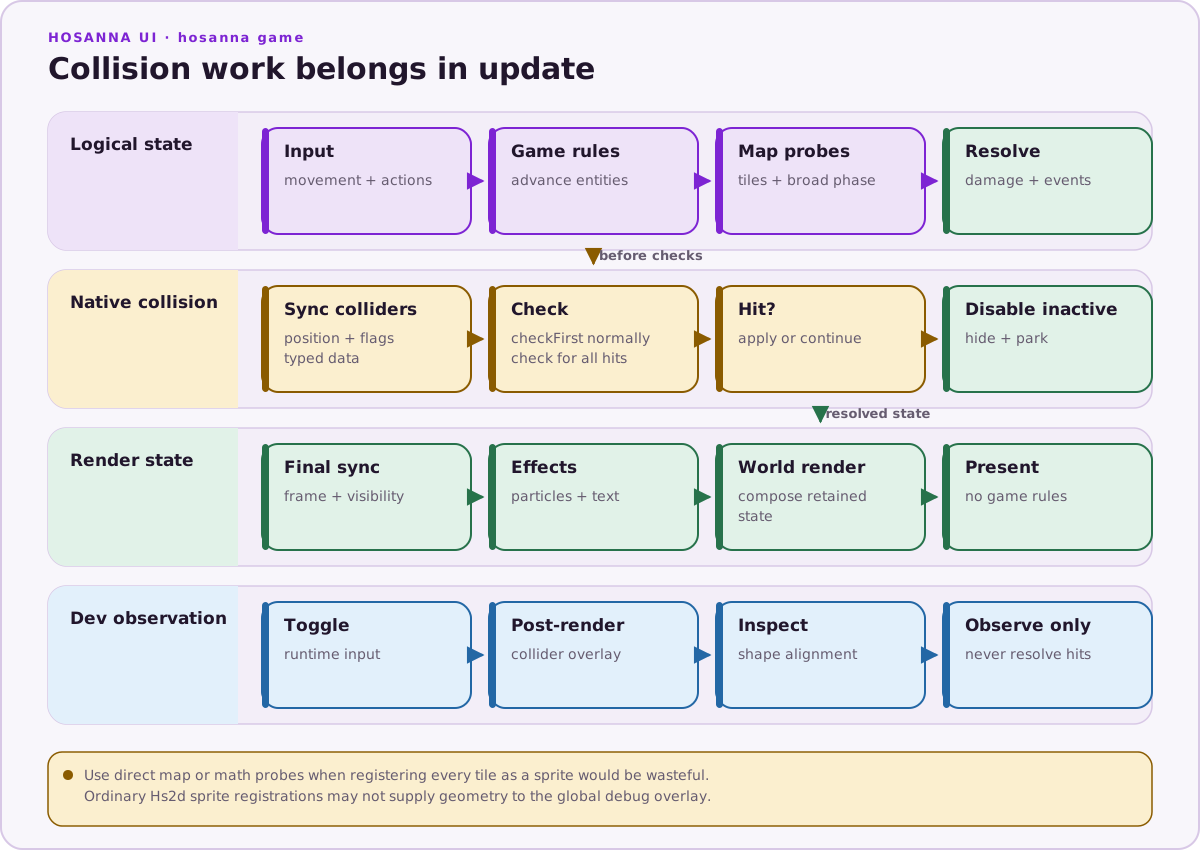
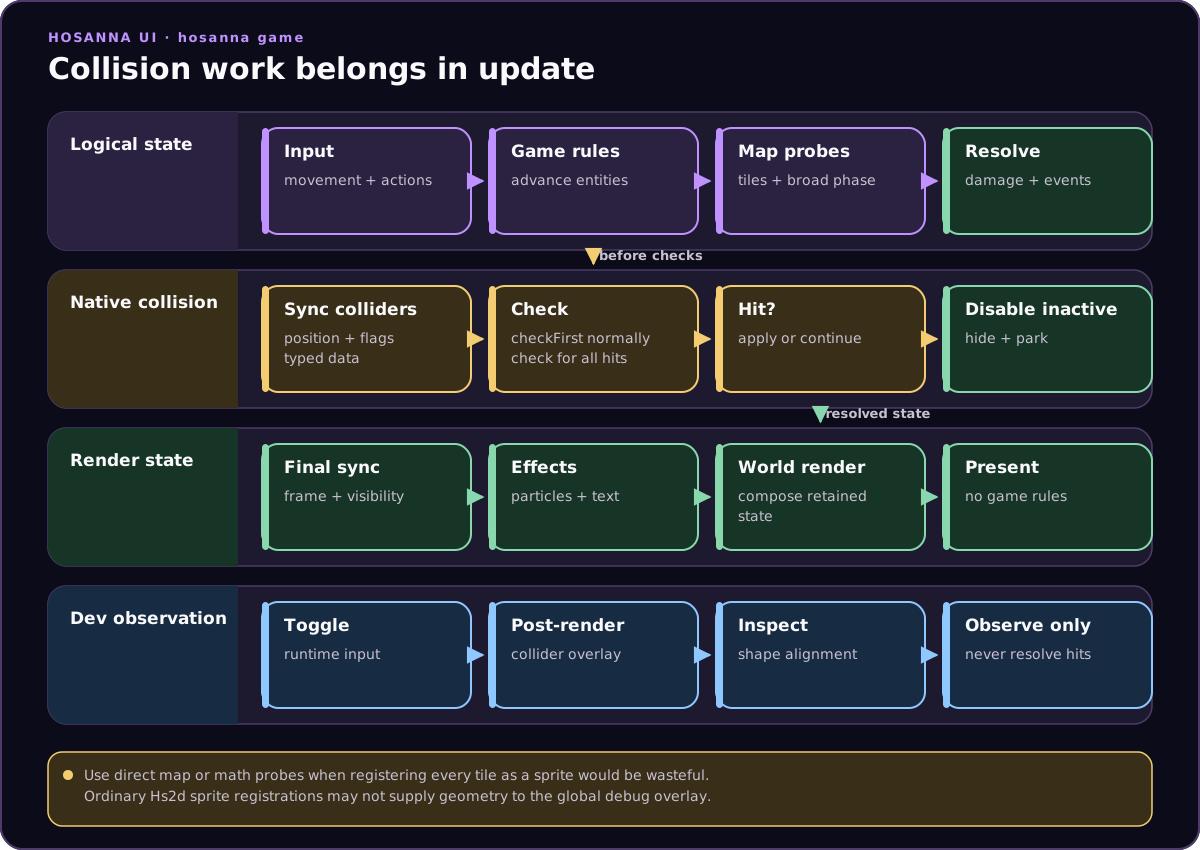
If a collision check depends on native sprite positions, update those positions before calling checkFirst or check. The vertical shooter does this with a projectile-specific sync helper before projectile/enemy checks.
private checkProjectileHits(): void {
  this.syncProjectileCollisionSprites();

  for (let i = 0; i < this.projectiles.items.length; i++) {
    const projectile = this.projectiles.items[i];
    if (!projectile.active) continue;

    const hit = this.collisionManager.checkFirst(projectile.collisionId);
    if (hit?.other.kind !== 'enemy') continue;

    this.applyProjectileEnemyHit(projectile, hit.other.enemyIndex, hit.otherSprite);
  }
}
Do not run collision checks from render, drawHud, a layer compose, or a cached surface renderer. Rendering may run while gameplay is paused, may be called by debug tooling, and should not mutate game state.
Single Hit vs Multiple Hits
Use checkFirst(id) when one hit resolves the interaction:
- projectile hits first enemy
- player touches a pickup
- ship touches one hazard and enters cooldown
Use check(id) only when all overlapping sprites matter:
- area damage
- collecting several overlapping pickups
- diagnostics that need hit counts
checkFirst calls the native single-hit path and avoids allocating/handling a hit array. The vertical shooter uses it for projectile/enemy hits.
Logical Collision Is Still Valid
Do not force every collision into sprite collision. The vertical shooter uses direct logical checks for solid tiles and broad gameplay checks:
const tileX = GameMath.floorToInt(projectile.x / TILE_SIZE);
const tileY = GameMath.floorToInt(projectile.y / TILE_SIZE);

if (this.loadedLevel?.isSolidTile(tileX, tileY)) {
  this.deactivateProjectile(projectile);
  this.projectileTileHitsThisSecond++;
}
That is usually better than registering every wall tile as a native sprite. Use native sprite collision when the colliders already have pooled sprites and region shapes. Use direct math or map lookups for grid tiles, distance probes, cooldown checks, and broad-phase filters.
Debug Overlays
The manager has a global debug registry:
GameCollisionManager.setDebugRenderingEnabled(true);
GameCollisionManager.toggleDebugRendering();
GameCollisionManager.renderDebugColliders(screen);
In a __DEV__ build, GameRuntime toggles collision debug rendering when the runtime consumes the options button, then renders debug colliders after controller render unless the controller reports that it handles collision debug rendering. Both the runtime shortcut and runtime overlay pass are compiled out of non-development builds.
The manager's manual static toggle and render APIs still exist independently, but ordinary production runtime frames do not call the overlay path.
Scenes can also expose a game-specific toggle:
if (isHs2dInputButton(input, 'replay') && !input.release) {
  const enabled = GameCollisionManager.toggleDebugRendering();
  this.statusText = 'colliders: ' + (enabled ? 'on' : 'off');
}
Debug colors are derived from collision data kind:
| Kind | Overlay intent |
|---|---|
player | Player collider |
enemy | Enemy collider |
projectile | Projectile collider |
wallTile | Tile or wall collider |
pickup | Pickup collider |
hazard | Hazard collider |
If a directly registered debug box does not line up, check the region pretranslation, sprite anchor, and debugPretranslation first. If no box appears for an Hs2dSprite, first account for the forwarding limitation above.
Stats
GameCollisionSystem counts checks and hits. GameCollisionManager.getStats() exposes them:
const stats = this.collisionManager.getStats();
this.statusText = `collision checks ${stats.checks} hits ${stats.hits}`;
this.collisionManager.resetFrameStats();
For HUDs, prefer once-per-stats-window counters such as projectileCollisionChecksThisSecond, projectileEnemyHitsThisSecond, and projectileTileHitsThisSecond. Rebuilding a long debug string every frame hides the cost you are trying to measure.
Do And Don't
| Do | Don't |
|---|---|
| Define shapes during world build or sprite-pool setup. | Call SetCollisionRectangle or SetCollisionCircle from the frame loop. |
Use Hs2dCollisionBridge with Hs2d sprites and pools. | Register native sprites directly from ordinary gameplay scenes when an Hs2d sprite API exists. |
| Sync native sprite positions before checks. | Run checks against stale positions and then debug the wrong phase. |
Use checkFirst for projectile-style interactions. | Allocate and scan hit arrays when the first hit ends the interaction. |
| Disable or hide pooled sprites when inactive. | Leave offscreen or dead sprites with member/collidable flags still set. |
| Keep tile collision as map probes when that is cheaper. | Register every solid tile as a live collidable sprite. |
| Use debug overlays and the collider diagnostic to validate shape alignment, accounting for the Hs2d forwarding limitation. | Assume every Hs2d sprite registration automatically has overlay geometry. |
| Reset and report counters on a stats window. | Build status strings or log collision details every frame. |
| Keep collision in update/sync hooks. | Put gameplay collision work in render, drawHud, or layer composition. |