Controller Pairing Scenes And Presentation
This page covers the user-facing flow built on Hs2dControlInputManager. See Controller Pairing for the server lifecycle, protocol, input conversion, runtime adapter, and pairing-state diagnostics.
All three engine scenes use object-form constructors. Some sample call sites still contain stale positional calls; do not copy those calls across the public module boundary.
Pairing Scene
Hs2dControlPairingScene is the full-screen pairing surface:
this.game?.pushScene(new Hs2dControlPairingScene({
  controlManager,
  onDone: () => this.game?.popScene(),
  clearColor: 0x07111fff,
}));
It calls controlManager.start() on enter, shows the pairing URL, draws a QR-style matrix, and displays four player slots.
| Input | Action |
|---|---|
up / down | Select player slot. |
ok | On web, open a controller popup for the selected slot. On hosted/device builds, remove the selected player slot. |
back / play | Close the scene. |
Its debug snapshot includes controllerPairing: controlManager.getPairingState() plus the selected slot.
Controller State Scene
Hs2dControlInputManagerScene is a compact overlay:
this.game?.pushScene(new Hs2dControlInputManagerScene({
  controlManager,
  screenWidth: this.options.screenWidth,
  screenHeight: this.options.screenHeight,
}));
It extends Hs2dOverlayScene with pauseBelow: false, so it can show state without freezing the scene below.
| Input | Action |
|---|---|
up / down | Select player slot. |
ok | On web, open a controller popup for the selected slot. On hosted/device builds, remove the selected player slot. |
back | Close the overlay. |
Use it for live diagnostics, not as the main pairing flow.
Pause Menu Pattern
The vertical shooter opens both control scenes from its pause menu:
private activate(id: string): void {
  if (id === 'pair') {
    if (this.options.controlManager) {
      this.game?.pushScene(new Hs2dControlPairingScene({
        controlManager: this.options.controlManager,
      }));
    }
  } else if (id === 'state') {
    if (this.options.controlManager) {
      this.game?.pushScene(new Hs2dControlInputManagerScene({
        controlManager: this.options.controlManager,
        screenWidth: this.options.screenWidth,
        screenHeight: this.options.screenHeight,
      }));
    }
  }
}
This keeps pairing out of the gameplay scene and gives players a predictable place to connect, inspect, or remove controllers.
Player And Character Assignment
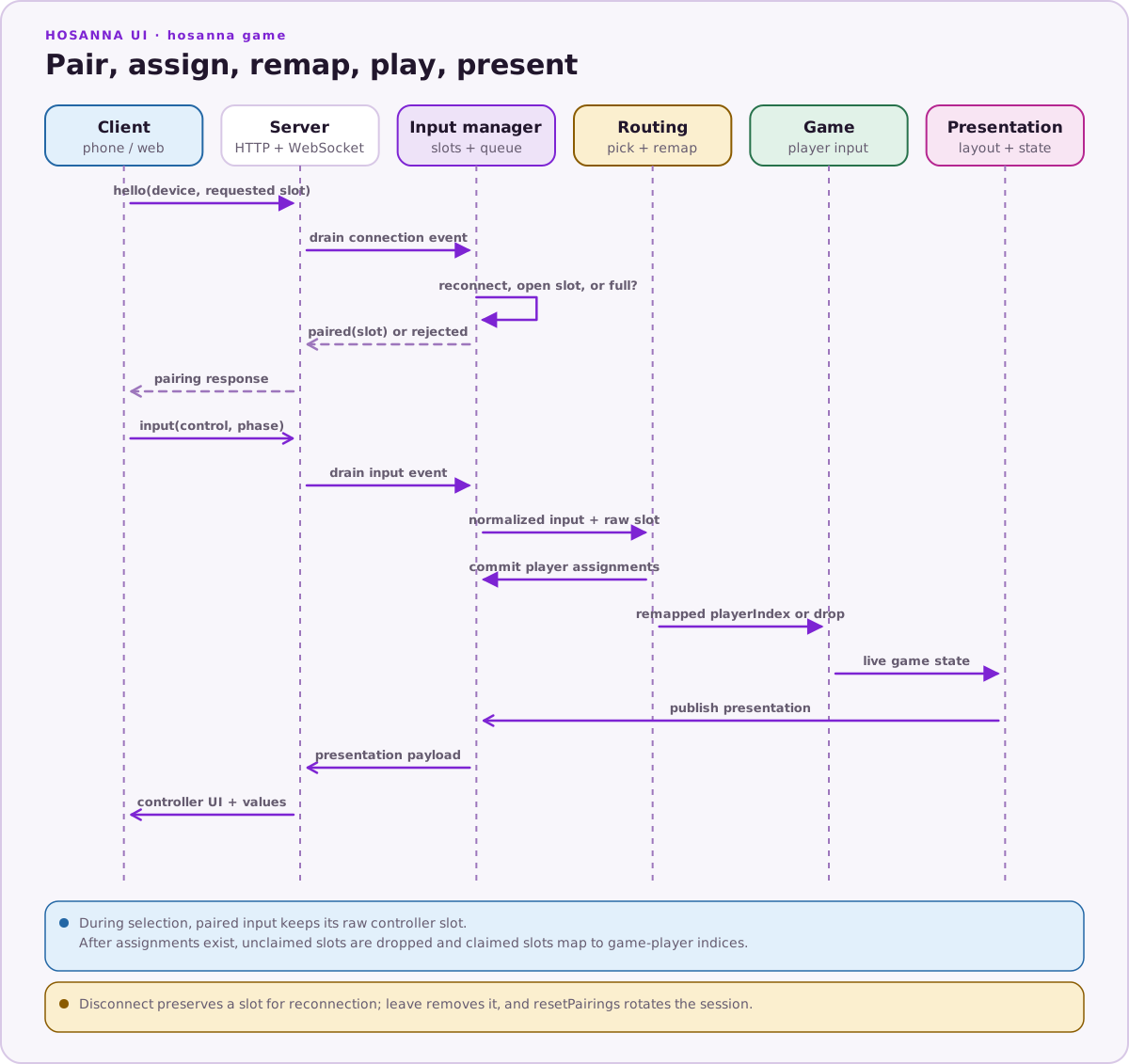
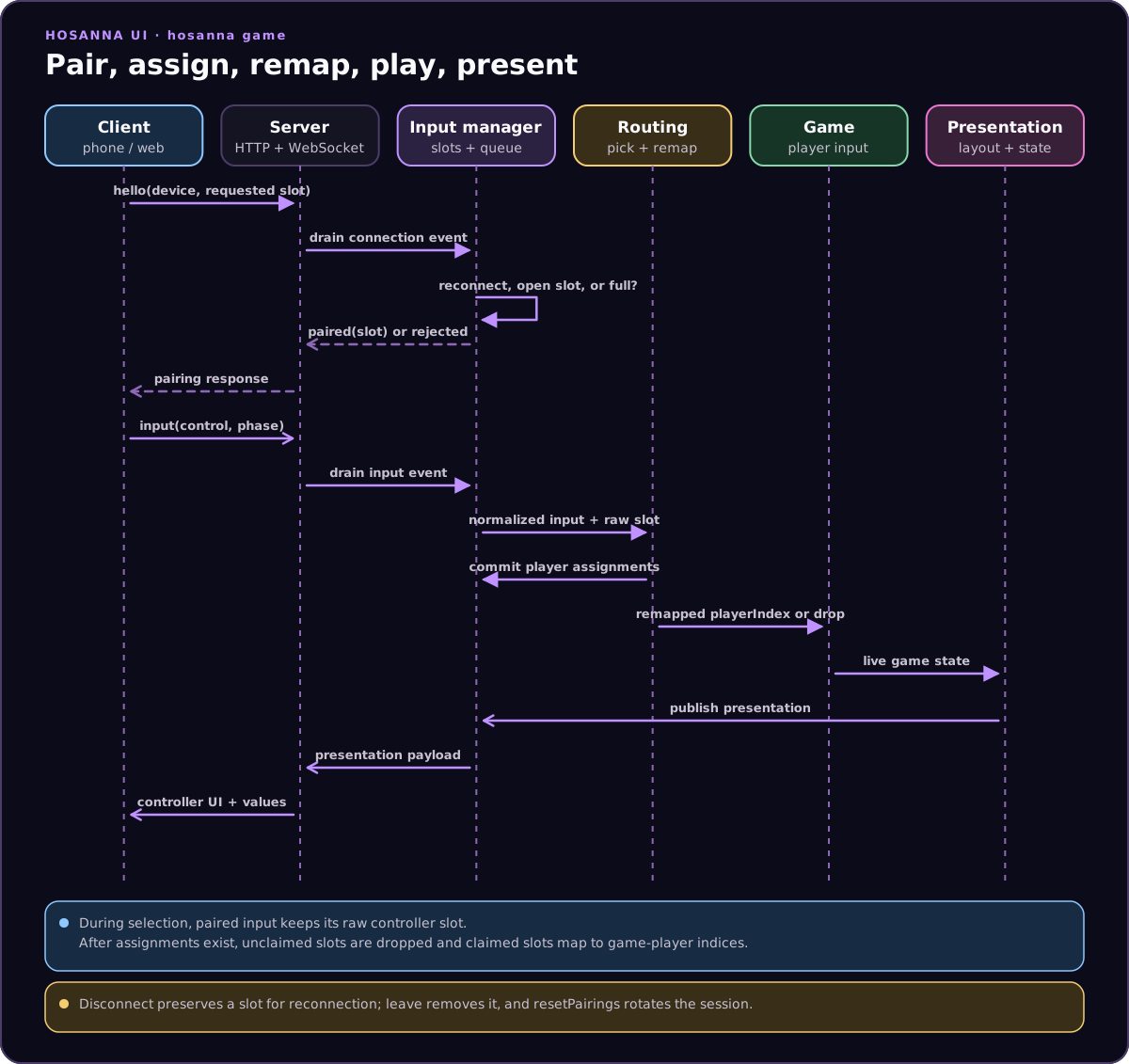
Open Hs2dControlPlayerPickerScene before a game that supports selectable roles:
this.game?.pushScene(new Hs2dControlPlayerPickerScene({
  controlManager,
  characters: [
    {
      id: 'pilot',
      name: 'Pilot',
      color: 0x38bdf8ff,
      weaponLabel: 'Pulse cannon',
      stats: [{ label: 'Speed', value: 4 }],
    },
  ],
  onDone: () => this.startGame(),
}));
The scene starts controller input, lets the host remote and paired slots claim characters, commits Hs2dPlayerAssignment records only on successful completion, and restores the previous assignments if the player cancels.
Use controlManager.getPlayerAssignments() when constructing the game. Do not infer assignments from connection order.
During selection, paired input retains its raw controller slot so the picker can claim it. After assignments exist, the runtime adapter remaps that slot to the assigned game-player index and drops input from unclaimed paired slots.
Controller Presentation, Motion, And Custom Controls
A game can provide a controller presentation with:
renderHtml(playerIndex, sessionToken)for the browser popup bodygetState(playerIndex)for lightweight values published to[data-hs2d-state]elementsbuttonLabelsfor standard hosted-controller buttonsmotionfor a declarative normalized steering control
The motion.control value and arbitrary data-hs2d-control names arrive as GameInput.control. Use input.isControl('attack') or compare control; the normalized button is unknown for a custom name. Raw orientation, rotation, acceleration, interval, and screen-orientation data is available on input.motion when the client supplies it.
Own the presentation for the same lifetime as the game controller:
private readonly presentation = bindHs2dControllerPresentation(
  this.context.controlManager,
  createHs2dRacingControllerPresentation(
    () => ({ speed: this.speed, stage: this.stage }),
  ),
);

update(): void {
  this.presentation.publish();
}

dispose(): void {
  this.presentation.dispose();
}
Publishing updates connected clients; disposal clears the game-specific presentation. The engine includes reusable racing and dungeon presentations, while samples show custom Bomber-style controls.
Do And Don't
| Do | Don't |
|---|---|
| Use object-form constructors for controller scenes. | Copy stale positional sample constructors. |
| Open pairing from a pause/menu surface. | Interrupt gameplay with pairing UI unexpectedly. |
| Read committed player assignments before game construction. | Infer roles from controller connection order. |
| Own controller presentation for the game-controller lifetime. | Leave game-specific HTML/state bound after disposal. |
Route custom controls through GameInput.control. | Expect every custom control to have a normalized button alias. |
| Distinguish web popup behavior from hosted/device slot removal. | Document ok as unconditional slot removal. |
Source References
| Source | What to read there |
|---|---|
../games/hosanna-ui/src/hosanna-game/control/Hs2dControlPairingScene.ts | Pairing scene constructor, URL/matrix display, player selection, platform-specific OK behavior, and snapshot. |
../games/hosanna-ui/src/hosanna-game/control/Hs2dControlInputManagerScene.ts | Live state overlay and platform-specific slot action. |
../games/hosanna-ui/src/hosanna-game/control/Hs2dControlPlayerPickerScene.ts | Host/paired slot claiming, character selection, commit, and cancel restore. |
../games/hosanna-ui/src/hosanna-game/control/Hs2dControllerPresentation.ts | Game-specific controller UI, live state, motion mapping, and button labels. |
../games/hosanna-ui/src/hosanna-game/control/Hs2dControllerPresentationHelpers.ts | Presentation binding lifetime and reusable dungeon/racing layouts. |
../hosanna-ui-game-samples-public/src/hosanna-game-examples/native-shoot-em-up/VerticalShooterPauseScene.ts | Pause-menu entry points for pairing and controller-state scenes. |