Particles And Effects
Hs2d particles are pooled sprite particles. A particle layer owns a fixed-capacity CompositorParticleSystem, gameplay updates emitters and bursts, and render composes the sprite layer. New gameplay code should not use draw2d particle loops.
Source References
| Source | Why it matters |
|---|---|
../games/hosanna-ui/src/hosanna-game/particles/CompositorParticleSystem.ts | Fixed sprite pool, default particle atlas, native emitter kinds, update loops, active/emit/move counters, and pool-full behavior. |
../games/hosanna-ui/src/hosanna-game/particles/ParticleEmitter.ts | Removed draw2d API. It throws and tells callers to use CompositorParticleSystem with sprite particles. |
../games/hosanna-ui/src/hosanna-game/particles/CompositorParticleOverlay.ts | Standalone overlay wrapper for simple compositor-backed particle effects. |
../games/hosanna-ui/src/hosanna-game/hosanna2d/Hs2dParticleLayer.ts | Hs2d layer wrapper that updates emitters, applies camera projection scale, clears particles, and exposes stats. |
../games/hosanna-ui/src/hosanna-game/hosanna2d/Hs2dWorld.ts | addParticleLayer creates a CompositorParticleSystem on an existing sprite layer and registers it for snapshots. |
../hosanna-ui-game-samples-public/src/hosanna-game-examples/native-shoot-em-up/VerticalShooterLevelScene.ts | Reference gameplay usage: add particle layer during world build, update rocket emitters, emit bounded bursts, reset counters. |
../hosanna-ui-game-samples-public/src/hosanna-game-examples/diagnostics/ParticleRigController.ts | Diagnostic usage: custom particle regions, emitter modes, counters, and HUD reporting. |
Current API
Use:
CompositorParticleSystemfor the underlying fixed sprite poolHs2dParticleLayerfor Hs2d world integrationHs2dWorld.addParticleLayerfor normal gameplay scenesCompositorParticleOverlayonly for simple non-world overlays or diagnostics
Do not use:
ParticleEmitter- per-frame
screen.DrawRectparticle loops - per-frame
screen.DrawObjectloops for particle sprites - dynamically created particle sprites during gameplay
ParticleEmitter remains as a failing compatibility shell so old code breaks loudly instead of silently returning to the removed draw2d path.
Fixed-Capacity Model
CompositorParticleSystem allocates all particle sprites in its constructor:
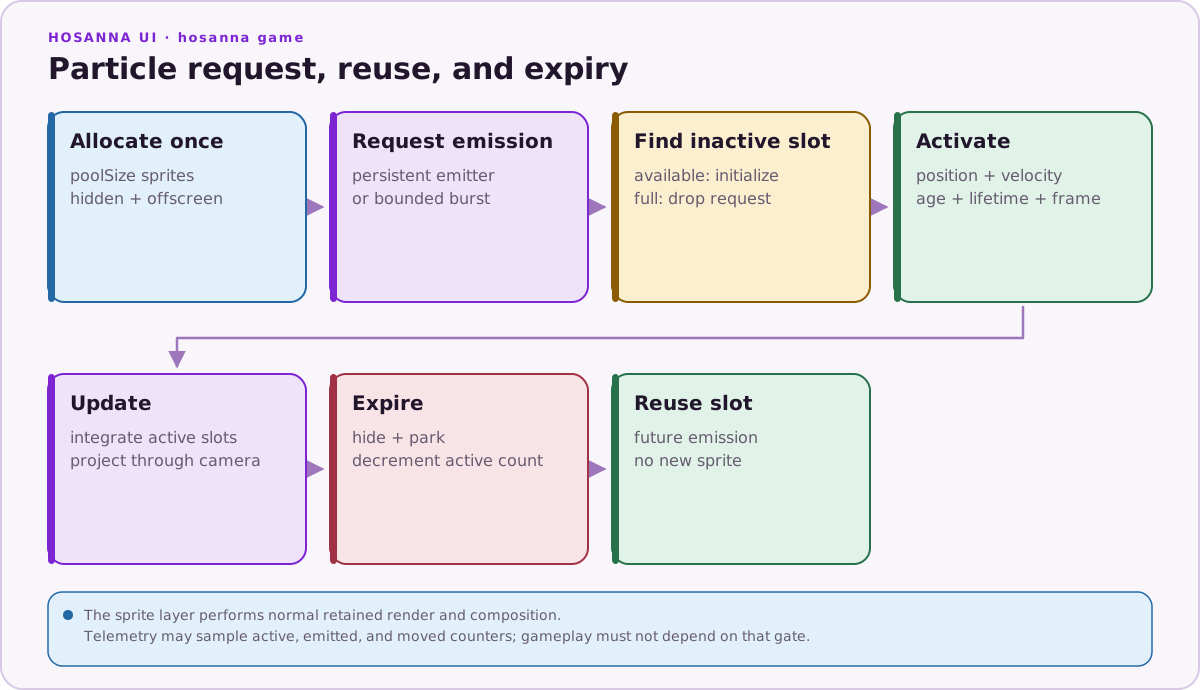
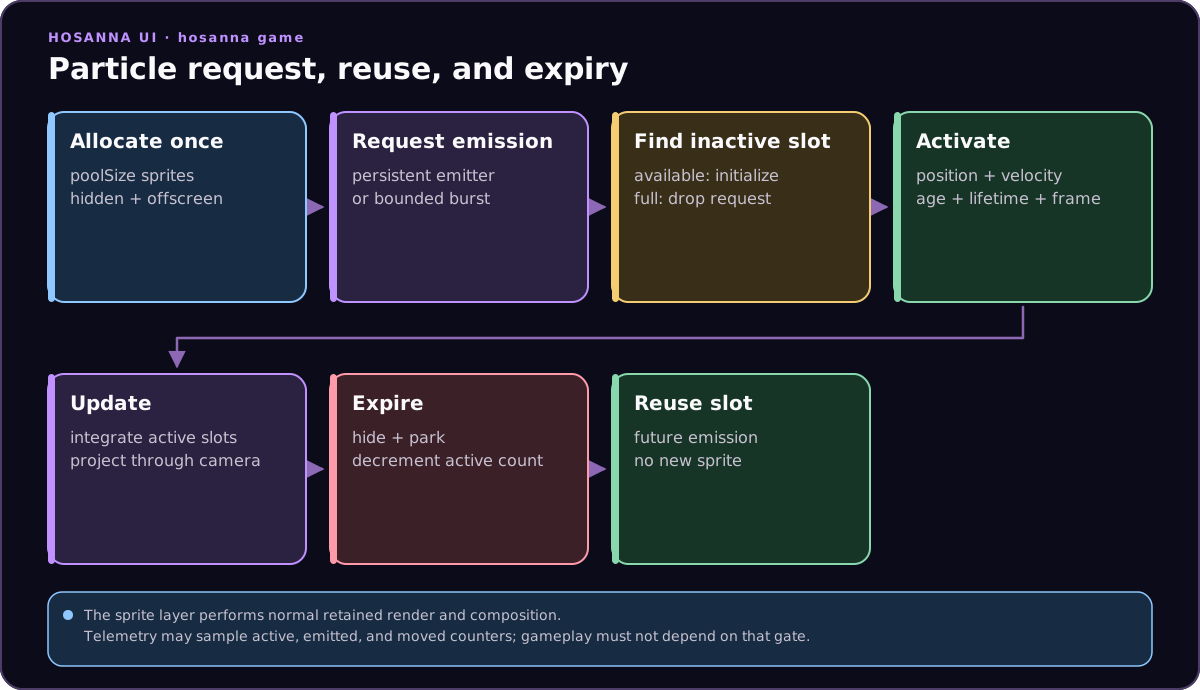
Each particle stores:
- active flag
- sprite handle
- world position
- velocity
- age and lifetime
- frame base and current frame
When an emitter fires, the system finds an inactive particle. If the pool is full, the emission is dropped. That is intentional: a frame must degrade by skipping excess particles, not by allocating.
Default particle regions are a small 16-frame atlas:
- sparkle frames at indices 0-3
- fire/explosion frames at indices 4-7
- laser/missile frames at indices 8-11
- dust frames at indices 12-15
You can pass custom regions when the game needs different art. Create bitmaps and regions during build/setup, not during the frame loop.
Adding A Particle Layer
Add particles after the world and sprite layer exist:
import { createDefaultCompositorParticleRegions, type NativeRigParticleEmitter } from '@hs-src/hosanna-game/particles';
import { Hs2dParticleLayer, type Hs2dWorld } from '@hs-src/hosanna-game/hosanna2d';

const FOREGROUND_LAYER_ID = 'my-game:foreground';
const PARTICLE_POOL_SIZE = 160;

class MyLevelScene extends Hs2dLevelScene {
  protected override buildWorld(): Hs2dWorld | undefined {
    const world = Hs2dWorld.create({
      viewportWidth: this.screenWidth,
      viewportHeight: this.screenHeight,
      worldWidth: this.worldWidth,
      worldHeight: this.worldHeight,
    });

    world.addSpriteLayer({ id: FOREGROUND_LAYER_ID });

    this.particles = world.addParticleLayer({
      id: 'my-game:particles',
      layer: FOREGROUND_LAYER_ID,
      regions: createDefaultCompositorParticleRegions(),
      poolSize: PARTICLE_POOL_SIZE,
      projectionScaleRatio: 1,
    });

    this.particleEmitters.push({
      kind: 'rocketFire',
      x: this.shipX,
      y: this.shipY + 58,
      rateMs: 24,
      burstSize: 1,
      accumulatorMs: 0,
    });

    return world;
  }
}
Hs2dWorld.addParticleLayer attaches the particle system to an existing sprite layer's compositor. Particles then render as sprites inside that layer's normal render/compose path.
Emitters
An emitter is plain data:
type NativeRigParticleEmitter = {
  kind: 'cameraSparkle' | 'sparkle' | 'fire' | 'firework' | 'explosion' | 'rocketFire' | 'laser' | 'missile' | 'dust';
  x: number;
  y: number;
  rateMs: number;
  burstSize: number;
  accumulatorMs: number;
};
Use persistent emitters for continuous effects:
- engine trails
- fires
- camera sparkle
- magic fountains
- ambient dust
Update their positions before the particle layer tick:
protected override updateParticles(deltaMs: number): void {
  if (!this.particles) return;

  Hs2dParticleLayer.updateRocketEmitters(this.particleEmitters, {
    x: this.shipX,
    y: this.shipY,
  });

  super.updateParticles(deltaMs);
  this.activeParticles = this.particles.getStats().activeParticles;
}
The base Hs2dLevelScene.updateParticles feeds particleEmitters and the active camera into the layer.
Bursts
Use burst emissions for one-shot effects:
private emitBurst(
  kind: NativeRigParticleEmitter['kind'],
  x: number,
  y: number,
  burstSize: number,
): void {
  this.particles?.emitForEmitter(
    { kind, x, y, rateMs: 1, burstSize, accumulatorMs: 1 },
    this.activeCamera,
  );
}
Keep burst sizes small and named:
const ENEMY_HIT_SPARK_PARTICLES = 2;
const ENEMY_DESTROY_EXPLOSION_PARTICLES = 8;
const ENEMY_DESTROY_FIRE_PARTICLES = 4;
Large burst constants are easier to review than scattered numeric literals. They also make performance tests and feature flags easier to reason about.
Diagnostics And Stats
Hs2dParticleLayer.getStats() returns:
| Stat | Meaning |
|---|---|
activeParticles | Currently live particle sprites. |
emittedParticles | Emissions since the last counter reset. |
movedParticles | Particle move operations since the last counter reset. |
Use a stats window:
protected override onStatsWindow(): void {
  const stats = this.particles?.getStats();
  this.statusText = `particles ${stats?.activeParticles ?? 0}`;
  this.particles?.resetCounters();
}
Hs2dLevelScene.onStatsWindow() runs only when __TELEMETRY__ is enabled. Using it to publish and reset optional diagnostic counters is appropriate, but required particle cleanup or gameplay state changes must live in normal update/reset paths.
The particle diagnostic displays active, emitted, and moved counters while cycling emitter configurations. Use it to validate pool sizes and emitter rates before moving an effect into a game.
Camera Projection
Particles are world-space by default. CompositorParticleSystem.update projects each particle through:
screenX = (particle.x - camera.x) * camera.scale
screenY = (particle.y - camera.y) * camera.scale
Hs2dParticleLayer can adjust scale through projectionScaleRatio. Keep this at 1 for gameplay particles that should track the world camera. Use a lower ratio only when an effect intentionally behaves closer to a screen-space overlay.
Effects Gating
Effects should be controlled by measured feature flags while tuning:
const ENABLE_ENEMY_HIT_PARTICLES = true;
const ENABLE_PROJECTILE_TILE_HIT_PARTICLES = true;

if (ENABLE_ENEMY_HIT_PARTICLES) {
  this.emitBurst('sparkle', projectile.x, projectile.y, ENEMY_HIT_SPARK_PARTICLES);
}
Remove or keep flags based on data. Do not leave a slow effect enabled just because it looks small in code; use particleUpdate telemetry, active particle counts, and moved particle counts.
Do And Don't
| Do | Don't |
|---|---|
| Allocate particle sprites when the world/layer is built. | Create particle sprites in response to every explosion. |
Use Hs2dWorld.addParticleLayer for gameplay. | Draw gameplay particles directly to GameScreen. |
| Use fixed pool sizes and bounded burst constants. | Let effects scale with enemy count without a cap. |
Update emitter positions before super.updateParticles(deltaMs). | Move emitters from render code. |
Read activeParticles, emittedParticles, and movedParticles on a stats window. | Log per-particle state every frame. |
| Drop emissions when the pool is full. | Allocate a bigger pool dynamically during a spike. |
| Create custom regions during build/setup. | Build particle atlases in the frame loop. |
| Gate expensive effects during profiling. | Optimize by guesswork without particle counters. |