Input Adapters
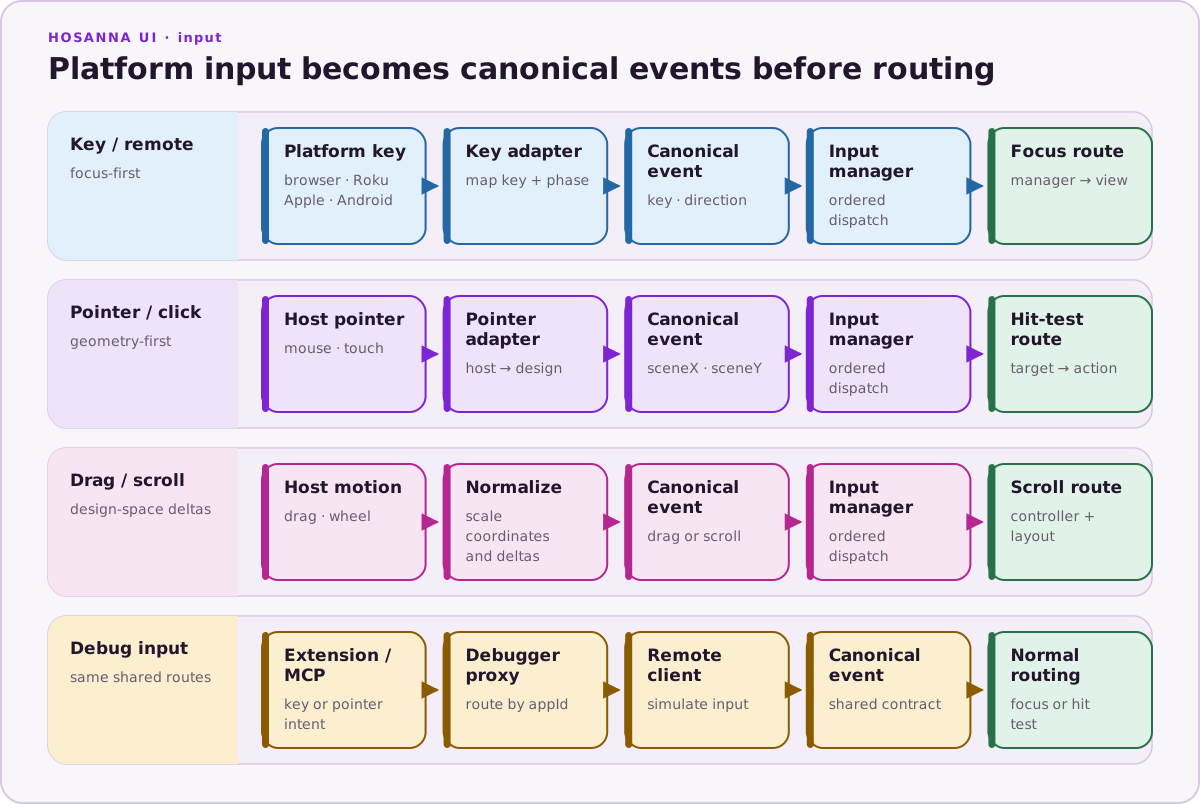
Hosanna input enters through platform adapters, then flows through InputAdapterManager before focus, pointer, click, drag, or scroll handlers see it.
Platform Matrix
Use ?adapters= selectors in web launch URLs. Runtime logs, debug output, and sourceAdapter metadata use registered adapter names.
| Platform | ?adapters= selectors | Registered adapter names | Main source | Notes |
|---|---|---|---|---|
| Browser | roku, keyboard, webkeyboard, debug, mouse, touch | rokuRemote, webKeyboardRoku, webKeyboard, webDebug, webMouse, webMouseTouch, touch | Browser keyboard, mouse, pointer, and touch events | Default Browser input emulates Roku remote behavior. The keyboard selector registers Roku-style browser keyboard input; webkeyboard registers browser keyboard input. touch converts browser client coordinates to Hosanna design coordinates. |
| Samsung Tizen | target default | tizenRemote; desktop preview also registers webKeyboardTizen | tizen.tvinputdevice and TV keyboard events; desktop DOM keyboard bridge | The native adapter owns key registration, Samsung Back 10009, media/color mapping, repeat/long press, and cleanup. The keyboard bridge calls the same raw-key path used by hardware. |
| LG webOS | target default | webOsRemote; desktop preview also registers webKeyboardWebOs | Magic Remote key events; desktop DOM keyboard bridge | Maps LG Back 461, media/color keys, repeat/long press, and cleanup. disableBackHistoryAPI keeps Back in the app. |
| Roku | n/a | rokuRemote | Roku remote key events | Maps Roku and simulator key names to Hosanna Key values. Long press is generated from held keys. |
| Apple | n/a | appleKey, touch | Swift key/touch bridge | Native Apple registers key input plus canonical touch. iOS uses touch; tvOS keeps remote/key behavior. |
| Android | n/a | keyboard, touch | Android native key/touch bridge | Phone/tablet launch args register canonical touch; keyboard/remote profiles register keyboard. Android TV stays on a non-touch remote-style profile. |
Canonical Event Shape
All adapters dispatch one of the shared event types:
| Event type | Important fields |
|---|---|
key | key, rawKey, keyState, phase, direction, isKeyPress, isKeyRelease, longPress, sourceAdapter |
pointerDown / pointerUp | phase, sceneX, sceneY, pointerId, pointerType, sourceAdapter |
pointerDrag | pointer fields plus frameDeltaX, frameDeltaY, totalDeltaX, totalDeltaY, velocityX, velocityY |
scroll | deltaX, deltaY, sourceAdapter |
click | targetView, coordinates, and source adapter metadata |
Key phases are start, repeat, finish, and cancel. Key states are None, Press, Release, LongPress, LongPressUpdate, and LongPressEnd. A normal key tap often starts with KeyState.None on key down, then emits Press and Release on key up. Long press emits repeat-phase long-press events until release or cancellation.
Touch Coordinates
Touch adapters normalize host coordinates before shared app code sees them:
- Native or browser touch/pointer event supplies host coordinates.
- The platform bridge converts them into Hosanna scene/design coordinates.
- The canonical
touchadapter dispatches pointer down, drag, up, cancel, and tap-as-OK events.
App code, CollectionView hit testing, and ScrollView offsets should use Hosanna design points. Do not multiply pointer positions by browser DPI, device pixel ratio, or CSS scale; adapters already account for that.
Touch lifecycle phases are start, move, end, and cancel at the native adapter boundary. Stable pointerId values should be preserved across one finger/pointer lifecycle.
Remote And Back
Remote-style adapters normalize arrows to Up, Down, Left, and Right, with matching direction values. Select/OK maps to Ok. Back maps to Back and keeps direction: None.
Android handles Back as a first-class native key path. It emits a Press on key down and a Release on key up, and also supports back-swipe recognition before routing remaining touches into the canonical touch adapter.
Apple routes key events through appleKey; native touch routes through touch.
Roku routes remote events through rokuRemote. Tizen and webOS route native
events through tizenRemote and webOsRemote; their desktop keyboard bridges
retain those source semantics rather than bypassing the real adapters.
Remote adapters cancel held-key state on blur, suspend, unmount, and source cleanup. Test Back, release, repeat, and long-press behavior with raw DOM events in previews and with the real remote on hardware.
Adapter Selection
On web, use ?adapters= selectors to limit active adapters:
http://localhost:5170/?adapters=keyboard,mouse
http://localhost:5170/?adapters=touch
http://localhost:5170/?adapters=webkeyboard
Use the selector names in URLs. Use the registered adapter names when reading runtime/debug output, including sourceAdapter fields.
For native Android and Apple, launch args and platform capability hints decide whether the app registers touch, keyboard, or remote-style adapters. Shared app code should read capabilities and event fields instead of branching on a platform-specific adapter class.