Browser Expression, DPI, and Touch Input
Hosanna's Browser target renders a design-space scene through the shared Web DOM platform, then maps browser input back into design coordinates. App code should use design points for layout, hit testing, and scroll math. The Web platform implementation handles browser scale, DPI, and pointer normalization.
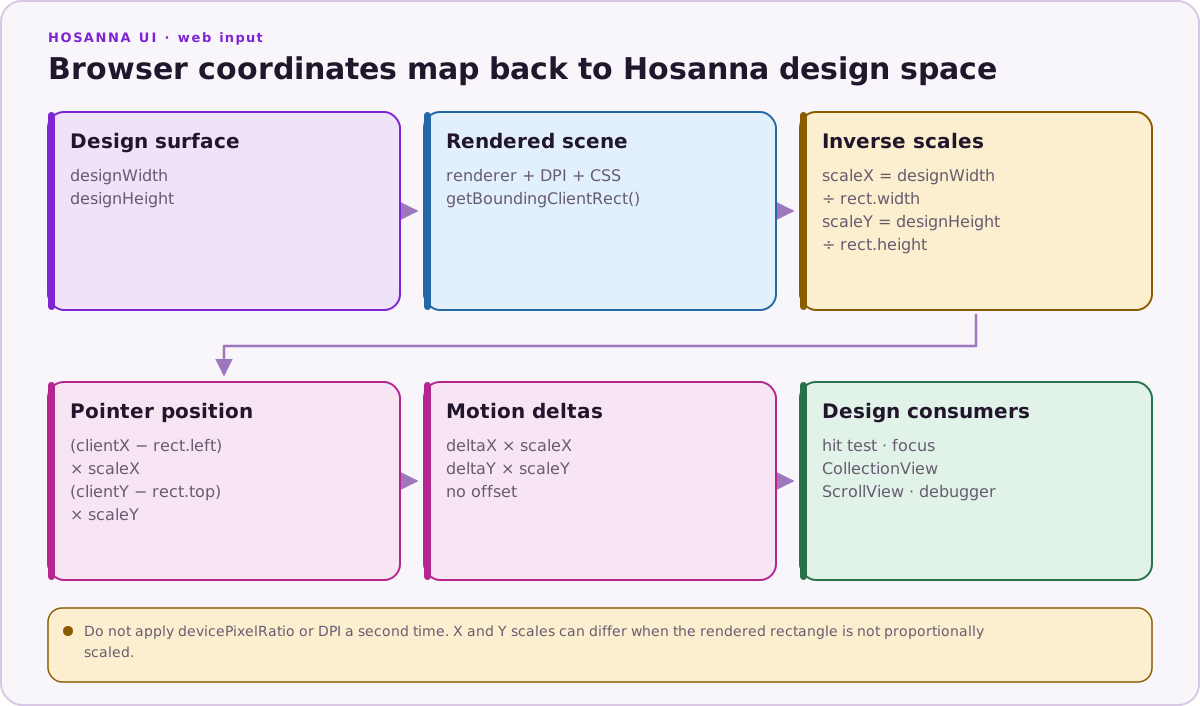
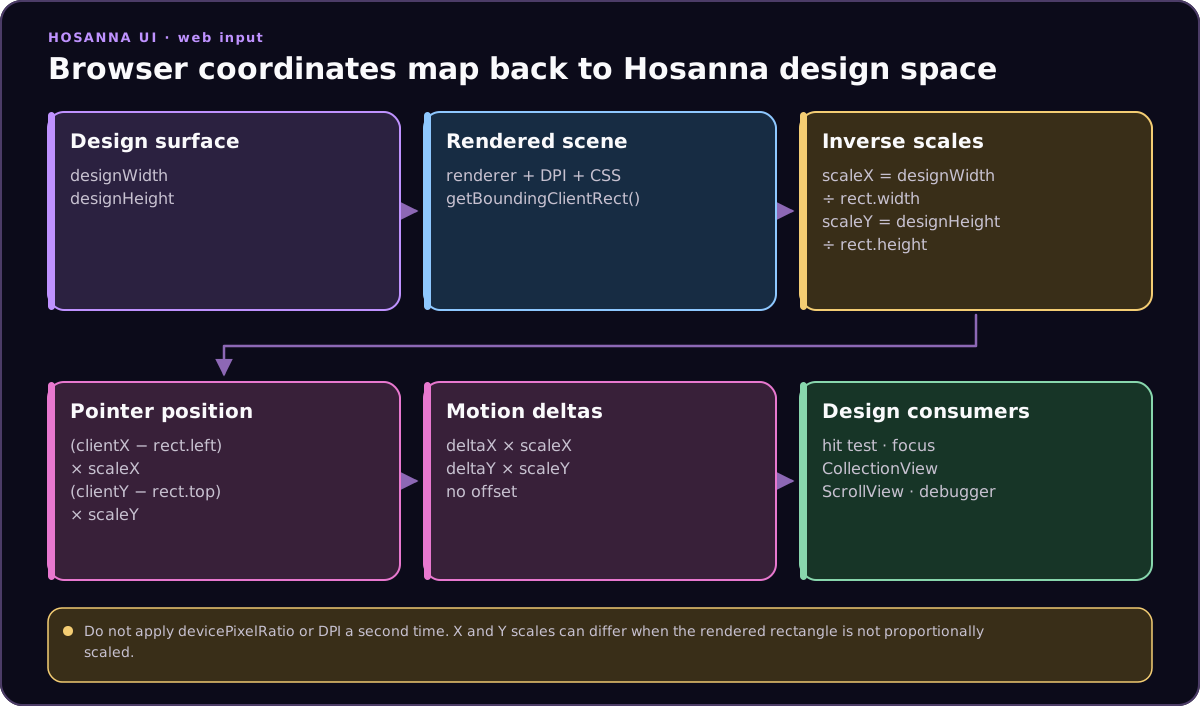
The web scene may be scaled inside the browser viewport. Input subtracts the scene offset and applies independent inverse X/Y scales; pointer, wheel, ScrollView, and CollectionView math then stays in Hosanna design coordinates.
Expression
Use ?expression= to choose the presentation mode:
tv: default TV-style scene. The scene is not auto-scaled for browser form factors.web: browser presentation mode with the scene scaled to fit the viewport.phone: handheld presentation mode.tablet: tablet presentation mode.
Unknown or empty values default to tv.
http://localhost:5170/?expression=phone
Expressions also drive AppConfig variant selection. For example, expression=phone uses app.config.phone.json when that file exists, then falls back through platform-specific and base config. See Cross-Platform Runtime Model.
Device Presets
Use device=<preset> to start from a known phone, tablet, foldable, or TV profile. Presets supply expression, design size, DPI, orientation defaults, and adapter defaults.
http://localhost:5170/?device=iphone-15
http://localhost:5170/?device=galaxy-tab-s9&orientation=landscape
Explicit parameters win over preset defaults:
http://localhost:5170/?device=iphone-15&displayWidth=390&displayHeight=844
Common presets include iphone-se, iphone-15, iphone-15-pro-max, ipad-10, ipad-pro-12-9, galaxy-s24, galaxy-s24-ultra, galaxy-z-fold-open, galaxy-tab-s9, pixel-8, pixel-tablet, rokuhd, rokufhd, apple-tv, apple-tv-4k, android-tv, android-tv-1080p, and android-tv-4k.
Design Surface
Use designWidth and designHeight to change the logical design surface. width and height are supported only as legacy fallbacks when the design* values are omitted.
?expression=phone&designWidth=390&designHeight=844
Use orientation=portrait to swap the design dimensions when needed.
?expression=phone&designWidth=1920&designHeight=1080&orientation=portrait
Use x and y to place the fixed stage in the browser viewport. These are CSS viewport offsets, not design-space coordinates.
?expression=web&designWidth=1280&designHeight=720&x=12&y=8
Installed PWA Geometry
An installed PWA is detected from standalone display mode. Use pwa=true or
pwa=1 to select the same capability and geometry path in a normal browser tab
for an install-discovery experience or targeted testing. pwa=false and
pwa=0 explicitly select ordinary browser-web behavior.
When a PWA launch has no device preset or explicit design dimensions, the
live browser innerWidth and innerHeight become the design surface and the
device pixel ratio supplies physical DPI. Browser resize and physical rotation
update the shared device layout and visible root. Live viewport axes are not
swapped to imitate a fixed emulator, and transient viewport changes such as a
software keyboard do not by themselves redefine physical orientation.
The fixed emulation contract still wins when the URL supplies device,
designWidth, designHeight, displayWidth, displayHeight, width, or
height. Expression is independent: installing an app does not force
expression=phone or choose an application ID.
See Browser Progressive Web Apps (PWA) for manifest, service-worker, hosting, and app-owned launch configuration.
DPI
Use dpi to set the physical pixel width of the output surface.
?designWidth=1920&dpi=3840
The DPI scale is dpi / designWidth, so dpi=3840 on a 1920-point design yields a scale of 2. Renderer DOM sizes and text measurement account for this, while app layout remains in design points.
For existing TV-authored screens on a phone-sized output, keep the TV design surface and change the expression/output:
?expression=phone&orientation=portrait&designWidth=1920&designHeight=1080&dpi=1179&adapters=touch,keyboard
For mobile-authored screens, use phone-sized logical values:
?expression=phone&orientation=portrait&designWidth=393&designHeight=852&dpi=1179&adapters=touch,keyboard
Input Adapters
Browser registers input adapters through InputAdapterManager. Use ?adapters= to limit the active adapters:
?adapters=keyboard,mouse,touch
?adapters=roku,touch
?adapters=webkeyboard
Valid names:
keyboard: browser keyboard events forwarded into Roku-style remote input.webkeyboard: genuine browser keyboard input events, bypassing Roku remote semantics.debug: debug hover/highlight input.mouse: pointer hover, click, and wheel input.touch: touch pointer input.roku: web Roku emulation profile; enables the Roku input manager plus keyboard shims.
When touch is enabled without mouse, touch can also accept mouse pointer events for easier local testing.
Touch Remote Overlay
Add showRemoteOverlay=true to show the web touch remote overlay. Compact modes use showRemoteOverlay=tiny or showRemoteOverlay=mini.
?expression=phone&showRemoteOverlay=true
?expression=phone&showRemoteOverlay=1
The overlay provides d-pad, OK, Back, and scale controls for mobile testing. In non-TV expressions, stage scaling is owned by the web scene rather than by resizing the document body.
The removed touch=true alias does not enable this overlay. Use
adapters=touch for touch input on the application canvas and
showRemoteOverlay=... for the on-screen remote.
Pointer Normalization
Mouse and touch adapters convert browser client coordinates into Hosanna design coordinates before finding a view, focusing a CollectionView item, or updating a ScrollView. Wheel deltas are also converted into design-space deltas.
This means:
- App code should not multiply pointer positions by browser DPI.
- CollectionView row bounds and ScrollView offsets should be treated as design points.
- CSS transforms applied by the web scene are already accounted for by the input adapters.