TV Video and Sidecar Captions
Browser, Samsung Tizen, and LG webOS share Hosanna's SGVideo state machine, playlist ordering, controls, timed updates, track selection, and caption overlay. The selected compile target supplies the playback slot:
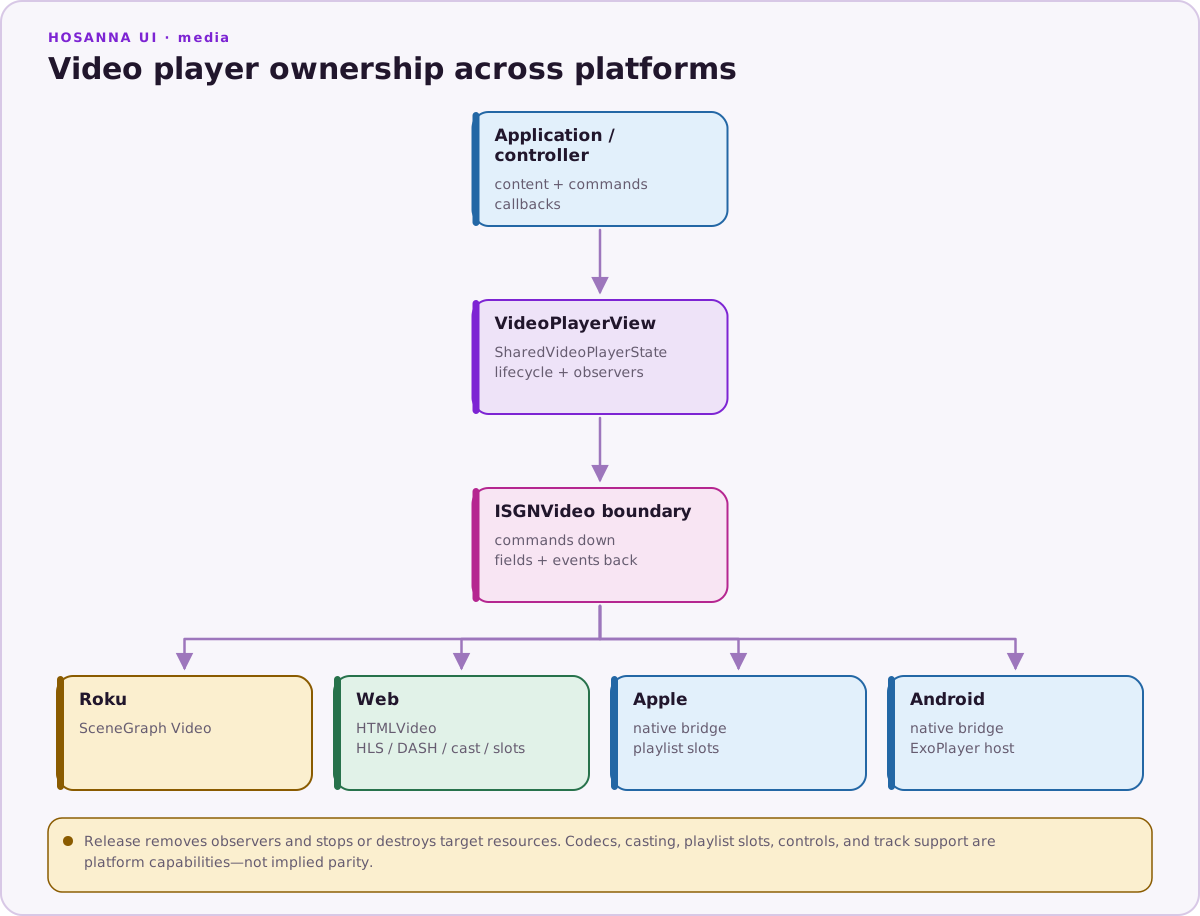
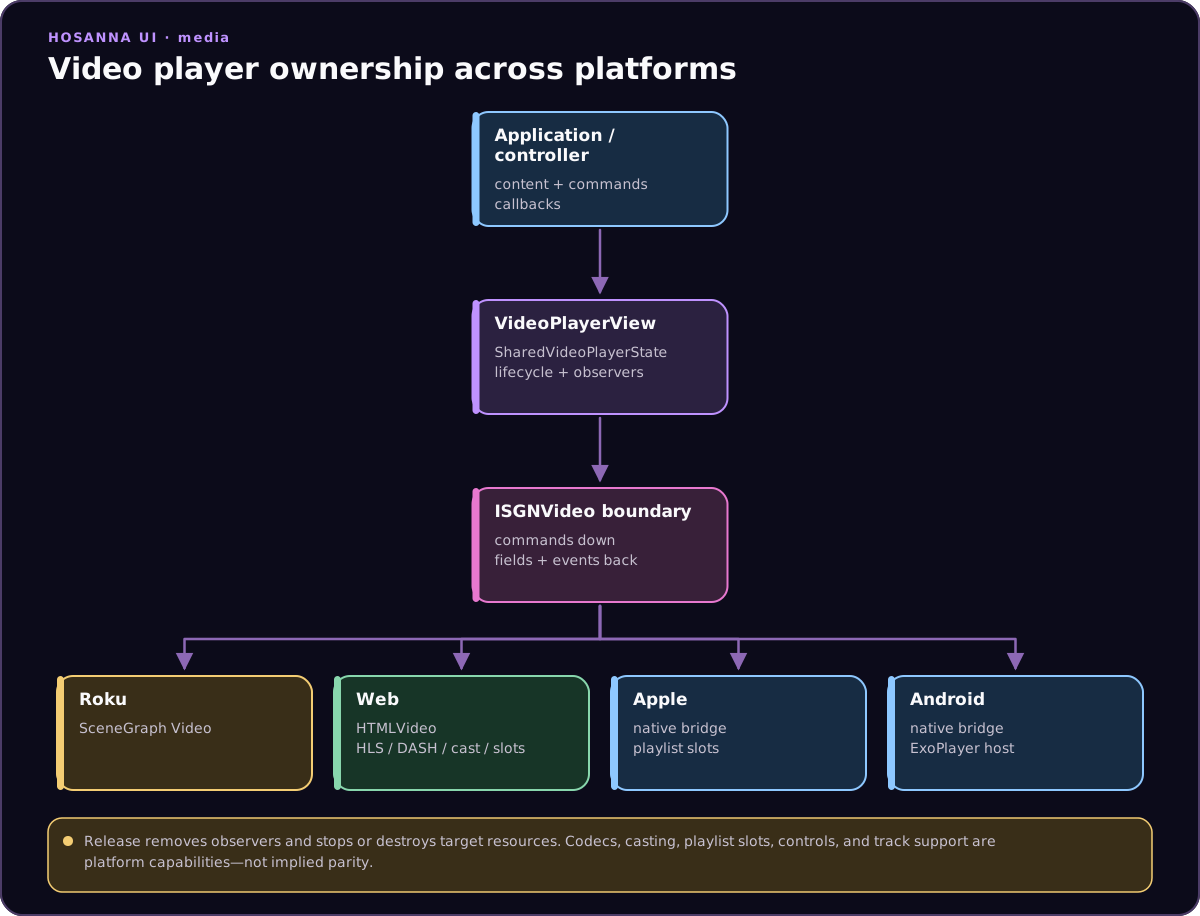
shared WebSGVideo and PlaylistVideoController
├── Browser WebVideoSlot: HTML media, hls.js, and dash.js where required
├── TizenVideoSlot: Samsung AVPlay
└── WebOsVideoSlot: native HTML media plus official webOS DRM services
The TV bundles do not include Shaka, hls.js, or dash.js. They target Chrome 68 syntax and support one active native decoder slot.
Shared SGVideo Contract
Application code continues to set SGVideo fields such as content, control,
mute, loop, speed, subtitleTrack, and suppressCaptions. Shared code
owns playlist transitions, playStart, state and error propagation, seeking,
timed position updates, global caption mode, and the public track lists.
The platform slot owns only native loading and control, event/error translation, current-time and duration snapshots, native track discovery, vendor DRM translation, lifecycle restore, teardown, and the visible playback rectangle. This boundary keeps product playback logic identical while avoiding a JavaScript transmux path on televisions.
Sidecar WebVTT
Declare sidecar tracks with the existing Roku-compatible content metadata:
video.content = {
  url: 'pkg:/media/program.m3u8',
  subtitleTracks: [
    {
      TrackName: 'pkg:/captions/program.en.vtt',
      Language: 'en',
      Description: 'English',
    },
  ],
};
TrackName is the sidecar URI. WebVTT is the supported Hosanna-rendered sidecar
format on TV. Unsupported formats produce a diagnostic
instead of being interpreted as WebVTT.
Hosanna merges sidecars with tracks reported by the active player. Selecting a
sidecar uses the exact existing TrackName; unselected tracks are not fetched.
The shared parser preserves overlapping and multiline cues, sorts their
timeline, uses binary lookup, and treats a cue's end boundary as exclusive. A
retained Web DOM text/background overlay reuses cue and text state while timed
slot snapshots advance. Track changes, content replacement (including a reused
TrackName URI), stop, playback errors, document suspension, and unmount
invalidate pending loads and clear the rendered cue and overlay.
Caption presentation continues to honor globalCaptionMode,
suppressCaptions, subtitleTrack, availableSubtitleTracks, and
captionStyle. The supported style fields match the existing Roku-style
caption options exposed through device info, including text, font, effect,
size, color, opacity, background, and window choices.
Native Playback and DRM
Tizen translates Hosanna playback to webapis.avplay, including display
rectangle, track selection, native events, and the implemented DRM properties. webOS
uses the television's native HTML media pipeline; PlayReady integration uses
the official webOSTV.js DRM agent/Luna service and vendor mediaOption
contract.
Applications keep using ISGIDrmParams, drmHeaders, and drmHttpAgent.
License URLs, credentials, signed media URLs, headers, certificates, and test
accounts must come from ignored secrets or protected CI. Applications should
advertise only the key system configured for their content service, license
flow, and supported television models.
The vendor translation has explicit boundaries. Tizen accepts only
keySystem: 'playready', maps static drmHeaders into AVPlay properties, and
warns that callback-based drmHttpAgent handling is unavailable. webOS accepts
only PlayReady through the Luna initiator contract and fails clearly when
drmHeaders or a drmHttpAgent callback is requested, because that vendor path
cannot represent them. Do not silently drop a license requirement or infer
support for another key system.
Package Paths
Use pkg:/ or package-relative asset references. The shared Web file resolver
maps bundled content against the Vite package map or document.baseURI, which
is required when a TV launches the app through file://. Do not use leading
root paths such as /assets/video.mp4; static TV package validation rejects
them.
Production CSP starts package-local. Add exact reviewed media and license origins rather than wildcard schemes. Development packaging can inject exact LAN debugger and test-stream origins; no unresolved template token may remain in the staged package.
Device release verification
A desktop Tizen or webOS preview exercises initializer selection, application logic, keyboard-to-vendor input semantics, captions, and shared state. A device run exercises native playback, the video plane, remote input, and accessibility services. For each application release, verify on representative supported models:
- MP4, HLS MPEG-TS, HLS fMP4, seek, live playback, and track selection;
- configured PlayReady content and license flow with secret-backed encrypted media;
- caption z-order over the native video plane, windowed/fullscreen rectangles, cue timing after seek, suspend/resume, and long-play synchronization;
- decoder release/restore, memory across repeated videos, and lifecycle errors;
- launch responsiveness during playback and evidence that no JavaScript transmux library is active.
Include caption overlay z-order on Samsung AVPlay in the application's device checklist. Hosanna does not silently switch to Shaka or another player.
See Samsung TV, LG webOS, and Regression Video Evidence.