Safe Areas and Edge-to-Edge Screens
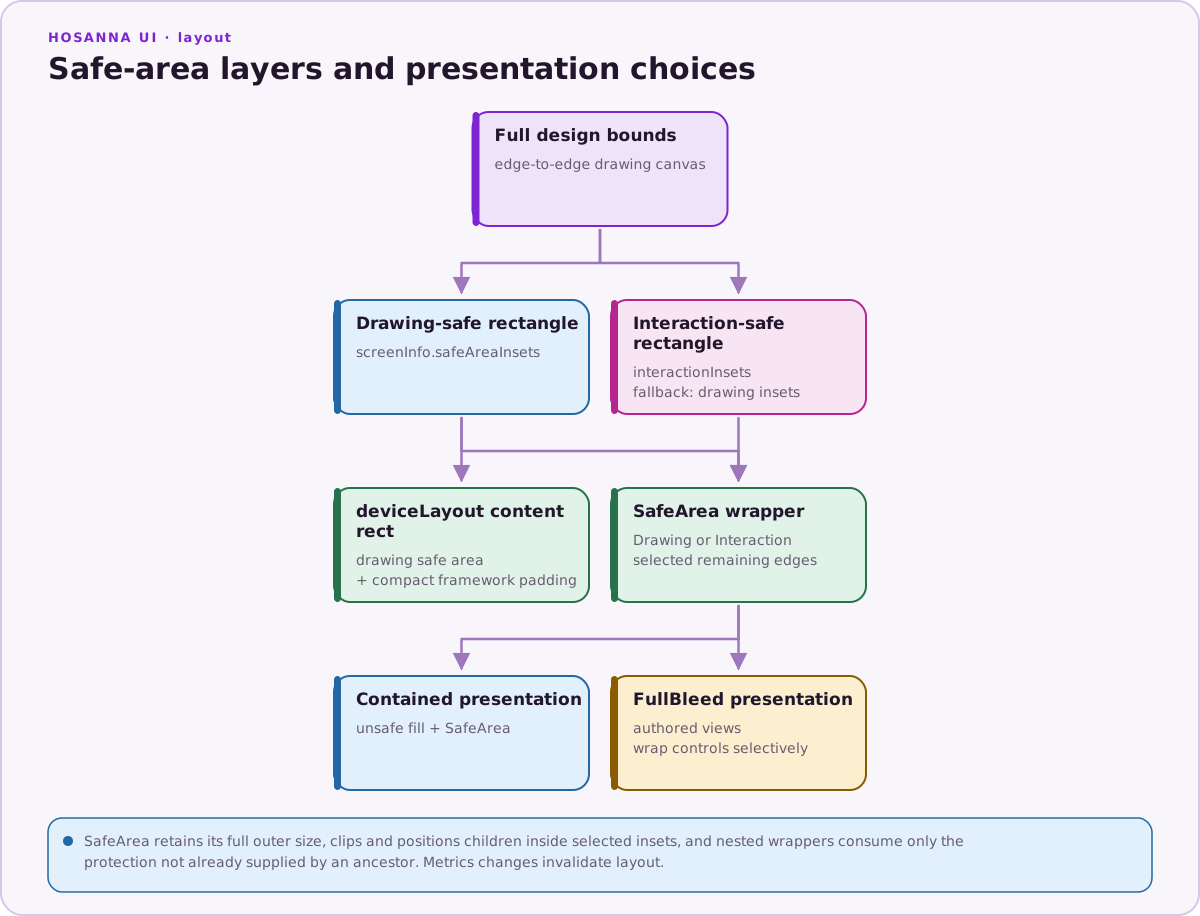
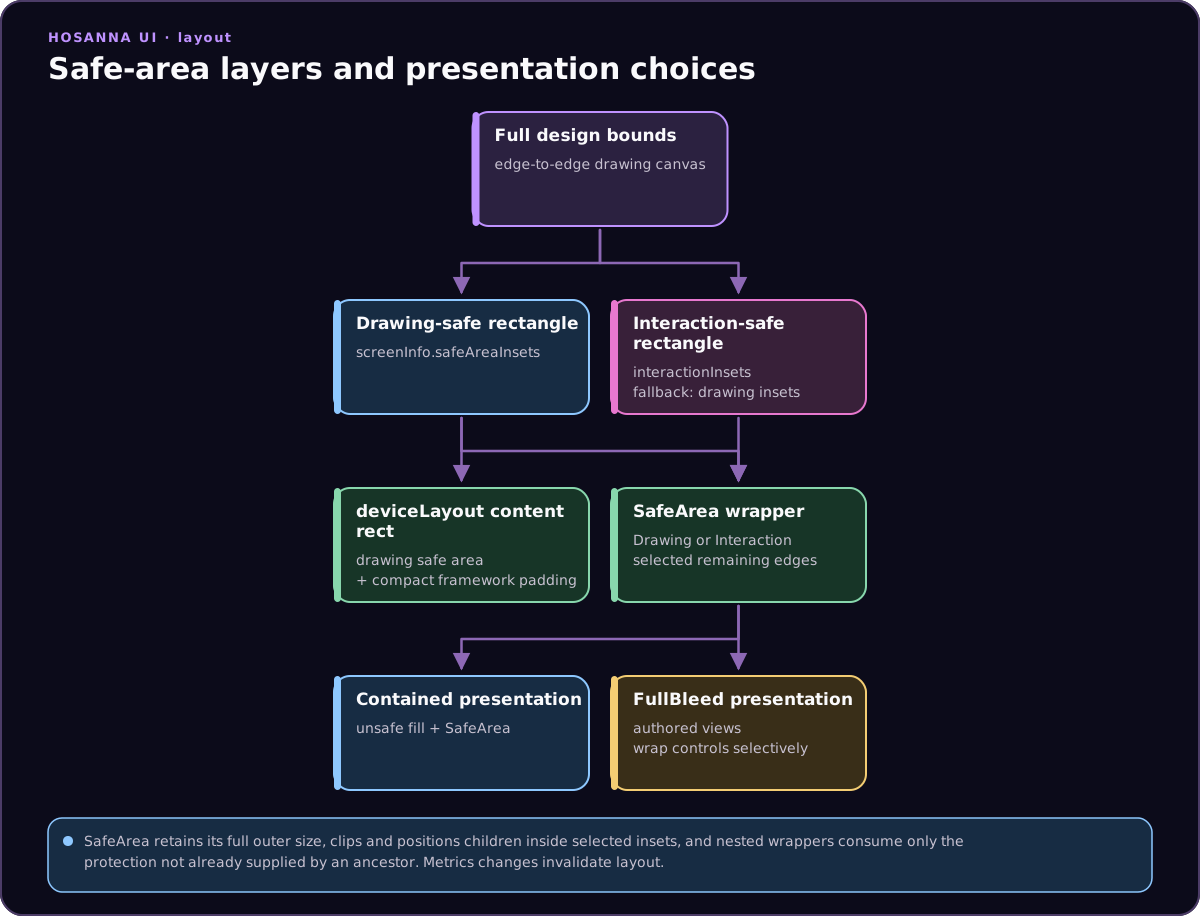
Hosanna exposes drawing and interaction safe-area measurements through device
metrics. Use the SafeArea aggregate view to protect selected edges, or apply a
screen-wide SafeAreaPresentation. Full-bleed screens can keep decorative
content in the full design bounds while wrapping only controls and readable
content.
The Two Metrics Objects
IHosannaScreenInfo records host measurements:
interface IHosannaScreenInfo {
  viewportWidth: number;
  viewportHeight: number;
  screenWidth: number;
  screenHeight: number;
  devicePixelRatio: number;
  safeAreaInsets: {
    top: number;
    right: number;
    bottom: number;
    left: number;
  };
  interactionInsets?: {
    top: number;
    right: number;
    bottom: number;
    left: number;
  };
}
safeAreaInsets protects drawing from bars, cutouts, and rounded display
edges. interactionInsets additionally protects controls from system-gesture
regions. Older or custom targets can omit the interaction value; SafeArea
then falls back to safeAreaInsets.
IHosannaDeviceLayoutInfo turns those values into the current Hosanna layout.
The most useful fields are:
| Field | Meaning |
|---|---|
designWidth, designHeight | Full logical canvas used by Hosanna views. |
safeAreaTop, safeAreaRight, safeAreaBottom, safeAreaLeft | Host safe-area insets. |
horizontalPadding, verticalPadding | Additional framework padding for phone/tablet layout modes. |
topPadding, bottomPadding | Safe-area top/bottom plus vertical framework padding. |
contentX, contentY, contentWidth, contentHeight | Recommended content rectangle after safe-area and layout padding. |
mode, orientation, isCompact, isPortrait, isLandscape | Current responsive-layout classification. |
revision | Increments when an exposed layout value changes. |
safeAreaInsets is also available on the layout object. topPadding and
bottomPadding are not aliases for the raw insets: compact layouts add
framework padding. The calculated content rectangle uses drawing-safe insets
plus that framework padding; use SafeAreaInsetType.Interaction when gesture
protection is required.
Choose a Presentation
decorateSafeAreaScreenViews() applies one policy to a complete screen tree:
SafeAreaPresentation.Containedadds an unsafe-region fill and wraps the screen in an interaction-safeSafeArea.SafeAreaPresentation.FullBleedreturns the authored tree unchanged, so the screen can draw edge to edge and wrap controls selectively.
return decorateSafeAreaScreenViews(views, {
  presentation: SafeAreaPresentation.Contained,
  unsafeAreaColor: '#000000',
});
For a full-bleed screen, place SafeArea around the content that needs
protection. It keeps the full width and height supplied by its parent, clips to
the available region, and offsets its layout children by the effective insets:
SafeArea([
  Button({ id: 'play', text: 'Play safely' }),
])
  .insetType(SafeAreaInsetType.Interaction)
  .edges([
    SafeAreaEdge.Top,
    SafeAreaEdge.Right,
    SafeAreaEdge.Bottom,
    SafeAreaEdge.Left,
  ])
  .width(layout.designWidth)
  .height(layout.designHeight)
Nested SafeArea views consume only the remaining protection that an ancestor
has not already supplied on each selected edge.
Read the Shared Layout
The IoC service key is deviceLayout:
import type { IHosannaDeviceLayoutInfo } from '@hs-src/hosanna-bridge-core/api';
import { inject } from '@hs-src/hosanna-bridge-core/decorators';

export class DetailsView extends BaseView<DetailsState> {
  @inject('deviceLayout')
  protected deviceLayout!: IHosannaDeviceLayoutInfo;

  protected override getViews(): ViewStruct<ViewState>[] {
    const layout = this.deviceLayout;

    return [
      Group([
        Rectangle({
          color: '#154c79',
          width: layout.designWidth,
          height: layout.designHeight,
        }),
        Group([
          Label({ text: 'Draw the background to every edge' }),
          Button({ text: 'Safe action' }).isInitialFocus(),
        ])
          .translation([layout.contentX, layout.contentY])
          .width(layout.contentWidth)
          .height(layout.contentHeight),
      ])
        .width(layout.designWidth)
        .height(layout.designHeight),
    ];
  }
}
The background uses the full design bounds. The content group uses the calculated content rectangle, so text, controls, and focus targets avoid the unsafe edges and the standard compact-layout padding.
Use contentX, contentY, contentWidth, and contentHeight when a custom
layout needs the standard drawing-safe region plus compact-layout padding. Use
SafeArea when a view should select edges, use interaction insets, or compose
nested safe regions.
Updates and Object Identity
Hosanna mutates the injected deviceLayout object and its safeAreaInsets
object in place. Do not hold a one-time copy of those values. Read them when
building or laying out a view, and use revision when a cache needs an
invalidation key.
BaseApp refreshes the metrics and invalidates the visible root when
orientation, viewport, resolution, device preset, or safe-area inputs change.
A view base class that needs explicit notification handling can subscribe to
the shared device-metrics event:
import {
  HOSANNA_DEVICE_METRICS_DID_CHANGE_NOTIFICATION,
  type HosannaDeviceMetricsChangeEvent,
} from '@hs-src/hosanna-ui/lib/device-metrics-api';
import {
  type INotification,
  onNotification,
} from '@hs-src/hosanna-ui/lib/notification-api';

@onNotification(HOSANNA_DEVICE_METRICS_DID_CHANGE_NOTIFICATION)
protected onDeviceMetricsDidChange(
  notification: INotification<HosannaDeviceMetricsChangeEvent>
): void {
  this.viewManager.forceInvalidateViewState(this);
  this.viewManager.invalidateViewLayout(this);
}
The event includes previous/current metrics, change reasons, and its source. Use it when a nested view or cache must react independently; ordinary visible root views already participate in BaseApp invalidation.
Fragment Computed Values
Fragment computed values expose only safeArea.insets.top, .right,
.bottom, and .left. They resolve from the shared layout object. There is no
safeArea.interactionInsets.* namespace.
{
  "_dataMap": {
    "view": {},
    "data": {},
    "fn": {},
    "computed": [
      {
        "name": "safeHorizontalInset",
        "fn": "max",
        "args": [
          "safeArea.insets.left",
          "safeArea.insets.right"
        ]
      }
    ]
  }
}
Use the computed name as an exact field value or as a numeric constraint argument. See Fragment Computed Values.
Platform and Test Notes
- Web reads CSS
env(safe-area-inset-*)values when the browser exposes them; otherwise they are zero. - Native display profiles supply and normalize their host safe-area insets.
- TV layouts normally add no compact-layout padding, but code should still use the shared metrics instead of assuming fixed values.
- Verify portrait and landscape on at least one iOS device profile with a sensor housing or Dynamic Island and one Android cutout/gesture-navigation profile. A plain desktop browser rectangle is not sufficient native validation.
Keep decorative pixels in the full design bounds. Keep anything a person must
read, tap, select, or focus inside an appropriate SafeArea or calculated
content rectangle unless the design explicitly accounts for a particular
edge.
See Device & Resolution for the broader viewport and design-resolution model.