Fragment Computed Values
Fragment computed values let AppConfig derive primitive values before fragment view fields and constraints are applied. Use them when a fragment needs small declarative decisions such as responsive line counts, focused colors, clamped artwork sizes, or constraint margins based on cell size.
Computed values live in a fragment's _dataMap.computed array and are referenced from view fields as exact computed.name strings.
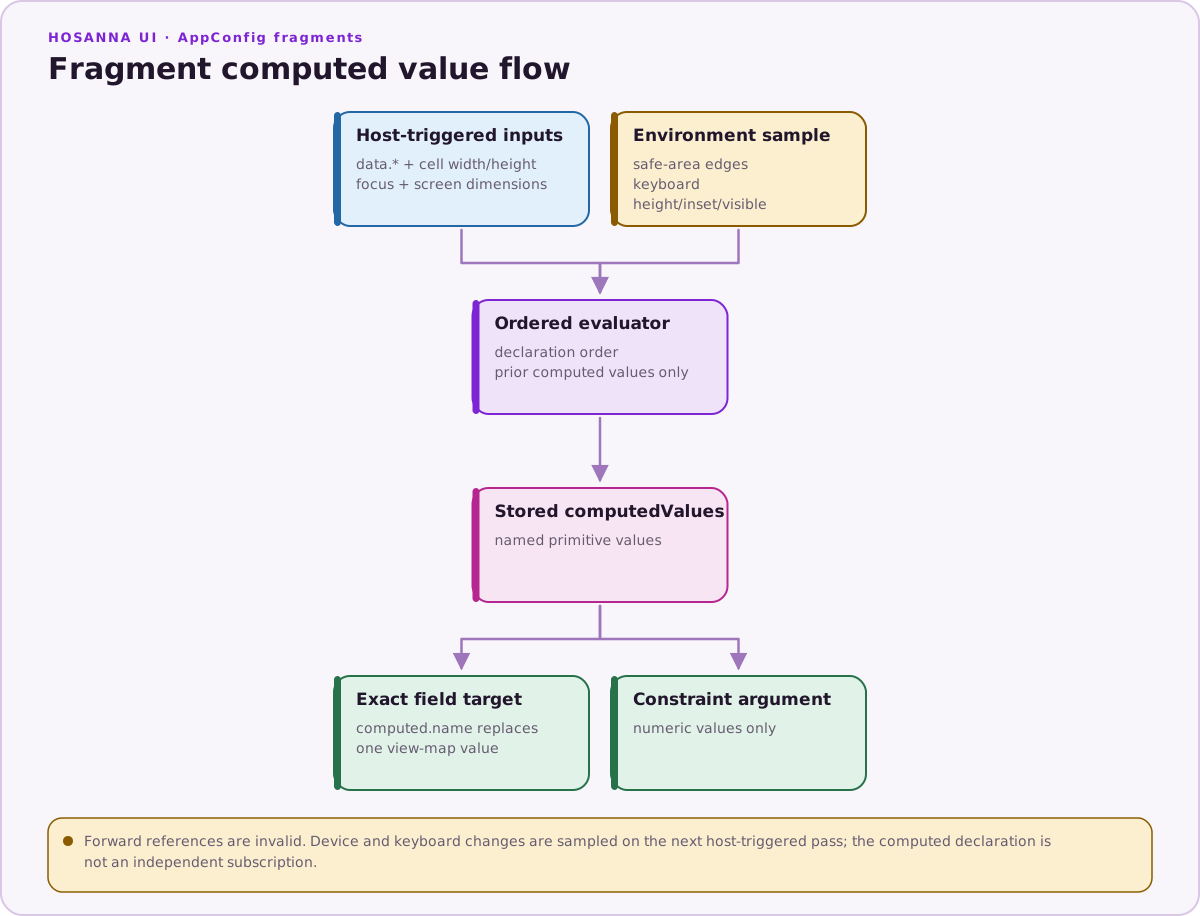
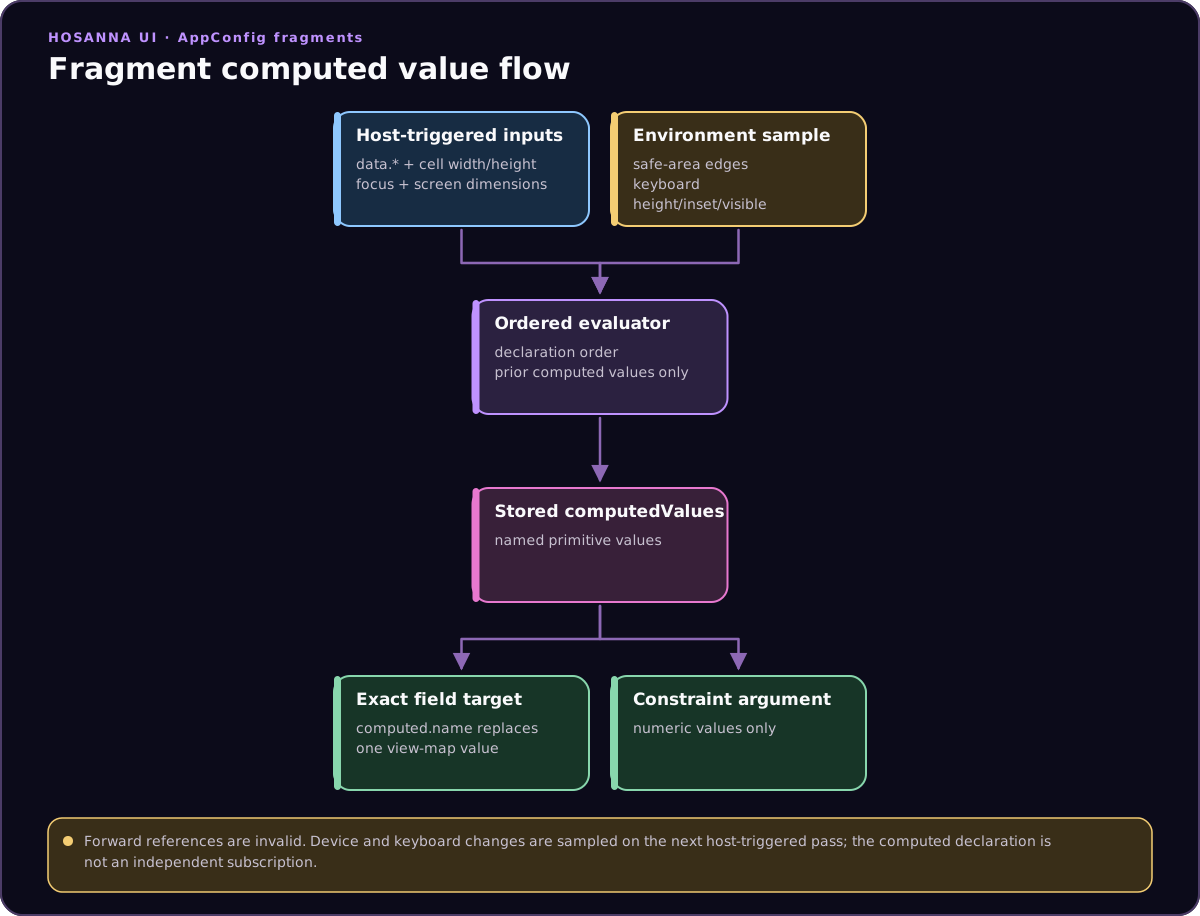
Computed values derive primitive fields from runtime inputs, then feed exact computed.name view fields, status styles, and numeric constraint arguments.
{
  "cells": {
    "adaptiveCard": {
      "$supportsDataMap": true,
      "width": 640,
      "height": 260,
      "views": {
        "base": [
          {
            "id": "titleLabel",
            "subType": "Label",
            "text": "${data.title}",
            "width": 360,
            "height": 72,
            "wrap": "computed.titleWrap",
            "maxLines": "computed.titleLines"
          }
        ],
        "normal": {},
        "focused": {
          "titleLabel": {
            "color": "computed.titleColor"
          }
        }
      },
      "_dataMap": {
        "view": {},
        "data": {},
        "fn": {},
        "computed": [
          { "name": "isWide", "fn": "compare", "args": ["cell.width", "gt", 400] },
          { "name": "titleLines", "fn": "select", "args": ["computed.isWide", 2, 1] },
          { "name": "titleWrap", "fn": "select", "args": ["computed.isWide", true, false] },
          { "name": "titleColor", "fn": "select", "args": ["focus", "#ff3b30", "#ffffff"] }
        ]
      }
    }
  }
}
The feature is intentionally small: it evaluates numbers, strings, and booleans. It does not replace fragment callbacks for measurement, host-side behavior, async data, or multi-view side effects.
Evaluation Model
Computed variables are evaluated in declaration order each time the fragment runtime calls applyFragmentComputed.
The current runtime recomputes values at these host-controlled points:
DynamicCellfragments when an item is bound, its effective cell dimensions change during binding, or the view status changes.- CollectionView header fragments when a data-mapped header is configured with row data.
FragmentViewwhen its width or height changes, when its view status is applied, and when anitemContentupdate also runs a constraint pass.
FragmentView currently does not recompute a computed-only view map for a
data-only itemContent change when the fragment has no constraints. If a
standalone fragment derives fields from data.*, ensure it also runs a
constraint pass or trigger another supported recomputation point, such as a
relevant size or status update. DynamicCell does not have this data-only
limitation.
After evaluation, the resolved values are stored on the fragment as computedValues. The fragment provider then substitutes exact computed.name strings in fragment view maps and status styles.
Computed values also flow into fragment constraints. Constraint arguments that expect numbers can use computed.name, which is useful for margins, insets, and aspect ratios.
These references are sampled when a host runs the computed pass. The computed
system does not subscribe directly to deviceLayout or the keyboard-insets
service, so a device, safe-area, or keyboard change does not by itself promise
a fragment recomputation.
Declaration Shape
Each computed variable has this shape:
{
  name: string;
  fn: 'compare' | 'select' | 'clamp' | 'min' | 'max' | 'multiply' | 'add' | 'subtract' | 'divide';
  args: Array<number | string | boolean>;
}
Names must be unique inside the fragment. A computed value can reference a value declared earlier in the same array with computed.otherName, but it cannot reference a later value.
References
Computed arguments support these references:
| Reference | Result |
|---|---|
computed.name | A previously declared computed value. |
data.path.to.value | A primitive value from the current item or FragmentView data object. |
cell.width | The current fragment host width, or 0 when unavailable. |
cell.height | The current fragment host height, or 0 when unavailable. |
focus | 1 when the status is Focused or FocusSelected; otherwise 0. |
screen.width | deviceLayout.designWidth, falling back to the device resolution width and then 0. |
screen.height | deviceLayout.designHeight, falling back to the device resolution height and then 0. |
safeArea.insets.top | Drawing-safe top inset from deviceLayout, falling back to screenInfo.safeAreaInsets.top and then 0. |
safeArea.insets.right | Drawing-safe right inset from deviceLayout, falling back to screenInfo.safeAreaInsets.right and then 0. |
safeArea.insets.bottom | Drawing-safe bottom inset from deviceLayout, falling back to screenInfo.safeAreaInsets.bottom and then 0. |
safeArea.insets.left | Drawing-safe left inset from deviceLayout, falling back to screenInfo.safeAreaInsets.left and then 0. |
keyboard.height | Current keyboard height from keyboardInsetsService, or 0 when the service is unavailable. |
keyboard.insets.bottom | Current keyboard bottom inset, or 0 when unavailable. |
keyboard.visible | 1 while the keyboard is visible; otherwise 0. |
data.* references must resolve to a number, string, or boolean. Missing data, object values, and array values fail evaluation.
screen.* and safeArea.insets.* read the shared deviceLayout IoC object,
not a one-off device snapshot. Keyboard references read the current
keyboardInsetsService state. The computed-value resolver does not define a
safeArea.interactionInsets.* namespace. A later host-triggered computed pass
sees the latest values in these services; the services do not push updates
directly into fragments.
View geometry references such as poster.right or titleLabel.width are not allowed in computed arguments. Use fragment constraints for child-to-child geometry.
Functions
| Function | Args | Result |
|---|---|---|
compare | [left, operator, right] | Boolean comparison. Operators: eq, ===, ne, !==, gt, >, gte, >=, lt, <, lte, <=. Equality can compare any primitive; ordered comparisons require numbers. |
select | [condition, whenTrue, whenFalse] | Returns one of two values. The condition must be a boolean or number. |
clamp | [value, min, max] | Number constrained between min and max. |
min | [value, ...values] | Smallest number. Requires at least one argument. |
max | [value, ...values] | Largest number. Requires at least one argument. |
multiply | [left, right, ...values] | Product of all numeric arguments. |
add | [left, right, ...values] | Sum of all numeric arguments. |
subtract | [left, right] | Numeric subtraction. |
divide | [left, right] | Numeric division. Division by zero fails evaluation. |
Numeric functions require finite numbers after references have been resolved.
Binding View Fields
A field in views.base can use a computed value when the entire field value is
an exact computed.name string.
{
  "id": "poster",
  "subType": "Poster",
  "width": "computed.posterWidth",
  "visible": "computed.posterVisible"
}
For views.base, computed values are not interpolated inside longer strings,
objects, or arrays. Use computed.posterWidth, not
"${computed.posterWidth}", "width: computed.posterWidth", or
[0, "computed.y"].
When AppConfig resolves a fragment with $supportsDataMap, exact computed references are moved into the fragment data map's view section. At runtime only those fields are updated by computed substitution.
Status styles use a different application path. The provider recursively walks
the selected status update object, so an exact computed.name reference can
also appear inside a status array or nested object. It still must be the whole
leaf value; substring interpolation is not supported.
{
  "views": {
    "focused": {
      "titleLabel": {
        "color": "computed.titleColor",
        "translation": ["computed.focusedX", 24]
      }
    }
  }
}
Using Computed Values In Constraints
Fragment constraints can use computed values only in numeric argument
positions. This works for margins, insets, and aspect ratios. The inline
{{constraint.*(...)}} parser accepts literal numeric arguments, so a
computed.name numeric argument must be written in an explicit
_dataMap.constraints rule:
{
  "_dataMap": {
    "view": {},
    "data": {},
    "fn": {},
    "computed": [
      { "name": "margin", "fn": "select", "args": ["focus", 24, 12] },
      { "name": "isWide", "fn": "compare", "args": ["cell.width", "gt", 500] },
      { "name": "ratio", "fn": "select", "args": ["computed.isWide", 1.7777777778, 1.3333333333] }
    ],
    "constraints": [
      { "viewId": "titleLabel", "property": "x", "fn": "pin", "args": ["poster", "left", "right", "computed.margin"] },
      { "viewId": "poster", "property": "height", "fn": "aspectRatio", "args": ["computed.ratio"] }
    ]
  }
}
String-only constraint arguments cannot be computed. For example, pin requires the referenced view and edge arguments to stay literal strings.
Common Patterns
Use computed values for cell-size responsive fields:
{
  "computed": [
    { "name": "rawPosterWidth", "fn": "multiply", "args": ["cell.width", 0.34] },
    { "name": "posterWidth", "fn": "clamp", "args": ["computed.rawPosterWidth", 120, 280] }
  ]
}
Use them for focus-aware presentation:
{
  "computed": [
    { "name": "titleColor", "fn": "select", "args": ["focus", "#ff3b30", "#ffffff"] },
    { "name": "posterVisible", "fn": "select", "args": ["focus", true, false] }
  ]
}
Use them for item-data decisions:
{
  "computed": [
    { "name": "badgeRawWidth", "fn": "multiply", "args": ["data.priority", 24] },
    { "name": "badgeWidth", "fn": "clamp", "args": ["computed.badgeRawWidth", 56, 128] }
  ]
}
Failure Cases
Computed evaluation fails when:
- a variable is missing
name - two variables use the same name
- a variable references
computed.namebefore that value has been declared - a
data.*reference does not resolve to a primitive value - a numeric function receives a non-number or non-finite number
dividereceives0as its divisor- a device, safe-area, or keyboard reference uses an unknown name
- a computed argument uses view geometry such as
poster.right - a constraint uses
computed.namein a string-only argument position
Keep computed variables close to the fields they serve and keep names specific. If a value needs child measurement, asynchronous state, or coordinated updates across several nodes, use fragment callbacks instead.