Fragment Constraints
Fragment constraints let AppConfig reposition and resize fragment children after the fragment is mounted, data is mapped, computed values are evaluated, or view status changes. Use them for layout relationships that should stay in metadata instead of callbacks, such as pinning a label to a poster, filling a background between two edges, keeping artwork at an aspect ratio, or anchoring a badge to the fragment cell.
The typical authoring form is an inline constraint binding on the field that the constraint writes. AppConfig compiles those inline bindings into the same _dataMap.constraints rules used by the runtime.
Author Inline Constraints
Use {{constraint.*(...)}} in the layout field that the constraint controls:
{
  "id": "titleLabel",
  "subType": "Label",
  "text": "${data.title}",
  "width": "{{constraint.fillX(left, cell.right, 0, 40, { priority: 10, min: 120, max: 520 })}}",
  "translation": [
    "{{constraint.pin(left, poster.right, 24)}}",
    "{{constraint.pin(top, poster.top, 0)}}"
  ]
}
During AppConfig resolution, those authored fields are removed from the emitted static SG node style and appended to _dataMap.constraints:
{
  "_dataMap": {
    "constraints": [
      { "viewId": "titleLabel", "property": "width", "fn": "fillX", "args": ["titleLabel", "left", "cell", "right", 0, 40], "options": { "priority": 10, "min": 120, "max": 520 } },
      { "viewId": "titleLabel", "property": "x", "fn": "pin", "args": ["poster", "left", "right", 24] },
      { "viewId": "titleLabel", "property": "y", "fn": "pin", "args": ["poster", "top", "top", 0] }
    ]
  }
}
translation[0] maps to constraint property x; translation[1] maps to y. If both translation entries are constraint bindings, AppConfig removes translation from the emitted SG style. If only one axis is constrained, AppConfig preserves the other literal axis and writes 0 for the constrained axis until the constraint pass runs.
Inline constraint bindings are compile-time metadata. AppConfig parses them during style resolution, stores the resulting rules on _dataMap.constraints, and the runtime uses those parsed rules without reparsing the inline expression.
Inline numeric arguments must be literal numbers. When a numeric argument
comes from data, focus, cell size, safe-area metrics, or another computed
value, declare an explicit _dataMap.constraints rule and put
computed.name in that argument position.
Inline bindings can include a final named options object:
{{constraint.fillX(cell.left, cell.right, 18, 18, { priority: 10, min: 120, max: 520 })}}
{{constraint.fillY(cell.top, cell.bottom, 0, 20, { min: 80 })}}
{{constraint.aspectRatio(1.777, "width", { max: 360 })}}
Legacy numeric priority tails still parse for compatibility, but new config should use named options.
{{constraint.pin(left, poster.right, 24, 100)}}
{{constraint.fillX(cell.left, cell.right, 0, 40, 100)}}
See the Fragment Constraint Catalog for every function signature, its runtime writes, supported references and edges, and visual examples.
Explicit Constraint Rules
Inline constraints compile into explicit rules. You can still write those rules directly in _dataMap.constraints when generated config, migration code, or a tooling pipeline needs the lower-level representation.
Each rule has this shape:
{
  viewId: 'titleLabel',
  property: 'x',
  fn: 'pin',
  args: ['poster', 'left', 'right', 24],
  options: { priority: 100 },
}
viewId: child view to update.property: target field for the rule. Supported values arex,y,width, andheight.fn: constraint function. Supported values arepin,fillX,fillY,inset,matchSize,matchFrame, andaspectRatio.args: function-specific arguments. References use child ids orcellfor the fragment host bounds.options: optional constraint metadata. Supported keys arepriority,min, andmax.
{
  "cells": {
    "responsiveHero": {
      "$supportsDataMap": true,
      "width": 900,
      "height": 340,
      "views": {
        "base": [
          { "id": "poster", "subType": "Poster", "width": 420, "uri": "${data.imageUrl}" },
          { "id": "titleLabel", "subType": "Label", "height": 42, "text": "${data.title}" },
          { "id": "descriptionLabel", "subType": "Label", "height": 96, "text": "${data.description}" },
          { "id": "badge", "subType": "Rectangle", "width": 48, "height": 48 }
        ],
        "normal": {}
      },
      "_dataMap": {
        "view": {},
        "data": {},
        "fn": {},
        "constraints": [
          { "viewId": "poster", "property": "height", "fn": "aspectRatio", "args": [1.7777777778] },
          { "viewId": "titleLabel", "property": "x", "fn": "pin", "args": ["poster", "left", "right", 30] },
          { "viewId": "titleLabel", "property": "y", "fn": "pin", "args": ["poster", "top", "top", 0] },
          { "viewId": "descriptionLabel", "property": "x", "fn": "pin", "args": ["titleLabel", "left", "left", 0] },
          { "viewId": "descriptionLabel", "property": "width", "fn": "fillX", "args": ["descriptionLabel", "left", "cell", "right", 0, 40], "options": { "priority": 10, "min": 120, "max": 520 } },
          { "viewId": "descriptionLabel", "property": "y", "fn": "pin", "args": ["titleLabel", "top", "bottom", 18] },
          { "viewId": "badge", "property": "x", "fn": "pin", "args": ["cell", "right", "right", -24] },
          { "viewId": "badge", "property": "y", "fn": "pin", "args": ["cell", "bottom", "bottom", -24] }
        ]
      }
    }
  }
}
Explicit rule function args:
pin:[targetRef, sourceEdge, targetEdge, margin]fillX:[leftRef, leftEdge, rightRef, rightEdge, leftMargin, rightMargin]fillY:[topRef, topEdge, bottomRef, bottomEdge, topMargin, bottomMargin]inset:[ref, left, top, right, bottom]matchSize:[ref]matchFrame:[ref, left, top, right, bottom]aspectRatio:[ratio]to deriveheightfromwidth, or[ratio, "height"]to derivewidthfromheight
References And Edges
Supported edges are left, right, start, end, top, bottom,
centerX, centerY, width, height, x, and y. AppConfig resolves the
logical start and end edges to left or right from the active locale before
the constraint plan is compiled. Use start and end for horizontal pin and
fillX relationships.
Inline constraints use target.edge references, such as poster.right or cell.bottom. Explicit rules split the target id and edge into separate args.
Use cell when a rule needs the FragmentView, CollectionView cell, or row header host bounds rather than another child view. Child-to-child constraints must reference views with the same parent.
Priority And Ordering
For a fragment resolved with $supportsDataMap: true, AppConfig sorts inline
and explicit constraints together by options.priority ascending, then by
original author order. Missing priority defaults to 0. Explicit constraints
that still use a legacy top-level priority are normalized to
options.priority during that compilation path.
A FragmentView can consume an authored _dataMap.constraints array without
$supportsDataMap, but that fallback path uses the array as written: it does
not normalize logical edges or legacy top-level priority, and it does not sort
the rules. Prefer $supportsDataMap: true whenever explicit constraints rely
on compilation, logical start/end, or priority.
Use priority only when one constraint depends on another rule having already updated a view. Most fragments should not need priorities; keep related layout rules in natural authoring order when possible.
Priority is sequencing, not a dependency solver. The runtime does not topologically sort references, detect dependency cycles, or iterate until a layout converges. Each rule reads the geometry available when its turn begins, so order every dependent write before the rule that consumes it.
{
  "$supportsDataMap": true,
  "_dataMap": {
    "constraints": [
      { "viewId": "view1", "property": "x", "fn": "pin", "args": ["cell", "left", "left", 10], "options": { "priority": 50 } }
    ]
  },
  "views": {
    "base": [
      {
        "id": "poster",
        "subType": "Poster",
        "width": 240,
        "height": 135
      },
      {
        "id": "view1",
        "subType": "Rectangle",
        "width": "{{constraint.fillX(left, cell.right, 0, 40)}}",
        "translation": ["{{constraint.pin(left, poster.right, 24, { priority: 100 })}}", 20]
      }
    ],
    "normal": {}
  }
}
The fillX rule runs first with priority 0, the explicit rule runs second with priority 50, and the final pin rule runs last with priority 100.
Runtime Semantics
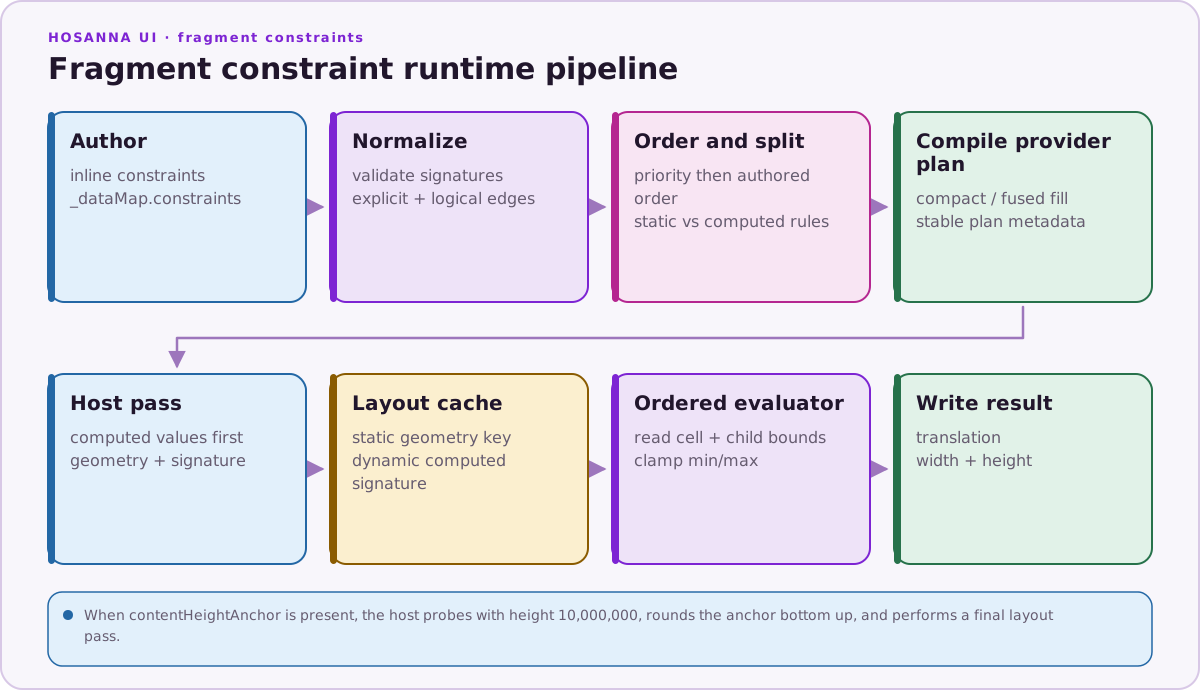
Constraints live on the fragment data map as constraints. They are applied
by CollectionView cells, header fragments, and FragmentView. FragmentView
also applies explicit constraints when the fragment does not use
$supportsDataMap, but those rules bypass the AppConfig compilation behavior
described below.
The runtime reads SG bounds through measurement APIs and writes SG fields. x and y rules update translation[0] and translation[1]; width and height rules update those fields directly.
During $supportsDataMap AppConfig resolution, constraint rules are split
automatically:
staticConstraints: arguments contain nocomputed.*references. With layout replay enabled, these use a geometry key based on style key, style revision, and host dimensions.dynamicConstraints: at least one argument usescomputed.*. With layout replay enabled, these use a full key that also includes the evaluated computed-value signature.
Set cacheFragmentConstraintLayout: true only when constraint output is
deterministic for those keys. DynamicCell and FragmentView choose the
geometry and full keys from the automatic split; the currently declared
cacheFragmentConstraintLayoutKeyMode setting does not alter either host's
execution path.
Raw item data is not part of a replay key. A rule without a computed.*
argument is classified as static even if it reads the measured bounds of a
data-bound label, image, or callback-mutated child. Status is included only
when the fragment's computed or constraint graph references focus. Do not
enable layout replay when item measurement, an untracked status overlay, or a
callback can change referenced geometry for the same host dimensions. AppConfig
style or locale invalidation clears the shared replay cache and advances the
style revision used in new keys.
contentHeightAnchorViewId enables a two-pass calculation. The first pass uses
a very tall synthetic cell height, then the runtime takes
ceil(anchorY + anchorHeight) from the resolved anchor bounds, with a minimum
of 0. A second pass uses that resolved height so rules anchored to
cell.bottom can settle against the content-driven boundary. FragmentView
writes a positive result to its host height; DynamicCell updates that cell
instance's local height. This setting does not by itself promise a surrounding
CollectionView row reflow, so do not use it as a general variable-row-height
mechanism.
options.min and options.max clamp the computed output value for the rule's target property after constraint evaluation. They do not clamp individual arguments or margins. Bounds apply only to rule.property: a width rule clamps width, not the x value also emitted by fillX; a height rule clamps height, not the y value also emitted by fillY. Rules targeting x or y can also be bounded, but those bounds are not treated as dimension-only.
Hidden views resolve to zero width and height. Constraint evaluation without min or max does not clamp negative dimensions: inverted anchors, oversized margins, or inset values larger than the target bounds are authoring errors and remain visible during development.
Validation
AppConfig rejects inline constraints when:
- the view has no
id - the constraint expression is malformed
- the function name is unknown
- a target reference is not shaped like
viewId.edge - an edge is unsupported
- the constraint is authored on an invalid field
- a numeric argument is missing or non-numeric
- the options object is not the final inline argument
- an option key is not one of
priority,min, ormax - an option value is missing or non-numeric
priorityis present but is not an integer- both
minandmaxare present andmin > max
Error messages include the view id and original inline expression so the failing field can be found quickly. These errors occur while AppConfig resolves the style, before a fragment instance is laid out.
Explicit rules have different error timing. In the $supportsDataMap
compilation path, AppConfig normalizes their logical edges and legacy priority
shape, but it does not perform the inline parser's complete syntax, function,
arity, or type validation. Without $supportsDataMap, FragmentView consumes
the authored array without that normalization. Explicit-rule errors can
therefore throw when DynamicCell, a header host, or FragmentView evaluates
the rule. Tree-dependent failures such as a missing child or a cross-parent
reference, and runtime failures such as a nonnumeric computed argument, also
occur during evaluation whether the rule originated as inline syntax or
explicit metadata.
The FragmentConstraintEditor exposes priority, min, and max controls. It exports named inline options and reconciles edited bounds so min does not exceed max.